
I have a 26tb Raid Z2 that said I was 81% full so I purged 3tb and that did not change the total available used space below 21.6tb. I then scrubbed the NAS with no change in the result. Previously I was able to purge the necessary amount to get the % used down to an acceptable level. I have 5-10tb drives with 9.1tb usable on each drive according to the TrueNAS interface. Besides moving all of the data off the pool and starting over, are there any other solutions. I have 2 other TrueNAS servers, not quite a big, and I don’t want to be constantly having the same issue with those NAS’s either. All are running v13.0.U6.7 with 32gb ram on a Gigabyte Z790 UD-AC with an Intel i7
If there are snapshots referencing the blocks of the files that were deleted then the deletion won’t free space. Check output of zfs list -o space and see if the 3TiB is now used by snapshots.
Thanks Andrew, that does make total sense. I ran the command they you indicated. But I don’t know really what I’m looking for in the result I got. But I now understand the reason for the totals for the used and free have not changed.
Post the command results back here using Preformatted Text </> on toolbar above where you reply. Ctrl+e will also do it.
NOT SUPPORTED AND WILL RESULT IN UNDEFINED BEHAVIOR AND MAY
RESULT IN SYSTEM FAILURE.

root@NetDrive6[~]# zfs list -o space
NAME                                                        AVAIL   USED  USEDSNAP  USEDDS  USEDREFRESERV  USEDCHILD
NetDrive6                                                   5.14T  21.6T0B    170K             0B      21.6T
NetDrive6/.system                                           5.14T   879M0B    846M             0B      32.8M
NetDrive6/.system/configs-b85043590a434da692c02c2416a40e36  5.14T  3.00M0B   3.00M             0B         0B
NetDrive6/.system/cores                                     1024M   170K0B    170K             0B         0B
NetDrive6/.system/rrd-b85043590a434da692c02c2416a40e36      5.14T  21.5M0B   21.5M             0B         0B
NetDrive6/.system/samba4                                    5.14T  1.46M      696K    795K             0B         0B
NetDrive6/.system/services                                  5.14T   170K0B    170K             0B         0B
NetDrive6/.system/syslog-b85043590a434da692c02c2416a40e36   5.14T  6.32M0B   6.32M             0B         0B
NetDrive6/.system/webui                                     5.14T   170K0B    170K             0B         0B
NetDrive6/NAS6                                              5.14T  21.6T     4.85T   16.8T             0B         0B
boot-pool                                                   1.74T  3.05G0B     96K             0B      3.05G
boot-pool/.system                                           1.74T  9.56M0B    120K             0B      9.44M
boot-pool/.system/configs-b17eb1df7fd94a8281208d511a311fb0  1.74T    96K0B     96K             0B         0B
boot-pool/.system/cores                                     1023M   716K0B    716K             0B         0B
boot-pool/.system/rrd-b17eb1df7fd94a8281208d511a311fb0      1.74T  7.91M0B   7.91M             0B         0B
boot-pool/.system/samba4                                    1.74T   336K      100K    236K             0B         0B
boot-pool/.system/services                                  1.74T    96K0B     96K             0B         0B
boot-pool/.system/syslog-b17eb1df7fd94a8281208d511a311fb0   1.74T   224K0B    224K             0B         0B
boot-pool/.system/webui                                     1.74T    96K0B     96K             0B         0B
boot-pool/ROOT                                              1.74T  3.03G0B     96K             0B      3.03G
Jerry
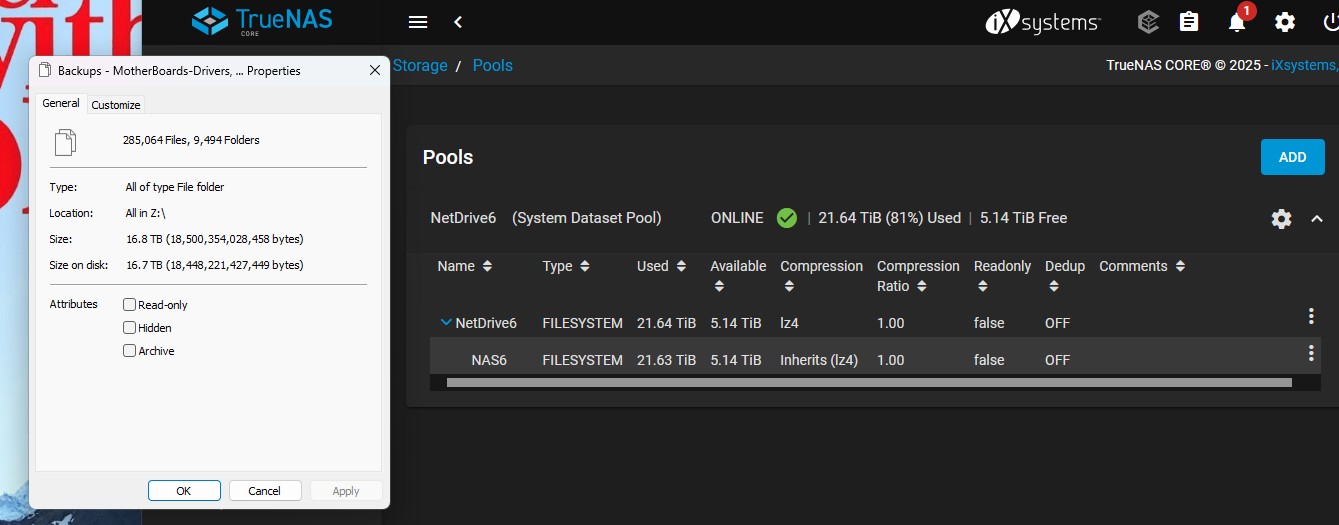
Take a look at the NetDrive6/NAS6 line of the results you posted. 4.85T is USEDSNAP (Snapshots) and 16.8T USEDDS (used dataset). The snapshots are normally hidden. I don’t know if you can ever get them to show in Windows. The USEDDS matches what you are showing in the properties window.
So essentially the Windows property window is not showing the amount of space that the snapshots are taking up. It’s just showing the data used with the system files. I suppose I could purge all of the archived snapshots, then have the system do a current snapshot.
The snapshots may be useful that you currently have. They are file add, deletions and changes. Windows can use the snapshots like Shadow Copies. If you delete a file and have everything set up with snapshots. The windows user can go back and look at the shadow copies and recover the deleted file or a file that was changed.
I don’t have any snapshots set so I can’t demonstrate it but you can browse the Documents for the version you are on.
You can just search for snapshots or shadow copy to find more in the documents. I don’t know if there is a way to make the snapshot data usage visable to a Windows user or easier for a TrueNAS admin user to figure it out. You sort of have to add up the numbers to get the usage, as you are experiencing.
WOW!!! Thank you so much for your help and insight. I’ve been using TrueNAS for years, even back when it was TrueNAS. I believe I started with v5 or 7. So far (knock on wood) it has not let me down. This is my 4th generation of them, but this time I started with all new hardware, prior builds were from parts I had from old (er) computers.
Thanks and take care.
Jerry