Hi,
After adding 2 new drives as a mirror to an existing pool, i tried the rebalancing script here however when i try to run command it creates a .balance file and then gives operation not permitted error. According to my researches i found out this happens when you have a smb permission and i have it in those partitions. I tried to smb service but didnt work out. What should i do?
PS: i run the script as root
Here is what the error looks like
I know this thread is very old, but I wanted to give a solution for you and for anyone who has this issue and stumbles upon this thread.
This person apparently has a solution for you: Github
You might want to double-check that the rebalancing script isn’t screwing up permissions. That indicates it’s doing chmod which typically will interact poorly with ZFS ACLs.
Just double checked, I can read and access my files just fine.
That’s not the relevant test. The question is whether you have same output of nfs4xdr_getfacl before and after. If you’ve already run the script then information could already be lost. Also you should put setting back to its default afterwards otherwise you can end up with processes changing ACLs in unexpected ways.
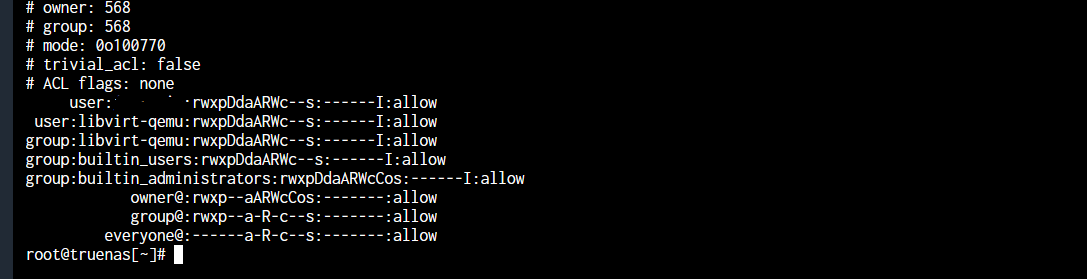
Here’s the output of the command you mentioned on a specific file (it was an ISO file that doesn’t really matter to me).
And here’s the output of the command after the script was run:
Is this a big deal? I only see “owner @” and the “group@” changed, and “everyone@” was added afterwards. To be honest, I’m not sure what those are referring to.
The deal is that it’s not preserving permissions in a 100% correct way. In this particular case not much functional impact apart from the fact that Windows will complain that aces are out of order, but maybe more in other cases.
I don’t personally work on that tool (it’s not something iX has developed) and it’s not even clear whether it’s beneficial.
Okay I understand. What is the best practice for rebalancing pool data after extending the vdev? Just copying files to a temporary holding place (like my computer), then move it back to the NAS?