What is "Encryption" for destination in Replication Task Wizard?

Hello community,

What confuses me is the “Encryption” toggle for destination location.

I’d like to replicate encrypted source dataset with all its children from main pool to a second local backup pool destination. For this I would expect TrueNAS to automatically make the replicated dataset encrypted as well, sending the encrypted data stream to its destination (zfs send), and no need to know key on destination.

Popup is not too helpful:

Help: Encryption
Set to use encryption when replicating data. Additional encryption options will appear.

What I discovered in the docs:

e. (Optional) Select Encryption to add a second layer of encryption over the already encrypted dataset. Source

Adding Transfer Encryption

The Encryption option adds another layer of security to replicated data by encrypting the data before transfer and decrypting it on the destination system. Selecting Encryption adds the additional setting options HEX key or PASSPHRASE. You can store the encryption key either in the TrueNAS system database or in a custom-defined location. Source

It’s still not quite clear to me. Is the toggle about

  • transport encryption
  • nested dataset encryption
  • Also not to be confused with point “SSH Transfer Security Encryption”

Encryption everywhere :slight_smile:

Why do I need a “second layer” of encryption, if my dataset is already encrypted?

I am also buffled a bit by
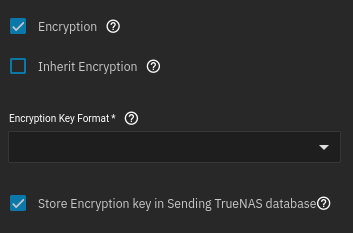
screenshot2

Help: Inherit Encryption
Target dataset encryption will be inherited from its parent dataset.

Shouldn’t dataset encryption be “inherited” from the source dataset in my case?

Thanks in advance for shedding some light for a newcomer on this topic.

Let me try an answer myself:

screenshot does only make sense in following cases:
  • replicate unencrypted source dataset to encrypted destination
  • replicate already encrypted source dataset, but re-encrypt destination with its own separate key/passphrase

When you want to replicate an encrypted source dataset to a destination while preserving its key (destination won’t know it this way; corresponds to zfs send --raw / -w on CLI), it doesn’t make sense. TrueNAS does not permit nested encryption.

TrueNAS automatically uses --raw, when either

  • “Include Dataset Properties” (zfs send -p)
  • “Full Filesystem Replication” (zfs send -R)

is used.

Hence “Encryption” should not be visible in webinterface, if one of these options is checked. Do we already have a feature request or bug report?

If this option should be still checked, you get error

Replication “myrepltask” failed: Re-encrypting already encrypted source dataset ‘mydssource’ while preserving its properties is not supported…

at the time, when replication task is started (not after you created the task).

Btw: with Replication Task Wizard, there are no explicit GUI options for -p and -R.
But “Include Dataset Properties” / -p seems to be preset, so same rules should apply.

That doesn’t make any sense.


You don’t.


Dataset inheritance only works within a pool itself. In this case, it’s just offering to inherit the destination dataset’s encryption from its parent (also on the destination pool).


Heh. I don’t use the GUI for ZFS replications. I’ve found it way too rigid and vague. This is one of those reasons. Your observations are correct.


To accomplish this in the command-line, you would indeed invoke the -w and -R / -p flags. No datasets are required to be unlocked. (Neither on the source or destination.) A raw stream is sent over, and the destination cannot access the data, since the encryptionroot will be in a “locked” state.

To accomplish this in the GUI, you have to ignore (leave unchecked) anything to do with encryption in the task’s configuration. As long as the source is encrypted, and you use “Full Filesystem Replication”, it will invoke the -w and -R flags under the hood. I highly recommend a passphrase instead of a keyfile if you’re using this method.

1 Like

Ohh. Aren’t these the official TrueNAS docs - or is it contributed by community?

Yeah, this makes sense.

The -p option (“Include Dataset Properties” in GUI) instead of -R (“Full Filesystem Replication”) also works and TrueNAS will use -w for encyrpted source datasets. But I guess you already mentioned that.

Can you share your solution? Perhaps it is a cron job?

It’s not a solution at all. I got so frustrated with the GUI very early into my FreeNAS days, that I made this very rudimentary script in haste, which I do not recommend anyone use. I did some changes after I upgraded to TrueNAS Core 12, when native encryption was introduced.

I would rather use the GUI, but it lacks some flexibility and control.

I prefer a replication that includes all intermediary snapshots, no matter what they are named. I like syncoid as a command-line tool for ZFS replications. It’s not included with TrueNAS, though.

This script is stupid and dangerous
SOURCEPOOL="main-pool"
TARGETPOOL="backup-pool"
SSH="ssh -c aes128-cbc root@192.168.2.2"


	if	[ -z "$($SSH zpool list | grep $TARGETPOOL)" ];

	then
            echo ""
            echo "Cannot begin incremental replication task because $TARGETPOOL is not present! Aborting replication!"
            echo ""

    elif [ -z "$(zpool list | grep $SOURCEPOOL)" ];

    then
            echo ""
            echo "Cannot begin incremental replication task because $SOURCEPOOL is not present! Aborting replication!"
            echo ""

	else
            echo ""
            echo "Necessary pools are present! Preparing incremental replication tasks!"
            echo ""

            
            echo ""
            echo "Checking dataset: zroot1"
            echo ""
           
            if 	[ -z "$(zfs list -H -t snap -o name -s creation $SOURCEPOOL/zroot1 | sed 's/.*@//' | grep backup- | tail -n 1)" ];
           
            then 
                echo ""
                echo "Aborting! $SOURCEPOOL/zroot1 does not have a base snapshot! Check snapshots and/or run a full, non-incremental initial replication."
                echo ""
                
            elif [ -z "$($SSH zfs list -H -t snap -o name -s creation $TARGETPOOL/zroot1 | sed 's/.*@//' | grep backup- | tail -n 1)" ];
               
            then 
                echo ""
                echo "Aborting! $TARGETPOOL/zroot1 does not have a base snapshot! Check snapshots and/or run a full, non-incremental initial replication."
                echo ""
                
            else
                
                echo ""
                echo "Everything checks for dataset: zroot1"
                echo "Recursively and incrementally replicating dataset: zroot1"
                echo ""
            
                SNAPLATEST=`zfs list -H -t snap -o name -s creation $SOURCEPOOL/zroot1 | sed 's/.*@//' | grep backup- | tail -n 1`
            
                SNAPBASE=`$SSH zfs list -H -t snap -o name -s creation $TARGETPOOL/zroot1 | sed 's/.*@//' | grep backup- | tail -n 1`

                zfs send -w -R -I $SOURCEPOOL/zroot1@$SNAPBASE $SOURCEPOOL/zroot1@$SNAPLATEST | $SSH zfs recv -s -d $TARGETPOOL
                
            fi
            
            zfs hold -r backup $SOURCEPOOL@$SNAPLATEST

	fi
1 Like

To accomplish this in the command-line, you would indeed invoke the -w and -R / -p flags. No datasets are required to be unlocked. (Neither on the source or destination.) A raw stream is sent over, and the destination cannot access the data, since the encryptionroot will be in a “locked” state.

To accomplish this in the GUI, you have to ignore (leave unchecked) anything to do with encryption in the task’s configuration. As long as the source is encrypted, and you use “Full Filesystem Replication”, it will invoke the -w and -R flags under the hood.

I just tried this and can’t confirm it on SCALE 25.10.

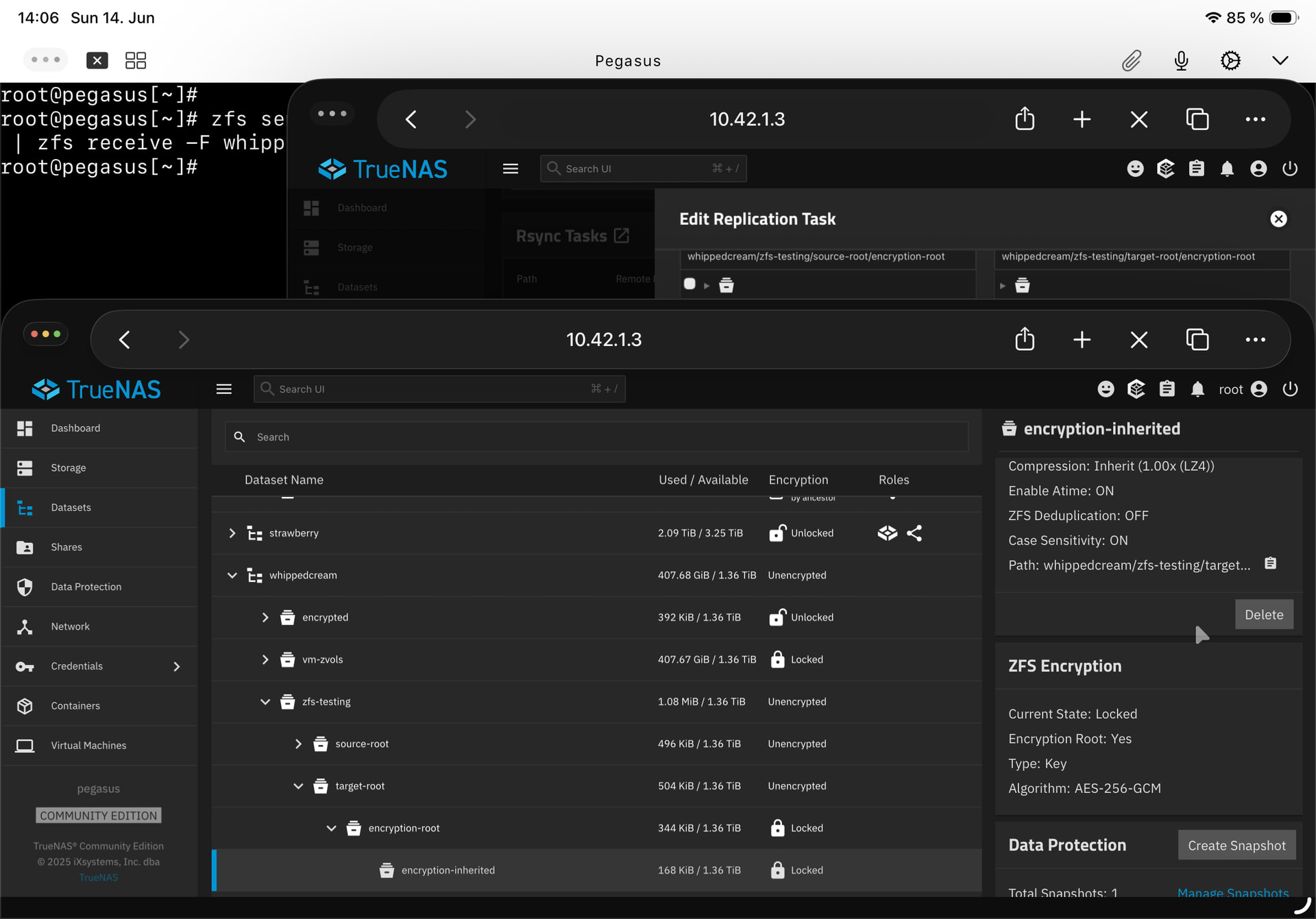
The first screenshot shows zfs send -Rw on an encryption root dataset with a child dataset inheriting encryption. The replication is locked, but encryption inheritance is kept (as indicated by the “Locked by ancestor” indicator in the table and the Encryption Root attribute in the Details panel).

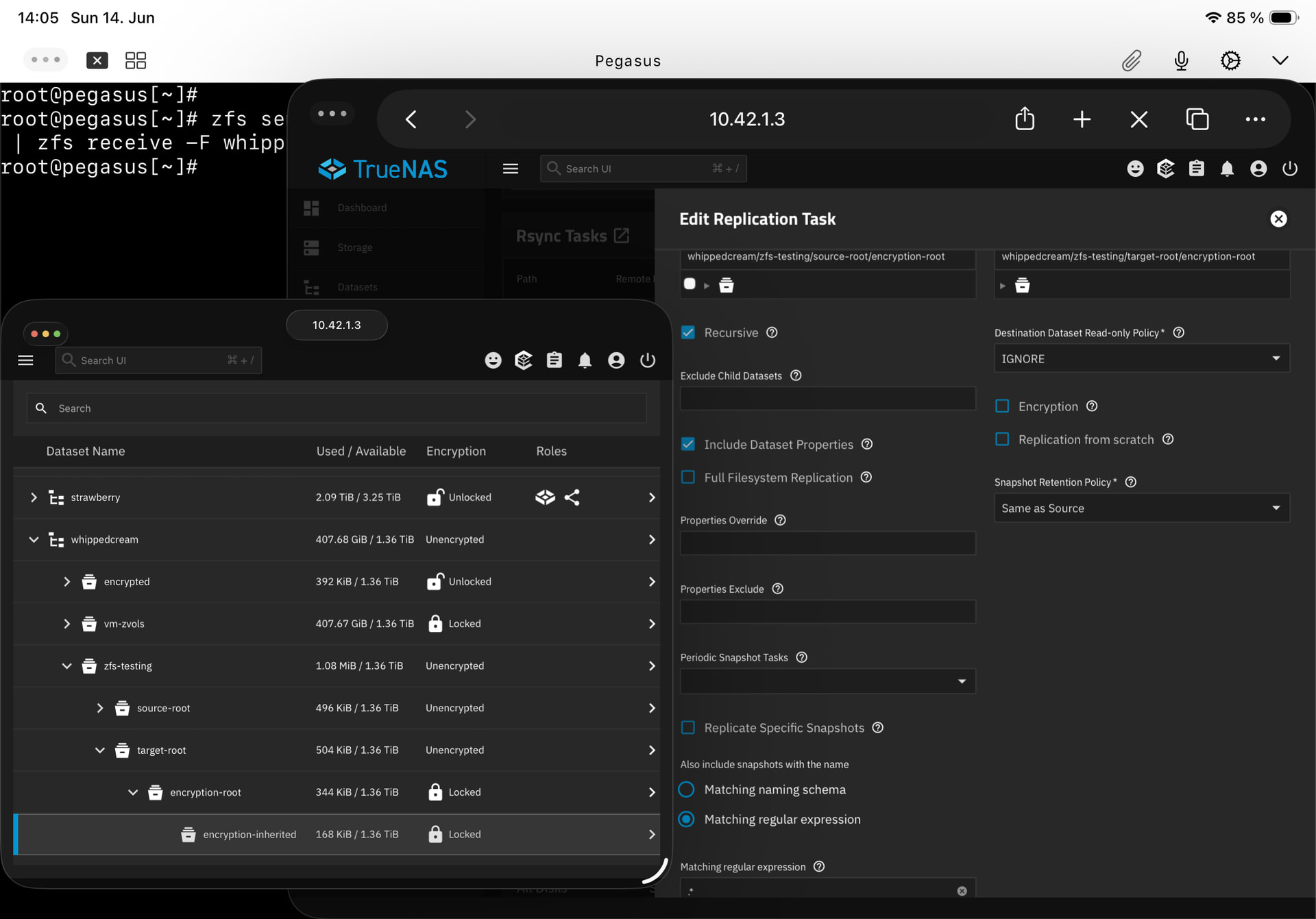
The next two screenshots show the replication task settings in the first screenshot’s right side, and the result in the bottom left: The target’s encryption-root and encryption-inherited are both independently locked.

The third screenshot shows the details of the target’s encryption-inherited dataset: it does not inherit encryption anymore, it is its own encryption root.

So despite Include Dataset Properties, raw send mode (-w) was not applied.

I didn’t try Full Filesystem Replication because it is something else - as far as I understand it, it doesn’t ever allow incremental backups, and that is one of the stated intentions of zfs send -w:

-w, --raw

For encrypted datasets, send data exactly as it exists on disk. This allows backups to be taken even if encryption keys are not currently loaded. The backup may then be received on an untrusted machine since that machine will not have the encryption keys to read the protected data or alter it without being detected. Upon being received, the dataset will have the same encryption keys as it did on the send side, although the keylocation property will be defaulted to prompt if not otherwise provided. For unencrypted datasets, this flag will be equivalent to -Lec. Note that if you do not use this flag for sending encrypted datasets, data will be sent unencrypted and may be re-encrypted with a different encryption key on the receiving system, which will disable the ability to do a raw send to that system for incrementals.

(source: zfs-send.8 — OpenZFS documentation )

From what I can tell, the TrueNAS GUI offers no way to trigger (at least incremental) raw encrypted backups as intended by zfs send -w.

Your screenshot shows you selected “Recursive”. There is no “recursive” option in ZFS. That is a feature of TrueNAS, which executes separate replications under the hood.

If you want a true, single recursive replication, you need to uncheck “Recursive” and instead use “Full Filesystem Replication”. Now it will behave as expected by preserving encryption via a raw stream.

:man_facepalming:

wow. Yes, of course, and that makes sense - I’ve been mulling this over and thinking „it seems like TrueNAS is doing the recursion itself rather than letting zfs handle the child datasets“, because that seemed to best explain the identical source dataset keys but individual encryption roots.

Because that’s what I told it to do - recurse. I didn’t get that enabling „Recursive“ is in conflict with zfs send -w

Thank you so much. I’ll try this again without recursion and report back… but well, that’ll probably be it.


edit, a day later: that was it indeed. Full Filesystem Replication did the trick, it had the same result as zfs send -w.


Maybe adding a specific note or even tutorial to the docs that explains how to do raw zfs sends - properly backing up encrypted datasets structures - might help? Or did I miss something really obvious somewhere?


but wait -

If you want a true, single recursive replication, you need to uncheck “Recursive” and instead use “Full Filesystem Replication”.

Doesn’t that disable incremental backups? That would be a rather significant limitation compared to the zfs send -w option, which explicitly mentions incremental backups…

It doesn’t conflict with it. The option doesn’t do what you might expect. Rather than executing a single replication of the selected (parent) dataset and its children, it does separate replications. Each replication is a raw stream (with -w) because you invoked “Include Dataset Properties” and it just so happens to be that the parent dataset and its individual children are all encrypted. (This is why -w is invoked, even if there is no obvious option in the TrueNAS UI for Replication Tasks.)

This isn’t a problem for a single dataset without children.

If you want to preserve not only encryption (in a raw stream) but also the encryptionroot relationship between parent and children, then you cannot simply use “Include Dataset Properties”. You must use “Full Filesystem Replication”. (I understand why users might assume they need to use the “Recursive” option, but it is completely unrelated. The “Recursive” option is the equivalent of creating multiple Replication Tasks: the parent and every child.)


No. You’re thinking of “Replication From Scratch”.[1]

“Full Filesystem Replication” means you want all the datasets that include the parent and all its children, all the snapshots of the parent and children, and to preserve all the properties. Any subsequent replications will be incremental, as expected. The only time it’s a non-incremental stream is the first time you run the replication.

The caveat is that you should have a recursive Snapshot Task for the parent, to ensure that all children have the same base snapshots needed for incremental replications.[2]


  1. This is a destructive option and is meant to start all over again if an incremental replication is not possible anymore, such as when a base snapshot is missing from the source. ↩︎

  2. If you configure a Snapshot Task that only applies to the parent (non-recursive), then you will not be able to do a “Full Filesystem Replication”, since it will abort and complain that the children are missing the expected snapshots. ↩︎

1 Like

I truly appreciate your rather patient explanation. This understanding will make backups, and especially my occasional „oopsie recoveries“, a lot easier :sweat_smile:

Thank you very, very much! :folded_hands:


Snapshot task! Yes. Kept me wondering for a bit why I would need a recursive task and a non-recursive…

But yes, the non-recursive Replication task that sends all those snapshots of all child datasets will need those snapshots to be created, which must be done by a recursive Snapshot task.

Subtleties… :laughing:

1 Like