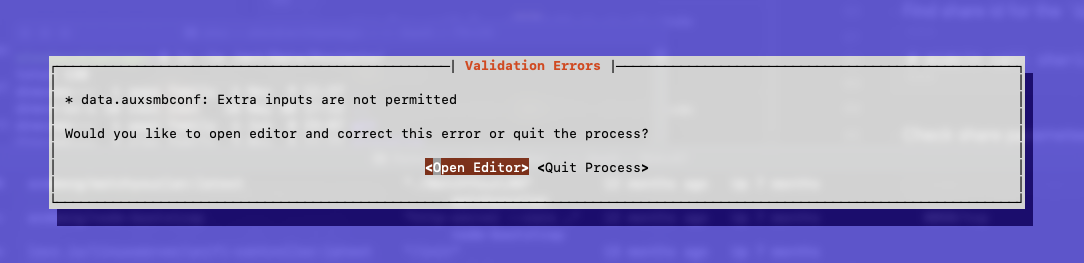
There were quite a lot of changes in the api. I currently don’t have any 25.10* (test) system here but only a 26.04* but it seems this is still the same.
25.04 OLD
# midclt callsharing.smb.query | jq
...
  {
    "id": 13,
    "purpose": "DEFAULT_SHARE",
    "path": "/mnt/p0-25-8z2/....Scan",
    "path_suffix": "",
    "home": false,
    "name": "Scan",
    "comment": "",
    "ro": false,
    "browsable": true,
    "recyclebin": false,
    "guestok": false,
    "hostsallow": [],
    "hostsdeny": [],
    "auxsmbconf": "shadow:snapdir = .zfs/snapshot\nshadow:sort = desc\nshadow:format = auto-%Y-%m-%d_%H-%M-1D-6W\nshadow:localtime = no\n",
    "aapl_name_mangling": false,
    "abe": false,
    "acl": true,
    "durablehandle": true,
    "streams": true,
    "timemachine": false,
    "timemachine_quota": 0,
    "vuid": "",
    "shadowcopy": true,
    "fsrvp": false,
    "enabled": true,
    "afp": false,
    "audit": {
      "enable": false,
      "watch_list": [],
      "ignore_list": []
    },
    "path_local": "/mnt/p0-25-8z2/.../Scan",
    "locked": false
  },
25.10 / 26.04
root@truenas ~ # midclt call sharing.smb.query | jq
[
  {
    "id": 1,
    "purpose": "LEGACY_SHARE",
    "name": "home",
    "path": "/mnt/virt/home",
    "enabled": true,
    "comment": "",
    "readonly": false,
    "browsable": true,
    "access_based_share_enumeration": false,
    "locked": false,
    "audit": {
      "enable": true,
      "watch_list": [
        "grp_user"
      ],
      "ignore_list": []
    },
    "options": {
      "recyclebin": false,
      "path_suffix": null,
      "hostsallow": [],
      "hostsdeny": [],
      "guestok": false,
      "streams": true,
      "durablehandle": true,
      "shadowcopy": true,
      "fsrvp": false,
      "home": true,
      "acl": true,
      "afp": false,
      "timemachine": false,
      "timemachine_quota": 0,
      "aapl_name_mangling": false,
      "vuid": "dd313232-465b-4231-b72c-2462198a28cf",
      "auxsmbconf": ""
    }
  },
  {
    "id": 2,
    "purpose": "DEFAULT_SHARE",
    "name": "acl1",
    "path": "/mnt/virt/acl1",
    "enabled": true,
    "comment": "",
    "readonly": false,
    "browsable": true,
    "access_based_share_enumeration": false,
    "locked": false,
    "audit": {
      "enable": false,
      "watch_list": [],
      "ignore_list": []
    },
    "options": {
      "aapl_name_mangling": false
    }
  }
]
As you might already see the “auxparams” are only listed with Leagacy Shares and they are now in an sub array (e.g. .options.auxsmbconf )
Now this will be a bit more hassle as we need a PURPOSE for the SHARE (Click on "Call Parameters → Purpose)
API 26 and maybe 25 version
# What to we wanna set
AUXSMBCONF='veto files = /._Thumbs.db/Thumbs.db/Temporary Items/.DS_Store/.AppleDB/.TemporaryItems/.AppleDouble/.bin/.AppleDesktop/Network Trash Folder/.Spotlight/.Trashes/.fseventd/'
# create dict - we need a "PURPOSE"
DICT="$(jq --null-input --arg auxsmbconf "$AUXSMBCONF" '
     {"purpose": "LEGACY_SHARE", "options": {"auxsmbconf": $auxsmbconf}}')"
# BULKRUN ( remove the echo to really run it )
# NONSENSE
#midclt call sharing.smb.query |
#   jq ' .[] |
#        select ( .options | to_entries |
#              select ( .[].key == "auxsmbconf" ) ) | .id ' | while read -r ID; do
#   echo midclt call sharing.smb.update "$ID" "$DICT";
#done
# Easier bulkrun
midclt call sharing.smb.query |
    jq ' .[] | select ( .purpose == "LEGACY_SHARE" ) | .id ' | while read -r ID; do
      echo midclt call sharing.smb.update "$ID" "$DICT";
done
This would do the same as above for any legacy share. or at least one where i could find the key auxparams as i just looked for that instead of checking if “purpose” is already “LEAGACY_SHARE” (which would have been way easier now that i even looked in the documentation  )
)
It turns out that only LEGACY_SHARES do support the auxparams so we should just use the shorter variant. I left the long one in just to show how it could be done.
And you can even see a better description about it when you open that and click on
- Call Parameters → Parameter 2: data → options - One of → Legacy opt
where you can see the different schemas/purposes.