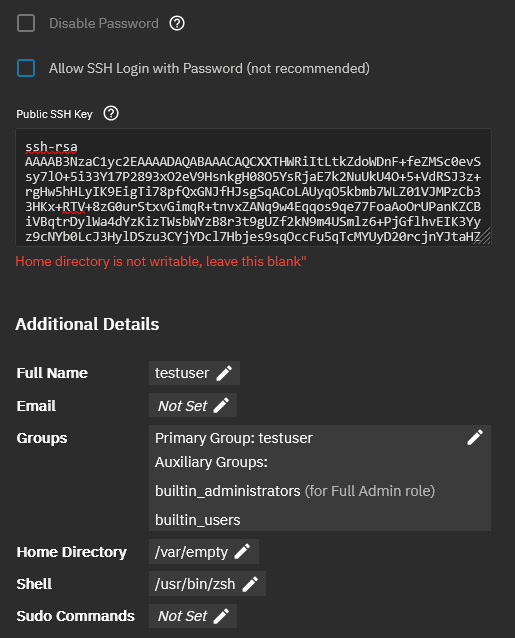
After migration to new hardware, I discovered that admin ssh access was not possible any more. So I went to the GUI to edit the admin’s authorization settings. The public key was gone so I tried to upload the key again. Not possible …
As you can see I used /home/$username for home directory’s before what is as far as I know the Ubuntu default
So that seems NOT OK in TrueNas terms. So lets test what is OK. To do that I did create a new user ^testuser^ (from the GUI off course). With a public key off course and … same problem even that ^standard home directory^ is not writable …. !!!???
Correct. Most users don’t need a home directory. TrueNAS is a NAS operating system, so most people are probably going to use SMB/NFS - those sharing protocols do not require a home directory. You really only need a home directory if you want SSH/SFTP access.
It is up to you to decide on where to store data. Storing data on the boot-pool is bad if the data is important. Data on the boot-pool is not backed up. So if you want durable user homes you want to create a dataset for that purpose on one of your non-boot pools. If you create a dataset homes in your pool tank then your home directory path for the user testuser would be /mnt/tank/homes/testuser.
I was really surprised with the reaction above. For reason, that IMHO sharing your home directory is …. IMHO not done and very strange.
However in my option all users should have a home directory. Some will use it more than others agreed. If you have private files a private key as example they or shell settings or what ever personal/private other file that should be there. I really regard it as obscure not to have a home directory even if that is under circumstances empty
The user only needs a home directory if they require shell access. And what I mean with home directory is the regular unix home directory, the one that is configured in the user settings.
You can still have one personal folder per user if you want. That is a very common setup. I personally have a folder per user located at /mnt/tank/homes/<username> which users can access via SMB. You can call those home directories, but they are not home directories in the unix sense. The unix home directory is /var/empty for all users that don’t need shell access.
I do know of setups where all users get shell access. But from a security perspective there are a ton of issues with giving users shell access.
I’m a bit late to the party here. I believe there will be an influx due to the added support of LXC’s and VMs. perhaps support was already there BUT it is still relatively new at the time of the posting. Why am here? Well… I run a local cluster at home. So, that said, I have spent extensive hours testing and debugging. I EXPECT a debian based system that simply rebranded: to function like debian. When I read that TrueNAS mounts the rootfs as read only, I was confused, naturally because I have been making immutable writes to the rootfs after I ran the dev installer script. This still doesn’t explain why I’m here. Why do we need to specify a predetermined location for the ZFS dataset mounts? I am on board with requiring the admins to configure users under a ZFS dataset but I do NOT agree with the rejection of /home as a dataset path. This brings me back to my previous comments. A ton of my customizations including my portable shellkit refuses to install due to /home being rejected. Now, I have gone ahead and patched the accounts.py to inject a bypass for my local user. I have also patched the DB to allow my local user to login to the web app, so I know it is possible. Solution? Allow admins to set datasets for users in /home so we can all be sane again
Your expectations simply do not align with reality. TrueNAS is not “a debian based system that simply rebranded,” and there many ways in which it does not “function like debian.” This has never been the case for SCALE, and it wasn’t the case for FreeNAS/CORE before it. You’re free, of course, to use dev mode to make your own Franken-OS, but you’re very much into unsupported territory.
Free/TrueNAS have always been this way, but since the move to make it Linux-based, there’s been an explosion of people who apparently think it should operate like any other Linux distro. It hasn’t, it doesn’t, and in all likelihood it never will.
I would think that at a very least if you are going to create a user folder for your ssh key, dont put it on a pool you might change. (maybe thats just me)
it should go somewhere that doesnt matter the status of your zfs pool.
It’s just a user folder, not rocket science. And yes, this is Debian. I was surprised TrueNAS went to such extents to rebrand it. Okay, I’ll slow down a little because I haven’t explored the OS a lot. When I say it’s Debian, I just mean that it behaves like it. I’ll accept there are major changes and move on from that angle. I wanted to create a local user but rebooting the machine wiped out the user so I was forced to Frankenstein the Account.py script to allow me to create what I wanted. It was roughly 15 lines of code I added sporadically to allow this mod. Really, that’s all I wanted. A local user with a folder I built all my programs to expect. At least the usr folder is writable so that works. My issue was with how my programs install. They were supposed to symlink to my user folder in /home and I didn’t want to rewrite everything to support the change. I did that once already years ago to move the sources to /usr. And what did I want so bad that I needed to mod the OS? Bash history and ble.sh. currently I’m just in explore mode. I haven’t moved my ZFS pool and likely won’t until I confirm or deny this can replace proxmox. Proxmox didn’t fight me at all and I’ve had a slightly custom version for over a year now without issue. I really like truenas because of its skin and how it seems very polished and clean. Only time will tell if I actually implement it.
I would like to add that I do not have ssh keys on my servers. Proxmox kinda requires them to function somewhat but they only allow themselves to connect to each other. If you mean authorized keys? I don’t really think those keys are as restricted. It’s just a public key. But even so, I meant to express that my lab is not typical. The only way to access most of my services is through my tailscale. I can’t isolate every single service since some require ports published such as proxmox. I can’t outright lock down all IPs is what I’m trying to say. I just simply cannot account for every security angle and I really don’t think many people would try to lock down their home lab as I have. My point is, I’m not concerned about security too much since I’m the only one using the services. It’s telling that I came here to rant about the user folder. I haven’t had anything fight me like this before. I also don’t really like how some devs try to restrict what root can do such as refusing snap installs or refusing to allow apt to work but I understand why it’s done. It’s similarly for the same reason ACLs were created on Linux. It’s to protect people from themselves.
As I already mentioned, I’m super stoked to explore truenas. It was basically a one click install. Not much to it.
Thank you! I agree. I fixed it as I previously stated. I did patch the DB first, that failed because I had to patch account.py to allow future user changes. As soon as the system reloaded slightly, the user dir would change. The patch I changed allowed me to install my user outside a ZFS dataset as if it was an admin user. I haven’t had more than an hour to explore the OS. I just couldn’t really do anything until I got my shellkit installed. Now it’s easy peasy.
I’m done here. I hope everybody has a fantastic day, and that any information I mentioned here may help benefit the community. I have already hinted at what I intend to do. True NAS isn’t the only application that fights me regarding the home directory. And that means what I need to do is to make my dotdeb files more robust and able to better account for the correct user home directory.
Afaik iX views the OS drive as ephemeral. It should be replaceable at any time. They give you tools to get back up and running in short order by putting in a new OS drive and loading up your saved config file. Because of this you aren’t specifically recommended to mirror or treble up your boot drive, and even if you do you may get stuck at a Grub screen if the drive that failed happens to be the one Grub favoured.
By placing the user home directory on the boot drive you’re putting more eggs in the Boot drive basket, you are directly going against their structure, which is likely why you feel the pushback from the OS. The repercussions of losing the boot drive increase.
It’s not a Linux Distro and it’s not marketed as such, you yourself list plenty of examples of how it diverges from what one would expect from a Debian install. It’s an Appliance OS.
iX isn’t stopping you from doing what you’ve done, as you clearly demonstrated, but don’t expect any help and you will likely see zero headway if you try to change their minds.
As long as the account.pi file isn’t fundamentally changed on a core level, the patch I created will automatically repatch the account.pi on every update. The Deb I created looks for a MATCH in the account.py code a patches it on install. It will fail if the code needing added cannot be added. I also have a backup of account.py but that’s a worst case scenario because if I replace it and it WAS changed, I’ll break the front end. I’m aware what I’m doing is unsupported but I wanted a State I can work with.
I have not implemented truenas. I simply installed it. Trust me when I say, I’m huge on one click buttons and deployments. Truenas was NOTHING compared to kubernetes. I had to revert to snapshots more than 70 times before I got the ‘one click’ installer working and even then, there are 5 parts to it. Each script works in tandem and it was relentlessly crafted to get my kubernetes system set up from a fresh Debian install with minimal interaction. I would like to move on from this conversation so I may not reply again. I appreciate truenas. It doesn’t align with me but I align with it. It offers me a significant library of tools I already use. I just need more time to explore. Again, thank you all who replied. I do not intend to submit pull requests or add more feedback than I already have. I was simply annoyed about the home directory restriction
The shellkit is just a portable bundle of utilities and customizations I use. It includes things like bash aliases references to scripts that are installed in the usr folder. If it’s Debian, I attempt to make all my login shells the same and scripts I regularly use available to me.
Yeah, I don’t understand why patching the base OS is the preferred choice as opposed to… I don’t know… creating a dataset for your home directories and using that. /mnt/dozer/home not hard and doesn’t require hacking the base OS.
But you won’t be using a shell very often on TrueNAS. Also what @awalkerix wrote - the home directory is supposed to go on one of your storage pools because that is the persistent storage in TrueNAS. The OS installation is considered ephemeral.