Tried SATA A : fail to boot
Tried SATA B: fail to boot
Can it be U6.8 beeing a problem with an old server like T610?
But it worked for a few weeks.
Reset CMOS using jumper ?
Tried SATA A : fail to boot
Tried SATA B: fail to boot
Can it be U6.8 beeing a problem with an old server like T610?
But it worked for a few weeks.
Reset CMOS using jumper ?
Maybe try disconnecting the data drives and only have one boot drive connected. Can you install and boot with just that? Can you try connecting the boot drive directly to the MB and trying install and boot?
Trying to narrow down if you have a hardware problem. You can try a different OS and see if you can install and boot
I thought about that but for some reason was worried it may cause a problem with the pool.
Will try that as it’s a Poweredge, I just have to pull each caddy.
More to come
Try going back to BIOS boot. Keep the variables down to a minimum. A server that old may not have a proper UEFI BIOS.
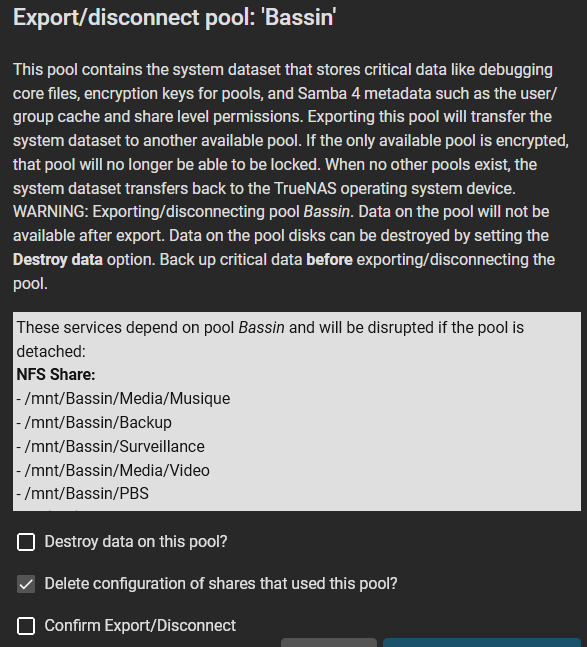
Now I get this and I am confused if I should “export/disconnect” in order to reimport/disconnect ?
I think we will want to see what your system is saying through the command line. Post the results back using (</>) Preformatted Text mode. Each command in a separate Preformatted Text box.
zpool status -v
zpool import
root@truenas[~]# zpool status -v
  pool: boot-pool
 state: ONLINE
config:

        NAME        STATE     READ WRITE CKSUM
        boot-pool   ONLINE       0     0     0
          mirror-0  ONLINE       0     0     0
            ada0p2  ONLINE       0     0     0
            ada1p2  ONLINE       0     0     0

errors: No known data errors
root@truenas[~]# zpool import
   pool: Bassin
     id: 11408224385006640159
  state: ONLINE
 action: The pool can be imported using its name or numeric identifier.
 config:

        Bassin                                          ONLINE
          raidz2-0                                      ONLINE
            gptid/cc646c59-d170-11ed-9d51-842b2b51538a  ONLINE
            gptid/cc426ae2-d170-11ed-9d51-842b2b51538a  ONLINE
            gptid/cc5962db-d170-11ed-9d51-842b2b51538a  ONLINE
            gptid/cc4df9dd-d170-11ed-9d51-842b2b51538a  ONLINE
Ok, I was able to import using zpool import Bassin
Everything seems to be working for this pool
You might want to do an export of the pool and then an Import using the GUI. I know on Scale the middleware is a bit fussy on where it gets imported and if everything works for stats, etc. You might be fine as is. It’s been a bit since I dealt with a Core set up
Maybe give your system a reboot and testing or two.
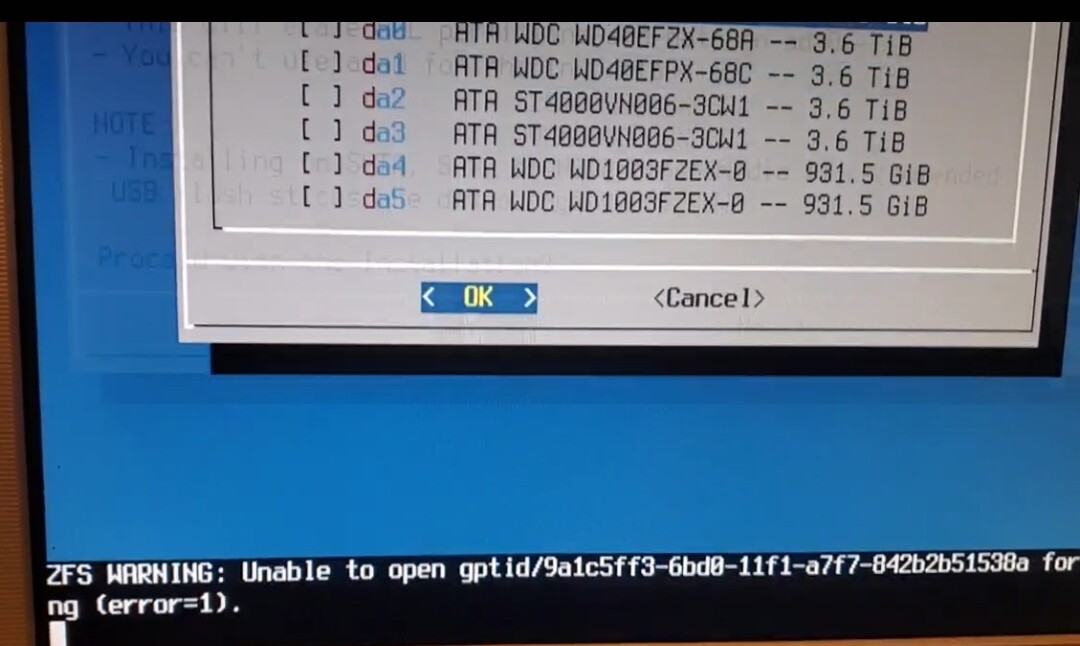
Now, when the system refused to boot and was trying to reinstall, I made a video of the process and was able to see this.
The gptid/9a1c5ff3 in the “ZFS WARNING” at the bottom of the screen is no disk of the primary pool.
root@truenas[~]# zpool import
   pool: Bassin
     id: 11408224385006640159
  state: ONLINE
 action: The pool can be imported using its name or numeric identifier.
 config:

        Bassin                                          ONLINE
          raidz2-0                                      ONLINE
            gptid/cc646c59-d170-11ed-9d51-842b2b51538a  ONLINE
            gptid/cc426ae2-d170-11ed-9d51-842b2b51538a  ONLINE
            gptid/cc5962db-d170-11ed-9d51-842b2b51538a  ONLINE
            gptid/cc4df9dd-d170-11ed-9d51-842b2b51538a  ONLINE
So it must be one of the 2 disks of the secondary data pool.
So, before I push those back to the backplane, how can a disk failure (not shown at the HBA POST) can prevent the system from booting?
What is the next step ?
I can do that but since the CLI import has worked, I am curious of what it will achieve ?
Never done that before… The part about “deleting share config” is a bit worrying.
Can I untick this since I import to the same system ?
Just wait on doing anything else.
@HoneyBadger need opinion on Core again. Got system up, pool imported with CLI. Not sure if export with CLI and import using GUI is necessary.
While we wait for the second opinion, please read post #30 if not already. Thanks.
Up to now, the no reboot after the power failure seems to be related to a non functional disk or a problem at the backplane for a secondary pool…
How can this prevent the system from booting ?
I am not sure as I don’t have experience with the true server systems. I was guessing a bit on the mirrored boot pool since I know if the first boot disk doesn’t come up, systems don’t normally fail over to the second boot device without intervention such as choosing the second boot device in the bios.
@Samuel_Tai Do you have any feedback on the last few posts in the thread? Failure cause or if CLI export & GUI import is necessary?
Core is a bit more tolerant of CLI import/export, so if the pool imported fine, a simple reboot should confirm Core can reimport on boot. The more concerning thing revealed from the boot failures and the VDEV error in the secondary pool is I think this is evidence of a failing HBA or backplane, or a possible incompatibility with the Dell’s UEFI BIOS. I would revert to the Dell’s legacy BIOS, since that had run solidly before. If everything seems copacetic afterwards, I would start looking at replacement hardware for that server.
Thank you all for your help.
In conclusion:
TN Core refused to boot following a shutdown (lets assume it was gracefull under the UPS config), because either the LSI HBA or the backplane failed.
This for me is solved since the system is now functionning without the secondary pool’s disks inserted in their respectual backplane.
Removing all the disks from the backplane is a normal troubleshooting step I did not initiate by myself because under my low knowledge of how TN works, I could not see how the datadisks (backplane) could keep the system from working while the bootpool (MB connected) was fine. Especially since the HBA initiate at boot seemed fine (as seen in video post #7 time stamp 20s).
If anyone reads this thread afterward,I should mention that the system was set to BIOS boot when the problem manifested (installed in 2021). Don’t remember if it was FreeNAS or TN Core then.
Only when I decided to reinstall 2 days ago, did I decide to try UEFI boots since my readings on PE T610 convinced me it should work fine.
Still, I will try:
changing the disks slots and see what happens.