
I broke my Unifi Network Application by updating it. I have a FreeNAS Mini XL which has a Intel(R) Atom™ CPU C2750. That CPU does not support AVX commands, which Mongo v5.0 and later requires. The latest Unifi Docker containers come without the Mongo database. Mongo has to be installed as a separate container, but both unifi and mongo can be installed with a single yaml script.
After a lot of forum reading and searching, I was unable to find easy to follow directions on how to install or upgrade Unifi and Mongo 4.4.
Here is what I did and hopefully it will save someone else some time. I prefer to have each app as a separate dataset, so it can have it’s own snapshot schedule and restore.
-
Create the following Datasets under the Apps Dataset: dockge (to store the dockge app from the TrueNAS app store) and stacks (to store docker config/yaml files that dockge creates).
-
Install Dockge as an app through the TrueNAS community app store. More info here Dockge | Servers@Home Wiki
-
Change the dockge port to 5001, Stack Storage to Host Path and point to the previously created dataset (mine was /mnt/tank/Apps/stacks), Dockge Data Storage to Host Path and point to the previously created dataset (mine was /mnt/tank/Apps/dockge).
-
Create the following Datasets under the Apps Dataset: mongo-db (to store the mongo database) and unifi (to store the unifi network application).
-
Open a TrueNAS shell, navigate to the mongo-db folder, create init-mongo.js file, and paste the following:
db.getSiblingDB("unifi").createUser({user: "unifi", pwd: "PickYourOwnPassword", roles: [{role: "readWrite", db: "unifi"}]}); db.getSiblingDB("unifi_stat").createUser({user: "unifi", pwd: "PickYourOwnPassword", roles: [{role: "readWrite", db: "unifi_stat"}]}); -
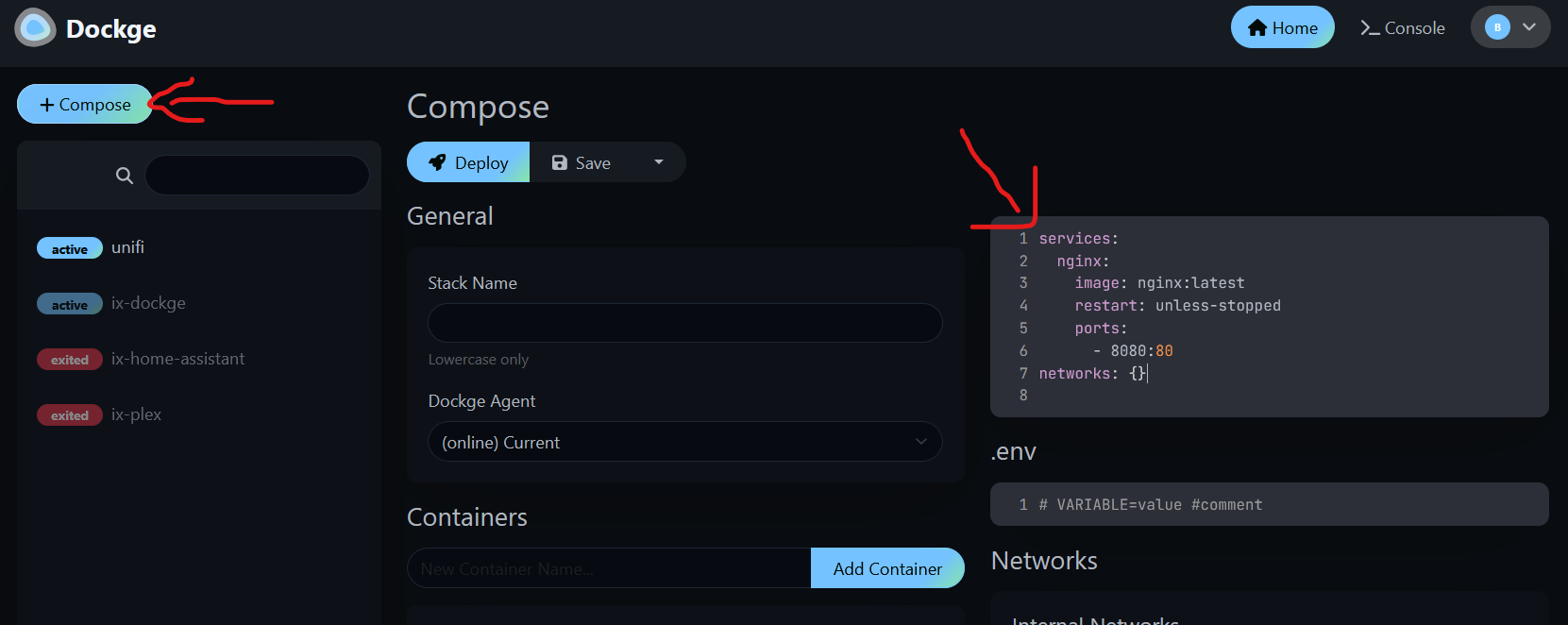
Go to the Apps and the dockge WebUI. First login asks you to create a dockge UI password. Click the “+Compose” button. On the right, erase everything in the numbered lines and paste the yaml code below.
version: "3.9"

services:
  mongo_db:
    image: docker.io/mongo:4.4
    container_name: mongo-db
    hostname: mongo-db
    mem_limit: 2g
    cpu_shares: 768
    healthcheck:
      test: ["CMD", "mongo", "--eval", "db.adminCommand('ping')"]
      interval: 10s
      timeout: 10s
      retries: 5
      start_period: 20s
    networks:
      - unifi_network
    volumes:
      - /mnt/tank/Apps/mongo-db/init-mongo.js:/docker-entrypoint-initdb.d/init-mongo.js:ro
      - /mnt/tank/Apps/mongo-db:/var/lib/mongo:rw
      - /mnt/tank/Apps/mongo-db:/data/configdb:rw
      - /mnt/tank/Apps/mongo-db:/data/db:rw
    restart: unless-stopped

  unifi_net_app_server:
    image: lscr.io/linuxserver/unifi-network-application:latest
    container_name: unifi_network_application-server
    hostname: unifi-net-app-server
    environment:
      - PUID=1000
      - PGID=1000
      - TZ=America/Los_Angeles
      - MONGO_HOST=mongo-db
      - MONGO_USER=unifi
      - MONGO_PASS=PickYourOwnPassword
      - MONGO_PORT=27017
      - MONGO_DBNAME=unifi
      - MEM_LIMIT=1024
      - MEM_STARTUP=1024
      - MONGO_TLS=false
    volumes:
      - /mnt/tank/Apps/unifi:/config
    ports:
      - 8443:8443
      - 3478:3478/udp
      - 10001:10001/udp
      - 8080:8080
      - 1900:1900/udp #optional
      - 8843:8843 #optional
      - 8880:8880 #optional
      - 6789:6789 #optional
     # - 5514:5514/udp #optional
    restart: unless-stopped
    networks:
      - unifi_network
    depends_on:
      - mongo_db

networks:
  unifi_network:
    name: unifi_network
    ipam:
      config:
        - subnet: 192.168.200.0/24
Change the yaml as needed for your paths, timezone, mongo password (also change the init-mongo.js to match) and which ports you want to expose. See ports info here unifi-network-application - LinuxServer.io and more Docker info here UniFi Controller in Docker: Migrating to UniFi Network Application
Hit Save and Deploy. After the installation, I logged into the unifi app at $IPAddress:8443 and restored my unifi backup. This installed Mongo version 4.4.30 (yaml set to 4.4) and Unifi Network Application 10.0.162 (yaml set to latest).