Not a mistake. You shouldn’t need to resort to any of this. You shouldn’t have had to double quadruple your RAM just to buy some more time to avoid OOM.
I’m trying so hard to bite my tongue about memory management of TrueNAS Core (FreeBSD) vs. TrueSCALE/CE (Linux), from what we’ve witnessed with ZFS and ARC on these forums and elsewhere.
Never experienced a single OOM event on FreeNAS/Core since 2019. My memory usage always stays around 30-31 GB (out of 32 GB of RAM). I am running qBittorrent and Jellyfin 24/7, and I will run Soulseek for long periods of time.
My memory usage stays consistent, always hovering just below 1-2 GB of “free” RAM, no matter what happens to my ARC. Not a single byte was ever swapped to disk.
One notable difference is that you’re using an iGPU for transcoding, which likely “shares” its VRAM usage with your actual RAM. However, your description sounds like you still risk an OOM, even if you’re not transcoding.
Going from 32 GB → 64 GB → 128 GB of RAM is definitely a (costly) way to avoid OOM.
I find it “interesting” that for the past 6 years on FreeNAS / TrueNAS Core, I never once experienced an OOM or any swapping, with only 16 GB of RAM (and now 32 GB). I run qBittorrent and Jellyfin 24/7. I have SMB and NFS shares that retain all file and folder metadata in the ARC with snappy browsing and performance.
Total memory usage always gracefully stays just below my RAM capacity, within 1-2 GB at all times.
It kind of looks like a job is kicking off at 02:00 (and 23:00?) wrecking havoc in your RAM.
qBittorrent is an obvious suspect, plex has been known to do stuff like that as well, among others.
@winnielinnie
I don’t have a clue as to what the iX developers have actually used or why they decided on certain parameters as related to memory, but by using the basic data they provide in the GUI, vs what I see for example when using the command lines free -h there is a discrepancy between what the operating system says is actual free memory and what Truenas says is actual free memory. The GUI “Free” value matches the free -h commands “Available” value when it should be matching the commands “Free” memory value and the GUI’s cache is matching the commands “Free” value instead of the commands Available value.
In simple terms, Available memory is not true Free memory. It is memory that is Free plus memory that can be released by other processes is needed. If Truenas is using Available instead of Actual free memory for memory management requests this could cause enough of a delay when memory is tight or over committed to trigger an OOM as free memory may run out before available is ready.
If Truenas is still not using swap, then when physical memory runs low or out there is nowhere to move less used pages to get some free memory which could also contribute to the issue.
As you mentioned, adding more ram masks the issue as there is now breathing room, but the system should be capable of managing memory properly if the proper internal values from the system are used or the system is allowed to actually handle the memory.
Or maybe I’m full of it and it is just a “reporting” error in the GUI
free -h
total used free shared buff/cache available
Mem: 62Gi 29Gi 25Gi 17Mi 8.5Gi 33Gi
Swap: 0B 0B 0B
GUI:
62.8 GiB total available (ECC)
Free: 33.2 GiB
ZFS Cache: 25.2 GiB
Services: 4.4 GiB
This appears to be the root cause of the issue you were facing. Depending on load and what each of these applications were doing at any given time, it’s very possible that you’d oversubscribed on RAM.
At the bottom of each individual app, you can define a resource limit for each app, which includes memory. By default, I think most apps allow for 4GB. If you’ve installed 8 applications, each with the default limit, you’ve gotten yourself into a situation where your apps are allowed 32GB of RAM, leaving nothing for the host OS.
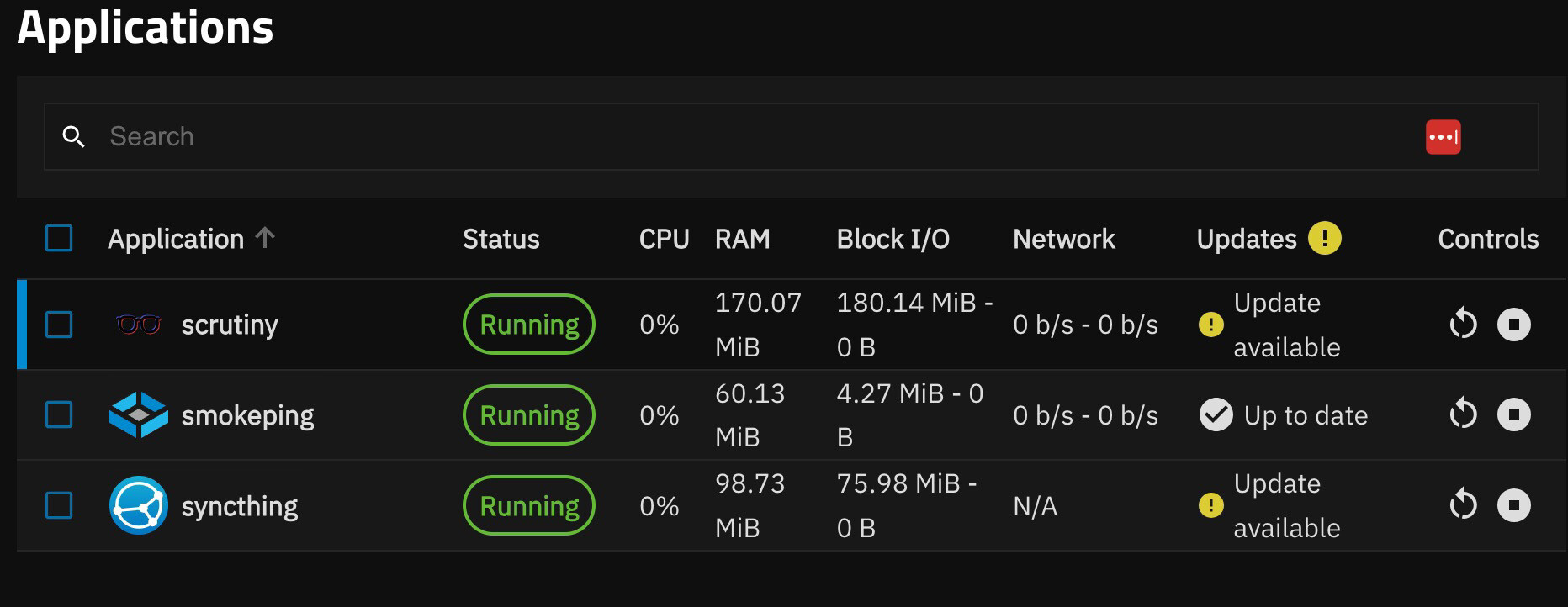
While granted, these limits don’t mean the app will always use 4GB of RAM, in your case I suspect they were using a fair bit. FWIW, you can check current usage on the Apps page:
Why not just set arc max at this point & avoid oom? I get that things shouldn’t need it to run properly, but the option to enter the command in cli is there & waiting. Seems cheaper than doubling physical ram every few weeks.
I don’t get the taboo of manually managing the system when needed.
Why not just set arc max at this point & avoid oom?
See my first few posts. Back when I had 32 GB of RAM, I tried setting the arc max to 8 GB. But, this did nothing to remedy the issue. Yes, the average ARC size hovered around 8 GB, but every once in a while it would spike rather sharply up to the point where the kernel had to step in and start killing things. This thread also mentions and questions this odd behavior of ARC exceeding the max. I’m tempted to take all the findings from both threads and go bug the OpenZFS devs for some insight.
“Free” and “releasable” actually make up “available (upon request)”. The GUI looks right to me.
But your comment perfectly summarises why dispensing with swap was not the best idea:
Weird man - I know that I periodically have to set it again after reboot or launch/stop of a VM, any chance either of those things happened before it spiked? I guess also there is the option of clearing & then setting the arc again (chron job of setting arc to like 1mb, then setting back to whatever your max is).
I know I’m giving workarounds instead of solutions, but uhh… other than bug reports or reaching out to devs of zfs I can’t think of anything more useful to get your working stable until who knows how long (or even if) official fix is implemented.
I know that I periodically have to set it again after reboot or launch/stop of a VM, any chance either of those things happened before it spiked?
Nope, I have no VMs. And, as far as I am aware, nothing was causing the max to get reset. The output of arc_summary always reflected the max of 8 GB when I had that set (I have since removed this maximum since it wasn’t making much of a difference).
you’ve gotten yourself into a situation where your apps are allowed 32GB of RAM, leaving nothing for the host OS.
I don’t think so, I’ve been watching memory consumption by my apps from two different places, Dozzle and the apps tab in the TrueNAS UI. Dozzle claims I’m only using 6ish GB. The TrueNAS UI thinks I’m about double that. Additionally, the dashboard card for Memory shows that services are only using about 10 GB.
On top of this, the reporting tab in TrueNAS always shows that each invocation of oom-killer is always preceded by a sharp spike in ARC size, not container memory usage.
I’m late to the party, but I believe the issues you are describing was understood and fixed separately on Core and Scale (different root causes though!) and no, not by buying more ram. This is just swiping the issue under the rag.
You are using scale 24.04 — rbis is where it started. Before that arc was allowed to use up to half of system ram. In 24.04 the limit was removed. This exposed a bunch of issues with interoperation between arc and Linux memory manager that resulted in both, excessive arc evictions, and OOM killer nuking applications when the evictions were not happing fast enough.
In 24.04.1 and 24.04.2 there were some changes introduced to tune this behavior and it should be working now.
Side note — issues like that is why I still use Core and not migrating to scale any time soon. It’s 2025, and scale still has these weird issues popping up all the time.
I think this problem is now solved for TrueNAS SCALE / CE: Double or quadruple your RAM and use an Auxiliary Parameter[1] custom startup script to limit how much memory the ARC can use.
Auxiliary Parameters are bad. Custom scripts are perfectly fine. That’s why one was removed from the NAS appliance, but the other gets to stay. Something like that. I’m not really sure anymore… ↩︎


 It feels like October 14, 2025 was only a week ago. How time flies. I’m feeling nostalgic.


 , I’m gonna start tagging people when I quote their replies.