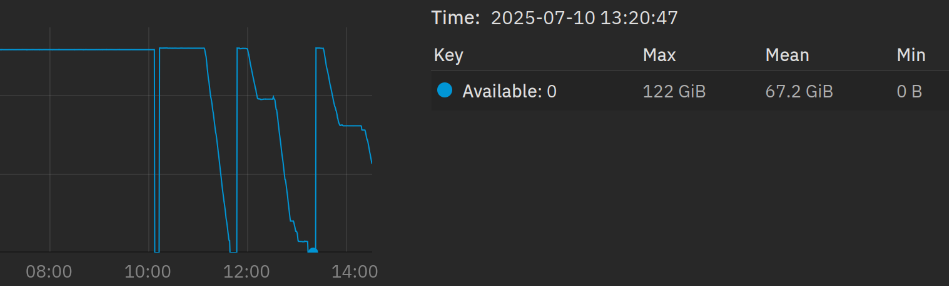
I’m currently copying all my data on my new and fresh TrueNAS. The ZFS Cache is using a lot of RAM while writing - that’s the good part.
But it will use all 100% RAM while I’m copying my data via SMB and then suddenly, the dataset locks, ZFS gets Unhealthy due to some errors in the last written files. And After that, the Cache becomes empty.
That can’t be right, right? How can I limit the max value? I thought, TrueNAS (v. 25 btw) uses 50% per default. The problem is, that the Cache doesn’t get flushed after smaller write sessions. I have 128 GB of RAM and I’m writing maybe 60 GB per task. So I can run 2 tasks and then it will crash again.
What did I miss while setting up the pool and datasets?
Yes it should adjust itself, and with my system it does… so no idea why yours doesn’t.
Is it a vanilla installation or did you do some manual tweaking of zfs parameters?`
Did you try to manually cap the arc size and see if your sytem locks up?
I don’t see strong correlation between ARC utilization and symptoms. Perhaps describe symptoms without ascribing to ARC and give exact errors presented by the system. Also provide full hardware details.
It’s the latest version of TrueNAS Scale and a normal pool w/o any cache VDEV or similar. I did not change anything. Just set up the pool (8x 6TB with RAIDZ2) and created some datasets.
I’m trying to limit the RAM but I’m searching the right config file atm.
Is it
Here. A reboot right after 10 am and then starting to copy all my data on the NAS. The free RAM is running down to zero like a burn-down-chart.
The NAS “ejects” and locks all datasets, the web GUI isn’t responding and then after locking all datasets, the Cache is empty and I can restart.
I started now a 390 GB transfer with >150k files. The Cache is at 80 GB right now. I’m curious…
If its a RAM damage, shouldn’t the NAS completely freeze and must be rebooted?
Bad RAM, RAM slots, or a memory controller does not have a particular way to manifest. Random and strange things can occur. If you can run a memtest overnight to rule out bad RAM, you’ll at least eliminate that possibility.
I recently dealt with the symptoms of a bad RAM stick, which I initially thought was the graphics card because of what appeared to be GPU lockups and the display not responding.
For testing purposes, drop it to JEDEC speeds - so no XMP, no EXPO, no custom tuning. I’ve seen systems pass everything else in memtest but spectacularly fail the bit fade test.
We really need detailed info on your system. Expand ‘My system specs’ on LarsR post #8 above. That is the kind of detail we like. Hard drive models would help as were are looking to make sure the drives are CMR and not SMR types.
I copied 13TB of data from Windows 11 to TrueNAS Fangtooth 25.04.1 and had no problems. I was using Windows Robocopy to make the backup onto a SMB share.