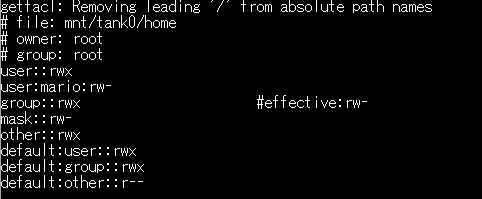
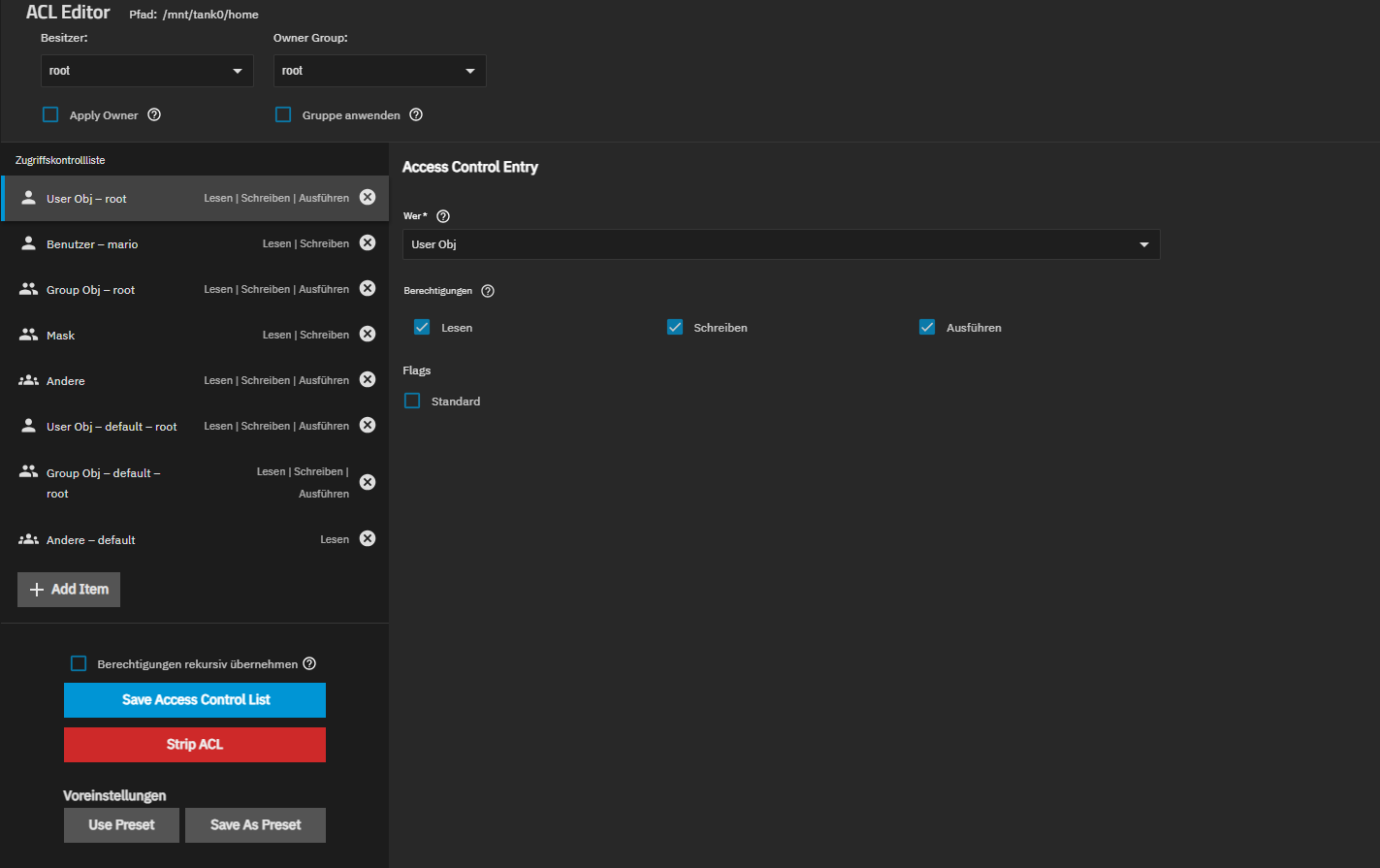
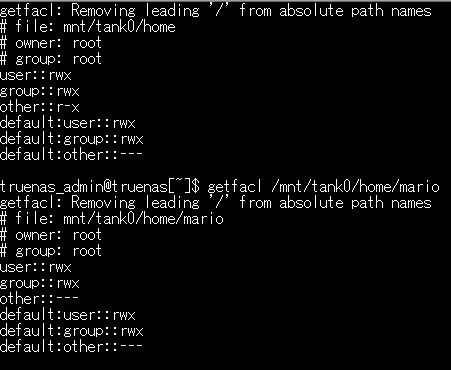
I hope you can help me. I accidently locked myself out from my home-folders on TrueNAS. Normally I’d simply recreate the shares, but there is some data in without a backup. (Yes, I know - stupid me).
I set up a different folder and during that process I somehow managed to alter the home shares dataset and changed owner and group. I then tried to revert it back, but I did not succeed.
I could access the home-directory before via SMB - which is not possible right now.
I also tried to login via SSH to copy over the data, but I don’t have acccess there too.
Would be great if anyone can help me to gain access to the direatories again, so I can at leat copy away the data.
I can provide screenshots, but I have to figure out how to upload them.
thanks - I didn’t get an invite to any tutorial. I can see a bot message, but there is no hint to any tutorial. I also checked my mails. The only mail I can see is the account confirmation.
thanks! I thought dan was refering to a forum-tutorial.
Can you give me a hint maybe?
Should the home-directory “mario” belong to root:root, or my user “mario”?
As of now, this belongs to root and i don’t know how to change it to my user, as the folder “mario” is not shown in datasets.
Edit: Can I maybe regain access if I use other:r-x and write those recursive on the home directoy dataset? I think the permissions are set correctly, but the owner for my home directory should be my user - or am I wrong?
Yes, changing ownership would be a good idea. The permissions of /mnt/tank0/home look good. For /mnt/tank0/home/mario you will want to change the owner to mario.
Please also check the owner of the files within /mnt/tank0/home/mario to check if you need to change the owner of all files, or only the folder.
Do sudo ls -al /mnt/tank0/home/mario, if the owner of the files/and folders are all root root you need to change owner recursively.
To change owner of the folder:
sudo chown mario:mario /mnt/tank0/home/mario
To change owner of the folder and everything within it:
sudo chown -R mario:mario /mnt/tank0/home/mario
I am assuming that the user is called mario and their primary group is mario, you might have to change that. You can check that in the Users tab in the web UI.
Edit: Can I maybe regain access if I use other:r-x and write those recursive on the home directoy dataset? I think the permissions are set correctly, but the owner for my home directory should be my user - or am I wrong?
Don’t use other:r-x for home directories, it allows any user to read the files which is bad for security.
Adding user permission and writing them recursive made me only see “mario” home folder again
after applying the owner “mario” recursive I have my data back
@bacon: Thanks for your tips - I think i did at least this but in the GUI.
I think normally truenas_admin should be able to browse home directories? In my case I can’t to that anymore. I might have to recreate the home.
I did that because I just wanted to at least see my data to copy it over, as I forgot that. Normally I always do backups, but I needed to free up space on my harddrive.
When you create a dataset in TrueNAS it will usually grant permissions to the builtin_administrators group. truenas_admin admin is a member of builtin_administrators. So yes, in the default setup the truenas_admin should get access to the files. But you can change the ACL as you want.
You are using Posix style ACL. I would suggest using NFSv4/SMB type ACL. That should also be the default if you create a dataset in truenas.
There is also the “Administrators Group” option in the SMB settings which can give a lot of power to a group, might even bypass the file system ACL.
Perfect! Thank you - that would have been my next question. If it’s better to use NFSv4/SMB type ACL for home. So I will use this when I recreate the share.
I will check the “Administrators Group”, thanks for the tip!
As I have access to my data again I will mark this topic as solved.
hey @SuperMario , does the “Administrators Group” approach work in your setup?
I ask because on my setup, it does not seem to work as expected. Because I have still files/folders copied over from an old fileshare to TrueNAS where I cannot set myself as owner despite being in the group mentioned in the “Administrators Group” SMB service setting. If it works for you I would know that something else on my setup is borked. Thanks in Advance
(Though my TrueNAS is connected to a AD & both the group & user are part of the AD.)
For anyone finding this thread later on: I never got the “Administrators Group” actually working, do not yet know why.
But via this thread and some trial&error with the TrueNAS patched ACL tools, I found a way for me to restore access good enough so I could continue with Windows Explorer / PowerShell to fully fix my ACLs:
nfs4xdr_setfacl -R -a g:GROUP_NAME:full_set::allow DIR_NAME
Needing to replace GROUP_NAME & DIR_NAME with correct names. AD group name worked in lower case & without domain, i.e. to give CONTOSO\ExampleShareAdmins permissions, use exampleshareadmins. Probably also works with user accounts directly using u:USER_NAME: as prefix, but I have not testet that.
This worked on my TrueNAS Scale, connected to an AD & with an AD group name, so that correctly authenticated Windows clients can access the files & edit the ACLs with native Windows tools when executed as root user on TrueNAS.