
No more than the fan control script for Supermicro boards…
3 Likes
Stale thread, I know, but I thought I’d update it in case anyone else has run into the same issue (successful scripted install, but solid white drive LEDs only).
To correct this, I set the mapping method to serial (as recommended by the script’s author) and carefully populated the SN values with reference to the output of lsblk -S -x hctl -o name,hctl,serial.
The relevant lines in the script are:
MAPPING_METHOD=serial
and
DISK_SERIAL="YOURSN01 YOURSN02 YOURSN03 YOURSN04 YOURSN05 YOURSN06"
Obviously, the number of SN values will depend on your model. (I have the DXP6800 Pro, running Fangtooth 25.04.2.1.)
–vspr
3 Likes
I’m interested in the Ugreen NAS, especially if I can install another OS. TrueNAS or Unraid?
Is the hardware a good value for the money?
I noticed the higher-tier hardware comes with an Intel i5 1235u processor. What’s the point of a faster CPU? Why would I want it over something more power-efficient like an N100?
Why would I want Thunderbolt 4 and an HDMI port in a NAS?
Which NIC does Ugreen use in their lineup of NAS?
They’re useless in TrueNAS, at least. With another NAS OS (which may or may not exist) that supports Thunderbolt and/or direct video playback, they could be useful. I mean, obviously, a display connection will be helpful for installing the OS in the first place, but after that, not so much.
It really depends how important it is to you to have a nicely-integrated, compact NAS chassis–I don’t think it’s a great value at the non-Kickstarter price, but it is a nice piece of hardware.
If you want your NAS to do something other than just serve files, mainly. Both TrueNAS and Unraid support running other apps/plugins/Docker containers, and some of them may have significant CPU requirements. The i5 also supports more RAM, IIRC.
Not sure about other models, but the 6800 uses Aquantia 10G NICs. Kind of flaky, but not horrible.
1 Like
Hey Dan, thank you so much for addressing this.
I’m mainly focusing on the DXP4800+ because of the positive reviews. It has a G8505 processor that apparently has very good performance for the money and is power-efficient. Since this is used for an NAS, and running 24/7/365, I don’t want more CPU performance than I actually need. Electricity rate isn’t dirt cheap over here so I want to have the right fit that should cover me for at least the next 5 years. What are the use cases that you’re alluding to where I’ll need a much more powerful CPU than the G8505?
In your opinion, what is important in a TrueNAS build?
Since I’m already into the Ubiquiti ecosystem, I’m contemplating two scenarios. The first scenario is to buy both the UNAS-Pro and the DXP4800+. This way I can play with both and better understand which will best fit my needs.
The second scenario is to build my own 2U rackmount TrueNAS. How beneficial is ECC RAM? It’s significantly more expensive, but I want to get this right. I also want to put in the upcoming Intel B50 GPU for media use.
I also have a spare Lenovo Tiny PC with an AMD Ryzen 4650GE processor. I am leaning towards maxing out at 64GB and using it with Proxmox and Docker.
So this is a rough idea of what I have in mind. I do want to limit the HDDs to two per NAS due to the expense involved. I feel like this is one of those situations where I really need to play with the various OS and hardware to get a better understanding. I do want your advice as well as others to get the basics so that I’m on the right track with this. The data integrity of my files is very important so that’s another reason why I want a good reliable NAS in addition to cloud storage that I’ll need.
Thank you!
Since the DXP4800+ doesn’t support ECC RAM and if I get this because the overall costs is lower, what are the steps and configuration I can take to mitigate against bitrot and ensure data integrity? I know I’ll want to use raidz2. Other than that, I don’t know what else I can do.
Are the HDMI port and SD card slots working with TrueNAS? Can I connect the UGREEN to a TV and use Plex in a container?
Can I insert an SD card with photos and then TrueNAS will back them up?
There is nothing you can do but run ZFS which will do all it technically can to prevent bit rot - ECC or not. If this is for long time storage, as you hinted at in your other thread, once the data is committed to disk/SSD it will never be rewritten. So even if the menory fails at some time in the future everything already on the system is still safe.
Commonly “bit rot” refers to data changing after being stored. ZFS’ checksums and redundancy take care of that regardless of the memory.
Memory is important for data in transit, i.e. written or read back at the very moment.
You might want to read this: Will ZFS and non-ECC RAM kill your data? – JRS Systems: the blog
As for Plex - didn’t you write this system is intended as a NAS only and the safety of your precious data is the only relevant concern? 
2 Likes
I did and that is still my goal, but because I’m researching and learning, I also want to ask. If I change my mind on the build then then what’s wrong with that? I want to get it right.
Greetings,
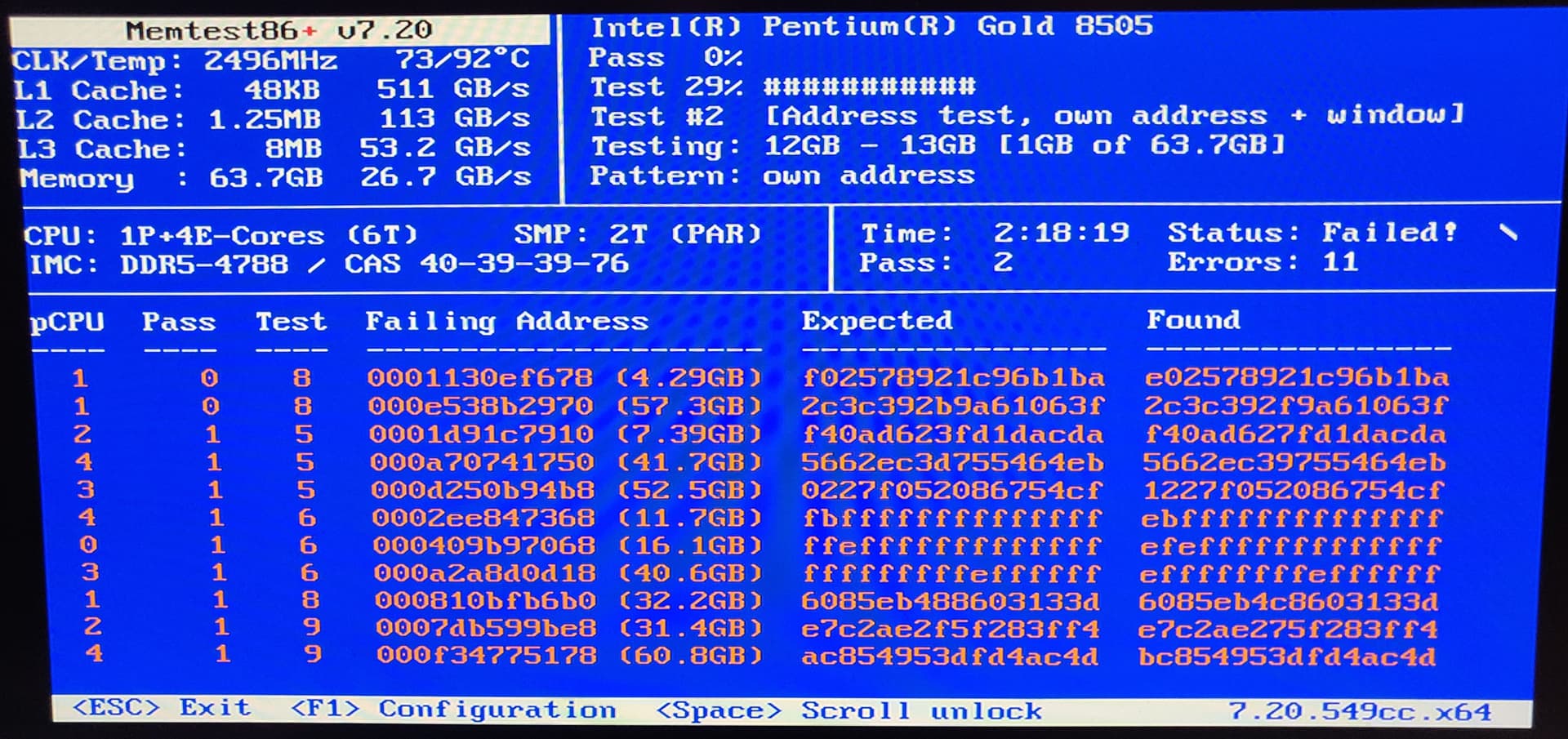
I picked up a DXP4800 Plus (Pentium Gold 8505) to run TrueNAS, but I want to warn: if you put your own memory modules in then absolutely consider running Memtest86+. I made the mistake of not checking the vendor’s QVL and went with a 64GB kit of Crucial DDR5-4800 SODIMMs as those are commonly available / recommended. It failed with 11 errors in only 2 passes. Despite that, a live Linux USB was still able to boot and function, so I might not have noticed if I hadn’t tested.
After swapping back to the 8GB Samsung module that came with it, it’s thankfully passing.
The QVL modules (at least the 32GB sticks that I checked) are difficult to find and cost more than the Crucial at the time of writing here in the U.S. I ordered a Kingston kit on eBay and will try it out when it arrives. Incidentally, memory prices have just gone insane.
The problematic Crucial P/N is CT32G48C40S5 (32GB) / CT2K32G48C40S5 (2x32GB kit). I can’t prove that I didn’t just get a defective kit, so it would be good to hear from others who also tried Crucial.
I didnt see any BIOS images on the UGREEN support site. They have what they call ‘firmware’ images, but I think that is the OS image if I’m not mistaken. The version numbers do not match anything in the AMI BIOS screens.
I’m planning to run a ‘badblocks’ test on my HDDs in the meantime while the new RAM kit is in transit…
(@pmh - nice to see you here!)
Take the tutorial by the forum bot.
1 Like
I am using Corsair 64 GB Kit CMSX64GX5M2A4800C40 in a DXP6800. And yes memory had problems when being used with STD timings and both memory slots populated. Using just 1 slot was no problem. Changed the timing to XMP and reduced max Boost on P-Cores to make it work. For those who didn’t know: CTRL+F12 to enter Bios, CTRL+F1 in Bios to make all settings visible.
3 Likes
Appreciate that tip! It opened up a lot more settings, although I didn’t see anything related to memory timing and XMP (I might have missed where it’s buried).
I received the Kingston sticks (2x KVR56S46BD8-32; mine came with Micron chips) and pleased to report that these are passing MemTest86+ without needing any timing adjustments. As they’re DDR5-5600 and the CPU only supports DDR5-4800, they were automatically down-clocked by the system but they run stable at that speed.
1 Like
Quick queston for @dan . I have a DXP8800 Plus that I’d like to install TrueNAS on but I’d prefer to do exactly what you did and remove the 2242 that has UGOS on it and replace it with a 500GB-1TB drive.
The issue is when I’m looking at 2242’s there seems to be 2 different connectors. 1 style with the single notch I’m used to seeing and a second with 2 notches.
Do you recall which style Ugreen uses?
In my 6800, the boot device was a standard 2280 m.2 NVMe SSD. That one had just the one notch, but if it’s a different size than yours, the configuration might also be different.
Sounds like I’ll be tearing the 8800 down to the studs to find out for certain what it’s actually using.
I’d love to think it’s a 2280 same as yours since the only difference between them is 2 bays but based on my luck so far I’m sure it’ll be different.
If you are tearing it apart anyways you might want to replace system fans and maybe apply new thermal paste on the cpu. The temps on the 6800 are pretty high out of the box and i assume the 8800 suffers the same problem.
Hadn’t thought of that but probably should’ve. I’ve seen several times where the HD Temps exceed 50C and the cores hit 100%.
Admittedly that was when the system was indexing and the CPU/HD’s were heavily loaded but compared to a Synology that I have it stood out as I don’t think I’ve ever seen it peg a core, much less multiple cores, when doing anything.
Believe I have some 120mm Noctua’s and know I have some Kryonaut/MX-4 from previous builds. If I have to tear it down might as well address everything I can while it’s broken down.
Thanks for the reminder.
Edit: And of course the 8800 doesn’t use 120MM fans .. ordered 2x NF-A9 PWM fans.
In case you want to control fan speeds you may want to modprobe it87 force_id=0x8623 in preinit and use coolercontrol to actually set curves for the different fans. On the 6800 it’s actually the 8613E but the 8623 seems to be somewhat compatible.
  services:
    coolercontrold:
      image: coolercontrol/coolercontrold:latest
      ports:
        - '11987:11987'
      privileged: True
      volumes:
        - /mnt/<pool>/<ds>/<folder>:/etc/coolercontrol
  version: '3.9'
Thank you @sard.
Ignore what I said about fan sizing on the 8800. I didn’t actually check the fan sizes. I made the mistake of checking on ChatGPT and ordered based on it saying the fans were 92MM which I can now confirm is NOT accurate.
The NF-A9’s are going back and NF-A12’s are on their way.
Sounds great - although it’s probably a bad time stating this, as RAM prices are virtually going through the roof right now but: from a friends 4800 i know that 2x 48 GB work as well and i’ve also stumbled upon some post of a 6800 owner using 2x 64 GB without a hitch.
1 Like