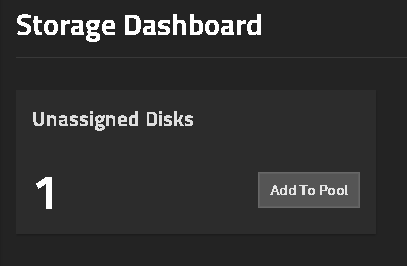
Server had 5x8TB drives on a Raidz1 pool and I added a drive to it. It shows under disks, and, in fact, storage sees it as unassigned with an option to add to a pool:
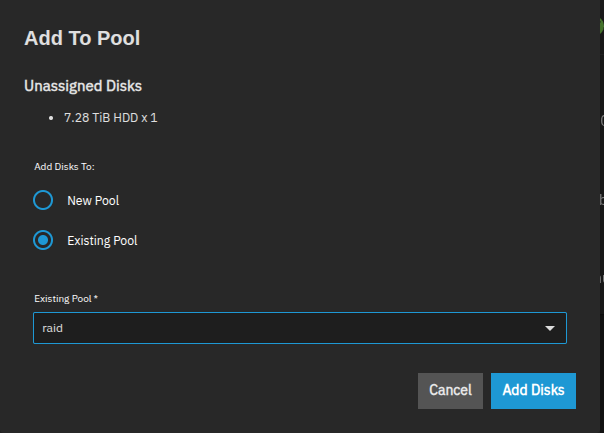
I click the option and select add to an existing pool in the next screen, click on add disks and go over the next screen options and it seems wants to add a vdev to the pool (At least 1 vdev is required to make an update to the pool), so:
The GUI needs to be flexible enough to handle most the situations you would do. It wouldn’t be much of a problem to make that type of mistake on a single stripe drive pool or a Mirror VDEV as you can back out of those mistakes without having to destroy and recreate the pool. If the original pool is a Raid-Z(1,2,3) that is where the mistakes happen.
It’s best to try to work through the procedures using a VM for testing, if possible. I have to do it every so often when giving advice just to make sure I have it correct.
If something isn’t clear on the online documentation, you can always ask questions to the forum or give feedback directly on the online documents pages. There is a little, blue button on the right side, Feedback.
ZFS is a bit complicated on what can be done with the pools / VDEVs and the terminology
I’ve been running ZFS on FreeBSD before FreeNAS → TrueNAS. Adding a disk to a ZFS pool is a new feature, year or two old, and I’m not familiar with it.
In fact as always I ran a full backup to another server before playing with it.
Regarding GUI I don’t agree a function becames available in it if you are not supposed to execute that function and further more if an error occurs has to be displayed to the user.
For now I’m adding the disk and will check status tomorrow.
…and how does the GUI decide if you’re “supposed to” execute that function?
Yeah, Free/TrueNAS has always been weak in this regard–it’s always been way too easy to get a stack trace out of it. It’s better than it used to be, but still lots of room for improvement.
The same way it found unasigned disk: logic. That same function can me modified to be improved for couple scenarios like: (1) Is there an existing pool? If yes add to it or create a new; (2) No pool exists - create a new?; etc, but that’s a question to be asked to TN Development team.
I know and I do think this is one of the best solutions out there. I did my own with FreeBSD years ago, but you guys did a better job than me.
The logic is doing exactly what you say it should be doing–if you have an existing pool, you can add an unassigned disk to that pool, you can create a new pool with that disk, or of course you can do nothing at all with it. If you try to add a single-disk vdev to a RAIDZn pool, it will warn you that it’s a dumb thing to do, but it will still allow you to do it, because it’s a technically-valid (albeit almost always stupid) configuration.
There might be room for improvement as the current way for adding a VDEV (creating new pool or adding to existing), Raid-Z Expansion (Extend button) or adding a drive to a Mirror or to make a Mirror (Extend button) from a single drive (stripe) VDEV. The logic or flow of the menus is a bit off, especially for users that don’t work with ZFS very often. I can find and work out what I need but I still work through items in a VM when giving advice on the forums
Maybe three main menus or options off of the Unassigned Disks, Add to pool option?
Add a pool or VDEV
Raid-Z Expansion
Mirrors
I’d say that the “Add to Pool” button from listing disks should not exist.
Better to force users through either “Add Pool” or “Add Vdev” to an existing pool. There is no good case to add a single drive as a new data vdev to an existing pool: Certainly not for a raidz# pool, and not even for a mirror pool, as one should really add a (2+)-mirror rather than a single drive. Single drive non-data vdev (SLOG, L2ARC) are already a specialised case, and single drive special/dedup vdev should be a big NO. (The legitimate edge case is adding a new data drive to a stripe pool, but creating the stripe in the first place should come with a warning.)
This button just looks to me as an invitation to make mistakes—especially irreversible mistakes.
It gives the impression of working like Unraid. “Add as many drives as you want. If you need protection from losing 1 or 2 drives, just add 1 or 2 parity drives that are at least as big as a data drive.”