Hi,
I have a Nextcloud app that I’ve been using since 2022 without any problems.
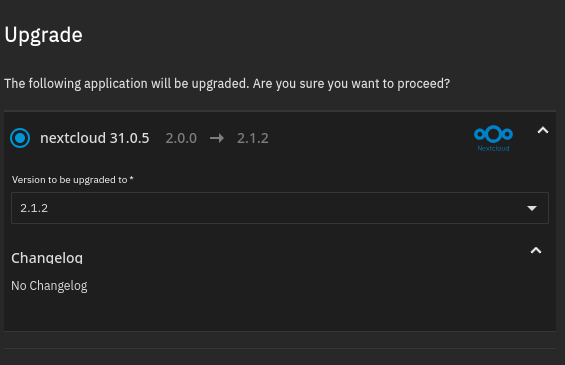
A couple of weeks ago I upgraded to the latest version, but the app doesn’t start anymore.
In the past, when I had problems after an upgrade, it was easy to roll back to a previous version to solve the issue. This time the problem persists. I tried rolling back to different previous versions with no luck.
Any ideas?
The error when started::
^^^^^^^^^^^^^^^^^^^^^^^^^^^^^^^^^^^^^^^^^^^^^^^^^^^^^^^^^^^^^^
Traceback (most recent call last):
File “/usr/lib/python3/dist-packages/middlewared/job.py”, line 515, in run
await self.future
File “/usr/lib/python3/dist-packages/middlewared/job.py”, line 562, in __run_body
rv = await self.middleware.run_in_thread(self.method, *args)
^^^^^^^^^^^^^^^^^^^^^^^^^^^^^^^^^^^^^^^^^^^^^^^^^^^^^^^
File “/usr/lib/python3/dist-packages/middlewared/main.py”, line 627, in run_in_thread
return await self.run_in_executor(io_thread_pool_executor, method, *args, **kwargs)
^^^^^^^^^^^^^^^^^^^^^^^^^^^^^^^^^^^^^^^^^^^^^^^^^^^^^^^^^^^^^^^^^^^^^^^^^^^^
File “/usr/lib/python3/dist-packages/middlewared/main.py”, line 624, in run_in_executor
return await loop.run_in_executor(pool, functools.partial(method, *args, **kwargs))
^^^^^^^^^^^^^^^^^^^^^^^^^^^^^^^^^^^^^^^^^^^^^^^^^^^^^^^^^^^^^^^^^^^^^^^^^^^^
File “/usr/lib/python3.11/concurrent/futures/thread.py”, line 58, in run
result = self.fn(*self.args, **self.kwargs)
^^^^^^^^^^^^^^^^^^^^^^^^^^^^^^^^^^
File “/usr/lib/python3/dist-packages/middlewared/api/base/decorator.py”, line 101, in wrapped
result = func(*args)
^^^^^^^^^^^
File “/usr/lib/python3/dist-packages/middlewared/plugins/apps/app_scale.py”, line 62, in start
compose_action(app_name, app_config[‘version’], ‘up’, force_recreate=True, remove_orphans=True)
File “/usr/lib/python3/dist-packages/middlewared/plugins/apps/compose_utils.py”, line 61, in compose_action
raise CallError(err_msg)
middlewared.service_exception.CallError: [EFAULT] Failed ‘up’ action for ‘nextcloud’ app. Please check /var/log/app_lifecycle.log for more details
^^^^^^^^^^^^^^^^^^^^^^^^^^^^^^^^^^^^^^^^^^^^^^^^^^^^^^^^^^^^^^
The log:
^^^^^^^^^^^^^^^^^^^^^^^^^^^^^^^^^^^^^^^^^^^^^^^^^^^^^^^^^^^^^^
2025-10-24 13:11:14.892023+00:00Conf remoteip disabled.
2025-10-24 13:11:14.892109+00:00To activate the new configuration, you need to run:
2025-10-24 13:11:14.892122+00:00service apache2 reload
2025-10-24 13:11:14.896447+00:00Configuring Redis as session handler
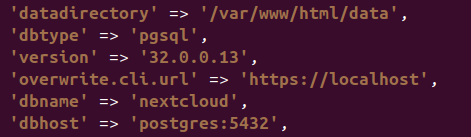
2025-10-24 13:11:15.060807+00:00Can’t start Nextcloud because the version of the data (32.0.0.13) is higher than the docker image version (31.0.5.1) and downgrading is not supported. Are you sure you have pulled the newest image version?
^^^^^^^^^^^^^^^^^^^^^^^^^^^^^^^^^^^^^^^^^^^^^^^^^^^^^^^^^^^^^^
Truenas Version 25.04.2.5

Name:
App Version: v31.0.5
Version: v2.0.0
Source: github.com/nextcloud/docker
Train: stable