
I bought my own domain and I am now trying to setup nginx-proxy-manager (npm) to access my truenas-apps like: jellyfin.example.com or truenas.example.com
I think I already got DNS set up correctly and added a Let’s Encrypt certificate in npm and I added the proxy hosts in npm.
To get that working I created a VLAN in Truenas itself to have the possibility to give an app its own IP. So I gave npm its own IP (10.0.30.11) so it still can run on the default ports, which is otherwise not possible except you would change either the Truenas-GUI-port or the npm-GUI-port.
For some reason it now seems like the apps can’t access each other, but can access the internet (tested with curl). Which I think is the reason why the access via npm (with the domains) does not work. From my client host I can access the services directly with their IP though.
- Truenas-IP: 10.0.30.10
- npm-IP: 10.0.30.11
- Jellyfin-IP: 10.0.30.40
- Pi-hole-IP: 10.0.30.10
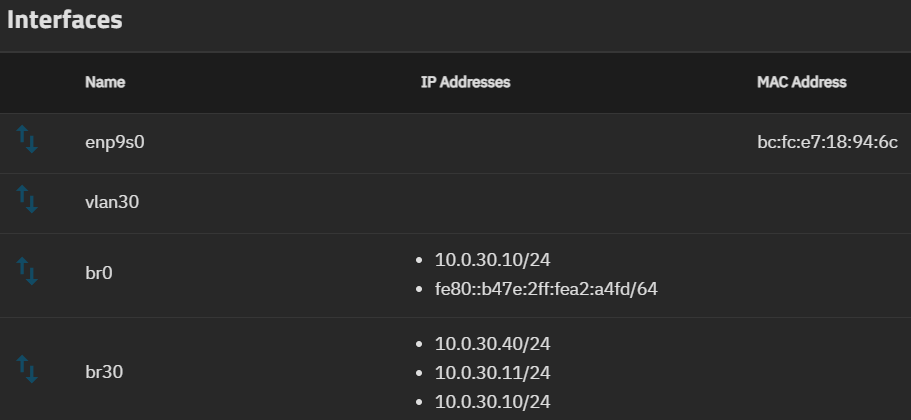
- br0 bridge-member: enp9s0
- vlan30 parent: enp9s0
- br30 bridge-member: vlan30
I don’t know pretty much anything about what I did with those interfaces. I kind of just tested what works and what now.
The br30 I created, because I could not add the IPs directly to the VLAN for some reason, without it failing.
I also added the 10.0.30.10 IP to br30 so my Pi-hole can use it, which probably isn’t good either, but it seems to work. The Truenas-GUI also only runs on 10.0.30.10.