I’m trying to decide how to set-up the boot drive:
I have 1x M.2 gen3x4 slot:
Option 1: Use a M.2 2x2 Card and install a NVME SSD in each slot (2 lanes per SSD) as Raid1.
(no additional slots for fast app storrage / cache)
Option 2: Use a M.2 4x1 Card and install NVME SSD in the first two slots (1 lane per SSD) as Raid1.
I would then have two additional M.2 1x1 slots available which I could use to install additional SSD storage (NVME or SATA with adapter) for caching or APP storrage.
Option 3: Use a M.2 4x1 Card, use a 2xSATA adapter in the first slot (1 lane) and connect two SATA SSDs to it in Raid1 as the boot drive. I would then have 3 additional M.2 single lane slots available to install additional NVME or SATA drives.
How important is it to have a fast boot drive. Will I notice much of a difference between having 4 lanes vs 2 lanes vs 1 lane dedicated to the boot drive? Will it only affect boot up times or does it also influence performance while the NAS is in operation?
BTW: This is for a home lab, backing up my personal data and my proxmox server (nextcloud, webserver, jellyfin etc.)
Not mirroring is realistically acceptable. You do a backup of your config once or twice a month & getting a boot drive replaced is a ~5 minute job.
The only real need to have the boot drive mirror’d is if you want to replace a failed boot drive without shutting down the system for 99.9999% uptime - which you’re not going to be able to do with nvme! It feels fun, I do it, but I wouldn’t waste an nvme slot on mirror’d boot.
I personally use a pair of optane m10 16G connected to the internal usb header of the mobo via m2/usb adapters. It fits up to 4 different boot environments, and that is enough for me.
There are only 2 issues so far:
Warning after the boot about being connected via usb.
No SMART support. Perhaps because of the usb/m2 adapter being dirt cheap.
Btw, I use vi a similar setup for my proxmox node. Spending entire sata or m2 slot for boot drive is a bit too much, IMO. I used to use pcie x1/m2 adapters, but then decided that spending a pcie x1 slot is also too much.
Only issue I see with that with recent version there is a wave of folks being unable to make pools at all if they get the usb/duplicate sn# warning, even if it isn’t included on the pool. Though I guess an option would be to boot into an older version, make the pool, then upgrade…
lol. I used a cheap noname usb stick as a boot drive. It would die every year, so I got fed up up and now I use a cheap noname ssd from eBay. 4 years and counting.
This is to say — you are overthinking boot drive. Its performance only matters during boot. I.e. once a year.
Edit: to save a disk bay — consider SATA DOM. Or, usb to SATA adapter (but see below)
Good catch. It probably can be a problem. But luckily, I have adapters that have different serials (even in the uefi). Can’t recall whether I’ve ordered them in a bunch. They look identical, at least at first glance.
It probably won’t be a problem if there is only one boot drive.
Yet the most expensive in the whole setup. Being like $5. A USB “splitter” is $2-3, and optanes are about $3. So it’s sub $20 for the entire mirrored boot pool setup.
When I was reading up on it, a lot of people said booting from USB is unreliable and a really bad idea, so this is not the case? I have plenty of free USB ports…
In my experience, booting via USB is only a problem if you use cheap USB sticks or SD cards. These don’t last forever because TN keeps writing to the data carrier.
A small SSD (32 … max. 128GB) in a USB enclosure is better. That’s perfectly adequate. I’ve been using one myself for a good 5 years without any problems.
Another vote. Usb itself is OK, it’s the stuff you plug in that’s sketchy.
A few years ago I had truenas core running off mirrored usb thumb drives. Every few months it would eat a drive and I’d give it a new one. Got fed up pretty quickly. Got a teeny tiny ssd with a USB adapter, ran for a few years like that.
So usb to ssd is probably OK. I like paired sata ssd drives as a boot mirror but it’s overkill. Ssd drives are extremely cheap insurance these days.
I personally avoid it, but multiple folks have success running specifically their boot pool on sata ssd to usb adapters; it seems to vary a bit on the quality of the adapter in terms of success. I still think you’d be fine with a single boot drive & that you’re overthinking things a bit. Backing up config periodically is best practice regardless of single/mirror boot for sata/nvme/other hardware choice.
Restoring from config is also much less painful than one may initially suspect.
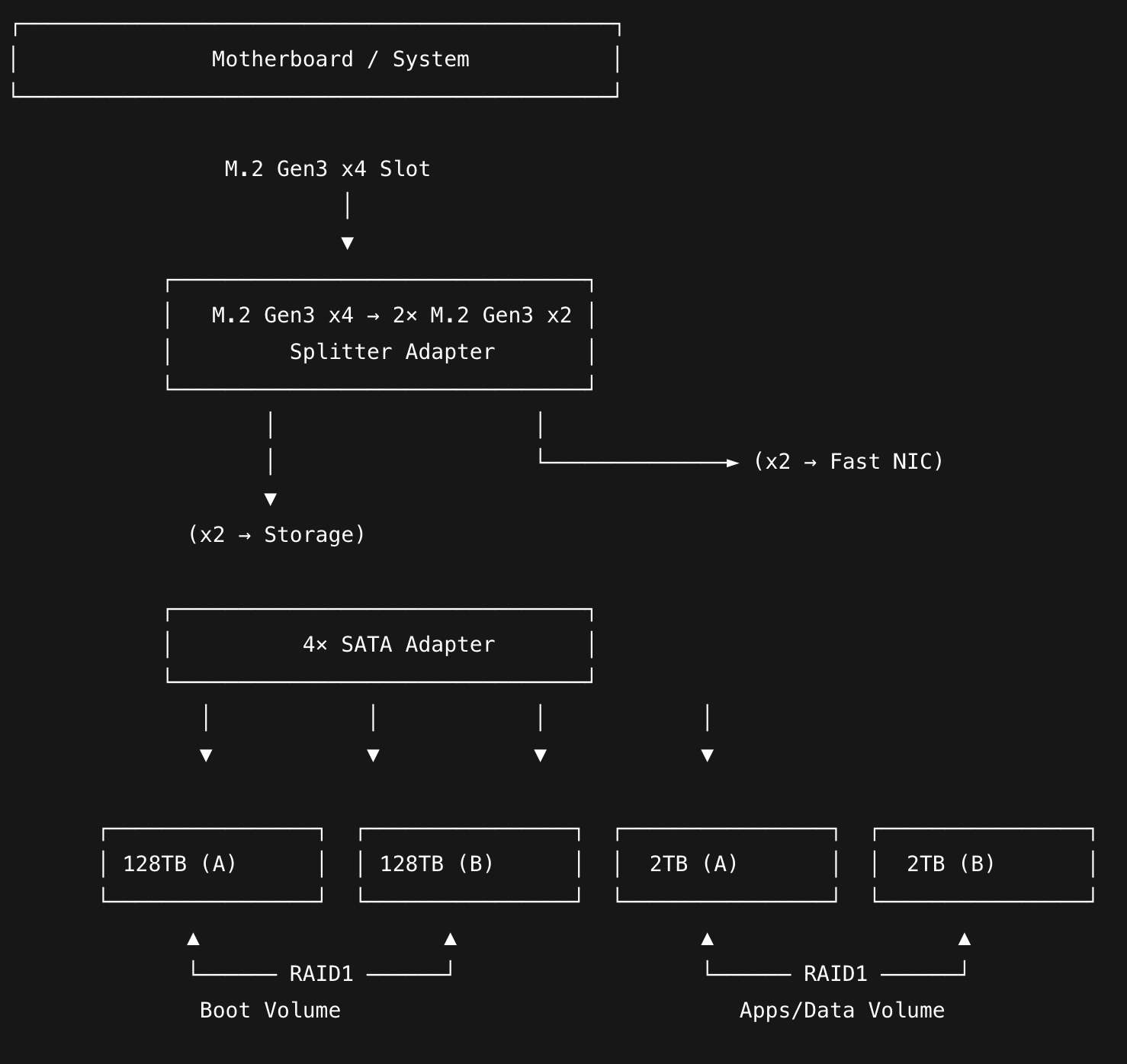
Thanks for all the replies. I guess I will settle on the following unless somebody has good reasons not to:
I’ll split the m.2 3x4 slot into two m.2 3x2 slots (with an adapter card).
I then use a 4xSATA adapter in the first slot and connect 2x SATA SSD 128TB (mirrored) for booting and 2x SATA SSD 2TB (mirrored) for APPS etc. I can then use the second m.2 3x2 port for a fast NIC.
Speed doesn’t matter. Redundancy barely matters. Redundancy over a pci splitter or switch is not trustworthy anyway, weird behavior is a common feature of them. Moreso a SATA adaptor - Keep it simple.
Keeping regular backups of your config files is critical. This is far more important than redundancy on your boot media. You or Ix will break your install more than disk errors.
Mid tier SATA SSD on a SATA header or on a USB-SATA dongle is my advice. If you want something a bit fancier for ultra high endurance but still cheap, buy a higher capacity Apacer MCL SATA module on ebay ( Access to this page has been denied. ).
The reason you’re trying to set it up this way is probably because you want to get it running on an Odroid H4 Ultra. That was already discussed earlier in this thread: Power efficient TrueNAS build with super cheap RDIMM (registered ECC memory)?
Along with several notes about using a 10 GbE NIC, there were also discussed possible boot configurations.
For me personally, the solution you’re aiming for involves too many layers / interfaces / adapters / protocol transitions, that’s my opinion. That level of complexity tends to introduce additional points of failure, and at least for my taste, that would be too complex. (I prefer the KISS approach myself)
Incredibly ODROID officially support x1x1x1x1 bifurcation.
I’d still suggest keeping it simple and using a more robust/traditional platform, and absolutely not a SATA adaptor. But your plan is looking a little less insane.