Boot-pool getting filled by older versions

Hello there fellow TrueNASers,

I updated to the latest version of EE (25.04.2.6) a few days ago. After the reboot, I noticed a notification telling that boot-pool was getting overcrowded (“Space usage for pool ‘boot-pool’ is 90%”). I just ran zfs list: it looks like all previous versions are still there, eating space (cf. below output). Question is, I suppose: do I need to manage this, or would it get somehow automagically managed? If I should manage this, what should I do? I sure don’t want to blow up the system, do I?

Here is the output:

$ sudo zfs list | grep boot-pool
boot-pool                                   14.1G   957M    96K  none
boot-pool/ROOT                              14.1G   957M    96K  none
boot-pool/ROOT/24.10.2.1                    2.74G   957M   165M  legacy
boot-pool/ROOT/24.10.2.1/audit              14.7M   957M  14.7M  /audit
boot-pool/ROOT/24.10.2.1/conf               6.82M   957M  6.82M  /conf
boot-pool/ROOT/24.10.2.1/data                304K   957M   304K  /data
boot-pool/ROOT/24.10.2.1/etc                7.50M   957M  6.50M  /etc
boot-pool/ROOT/24.10.2.1/home                160K   957M   160K  /home
boot-pool/ROOT/24.10.2.1/mnt                 112K   957M   112K  /mnt
boot-pool/ROOT/24.10.2.1/opt                  96K   957M    96K  /opt
boot-pool/ROOT/24.10.2.1/root                540K   957M   540K  /root
boot-pool/ROOT/24.10.2.1/usr                2.40G   957M  2.40G  /usr
boot-pool/ROOT/24.10.2.1/var                 151M   957M  31.4M  /var
boot-pool/ROOT/24.10.2.1/var/ca-certificates  96K   957M    96K  /var/local/ca-certificates
boot-pool/ROOT/24.10.2.1/var/log             119M   957M   118M  /var/log
boot-pool/ROOT/24.10.2.1/var/log/journal     832K   957M   832K  /var/log/journal
boot-pool/ROOT/25.04.0                      2.81G   957M   174M  legacy
boot-pool/ROOT/25.04.0/audit                14.3M   957M  14.3M  /audit
boot-pool/ROOT/25.04.0/conf                 6.97M   957M  6.97M  /conf
boot-pool/ROOT/25.04.0/data                  284K   957M   284K  /data
boot-pool/ROOT/25.04.0/etc                  7.12M   957M  6.19M  /etc
boot-pool/ROOT/25.04.0/home                  152K   957M   152K  /home
boot-pool/ROOT/25.04.0/mnt                   112K   957M   112K  /mnt
boot-pool/ROOT/25.04.0/opt                    96K   957M    96K  /opt
boot-pool/ROOT/25.04.0/root                  480K   957M   480K  /root
boot-pool/ROOT/25.04.0/usr                  2.51G   957M  2.51G  /usr
boot-pool/ROOT/25.04.0/var                  97.6M   957M     6M  /var
boot-pool/ROOT/25.04.0/var/ca-certificates    96K   957M    96K  /var/local/ca-certificates
boot-pool/ROOT/25.04.0/var/lib              28.9M   957M  28.6M  /var/lib
boot-pool/ROOT/25.04.0/var/lib/incus         104K   957M   104K  /var/lib/incus
boot-pool/ROOT/25.04.0/var/log              61.7M   957M  11.5M  /var/log
boot-pool/ROOT/25.04.0/var/log/journal      50.2M   957M  50.2M  /var/log/journal
boot-pool/ROOT/25.04.1                      2.80G   957M   174M  legacy
boot-pool/ROOT/25.04.1/audit                 208K   957M  15.0M  /audit
boot-pool/ROOT/25.04.1/conf                 7.06M   957M  7.06M  /conf
boot-pool/ROOT/25.04.1/data                  100K   957M   280K  /data
boot-pool/ROOT/25.04.1/etc                  7.13M   957M  6.21M  /etc
boot-pool/ROOT/25.04.1/home                    0B   957M   152K  /home
boot-pool/ROOT/25.04.1/mnt                   104K   957M   104K  /mnt
boot-pool/ROOT/25.04.1/opt                    96K   957M    96K  /opt
boot-pool/ROOT/25.04.1/root                    8K   957M   480K  /root
boot-pool/ROOT/25.04.1/usr                  2.53G   957M  2.53G  /usr
boot-pool/ROOT/25.04.1/var                  86.8M   957M  6.22M  /var
boot-pool/ROOT/25.04.1/var/ca-certificates    96K   957M    96K  /var/local/ca-certificates
boot-pool/ROOT/25.04.1/var/lib              29.5M   957M  29.0M  /var/lib
boot-pool/ROOT/25.04.1/var/lib/incus          96K   957M    96K  /var/lib/incus
boot-pool/ROOT/25.04.1/var/log              50.2M   957M  12.2M  /var/log
boot-pool/ROOT/25.04.1/var/log/journal      49.9M   957M  49.9M  /var/log/journal
boot-pool/ROOT/25.04.2                      2.84G   957M   176M  legacy
boot-pool/ROOT/25.04.2.6                    2.87G   957M   176M  legacy
boot-pool/ROOT/25.04.2.6/audit              45.2M   957M  16.2M  /audit
boot-pool/ROOT/25.04.2.6/conf               7.15M   957M  7.15M  /conf
boot-pool/ROOT/25.04.2.6/data                760K   957M   284K  /data
boot-pool/ROOT/25.04.2.6/etc                7.66M   957M  6.59M  /etc
boot-pool/ROOT/25.04.2.6/home               1.91M   957M  1.73M  /home
boot-pool/ROOT/25.04.2.6/mnt                 112K   957M   112K  /mnt
boot-pool/ROOT/25.04.2.6/opt                  96K   957M    96K  /opt
boot-pool/ROOT/25.04.2.6/root                740K   957M   496K  /root
boot-pool/ROOT/25.04.2.6/usr                2.56G   957M  2.56G  /usr
boot-pool/ROOT/25.04.2.6/var                70.1M   957M  4.69M  /var
boot-pool/ROOT/25.04.2.6/var/ca-certificates  96K   957M    96K  /var/local/ca-certificates
boot-pool/ROOT/25.04.2.6/var/lib              28M   957M  27.7M  /var/lib
boot-pool/ROOT/25.04.2.6/var/lib/incus        96K   957M    96K  /var/lib/incus
boot-pool/ROOT/25.04.2.6/var/log            36.6M   957M  15.6M  /var/log
boot-pool/ROOT/25.04.2.6/var/log/journal    8.39M   957M  8.39M  /var/log/journal
boot-pool/ROOT/25.04.2/audit                 216K   957M  14.6M  /audit
boot-pool/ROOT/25.04.2/conf                 7.16M   957M  7.16M  /conf
boot-pool/ROOT/25.04.2/data                  116K   957M   276K  /data
boot-pool/ROOT/25.04.2/etc                  7.68M   957M  6.57M  /etc
boot-pool/ROOT/25.04.2/home                    0B   957M   152K  /home
boot-pool/ROOT/25.04.2/mnt                   112K   957M   112K  /mnt
boot-pool/ROOT/25.04.2/opt                    96K   957M    96K  /opt
boot-pool/ROOT/25.04.2/root                    8K   957M   484K  /root
boot-pool/ROOT/25.04.2/usr                  2.56G   957M  2.56G  /usr
boot-pool/ROOT/25.04.2/var                  89.7M   957M  6.48M  /var
boot-pool/ROOT/25.04.2/var/ca-certificates    96K   957M    96K  /var/local/ca-certificates
boot-pool/ROOT/25.04.2/var/lib              31.4M   957M  30.9M  /var/lib
boot-pool/ROOT/25.04.2/var/lib/incus          96K   957M    96K  /var/lib/incus
boot-pool/ROOT/25.04.2/var/log              50.9M   957M  15.2M  /var/log
boot-pool/ROOT/25.04.2/var/log/journal      50.6M   957M  50.6M  /var/log/journal
boot-pool/grub                              8.22M   957M  8.22M  legacy
$ 

Thanks a lot for your insights!
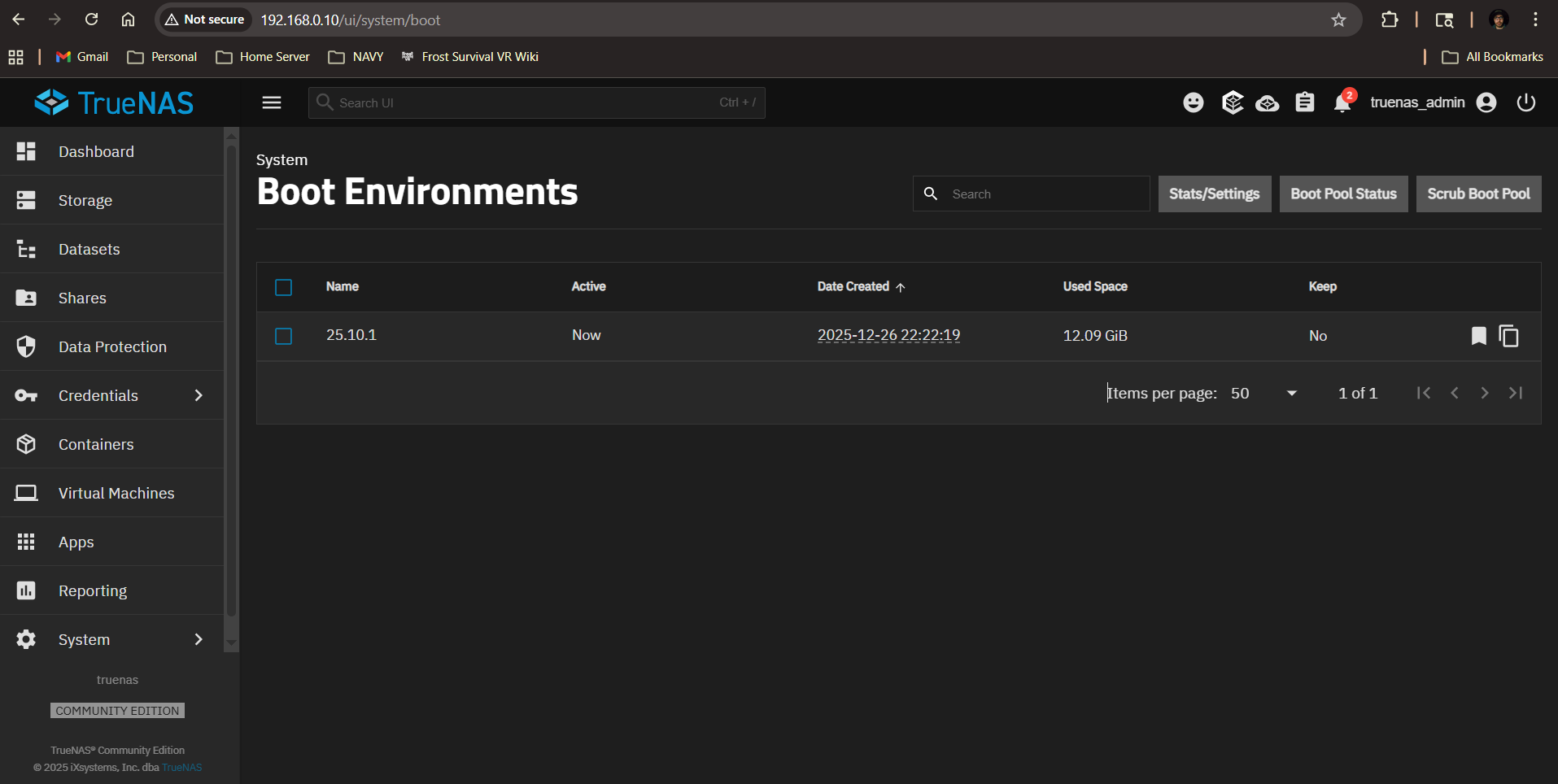
Delete whatever old boot environments you aren’t going to need any more. Go to System → Boot in the web UI to manage them.

1 Like

Errr… I managed to find during the few seconds between my shameful post and your patient answer. Thanks for pointing the answer though!

1 Like

Im getting a simalr issue but my list is smaller and the web Ui only has the boot drive. Maybe im not understanding somthing or im looking in the wrong spot?

Errors:

  • Space usage for pool ‘boot-pool’ is 96%.
  • Quota exceeded on dataset boot-pool/.system/cores. Used 100.00% (1 GiB of 1 GiB).

root@truenas[~]# zfs list | grep boot-pool
boot-pool 12.1G 0B 96K none
boot-pool/.system 1.52M 0B 128K legacy
boot-pool/.system/configs-ae32c386e13840b2bf9c0083275e7941 96K 0B 96K legacy
boot-pool/.system/cores 96K 0B 96K legacy
boot-pool/.system/netdata-ae32c386e13840b2bf9c0083275e7941 876K 0B 876K legacy
boot-pool/.system/nfs 104K 0B 104K legacy
boot-pool/.system/samba4 164K 0B 164K legacy
boot-pool/.system/vm 96K 0B 96K legacy
boot-pool/ROOT 12.1G 0B 96K none
boot-pool/ROOT/25.10.1 12.1G 0B 104M legacy
boot-pool/ROOT/25.10.1/audit 2.75M 0B 2.75M /audit
boot-pool/ROOT/25.10.1/conf 7.53M 0B 7.53M /conf
boot-pool/ROOT/25.10.1/data 296K 0B 296K /data
boot-pool/ROOT/25.10.1/etc 7.66M 0B 6.52M /etc
boot-pool/ROOT/25.10.1/home 156K 0B 156K /home
boot-pool/ROOT/25.10.1/mnt 136K 0B 136K /mnt
boot-pool/ROOT/25.10.1/opt 4.65M 0B 4.65M /opt
boot-pool/ROOT/25.10.1/root 8.50G 0B 8.50G /root
boot-pool/ROOT/25.10.1/usr 3.33G 0B 2.94G /usr
boot-pool/ROOT/25.10.1/var 54.9M 0B 5.54M /var
boot-pool/ROOT/25.10.1/var/ca-certificates 108K 0B 108K /var/local/ca-certificates
boot-pool/ROOT/25.10.1/var/lib 28.8M 0B 28.4M /var/lib
boot-pool/ROOT/25.10.1/var/lib/incus 96K 0B 96K /var/lib/incus
boot-pool/ROOT/25.10.1/var/log 19.6M 0B 9.00M /var/log
boot-pool/ROOT/25.10.1/var/log/journal 10.6M 0B 10.6M /var/log/journal
boot-pool/grub 9.04M 0B 9.04M legacy
root@truenas[~]#

System configuration

TrueNAS SCALE 25.10.1

MB: Dell Precision Tower 3620
CPU: Intel(R) Xeon(R) CPU E3-1240 v5 @ 3.50GHz (8 core)
RAM: 2x 8GB DDR4 ECC
PSU: DELL 365W Power Supply
STORAGE: 2x 2TB RAID0, 2x 1TB RAID1, 1x 256GB NMVe (APPs), 1x 16GB NMVe (boot drive). 1x ext 4TB backup for RAID0

How large is your boot device? over 12GB is odd for a boot device with only one environment listed. Full hardware details on your system and where you have the System Pool stored.
I have three total BE and my boot-pool totals about 9.5G.
System, Advanced, Storage, then Configure on TrueNAS 25.10.1. Your may be a bit different.

TrueNAS SCALE 25.10.1

MB: Dell Precision Tower 3620
CPU: Intel(R) Xeon(R) CPU E3-1240 v5 @ 3.50GHz (8 core)
RAM: 2x 8GB DDR4 ECC
PSU: DELL 365W Power Supply
STORAGE: 2x 2TB RAID0, 2x 1TB RAID1, 1x 256GB NMVe (APPs), 1x 16GB NMVe (boot drive). 1x ext 4TB backup for RAID0

I have the boot drive on the 16GB NMVe. So how would i go about making the boot drive smaller?

That’s pretty small for a boot device any more, but shouldn’t be a problem. But something’s stored there that shouldn’t be, it appears. What’s the output of du -sh /*?

Well Looks Like i can’t Login now. think a system reset would help?

[EFAULT] Login with credentials failed: pututline() failed with error: No space left on device

Log:
Error Name: EFAULT
Error Code: 14
Reason: [EFAULT] Login with credentials failed: pututline() failed with error: No space left on device
Error Class: CallError
Trace: Traceback (most recent call last):
File “/usr/lib/python3/dist-packages/middlewared/api/base/server/ws_handler/rpc.py”, line 360, in process_method_call
result = await method.call(app, id_, params)
^^^^^^^^^^^^^^^^^^^^^^^^^^^^^^^^^^^
File “/usr/lib/python3/dist-packages/middlewared/api/base/server/method.py”, line 57, in call
result = await self.middleware.call_with_audit(self.name, self.serviceobj, methodobj, params, app,
^^^^^^^^^^^^^^^^^^^^^^^^^^^^^^^^^^^^^^^^^^^^^^^^^^^^^^^^^^^^^^^^^^^^^^^^^^^^^^^^^^^^^^^^^
File “/usr/lib/python3/dist-packages/middlewared/main.py”, line 954, in call_with_audit
result = await self._call(method, serviceobj, methodobj, params, app=app,
^^^^^^^^^^^^^^^^^^^^^^^^^^^^^^^^^^^^^^^^^^^^^^^^^^^^^^^^^^^^^^^^
File “/usr/lib/python3/dist-packages/middlewared/main.py”, line 771, in _call
return await methodobj(*prepared_call.args)
^^^^^^^^^^^^^^^^^^^^^^^^^^^^^^^^^^^^
File “/usr/lib/python3/dist-packages/middlewared/api/base/decorator.py”, line 108, in wrapped
result = await func(*args)
^^^^^^^^^^^^^^^^^
File “/usr/lib/python3/dist-packages/middlewared/plugins/auth.py”, line 872, in login_ex
await login_fn(app, cred)
File “/usr/lib/python3/dist-packages/middlewared/plugins/auth.py”, line 146, in login
raise CallError(f’Login with credentials failed: {resp.reason}')
middlewared.service_exception.CallError: [EFAULT] Login with credentials failed: pututline() failed with error: No space left on device

Do you have a current download of your system configuration and another boot device to replace that one?
Fresh install with reloading the system configuration followed right after by figuring out what is fill it up.
I would kill off apps while you investigate. What apps?

i actullally just backed it up today. and sadly i do have a back up drive just for this issue.
Apps -
JellyFin
Unmanic
NextCloud
metube
tailscale
Qbit Torrent

VM-
HomeAssisst

A guess is an app is filling your boot-pool with data or errors being logged.

1 Like

I can’t scroll up but this is what I can see after trying that code you gave me.

And it seems to be spewing this every few minutes

That tracks I was having a lot of issues with jelly fin and then just as I got jellyfin fix itself. I then started moving some files and tried to reboot it. but then it wouldn’t reboot because of these errors suddenly popping up.

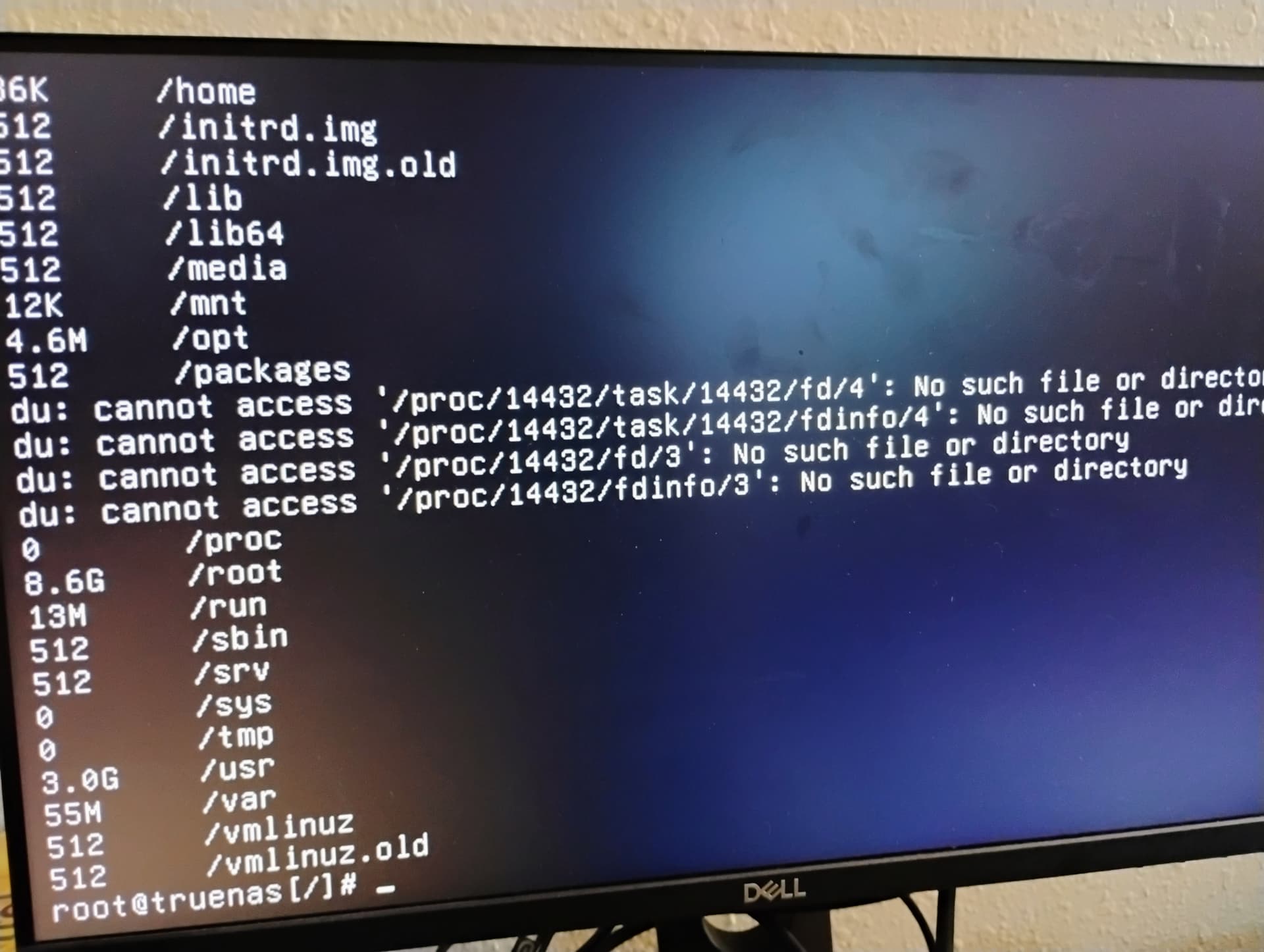
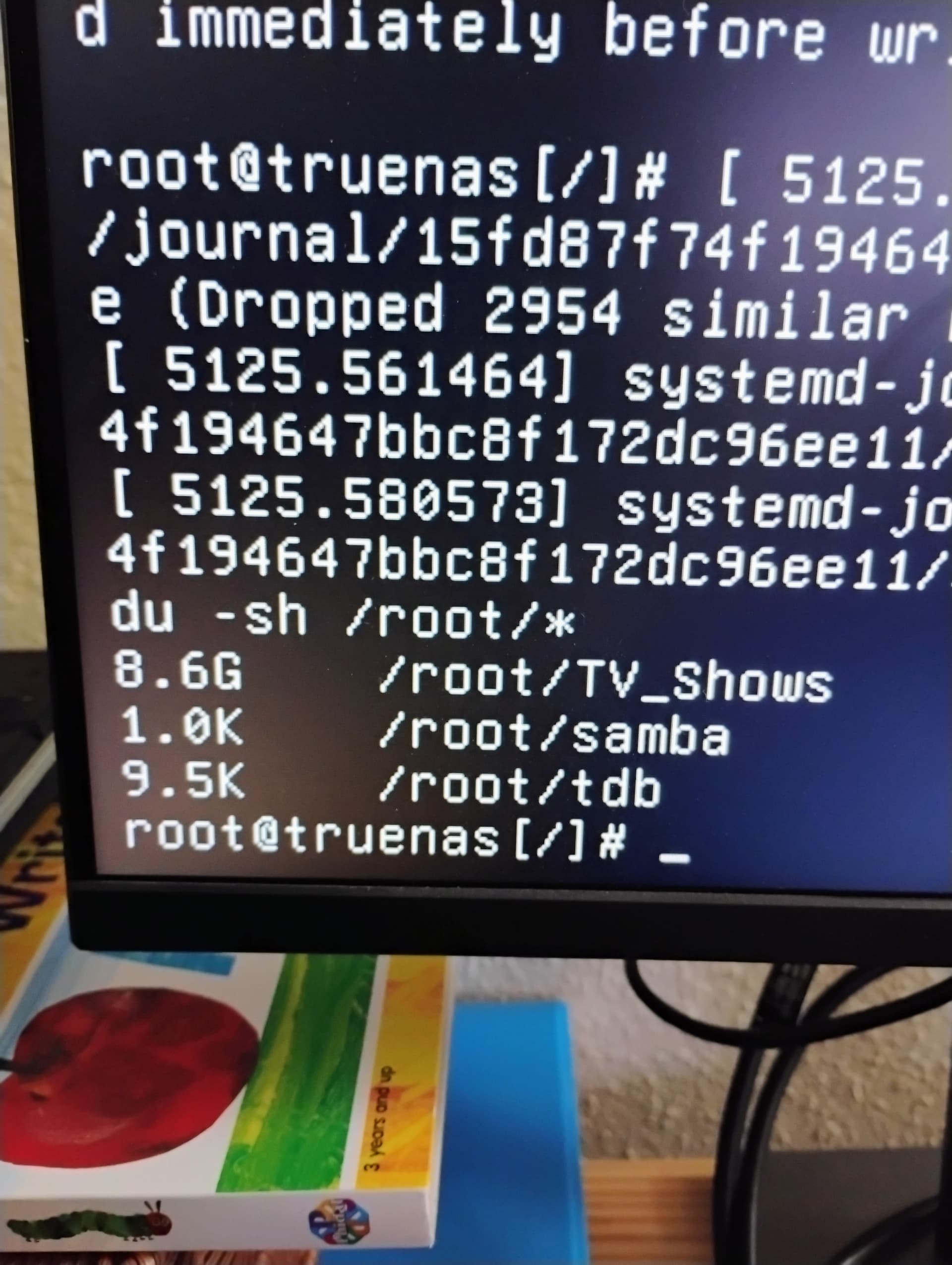
8.6G on /root is your problem. I don’t know why it’s there (the next step would be du -sh /root/*, but there’s no valid reason for /root to have so much in it.

1 Like

Oh no I think I figured out what happened. I was renaming a folder and I went to cancel it and I guess it tried to copy the folder to root directly. How do I delete the folder from the shell?

![1769906133848972829847393016216|376x500]
(upload://a514piXWgGyI77kZNNzQpO79GzK.jpeg)

the rm -r /root/TV_Shows/* This removes everything in the TV_Shows directory. Be very careful with the * wildcard and the directory you are in. I named the whole path in my example.

Use the command below by @dan

rm -rf /root/TV_Shows

1 Like

Never fear, Crisis has been averted. Everything is running smoothly; even jellyfin is working again. Thank you so much for your help, guys!

2 Likes