
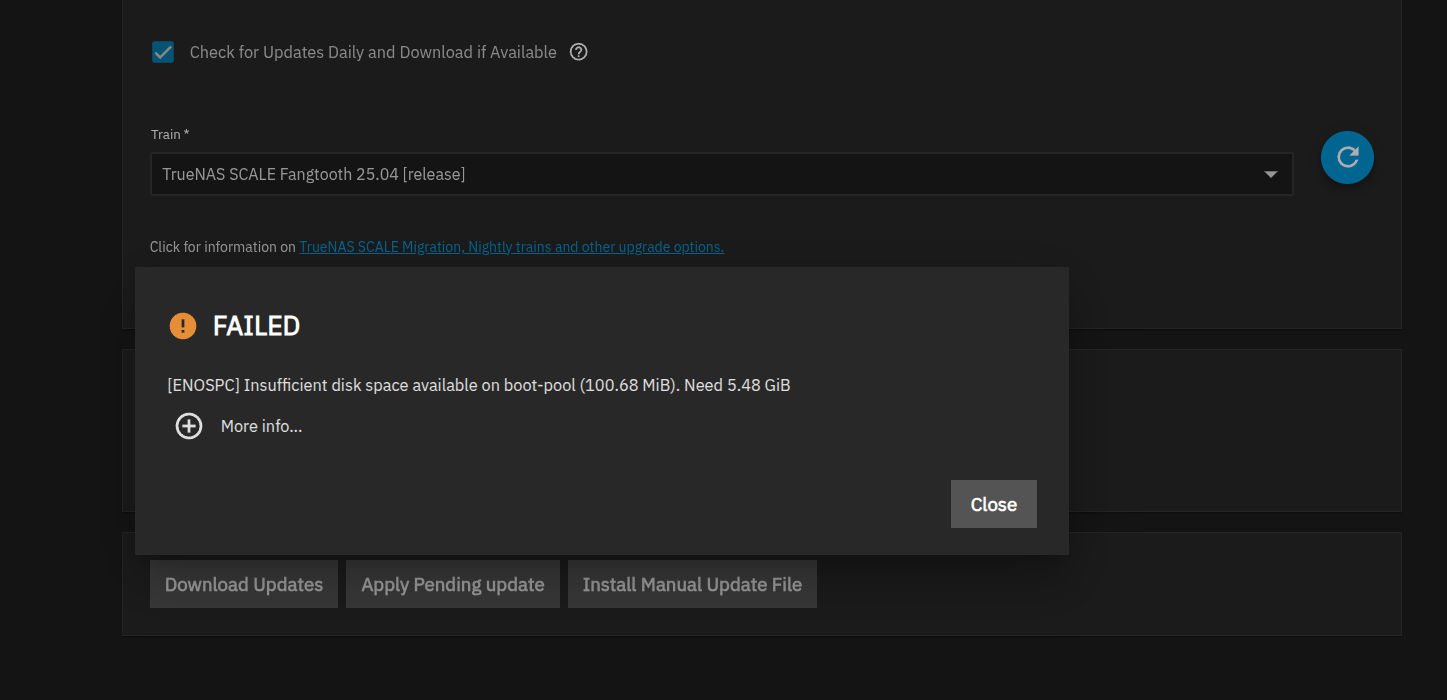
Upgrading 25.04.0 to 25.04.2.4 gave me an error that my boot pool had insufficient space (2 x 465G M.2 SSD’s mirrored) so I purchased a pair of 1TB SSD’s to “upgrade”. Based on what I have read I am expecting that the recommended process to “upgrade” to larger drives is to backup the config, replace the SSDs, install clean, then restore the config? As a *nix geek I’m willing to try things like swap out one SSD breaking the mirror, replacing with larger, then recovering the mirror and repeating, then expanding the pool (if it is quicker/sane) … Would that even work? Thanks for your time. GS
That’s not normal. My boot-pool is only consuming 5GB, and that’s with multiple saved boot environments.
Yes that would work fine & is arguably more fun if not quicker. Still a good idea to back up your config.
I have absolutely no clue how you’ve filled up your boot drive. Have you deleted previous boot versions? You don’t really need to keep them all if you’ve tested & happy with a particular version.
Honestly I’d investigate the space issue instead of upgrade unless the wear level on your boot drive is close to critical. 1tb is like 10 times more than what you’d reasonably need unless you’re worried about wear levels.
Maybe I am not completely understanding what is laid out in the boot pool display. Attached is the nastygram from the upgrade attempt and below is the output of sfdisk, df, zpool, and zfs commands. I am pretty sure I took all of the defaults during the build which may have been too small? As far as saving previous releases, this build (25.04.0) is the first build I put on this box and this upgrade is the first one I’ve launched. Let me know if this helps you understand why I’m out of space. Thanks! (apologies - working on the attachment)
root@truenas2[~]# sfdisk -l
Disk /dev/nvme1n1: 447.13 GiB, 480103981056 bytes, 937703088 sectors
Disk model: ADATA SX8200NP
Units: sectors of 1 * 512 = 512 bytes
Sector size (logical/physical): 512 bytes / 512 bytes
I/O size (minimum/optimal): 512 bytes / 512 bytes
Disklabel type: gpt
Disk identifier: 398000D5-5CA1-4D4F-8BF7-1E3DC3D044C1
Device Start End Sectors Size Type
/dev/nvme1n1p1 4096 6143 2048 1M BIOS boot
/dev/nvme1n1p2 6144 1054719 1048576 512M EFI System
/dev/nvme1n1p3 1054720 937703054 936648335 446.6G Solaris /usr & Apple ZFS
Disk /dev/nvme0n1: 465.76 GiB, 500107862016 bytes, 976773168 sectors
Disk model: Samsung SSD 970 EVO Plus 500GB
Units: sectors of 1 * 512 = 512 bytes
Sector size (logical/physical): 512 bytes / 512 bytes
I/O size (minimum/optimal): 512 bytes / 512 bytes
Disklabel type: gpt
Disk identifier: E0A293DF-A9C3-49E8-B13C-E88D2DAF95EB
Device Start End Sectors Size Type
/dev/nvme0n1p1 4096 6143 2048 1M BIOS boot
/dev/nvme0n1p2 6144 1054719 1048576 512M EFI System
/dev/nvme0n1p3 1054720 976773134 975718415 465.3G Solaris /usr & Apple ZFS
…
root@truenas2[~]# df -h|grep -v volume1
Filesystem Size Used Avail Use% Mounted on
udev 32G 0 32G 0% /dev
tmpfs 6.3G 6.9M 6.3G 1% /run
boot-pool/ROOT/25.04.0 275M 174M 101M 64% /
boot-pool/ROOT/25.04.0/audit 104M 2.9M 101M 3% /audit
boot-pool/ROOT/25.04.0/conf 108M 7.0M 101M 7% /conf
boot-pool/ROOT/25.04.0/data 101M 384K 101M 1% /data
boot-pool/ROOT/25.04.0/etc 107M 6.3M 101M 6% /etc
boot-pool/ROOT/25.04.0/home 101M 128K 101M 1% /home
boot-pool/ROOT/25.04.0/mnt 428G 428G 101M 100% /mnt
boot-pool/ROOT/25.04.0/opt 101M 128K 101M 1% /opt
boot-pool/ROOT/25.04.0/root 101M 256K 101M 1% /root
boot-pool/ROOT/25.04.0/usr 2.7G 2.6G 101M 97% /usr
boot-pool/ROOT/25.04.0/var 106M 5.3M 101M 5% /var
boot-pool/ROOT/25.04.0/var/ca-certificates 101M 128K 101M 1% /var/local/ca-certificates
boot-pool/ROOT/25.04.0/var/lib 133M 32M 101M 25% /var/lib
boot-pool/ROOT/25.04.0/var/lib/incus 101M 128K 101M 1% /var/lib/incus
boot-pool/ROOT/25.04.0/var/log 117M 16M 101M 14% /var/log
boot-pool/ROOT/25.04.0/var/log/journal 152M 51M 101M 34% /var/log/journal
tmpfs 32G 276K 32G 1% /dev/shm
tmpfs 100M 0 100M 0% /run/lock
efivarfs 256K 124K 128K 50% /sys/firmware/efi/efivars
tmpfs 32G 0 32G 0% /tmp
boot-pool/grub 110M 8.5M 101M 8% /boot/grub
tmpfs 6.3G 0 6.3G 0% /run/user/0
root@truenas2[~]# zpool list
NAME SIZE ALLOC FREE CKPOINT EXPANDSZ FRAG CAP DEDUP HEALTH ALTROOT
boot-pool 444G 430G 13.8G - - 10% 96% 1.00x ONLINE -
volume1 43.6T 21.5T 22.1T - - 15% 49% 1.00x ONLINE /mnt
root@truenas2[~]# zfs list
NAME USED AVAIL REFER MOUNTPOINT
boot-pool 430G 101M 96K none
boot-pool/ROOT 430G 101M 96K none
boot-pool/ROOT/25.04.0 430G 101M 174M legacy
boot-pool/ROOT/25.04.0/audit 2.86M 101M 2.86M /audit
boot-pool/ROOT/25.04.0/conf 6.97M 101M 6.97M /conf
boot-pool/ROOT/25.04.0/data 308K 101M 308K /data
boot-pool/ROOT/25.04.0/etc 7.22M 101M 6.19M /etc
boot-pool/ROOT/25.04.0/home 104K 101M 104K /home
boot-pool/ROOT/25.04.0/mnt 427G 101M 427G /mnt
boot-pool/ROOT/25.04.0/opt 96K 101M 96K /opt
boot-pool/ROOT/25.04.0/root 196K 101M 196K /root
boot-pool/ROOT/25.04.0/usr 2.51G 101M 2.51G /usr
boot-pool/ROOT/25.04.0/var 105M 101M 5.22M /var
boot-pool/ROOT/25.04.0/var/ca-certificates 96K 101M 96K /var/local/ca-certificates
boot-pool/ROOT/25.04.0/var/lib 32.3M 101M 31.8M /var/lib
boot-pool/ROOT/25.04.0/var/lib/incus 96K 101M 96K /var/lib/incus
boot-pool/ROOT/25.04.0/var/log 66.1M 101M 15.4M /var/log
boot-pool/ROOT/25.04.0/var/log/journal 50.7M 101M 50.7M /var/log/journal
boot-pool/grub 8.47M 101M 8.47M legacy
How many old boot environments are stored? You can free space by deleting old ones
Forgot this one
root@truenas2[~]# zpool list boot-pool -v
NAME SIZE ALLOC FREE CKPOINT EXPANDSZ FRAG CAP DEDUP HEALTH ALTROOT
boot-pool 444G 430G 13.8G - - 10% 96% 1.00x ONLINE -
mirror-0 444G 430G 13.8G - - 10% 96.9% - ONLINE
nvme0n1p3 465G - - - - - - - ONLINE
nvme1n1p3 447G - - - - - - - ONLINE
root@truenas2[~]#
None that I am aware of.
There’s your problem.
Somehow you likely saved files directly under /mnt, but not within a subdirectory of /mnt that should have been a path for a storage pool’s path.
Verify with:
ls -lh /mnt
You should see only the names of folders that match the names of your storage pools. Nothing else.
Even if the output looks correct, it’s also possible that you’ve written data to the “supposed” mountpath of a storage pool, but for some reason the folder remained, even though the storage pool’s datasets were not currently mounted at the time.
I have seen this situation on other unix servers. As you described files were written before the mount happened. Is there a way to nicely unmount volume1 without ticking off the system, then cleaning house in /mnt?
All fixed. I found a .~tmp~ file with 400g of files in it. Whacked them and /mnt is now 1%. Tried the upgrade and it failed complaining about a /tmp/tmp/… filesystem being read-only so I rebooted, reran the upgrade, and everything worked as expected. Based on what y’all have said about actual filesystem requirements for the OS I think I can send these M.2’s back to Amazon. Thanks again!
You should make sure that this doesn’t happen again.
Let the UI/middleware mount as it does without using any special scripts or configurations.
As for the ~400GB of files within a hidden ~.tmp~ folder, I wonder if TrueNAS did that itself? What types of files were within?
They were from Blueiris, a Winders Camera DVR software app that I have used for years. BI only runs on Winders so I had to build a VM on Proxmox and while testing moving the BI VM between proxmox nodes (2) and Truenas systems (2) for testing and playing, then converting them from “local” disks to SMB, I probably got ahead of myself. Plus I was doing a sync from one TN box to the other so there is a lot of room in there for me to have screwed something up. Pretty sure this was an ID10T error. Thanks very much for the reminder of mount points on directories that have files in them! 