I want to setup my TrueNAS CE to serve as a repo for borgbackup. I set up a user “borg” for that. It uses /var/empty as home and /usr/sbin/nologin as shell for security. However, things like setting command="borg serve --append-only --restrict-to-path <more no-whatever-options>, <public key> to the autorized_keys do not work because TrueNAS wipes all edits in /etc/ssh
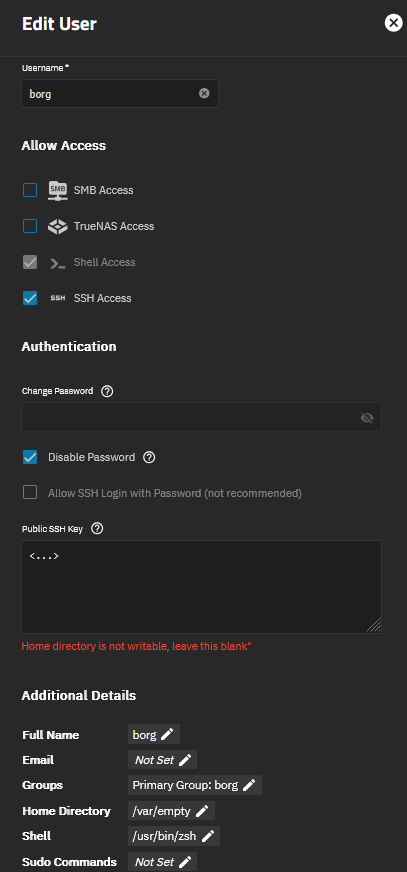
In the GUI, I cannot select to allow ssh access without shell. I also cannot add the key - it always tells me Home directory is not writable, leave this blank" (with the “ at the end - seems to be a minor bug). I do not want a writable home directory; that user should only do borg serve or docker exec -i borg-serve borg serve.
Why is this not possible to set up in the GUI?
What is the “correct” way to have a mostly secure borg repo with the user and ssh access locked down?
Thanks for the suggestion. Unfortunately, that is where the Home directory is not writable, leave this blank" error message comes from (red text below that input text field; no matter if I enter “command .. key” or just the key).
“An error occurred: Sorry, you can’t embed media items in a post.” - How to change that, so that I can send the screenshot?
This is a limitation by TrueNAS; the key could be stored somewhere else (and TrueNas even gives the option to place the line that then gets written into .ssh/configwhen I understand the advanced options correctly.
Which option would be better? A container with “my own” openssh-server or a not-so-locked-down ssh user with command=docker exec?