Cannot pass NVME through to a VM

Hello,

I am trying to pass an NVME through to a windows 11 VM running on TrueNAS 26

I can see it in the TN interface as a spare disk and it gives me the option to add to a pool which in this case I do not want to do. Do i need to blacklist this device from TN before adding it to the VM?

More details are below. Thanks in advance for an assistance.
Cannot start domain ‘Windows11Pro’:
device.pci_0000_03_00_0: Device pci_0000_03_00_0 is not available

Error Name: EINVAL
Error Code: 22
Reason: Cannot start domain ‘Windows11Pro’:
device.pci_0000_03_00_0: Device pci_0000_03_00_0 is not available
Error Class: Error
Trace: Traceback (most recent call last):
File “/usr/lib/python3/dist-packages/middlewared/api/base/server/ws_handler/rpc.py”, line 387, in process_method_call
result = await method.call(app, id_, params)
^^^^^^^^^^^^^^^^^^^^^^^^^^^^^^^^^^^
File “/usr/lib/python3/dist-packages/middlewared/api/base/server/method.py”, line 57, in call
result = await self.middleware.call_with_audit(self.name, self.serviceobj, methodobj, params, app,
^^^^^^^^^^^^^^^^^^^^^^^^^^^^^^^^^^^^^^^^^^^^^^^^^^^^^^^^^^^^^^^^^^^^^^^^^^^^^^^^^^^^^^^^^
message_id=id_)
^^^^^^^^^^^^^^^
File “/usr/lib/python3/dist-packages/middlewared/main.py”, line 1118, in call_with_audit
result = await self._call(method, serviceobj, methodobj, params, app=app,
^^^^^^^^^^^^^^^^^^^^^^^^^^^^^^^^^^^^^^^^^^^^^^^^^^^^^^^^^^^^^^^^
audit_callback=audit_callback_messages.append, **kwargs)
^^^^^^^^^^^^^^^^^^^^^^^^^^^^^^^^^^^^^^^^^^^^^^^^^^^^^^^^
File “/usr/lib/python3/dist-packages/middlewared/main.py”, line 945, in _call
return await self.run_in_executor(
^^^^^^^^^^^^^^^^^^^^^^^^^^^
…<4 lines>…
)
^
File “/usr/lib/python3/dist-packages/middlewared/main.py”, line 798, in run_in_executor
return await loop.run_in_executor(pool, functools.partial(method, *args, **kwargs))
^^^^^^^^^^^^^^^^^^^^^^^^^^^^^^^^^^^^^^^^^^^^^^^^^^^^^^^^^^^^^^^^^^^^^^^^^^^^
File “/usr/lib/python3.13/concurrent/futures/thread.py”, line 59, in run
result = self.fn(*self.args, **self.kwargs)
File “/usr/lib/python3/dist-packages/middlewared/api/base/decorator.py”, line 217, in wrapped
result = func(*args)
File “/usr/lib/python3/dist-packages/middlewared/plugins/vm/vm_lifecycle.py”, line 55, in start
self.middleware.libvirt_domains_manager.vms.start(self.pylibvirt_vm(vm, options))
~~~~~~~~~~~~~~~~~~~~~~~~~~~~~~~~~~~~~~~~~~~~~~~~~^^^^^^^^^^^^^^^^^^^^^^^^^^^^^^^^
File “/usr/lib/python3/dist-packages/truenas_pylibvirt/domain/manager.py”, line 66, in start
raise Error(f"Cannot start domain {domain.configuration.name!r}:\n{error_msg}")
truenas_pylibvirt.error.Error: Cannot start domain ‘Windows11Pro’:
device.pci_0000_03_00_0: Device pci_0000_03_00_0 is not available

Is the NVMe drive in its own IOMMU group ?
If not, it doesnt work.

You can check with the following script

#!/bin/bash
for d in /sys/kernel/iommu_groups/*/devices/*; do
  n=${d#*/iommu_groups/*}; n=${n%%/*}
  printf 'IOMMU Group %s ' "$n"
  lspci -nns "${d##*/}"
done

Also your version of Truenas is a BETA version, and might still have bugs.

What is your hardware ? Is it still that N100 board ?

Hi Farout!

Its on its own group - please see below

its a 14500 system on an MSI z790 Tomahawk mobo. You can see all the other bits an bobs I have in the system from the grouping info below.

IOMMU Group 00:00.0 Host bridge [0600]: Intel Corporation Device [8086:4640] (rev 02)
00:01.0 PCI bridge [0604]: Intel Corporation 12th Gen Core Processor PCI Express x16 Controller #1 [8086:460d] (rev 02)
00:02.0 VGA compatible controller [0300]: Intel Corporation AlderLake-S GT1 [8086:4680] (rev 0c)
00:06.0 PCI bridge [0604]: Intel Corporation 12th Gen Core Processor PCI Express x4 Controller #0 [8086:464d] (rev 02)
00:08.0 System peripheral [0880]: Intel Corporation 12th Gen Core Processor Gaussian & Neural Accelerator [8086:464f] (rev 02)
00:0a.0 Signal processing controller [1180]: Intel Corporation Platform Monitoring Technology [8086:467d] (rev 01)
00:14.0 USB controller [0c03]: Intel Corporation Raptor Lake USB 3.2 Gen 2x2 (20 Gb/s) XHCI Host Controller [8086:7a60] (rev 11)
00:14.2 RAM memory [0500]: Intel Corporation Raptor Lake-S PCH Shared SRAM [8086:7a27] (rev 11)
00:14.3 Network controller [0280]: Intel Corporation Raptor Lake-S PCH CNVi WiFi [8086:7a70] (rev 11)
00:16.0 Communication controller [0780]: Intel Corporation Raptor Lake CSME HECI #1 [8086:7a68] (rev 11)
00:17.0 SATA controller [0106]: Intel Corporation Raptor Lake SATA AHCI Controller [8086:7a62] (rev 11)
00:1a.0 PCI bridge [0604]: Intel Corporation Raptor Lake PCI Express Root Port #25 [8086:7a48] (rev 11)
00:1b.0 PCI bridge [0604]: Intel Corporation Raptor Lake PCI Express Root Port #17 [8086:7a40] (rev 11)
00:1b.4 PCI bridge [0604]: Intel Corporation Raptor Lake PCI Express Root Port #21 [8086:7a44] (rev 11)
00:1c.0 PCI bridge [0604]: Intel Corporation Raptor Lake PCI Express Root Port #1 [8086:7a38] (rev 11)
00:1c.1 PCI bridge [0604]: Intel Corporation Device [8086:7a39] (rev 11)
00:1c.3 PCI bridge [0604]: Intel Corporation Raptor Lake PCI Express Root Port #4 [8086:7a3b] (rev 11)
00:1d.0 PCI bridge [0604]: Intel Corporation Raptor Lake PCI Express Root Port #9 [8086:7a30] (rev 11)
00:1f.0 ISA bridge [0601]: Intel Corporation Raptor Lake LPC/eSPI Controller [8086:7a04] (rev 11)
00:1f.3 Audio device [0403]: Intel Corporation Raptor Lake High Definition Audio Controller [8086:7a50] (rev 11)
00:1f.4 SMBus [0c05]: Intel Corporation Raptor Lake-S PCH SMBus Controller [8086:7a23] (rev 11)
00:1f.5 Serial bus controller [0c80]: Intel Corporation Raptor Lake SPI (flash) Controller [8086:7a24] (rev 11)
01:00.0 Serial Attached SCSI controller [0107]: Broadcom / LSI SAS3416 Fusion-MPT Tri-Mode I/O Controller Chip (IOC) [1000:00ac] (rev 01)
02:00.0 Non-Volatile memory controller [0108]: Samsung Electronics Co Ltd NVMe SSD Controller PM9A1/PM9A3/980PRO [144d:a80a]
03:00.0 Non-Volatile memory controller [0108]: Sandisk Corp SanDisk Extreme Pro / WD Black 2018/SN750/PC SN720 NVMe SSD [15b7:5002]
05:00.0 Non-Volatile memory controller [0108]: SK hynix Gold P31/BC711/PC711 NVMe Solid State Drive [1c5c:174a]
06:00.0 Ethernet controller [0200]: Intel Corporation Ethernet Controller I226-V [8086:125c] (rev 04)
07:00.0 SATA controller [0106]: ASMedia Technology Inc. ASM1064 Serial ATA Controller [1b21:1064] (rev 02)
08:00.0 SATA controller [0106]: ASMedia Technology Inc. ASM1061/ASM1062 Serial ATA Controller [1b21:0612] (rev 02)
09:00.0 Ethernet controller [0200]: Realtek Semiconductor Co., Ltd. Device [10ec:8127] (rev 07)

Did you try a stable release of Truenas ?
You cannot blacklist devices as in Proxmox.
I guess the isolating GPU option does that, but only for GPUs.

I have not tried a stable version as my 10GBE card is only supported in TN26.

Happy to wait until this is a stable release but not sure if thats the actual issue here.

Try this:

Select the PCI device in the GUI as you did before.
Do not start the VM

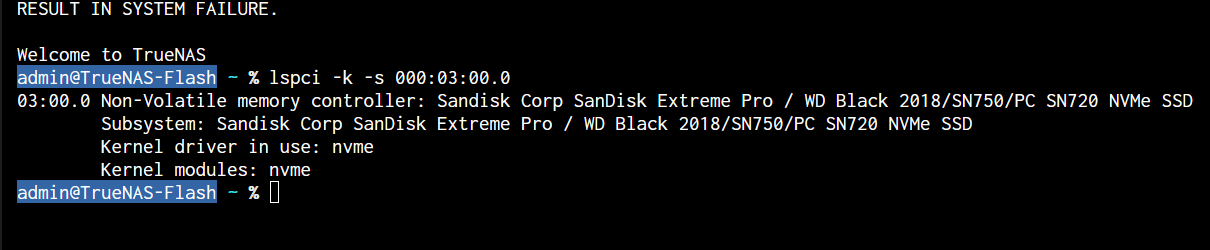
Check with:

lspci -k -s PCI_adress_of_device

The device should be bound to vfio-pci not “nvme”.

If its bound to nvme, even tho selected in the VM GUI you can try to bind it manually, at each startup, to vfio-pci using a script. I think there was recently a post on this forum about how to do that, but i cant find it right now.

1 Like

The nvme driver has it, that’s why. I solved it here: Cannot pass NVMe to VM in TrueNAS 26: User error or bug? - #4 by yorick

3 Likes

I tihnk you are onto the right track.

@yorick going to try your fix

Thanks all for your assistance with this :slight_smile:

1 Like

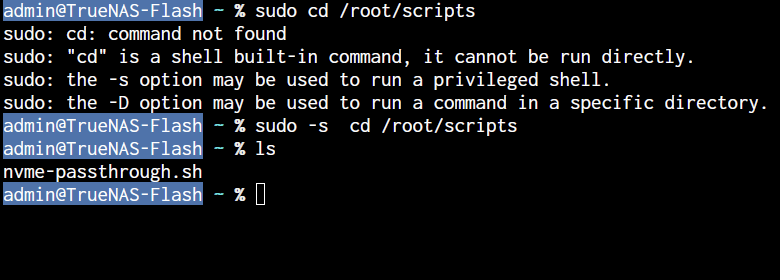
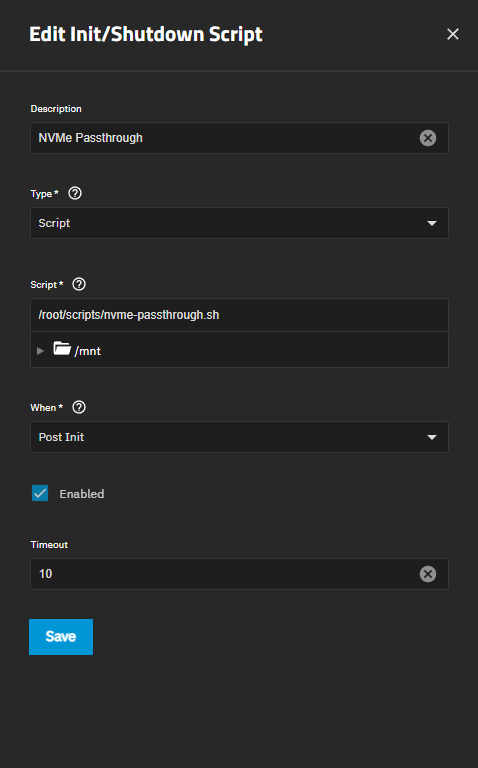
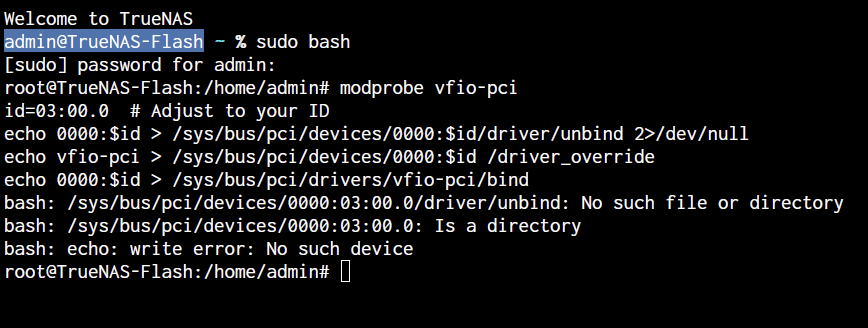
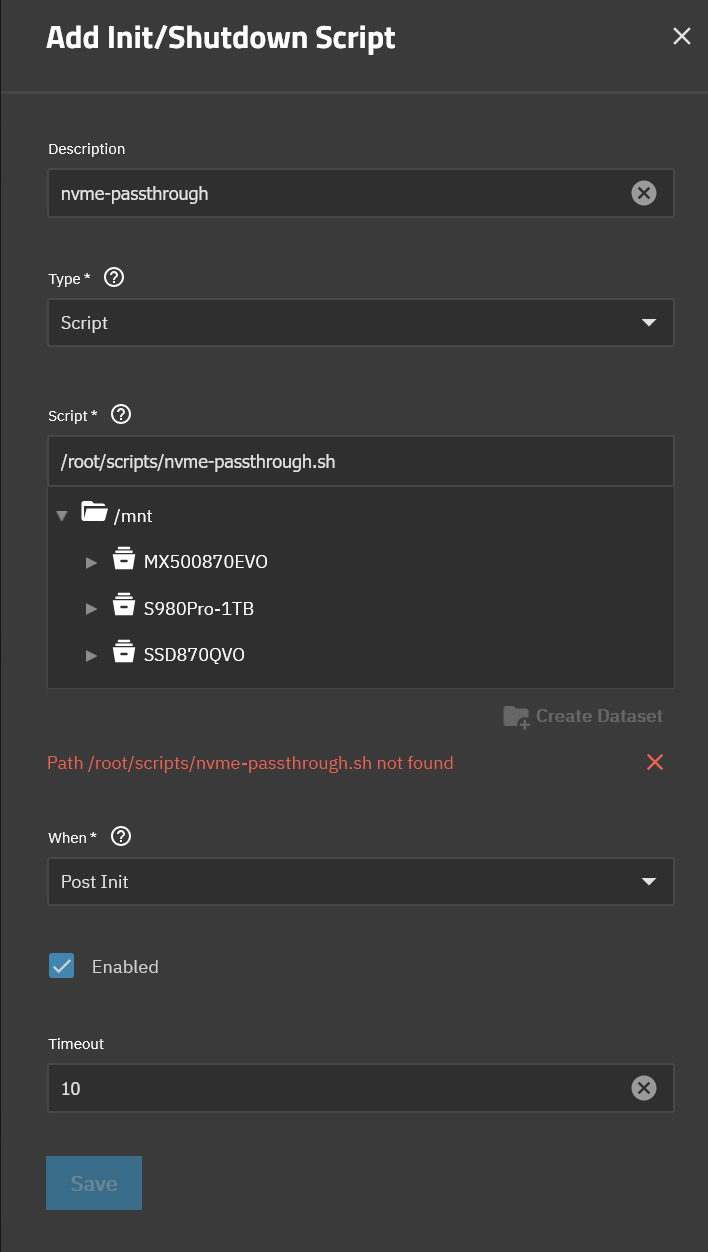
I have been following your guide, but when I get to add the script to the UI it does not come up with the option to select /root/scripts/nvme-passthrough.sh as a location.

any ideas? Thanks again.

It’s just a location you type in. Place it somewhere else if you like. Also, just to be sure, you made this executable with chmod +x on the file, or something along those lines, right?

Hi yorick,

I am not sure what I am doing wrong.

I moved the script to a folder I could access via the UI and that part is is now working. However the pass through is not.

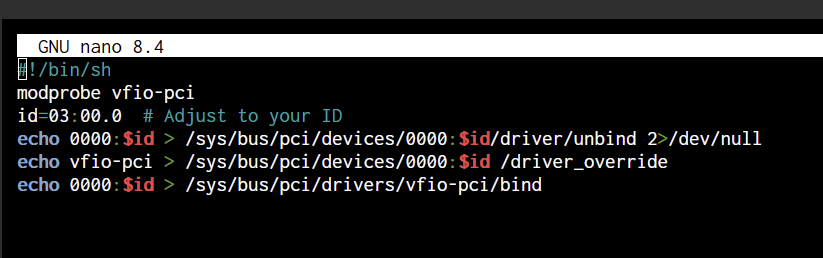
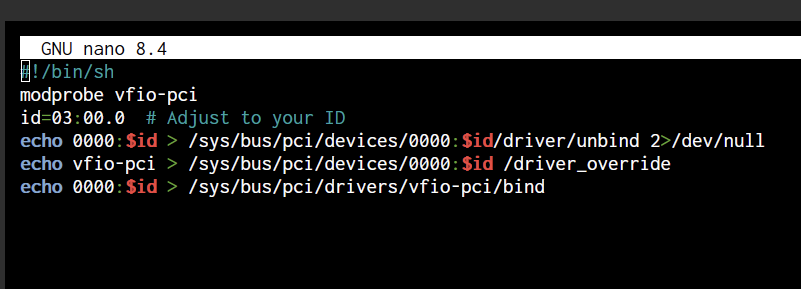
I noticed that your system and script had an extra 0 on the drive id in lspci so I have tried modifying the script without the extra 0.

Still no luck though :weary_face:

Do you seen anything I am doing wrong here? Many thanks!

You have the id wrong. Your id is 03:00.0. And yes it’s 4 leading zeros with a colon when you send it to the control files.

So 0000:$id in the script

Try a few things. Do a sudo bash so you’re root, then run the script, check with lspci -k -s 03:00.0

If that didn’t work, run each line in the script .. first the unbind, check it’s unbound, &c &c

1 Like

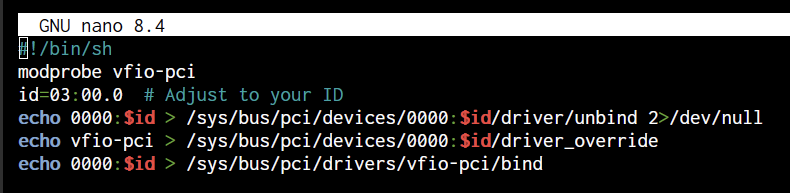
I thought you might have nailed it with that extra 0 I had in there.

Adjusted it:

Seems like their could be an issue with the unbind command.

We have some progress!

I triple checked everything and I could not find anything wrong.

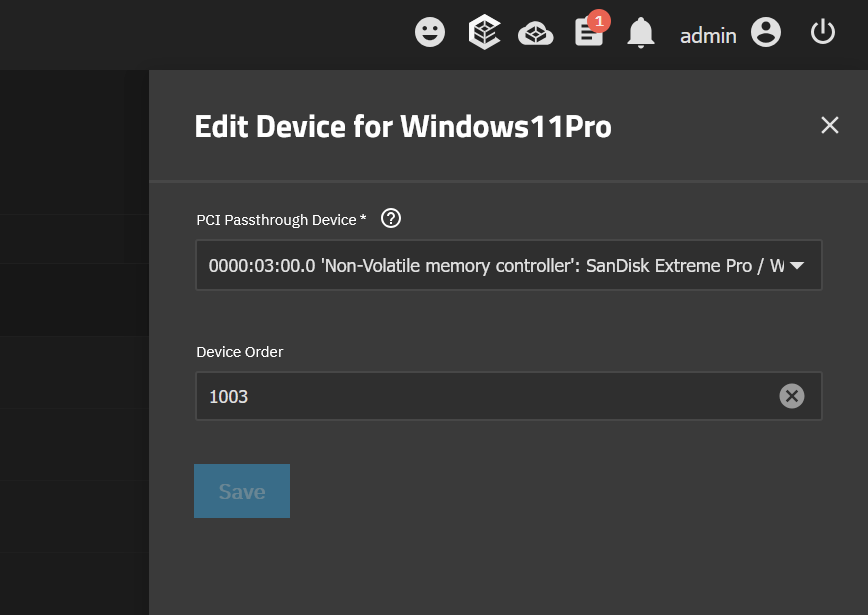
So I decided just to try the passthough again on the VM and it worked now with no error.

Passthrough to the VM

I think it was working after that that sneaky extra 0 was removed and I just did not try to boot the VM.

Many thanks for your help @yorick and @Farout :slight_smile:

1 Like

Nice! tbh I don’t know what those 0s at the start are. You have three, I have four … eventually I may understand why that is. But who cares, you have vfio_pci and passthrough! Have fun!

1 Like

There’s an extra space between id and the override , that can’t work.

Happy to make some changes if you want to test something.

This is what worked, which is basically what you posted originally

I see the extra space. going to remove it and reboot.

2 min

Still works :sweat_smile:

Something I did notice was when passing through the drive to the VM it now shows the details of the SSD.

Before it was showing unknown.

This is it now

1 Like