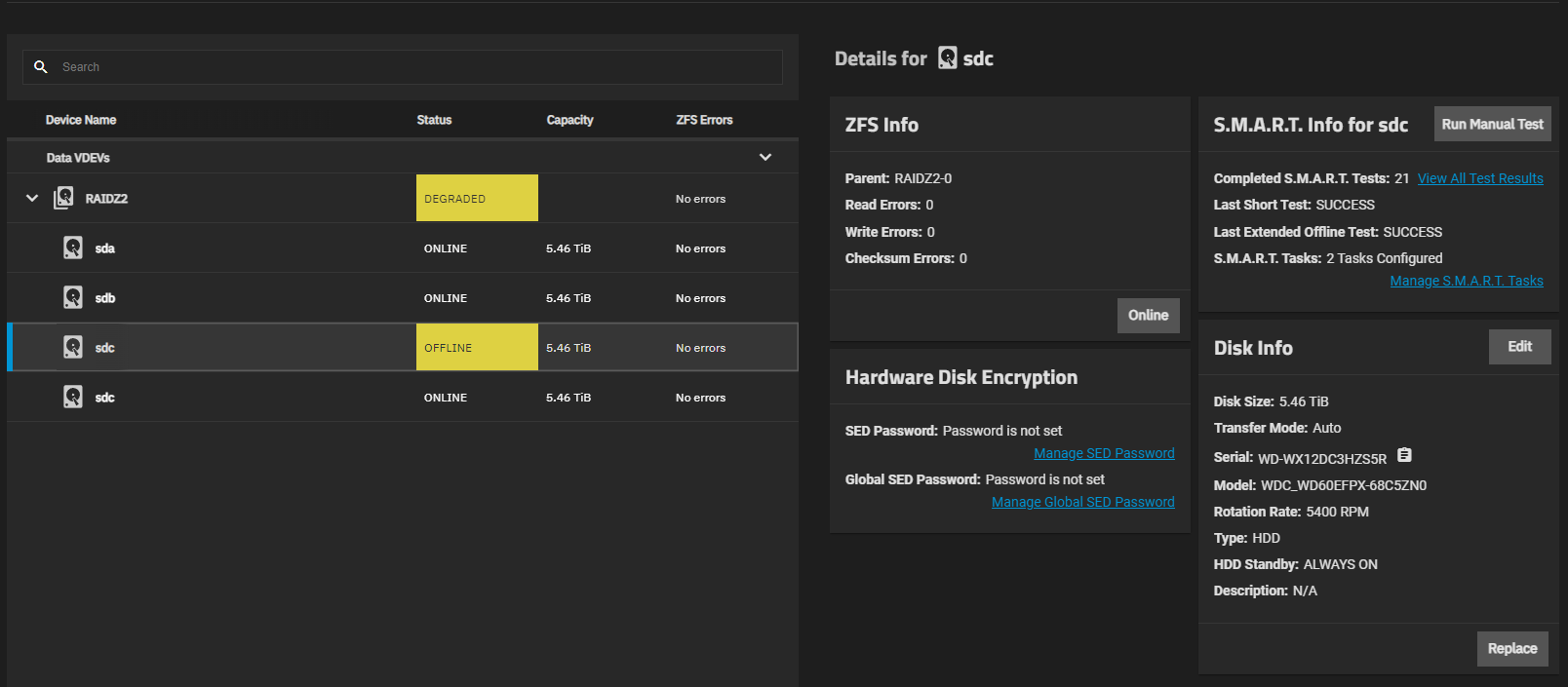
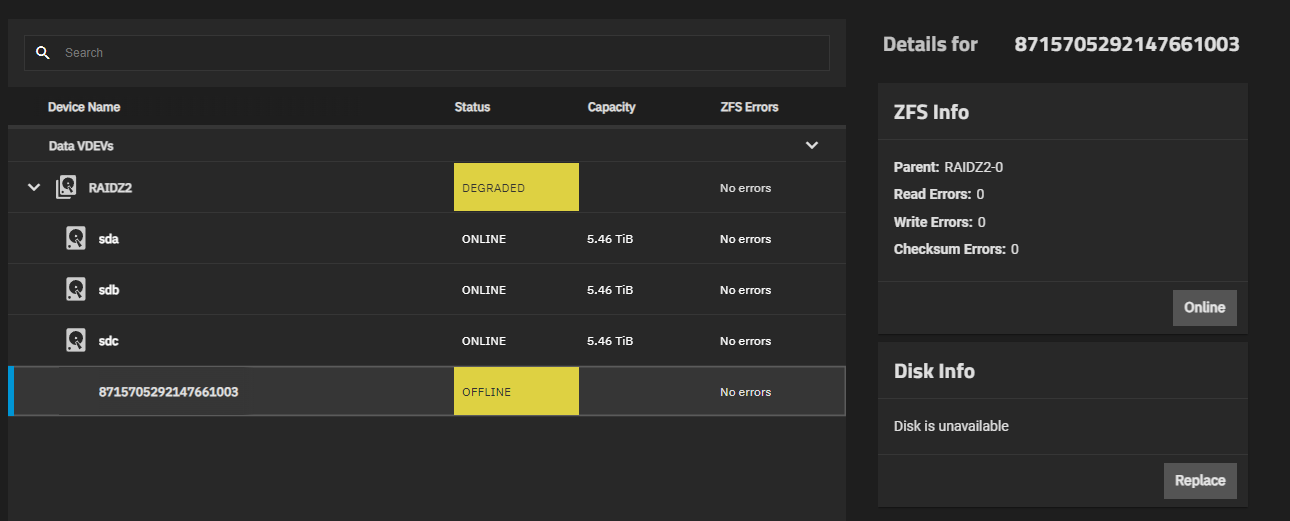
Hi, I’m trying to replace a disk in a RAIDZ2 vdev, but when I offline the disk and physically replace it, I found that the new disk just takes up the old disk’s name, and online-ing the new disk causes it to immediately fault.
Even completely disconnecting the disk still doesn’t make TrueNAS recognize that it’s UNAVAIL. At least putting the old disk back in and online-ing it still brought the vdev back to normal.
I checked in the command line and it seems like the disks are really being referred to by sd# names?
  pool: rustspin
 state: ONLINE
status: Some supported and requested features are not enabled on the pool.
        The pool can still be used, but some features are unavailable.
action: Enable all features using 'zpool upgrade'. Once this is done,
        the pool may no longer be accessible by software that does not support
        the features. See zpool-features(7) for details.
  scan: resilvered 3.40M in 00:00:02 with 0 errors on Tue Sep 23 11:59:49 2025
config:

        NAME        STATE     READ WRITE CKSUM
        rustspin    ONLINE       0     0     0
          raidz2-0  ONLINE       0     0     0
            sda2    ONLINE       0     0     0
            sdb2    ONLINE       0     0     0
            sdc2    ONLINE       0     0     0
            sdd2    ONLINE       0     0     0

errors: No known data errors
Would that mean even if I connect both the old disk and new disk simultaneously, do a replace, then disconnect the old disk, it could reorganize the disk names, potentially causing problems? If so, is there a way to change the pool to use some kind of id instead?
note that I can’t hotplug drives, so every time I have to (dis)connect disks I have to shut the system down.
also this used to run TrueNAS Core, then migrated to Scale and now currently running Scale 24.10.2.1
This should work by exporting the pool from the UI, then importing it on CLI via zpool import -d /dev/disk/by-id -aN, exporting it again via CLI and importing it in the GUI. I haven’t done this myself before so take that with a grain of salt.
Interestingly one of my pools uses partuuids, the other uses a mix of disk ids and one partuuid. I haven’t done anything on CLI here - all through the GUI and the pools were created in TN Scale 22.12 I think.
Question: What’s the storage controller in use? This kind of behavior on drive removal is what I’d expect to see when there’s a RAID controller presenting virtual disks, and it’s trying to just transparently reattach the physical disk underneath.
I directly attach them to my motherboard via SATA cables.
Do I need to online it to make TrueNAS recognize that it’s UNAVAIL? I’m not sure if I did try to online it while disconnected but I assumed it should’ve changed to UNAVAIL instead of staying OFFLINE when a disk is removed
The problem is that the new disk just takes up the old disk’s name (sdc), and so I can’t actually do the replacement process. I thought ONLINEing it would let ZFS recognize that it’s a different disk and start re-silvering or something, but that doesn’t seem to be the case.
What make/model is the motherboard, and is the onboard SATA controller set up in “AHCI” mode, as opposed to any kind of “fake RAID” that it might accidentally be doing?
Are you actually just clicking “ONLINE” when the new disk is inserted, or are you using the “REPLACE” option to let ZFS know that you’ve inserted a new disk rather than reconnected the old one?
GA-B360M-DS3H Gigabyte motherboard (yeah it’s a DIY home NAS setup)
I don’t think it has any onboard RAID controllers
The thing is, I can’t use the REPLACE option because it thinks the new drive is sdc. It doesn’t recognize that the old disk was removed and replaced with a different disk.
At the next boot, make a trip into BIOS and check whether the SATA controller is set to “AHCI mode” or to something else. The board may not have a genuine RAID controller but sill offer some poor man’s RAID functions—and ZFS does not want these in the way.
Ok so I’ve checked the BIOS and the onboard storage controller is configured for AHCI.
I also have another idea for why it’s not recognizing that “sdc” is disconnected… Linux reorders the disk names around, so when I remove sdc, sdd becomes sdc. Somehow, ZFS is still able to import the pool despite “sdd” no longer existing, but “disk recognition” is still based on sd# names?
This is what I saw in the shell, after offlining and unplugging sdc.
I’m not putting the new disk in again until I resolve this, so imagine the new disk taking the sdc name instead of recognizing that old sdc became UNAVAIL and that there’s a new disk. I click on sdc, it shows another disk’s serial number. I open the Replace menu and there isn’t any disk I can choose. I try online-ing it and it immediately faults.
Actually, I’m not even sure if the new disk took sdc or some other name, as I don’t remember which serial number appeared
so, zpool import -d /dev/disk/by-partuuid -aN?
also can I trust -a to correctly search for pools or should I directly specify partuuids myself? or can I use zpool import -D -d /dev/disk/by-partuuid to check first?
I’ve just went ahead and did it. (I really should’ve waited for more advice first tbh)
The first export step errored with something along the lines of “homes dataset busy” because I had a SSH session connected with the admin account. I already have root ssh login setup so I used that instead, and exporting again went fine.
zpool import -D -d /dev/disk/by-partuuid wasn’t helpful (it just says no pools available to import), but zpool import -a -N -d /dev/disk/by-partuuid works, and zpool status shows this now
  pool: rustspin
 state: ONLINE
status: Some supported and requested features are not enabled on the pool.
        The pool can still be used, but some features are unavailable.
action: Enable all features using 'zpool upgrade'. Once this is done,
        the pool may no longer be accessible by software that does not support
        the features. See zpool-features(7) for details.
  scan: resilvered 4.08M in 00:00:02 with 0 errors on Wed Sep 24 08:58:43 2025
config:

        NAME                                      STATE     READ WRITE CKSUM
        rustspin                                  ONLINE       0     0     0
          raidz2-0                                ONLINE       0     0     0
            88062f34-10f6-11ef-86e8-e0d55e8e575d  ONLINE       0     0     0
            882ee741-10f6-11ef-86e8-e0d55e8e575d  ONLINE       0     0     0
            88121d5e-10f6-11ef-86e8-e0d55e8e575d  ONLINE       0     0     0
            881c043c-10f6-11ef-86e8-e0d55e8e575d  ONLINE       0     0     0

errors: No known data errors
then I zpool export rustspin and import it from the web UI. another zpool status shows the same as above.
I made sure to not check the “Delete saved configurations from TrueNAS” on first export, and all my replication tasks, snapshotting configs, and shares are still there.
All disks were attached in that zpool status report.
Now I removed the disk, and this time the “sdc” disk (s/n WX2…C2A) is being correctly recognized as UNAVAIL, and “sdd” (s/n WX1…S5R) changing names to become sdc in the UI
  pool: rustspin
 state: DEGRADED
status: One or more devices has been taken offline by the administrator.
        Sufficient replicas exist for the pool to continue functioning in a
        degraded state.
action: Online the device using 'zpool online' or replace the device with
        'zpool replace'.
  scan: resilvered 4.08M in 00:00:02 with 0 errors on Wed Sep 24 08:58:43 2025
config:

        NAME                                      STATE     READ WRITE CKSUM
        rustspin                                  DEGRADED     0     0     0
          raidz2-0                                DEGRADED     0     0     0
            88062f34-10f6-11ef-86e8-e0d55e8e575d  ONLINE       0     0     0
            882ee741-10f6-11ef-86e8-e0d55e8e575d  ONLINE       0     0     0
            88121d5e-10f6-11ef-86e8-e0d55e8e575d  OFFLINE      0     0     0
            881c043c-10f6-11ef-86e8-e0d55e8e575d  ONLINE       0     0     0

errors: No known data errors
and now with new disk connected. old “sdc” still UNAVAIL, new disk appears in Replace menu