Unable to Replace Disk - Pool Using "sd*" Names

My system was originally TrueNAS Core 13 which I then updated to Scale I think 22 and then upgraded from 22 to 24.10. Due to a bug on my boot pool where it thought it had an exported pool on it, upgrading to 25.04 failed, and the JIRA ticket on the issue said the best thing to do was back up my config, fresh install 25.04.2.4 and restore my config, which worked.

However today I came to replace a failed drive and I had trouble as the replacment drive appeared in the list but when I went to do the replace, it said it was already in use in the “data” pool.

I powered down the NAS and started up without the new drive, checked the drive to ensure it was clean in my desktop PC, then powered down the NAS again and plugged in the new drive. This time I was able to do the replace and it is resilvering.

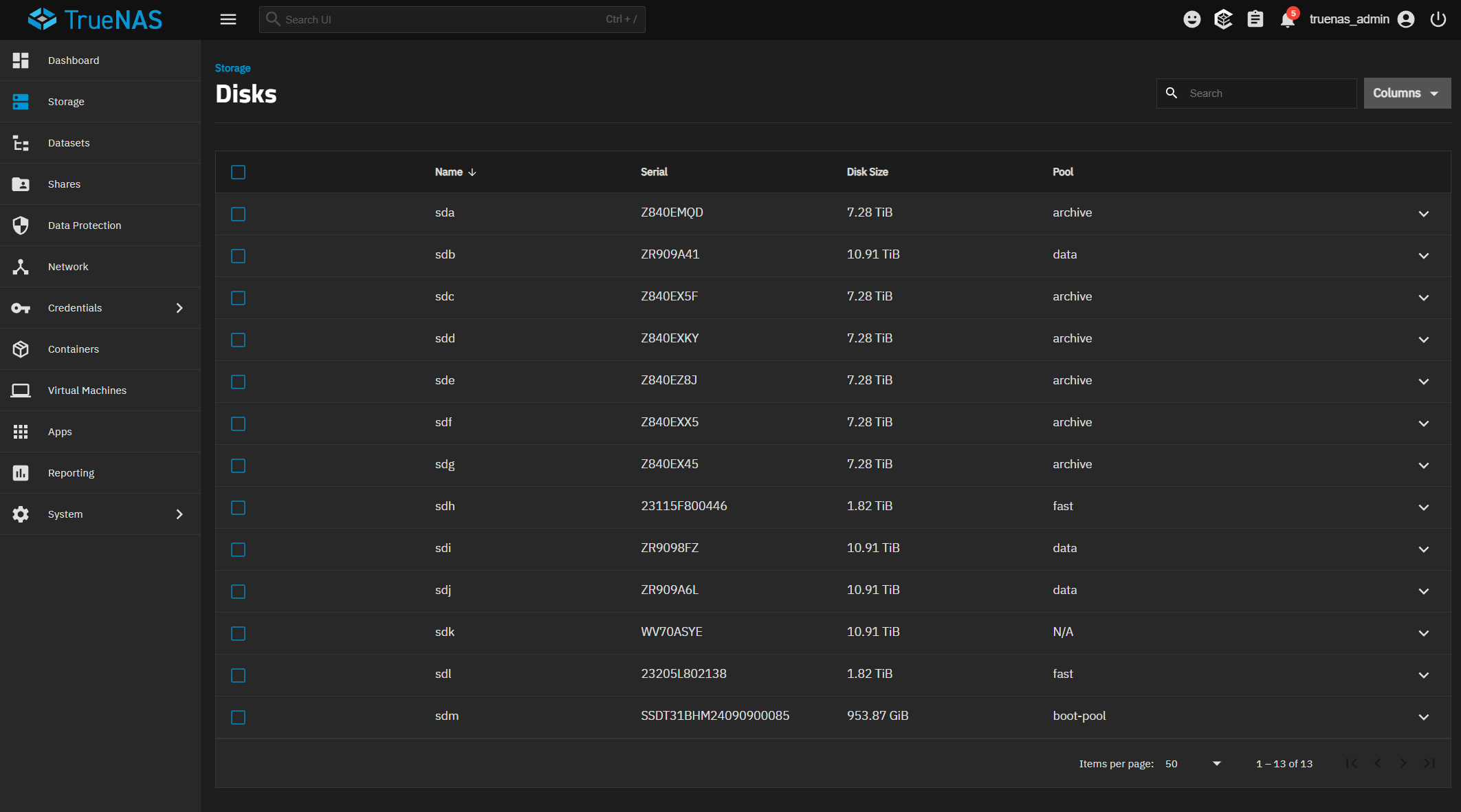
However now I notice that TrueNAS thinks one drive from my “Archive” pool is in my “Data” pool. The common thing I notice here is TrueNAS scale seems to address my drives as sda through sdm instead of a GUID like TrueNAS core did.

Originally I had 4x WD Red Plus/Pro 8TB drives in a RAIDZ1 as “Data” pool, and 6x Seagate Archive 8TB drives (I know SMR Bad, but I got them before the issues were widely know and never had to resilver) in a RAIDZ2 as “Archive” pool.

I also have two WD Red 2TB SATA SSDs (one M.2 SATA and one 2.5" SATA) as a MIRROR as “Fast” pool which I use for Apps, VMs, and System DataSet.

The “Boot-Pool” is a SK Hynix SSD connected via USB. It is not a normal flash drive.

HBA is a genuine LSA 9207-8i and since I have more than 8 disks, some are on the Intel Xeon D 1541’s SATA controller which is in AHCI mode.

I’ve had two failures of the WD Red 8TB drives in the “Data” pool and I’ve replaced one successfully with a Seagate IronWolf 12TB drive (ZR909A6L), and now this issue has occurred after the second failure with another Seagate IronWolf 12TB drive (R909A41).
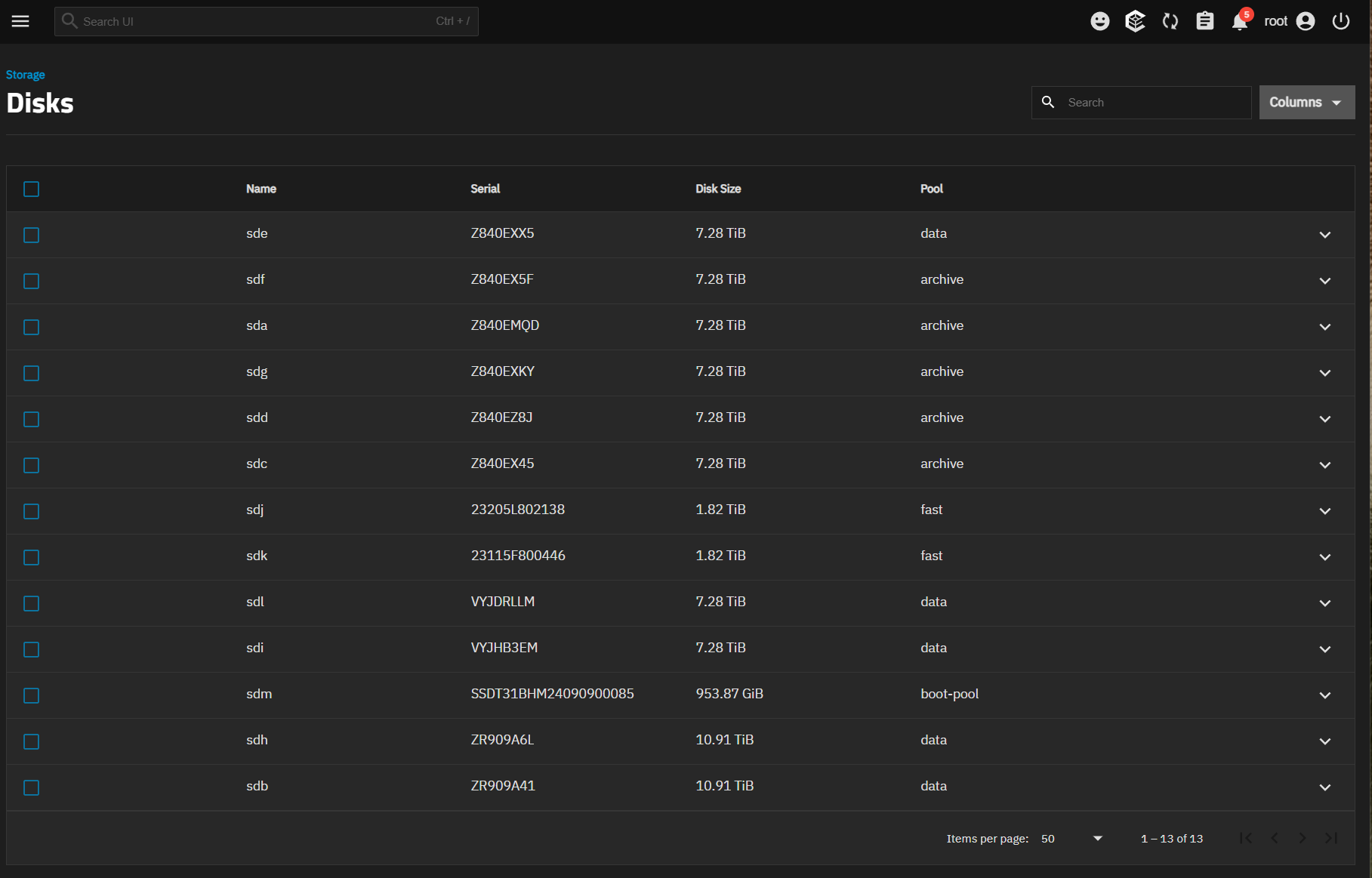
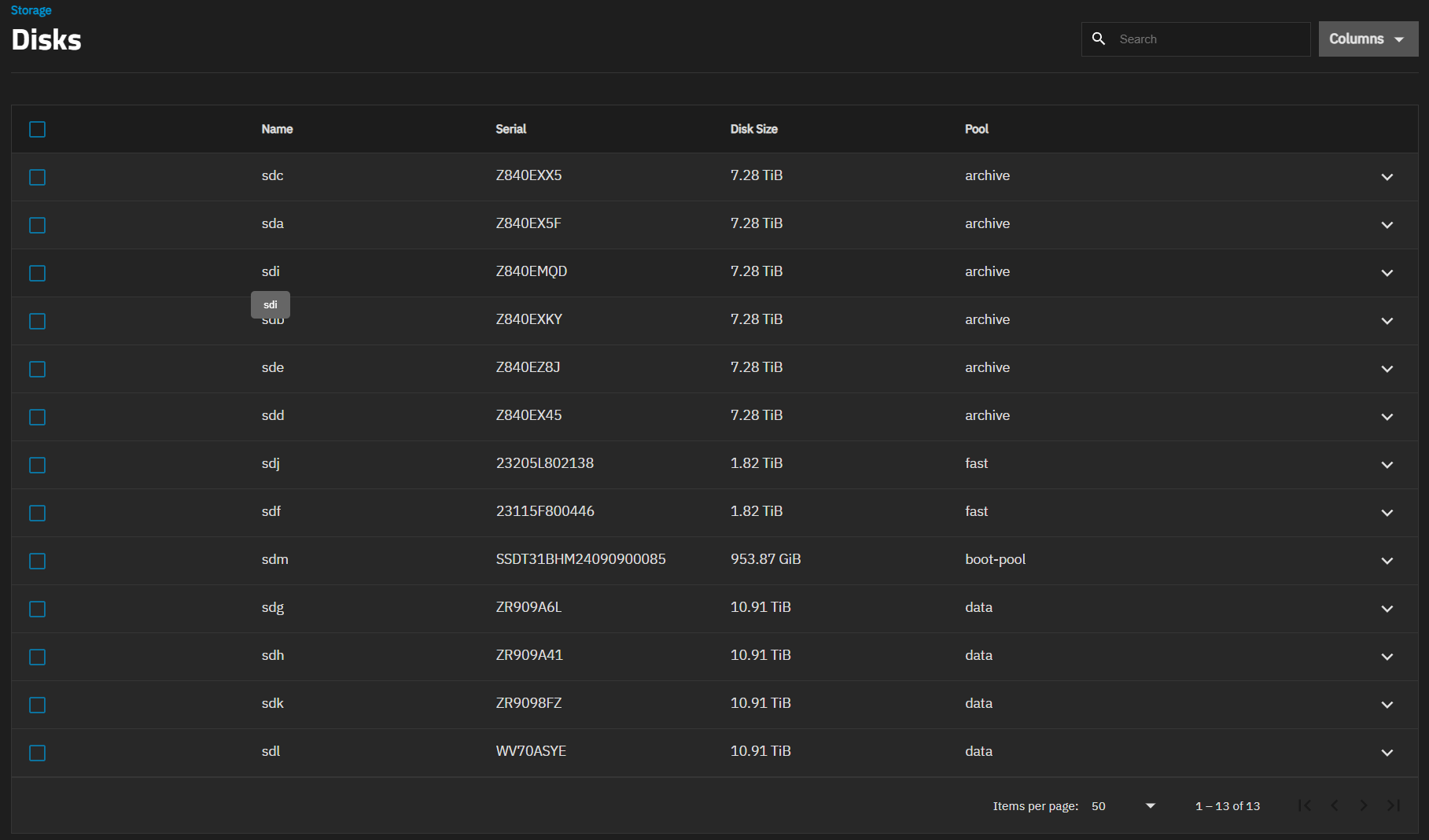
The drives with serial Z840E are the 6x Seagate Archive drives and they should be members “Archive” pool. However now Z840EXX5 is saying it is in the “Data” pool which is not correct.

The “Data” pool currently comprises of the 2x WD Red Pro/Plus 8TB drives with serials beginning with VYJ, and the 2x IronWolf 12TB drives with serials starting with ZR909A.

For some reason TrueNAS UIthinks there are now 5 drives in “Data” and 5 drives in “Archive”. However ZFS CLI knows the true correct state by the looks

root@freenas[~]# zpool status
  pool: archive
 state: ONLINE
status: Some supported and requested features are not enabled on the pool.
        The pool can still be used, but some features are unavailable.
action: Enable all features using 'zpool upgrade'. Once this is done,
        the pool may no longer be accessible by software that does not support
        the features. See zpool-features(7) for details.
  scan: scrub repaired 0B in 13:59:34 with 0 errors on Wed Oct  1 14:00:17 2025
config:

        NAME                                        STATE     READ WRITE CKSUM
        archive                                     ONLINE       0     0     0
          raidz2-0                                  ONLINE       0     0     0
            ata-ST8000AS0002-1NA17Z_Z840EZ8J-part2  ONLINE       0     0     0
            ata-ST8000AS0002-1NA17Z_Z840EXKY-part2  ONLINE       0     0     0
            ata-ST8000AS0002-1NA17Z_Z840EMQD-part2  ONLINE       0     0     0
            ata-ST8000AS0002-1NA17Z_Z840EX45-part2  ONLINE       0     0     0
            ata-ST8000AS0002-1NA17Z_Z840EXX5-part2  ONLINE       0     0     0
            ata-ST8000AS0002-1NA17Z_Z840EX5F-part2  ONLINE       0     0     0

errors: No known data errors

  pool: boot-pool
 state: ONLINE
  scan: scrub repaired 0B in 00:02:47 with 0 errors on Fri Oct 17 03:47:49 2025
config:

        NAME        STATE     READ WRITE CKSUM
        boot-pool   ONLINE       0     0     0
          sdm3      ONLINE       0     0     0

errors: No known data errors

  pool: data
 state: DEGRADED
status: One or more devices is currently being resilvered.  The pool will
        continue to function, possibly in a degraded state.
action: Wait for the resilver to complete.
  scan: resilver in progress since Mon Oct 20 11:32:29 2025
        24.7T / 25.4T scanned at 788M/s, 21.2T / 25.4T issued at 675M/s
        5.07T resilvered, 83.58% done, 01:47:49 to go
config:

        NAME                                        STATE     READ WRITE CKSUM
        data                                        DEGRADED     0     0     0
          raidz1-0                                  DEGRADED     0     0     0
            sdi2                                    ONLINE       0     0     0
            replacing-1                             DEGRADED     0     0     0
              14030011023509234989                  FAULTED      0     0     0  was /dev/sde2
              f3634186-4f97-46af-8a40-9903c847684b  ONLINE       0     0     0  (resilvering)
            da00085c-ee41-424a-bdb2-b79a533f0d3e    ONLINE       0     0     0
            sdl2                                    ONLINE       0     0     0

errors: No known data errors

  pool: fast
 state: ONLINE
status: Some supported and requested features are not enabled on the pool.
        The pool can still be used, but some features are unavailable.
action: Enable all features using 'zpool upgrade'. Once this is done,
        the pool may no longer be accessible by software that does not support
        the features. See zpool-features(7) for details.
  scan: scrub repaired 0B in 00:14:32 with 0 errors on Sun Oct  5 00:14:34 2025
config:

        NAME        STATE     READ WRITE CKSUM
        fast        ONLINE       0     0     0
          mirror-0  ONLINE       0     0     0
            sdk2    ONLINE       0     0     0
            sdj2    ONLINE       0     0     0

errors: No known data errors
root@freenas[~]#

One thing I noticed is that in TrueNAS Core drives were listed as a GUID while in TrueNAS Scale they’ve changed to sd*# for the “data” pool and some drive ID made up of model and serial number for the “Archive” pool.

I have the drives set to power down after 30 minutes of inactivity (Yes I know this is frowned upon) but most of my drives last the best part of a decade doing so. They only spin up a couple of times per day. I’m pretty sure ZFS is resilvering the correct drives as feeling them in my case with good airflow, the 6x Seagate Archive drives are cold and not vibrating, while the 2x Seagate IronWolf and 2x WD Red drives are warm and vibrating.

Maybe this will sort itself out once the resilver finishes, but if it doesn’t do I have to do something like this - Cannot replace disk due to TrueNAS Scale using sd# names for disks?

Also I have backup of both pools on another old N36L HP Gen7 MicroServer running 3x 24TB Exos as a backup of “Data” and one single 28TB Exos as a backup of “Archive”, but I’d prefer a fix that doesn’t require rebuilding either pool.

Any ideas?
I wouldn’t worry about it at this time. Let the resilver finish. The device names such as sde, etc can change at boot for the individual drives.

You might give it a reboot after the resilver and the problem disappears.

It won’t sort itself out. If sd* names appear in the CLI, that means it’s a problem.
This is purely speculation, but you might also have separate drive names that actually refer to the same drives, which I don’t know what ZFS will do in that situation

I don’t know if you can/should export the boot pool, so I don’t know if the procedure works for it. Luckily I had my boot pool on an NVME drive so it had an nvme* name separate from my data drives with sd* names and I didn’t bother with it.
Hopefully someone with more experience will chime in

So after resilver finished, the Storage → Disks page was still not correct, however it corrected itself after reboot.

Since then I decided to replace the remaining 8TB WD drives with 12TB Ironwolf drives and the 3rd drive replaced without issue.

I found with the 3rd drive, shutting down the NAS, removing the drive, powering on the NAS without the drive, then powering down the NAS again, insert the new drive, then powering on the NAS and doing the replace as per the documentation worked.

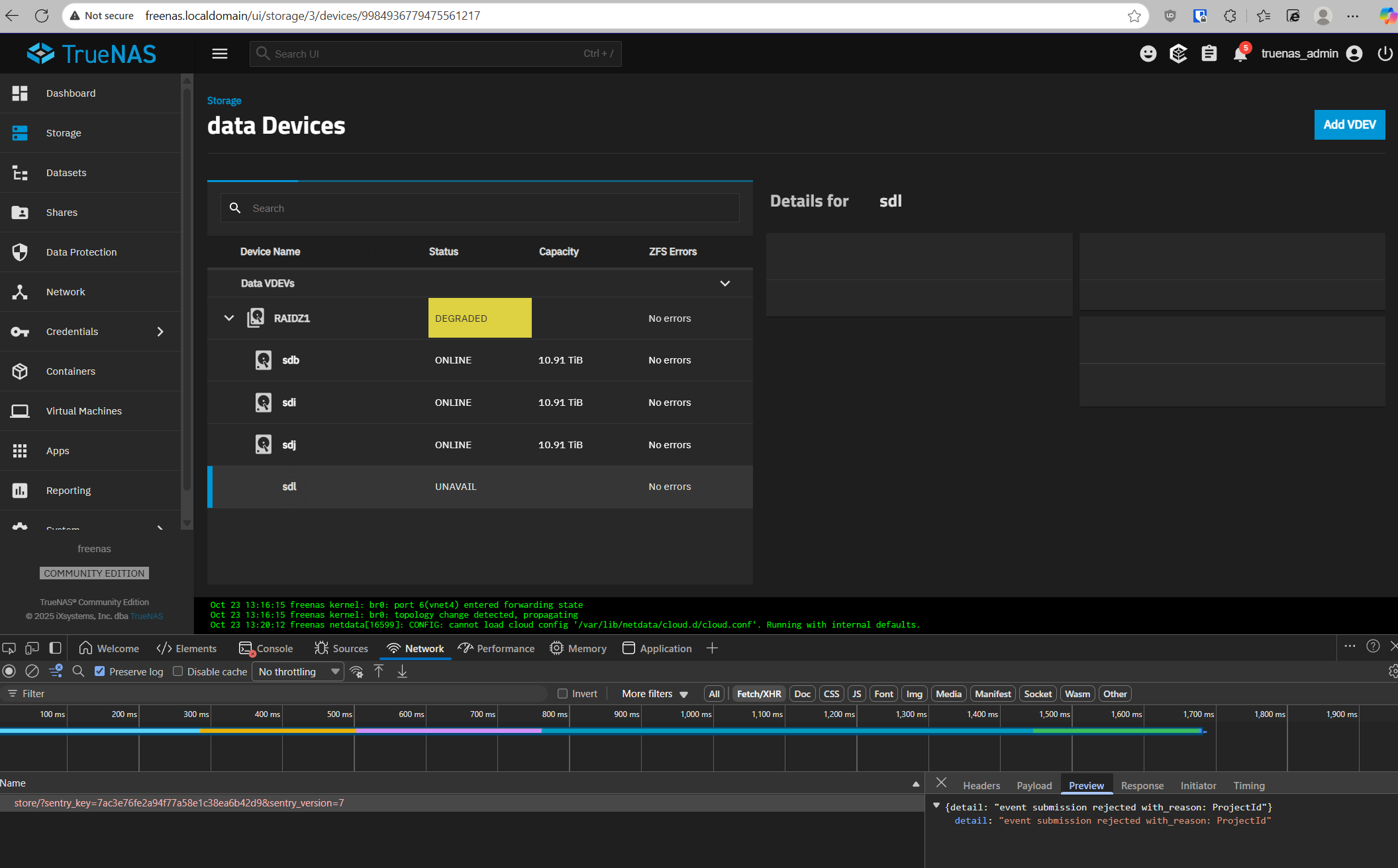
However I attempted to repeat that process with the final 8TB WD drive, and I get this

The whole Web UI goes unresponsive because of this error shown in the browser debug tools.

TrueNAS Scales seems quite buggy compared to TrueNAS Core when it comes to managing drives.

Is there any way to replace from the command line?

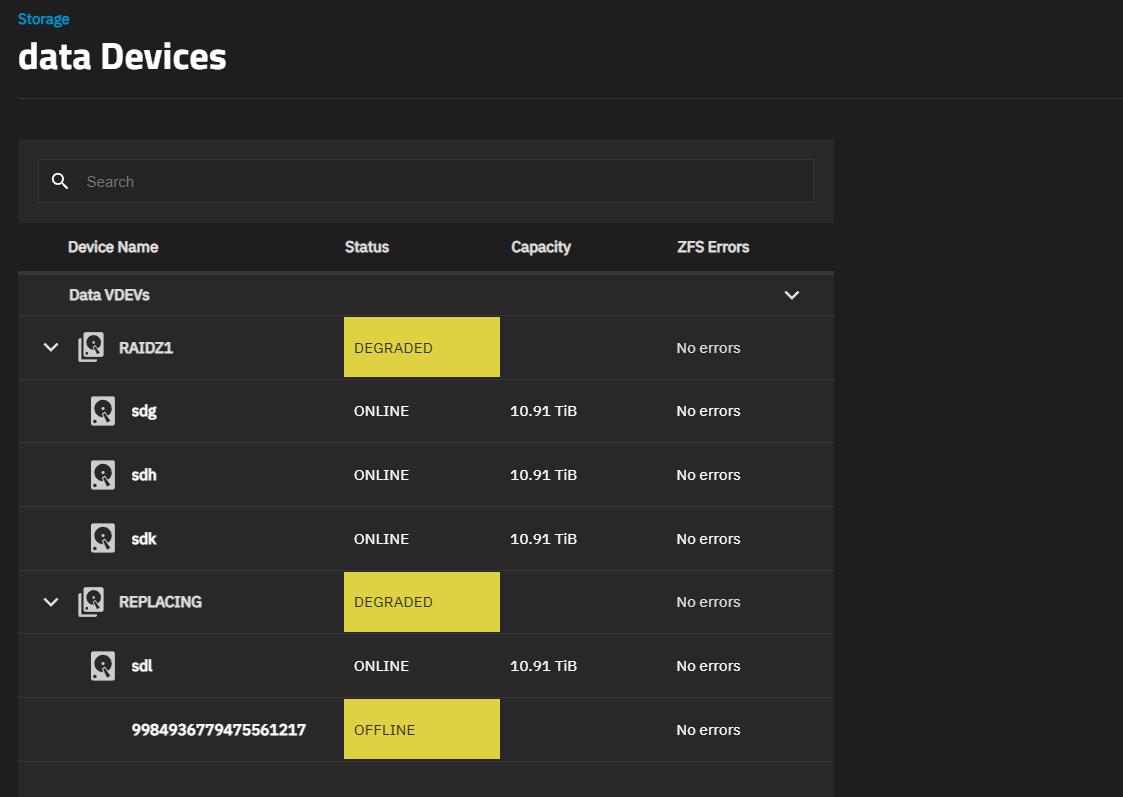
Below is my disk setup now from the UI

and this is what ZFS status is showing

root@freenas[~]# zpool status
  pool: archive
 state: ONLINE
status: Some supported and requested features are not enabled on the pool.
        The pool can still be used, but some features are unavailable.
action: Enable all features using 'zpool upgrade'. Once this is done,
        the pool may no longer be accessible by software that does not support
        the features. See zpool-features(7) for details.
  scan: scrub repaired 0B in 13:59:34 with 0 errors on Wed Oct  1 14:00:17 2025
config:

        NAME                                        STATE     READ WRITE CKSUM
        archive                                     ONLINE       0     0     0
          raidz2-0                                  ONLINE       0     0     0
            ata-ST8000AS0002-1NA17Z_Z840EZ8J-part2  ONLINE       0     0     0
            ata-ST8000AS0002-1NA17Z_Z840EXKY-part2  ONLINE       0     0     0
            ata-ST8000AS0002-1NA17Z_Z840EMQD-part2  ONLINE       0     0     0
            ata-ST8000AS0002-1NA17Z_Z840EX45-part2  ONLINE       0     0     0
            ata-ST8000AS0002-1NA17Z_Z840EXX5-part2  ONLINE       0     0     0
            ata-ST8000AS0002-1NA17Z_Z840EX5F-part2  ONLINE       0     0     0

errors: No known data errors

  pool: boot-pool
 state: ONLINE
  scan: scrub repaired 0B in 00:02:47 with 0 errors on Fri Oct 17 03:47:49 2025
config:

        NAME        STATE     READ WRITE CKSUM
        boot-pool   ONLINE       0     0     0
          sdm3      ONLINE       0     0     0

errors: No known data errors

  pool: data
 state: DEGRADED
status: One or more devices could not be used because the label is missing or
        invalid.  Sufficient replicas exist for the pool to continue
        functioning in a degraded state.
action: Replace the device using 'zpool replace'.
   see: https://openzfs.github.io/openzfs-docs/msg/ZFS-8000-4J
  scan: resilvered 6.06T in 10:57:27 with 0 errors on Wed Oct 22 06:42:40 2025
config:

        NAME                                      STATE     READ WRITE CKSUM
        data                                      DEGRADED     0     0     0
          raidz1-0                                DEGRADED     0     0     0
            9984936779475561217                   UNAVAIL      0     0     0  was /dev/sdl2
            f3634186-4f97-46af-8a40-9903c847684b  ONLINE       0     0     0
            da00085c-ee41-424a-bdb2-b79a533f0d3e  ONLINE       0     0     0
            4f4475e1-fad8-4ea1-98d3-8066d650694c  ONLINE       0     0     0

errors: No known data errors

  pool: fast
 state: ONLINE
status: Some supported and requested features are not enabled on the pool.
        The pool can still be used, but some features are unavailable.
action: Enable all features using 'zpool upgrade'. Once this is done,
        the pool may no longer be accessible by software that does not support
        the features. See zpool-features(7) for details.
  scan: scrub repaired 0B in 00:14:32 with 0 errors on Sun Oct  5 00:14:34 2025
config:

        NAME        STATE     READ WRITE CKSUM
        fast        ONLINE       0     0     0
          mirror-0  ONLINE       0     0     0
            sdh2    ONLINE       0     0     0
            sdl2    ONLINE       0     0     0

errors: No known data errors

Hmm it seems another user on Reddit has had the same issue, but as usual the original poster never replied to how they solved it (if they ever did)

https://www.reddit.com/r/truenas/comments/1hv68ap/drive_unavailable_no_option_to_replace_drive/

So I put the 8TB WD drive back in and the pool changed from DEGRADED to ONLINE, but as expected ZFS reported corrected errors as data would have changed.

I then offlined the drive again, shutdown, put the new drive in this time without booting up once with no drive in the slot, and this time I was able to see the replace button and click on it, and it all seems to be working.

root@freenas[~]# zpool status data
  pool: data
 state: DEGRADED
status: One or more devices is currently being resilvered.  The pool will
        continue to function, possibly in a degraded state.
action: Wait for the resilver to complete.
  scan: resilver in progress since Thu Oct 23 14:10:40 2025
        12.6T / 25.4T scanned at 1.91G/s, 4.69T / 25.4T issued at 730M/s
        1.17T resilvered, 18.49% done, 08:15:14 to go
config:

        NAME                                        STATE     READ WRITE CKSUM
        data                                        DEGRADED     0     0     0
          raidz1-0                                  DEGRADED     0     0     0
            replacing-0                             DEGRADED     0     0     0
              sdl2                                  OFFLINE      0     0     0
              d99c57c6-7637-46c8-a958-db69f0217e60  ONLINE       0     0     0  (resilvering)
            f3634186-4f97-46af-8a40-9903c847684b    ONLINE       0     0     0
            da00085c-ee41-424a-bdb2-b79a533f0d3e    ONLINE       0     0     0
            4f4475e1-fad8-4ea1-98d3-8066d650694c    ONLINE       0     0     0

errors: No known data errors
root@freenas[~]#

Interestingly as I have replaced drives in my “Data” pool, the drive identifiers have changed from sd*# back to a guid like my system had when it was TrueNAS Core 13 based.

Why did TrueNAS Scale switch to the sd*# naming convention for disks in the pool in the first place?

I remember it was a pain to identify which guid matched which drive, but last time I replaced drives under TrueNAS Core, I just found a command to figure out which drive serial number matched to which guid that ZFS reported the error on (offlined the drive if I could), then pulled that drive using the serial number sticker on the drive (Thank you Seagate for putting serial number stickers where I can see the serial number without pulling the drive).

One thing I noticed is while zfs commands use the guid now, the TrueNAS UI still uses the sd*# identifier

The drive resilvered fine and after a reboot both the Storage → Disks and Storage → data Devices pages showed the correct info.

One thing I noticed is the zpool didn’t automatically expand in size even though the expand option as set and used to do so on TrueNAS Core. I found the button in the UI and it expanded okay.

Hopefully all the above helps someone in the future.