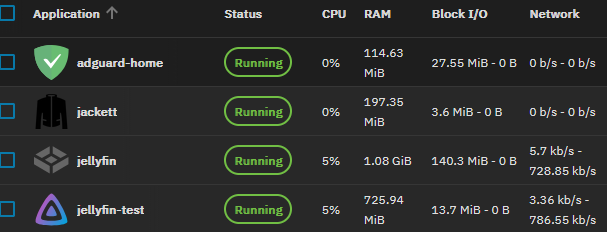
I think I figured that one out yesterday and I feel like sharing my experience.
Edit: out of curiosity, I spun up a fresh container with…
GPU Configuration
 Passthrough available (non-NVIDIA) GPUs
opened the shell and …
$ ls -la /dev/dri
total 0
drwxr-xr-x 2 root root        80 Oct 17 11:18 .
drwxr-xr-x 6 root root       360 Oct 17 11:18 ..
crw-rw---- 1 root video 226,   0 Oct 17 11:18 card0
crw-rw---- 1 root   107 226, 128 Oct 17 11:18 renderD128
$ groups
groups: cannot find name for group ID 568
568 video groups: cannot find name for group ID 107
107
Meaning, before you follow my guide below, just check this output in your Jellyfin’s shell. If it matches the above, open Jellyfin’s transcode settings (in the web GUI), pick hardware acceleration “VAAPI” and be done.
Comparing both setups (the above one and my custom app below, the result is the same
Read the above first!!
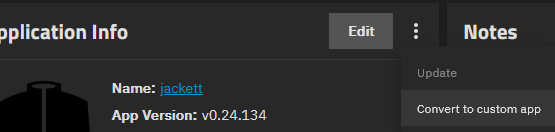
Assuming you installed Jellyfin through the “Discover Apps” catalogue, it’s running as a mostly preconfigured docker container. Trouble is, you cannot follow this comprehensive guide on jellyfin transcoding with the normal Jellyfin app, since the right boxes are missing in the TrueNas GUI. So we need to convert it into a custom app:
The “Edit” button will henceforth open a YAML file which contains the docker compose file. We need to make at least two edits there. But we first need to make sure we punch in the correct numbers. I’ll explain later what we’re doing.
- In your Truenas GUI, open System → shell, then follow those things:
truenas_admin@truenas[~]$ ls -la /dev/dri
total 0
drwxr-xr-x  3 root root        100 Oct 13 13:11 .
drwxr-xr-x 18 root root       3980 Oct 13 13:11 ..
drwxr-xr-x  2 root root         80 Oct 13 13:11 by-path
crw-rw----  1 root video  226,   0 Oct 13 13:11 card0
crw-rw----  1 root render 226, 128 Oct 13 13:11 renderD128 ## note the group
truenas_admin@truenas[~]$ getent group render ## get the group's id
render:x:107:
- Add this info in jellyfin’s YAML, but make sure to do so in the correct context; I’ll provide some for reference
configs:
  permissions_actions_data:
    content: >-
      [{"read_only": false, "mount_path": "/mnt/per..."

## [...]
## we're skipping a lot of lines

services:
  jellyfin:
    cap_drop:
      - ALL
    depends_on:
      permissions:
        condition: service_completed_successfully
    deploy:
      resources:
        limits:
          cpus: '16'
          memory: 6096M

## start of first insertion: forwarding the host device.
## here: the render driver. Match it with your machine's output (above)

    devices:
      - /dev/dri/renderD128:/dev/dri/renderD128

## end of first insertion

    environment:
      GID: '568'
      GROUP_ID: '568'
      JELLYFIN_CACHE_DIR: /cache
      NVIDIA_VISIBLE_DEVICES: void
      PGID: '568'
      PUID: '568'
      TZ: Europe/Zurich
      UID: '568'
      UMASK: '002'
      UMASK_SET: '002'
      USER_ID: '568'
    group_add:
      - 568

## start of second insertion
## add the "render" group id to your jellyfin user

      - 107

## end of second insertion

    healthcheck:

## [...] lines we ignore

## start of third edit, optional
## to make sure you're not stuck at the version
## from when you converted to custom app.
## Replace "jellyfin:10.10.7" with "jellyfin:latest"

    image: jellyfin/jellyfin:latest

## end of third insertion
## rest of YAML
- Just like in the article I had linked above, you may now open Jellyfin’s transcode settings, pick hardware acceleration “VAAPI” and enjoy silent fans. In my system (Ryzen 5700G, using iGPU), CPU load dropped from 70 to 6 %, temperature from 70 to 50 Celsius.
What just happened? An explanation
As for now, the Jellyfin app from community doesn’t seem to forward the render device. And the jellyfin user isn’t part of the host’s render group either. Those aren’t defaults, which is okay. But you’re not handed an easy way to define those either, which is not okay. I’ll try to reach out to them about that.
For my research, I opened the jellyfin shell to find /dev/dri empty (command: “ls -la /dev/dri”) and the jellyfin user to be in no group but its own (a Linux default, command: “groups”). If you’re interested/trying to fix stuff, run those commands before and after patching – in the jellyfin shell!