
Hi,
How to renew this default certificate? I couldn’t find the “Renew” button anywhere which is weird, because certificates are expected to expire.
Truenas CE v25.04.2.6
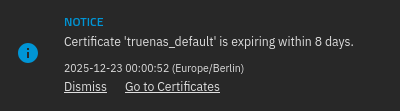

That’s because there isn’t one and never has been. At least in 25.04 the “certificate authority” is still present. So, options include:
Thanks for the info! I don’t really know what is using this default certificate within Truenas, can I remove it? I access the Web GUI only by IP, so HTTP is good enough for me.
I have setup Let’s Encrypt with Nginx Proxy Manager and that works fine for my self hosted services.
No; TrueNAS is going to serve the web UI via HTTPS regardless, and it needs some cert for that. But, again, you can just let it expire.
I also have Nginx Proxy Manager running but I don’t use for the connection to the server TN Web GUI, that seems like it would be unnecessarily fragile; I don’t want my easy of access to the web GUI to be dependant on if an app is running or not. I use one Let’s Encrypt cert specifically for the web GUI and a wildcard cert in NPM.
I removed the default cert on my install, but I had added my own before that. Perhaps the GUI would have stopped me otherwise?
It would have. TrueNAS is going to serve the GUI via HTTPS, and doing so requires some certificate (even if only a self-signed one). If you try to delete a cert that’s in use, you’ll get an error. So installing a new cert, telling TrueNAS to use it, and deleting the old one is just fine–but deleting the only cert the system has isn’t.