I have two options, Use 2 x samsung 840 pro’s 128GB 520MB/s x 2 =1040MB/s in strip for truenas or a kingston 120GBSV300S37A 120Gb 450MB/s.
The question relies in, network speed. Apps cannot be installed to boot-pool = the stripe, so apps, where ever they are installed, like openspeedtest are limited by the ssd/hdd it’s installed on? Network speed, if truenas scale is installed on the SV300S37A = 450MB/s, is the network limited to 450MB/s? If truenas is installed to the strip, is network limited to 1040MB/s? Even though with a 10Gbps NIC.
The network speed is limited by the speed of the pool you transfer to, not the speed of the disk used as boot medium and apps like openspeedtest, as far as I know test network speed, not disk speed
Ok, with the two 840’s, boot is really long timing. Why is this? read/write should be around 1040MB/s and boot should be instant. Takes around good 3-4.5 minutes.
Do you have a Mirror boot-pool and not a Stripe as you said above? The boot-pool is normally a single drive (stripe) or a mirror pair. You might be able to set it up differently using the command line but those are the default two choices using the GUI setup.
You need to look up the specs for that system. It may have only had SATA 3Gbps speeds. Make sure to keep your MB and Mb, bytes vs bits correct. The booting may be the bios self testing RAM or something. We can’t see your system as it boots
No chance it has IPMI/KVM/Remote management of some kind? Not sure if it is workstation or server board, details are muddy on my googlefu. If it is server board - I’ve seen longer boot times.
Otherwise, to isolate if this is just truenas being weird, how long does a randolinux distro on a usb stick take to boot? If (for example) debian boots faster off of a usb than TrueNAS, then we can narrow this down to likely a TrueNAS issue.
Wouldn’t be the first time we’ve had middleware hogging resources on TrueNAS….
Edit: Barky also brings up a good point - is this purely TrueNAS taking forever to boot, or we got weird-long-ass post & bios on the system? Any chance you got a monitor & can confirm what is taking the most time?
HP Z systems are workstations. I have not looked up the specifications for this old version, but I would assume that there is no IPMI (or a very old one which may not be helpful anyway). It’s quite possible that the system is generally slow to boot.
When I installed, using ventroy, legacy bios as z600 is lagacy, so the install process is arrow key, space to sect, tab to move etc, when I went to select the install disks, I * “spaced” the two 840’s, as for its stripe or mirror? I really don’t know, I’d figured truenas made it stripe I hope. I don’t want mirror, for performance. I’m not worried about ssd failure, I can always reinstall some way. So, in this case, how do I find out if truenas installed as stripe? It did not give this option when I selected the 2 ssd’s as stripe or mirror.
Also, I think you guys are wondering, am I adding in from powering on going through the bios devices loading, no, this is after all that when truenas os start its bootup process.
Also, some asteristic characters appear in the lines of loading drivers/modules/services etc, weird ones like non english letters while loading. To me, seems abnormal.
As stated, these are the two that loads the longest.
middlewared
ix-netif
Also, 2xsamsung 840 pro for boot-pool on sata6 controller, UGT-ST644R. On PCIe Gen2 x8 slot, which has plenty bandwidth of 2GB/s, and the combined 840’s, should max out at 1040MB/s read/write in stripe.
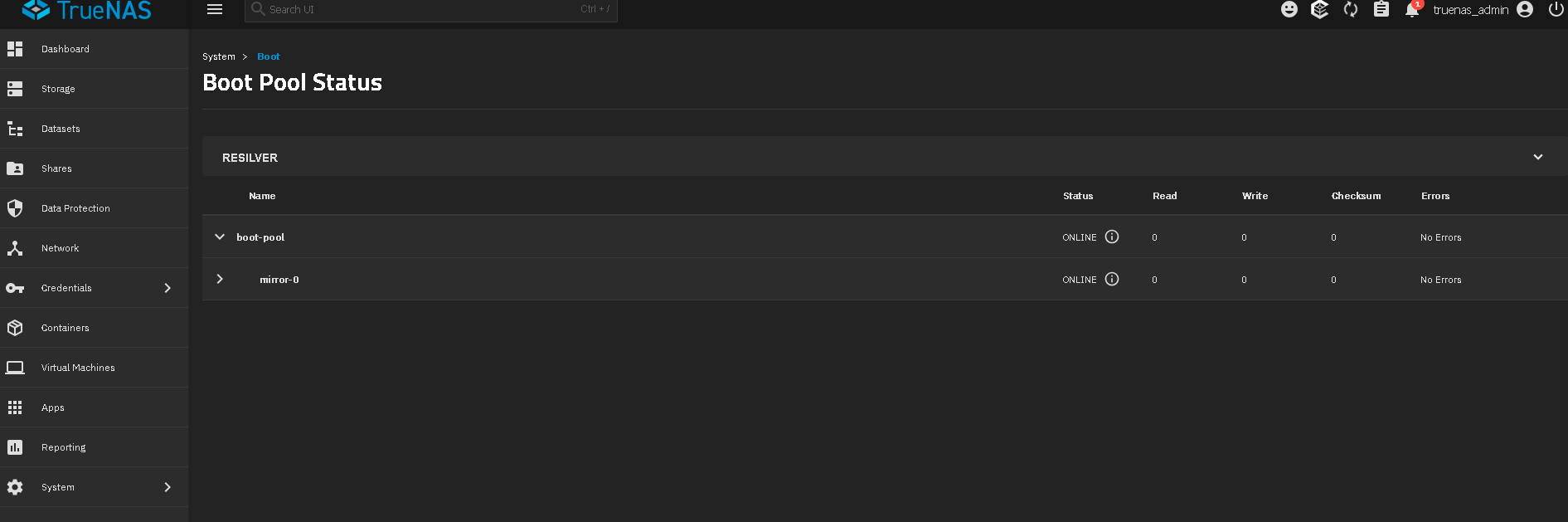
If you selected two disks at install time for the boot-pool, they are mirrored.
Go to System, Boot, and click the Boot Pool Status button. A mirror boot pool will look like below image. You can also go to the System, Shell menu and then type in zpool status -v and hit enter to see the pools.
Have you watched your TrueNAS boot with a monitor attached to see it loading? I use a single Teamgroup SSD for my TrueNAS and I am back into the UI in maybe 2mins from a full reboot, using a Dell T5820 Tower…
doing a stripe likely wont help boot times much vs a single drive or mirrored as TrueNAS is not that taxing on a reboot, I would think more your older gen CPU might be hitting some max usage on cores while booting?