This makes complete sense. Great combination of computer knowledge and analytical skills.
And now that I think about it, I believe this 2.5" drive was from an Acer laptop that I upgraded to a SSD drive 10 years ago. And those drives had two partitions (either C: and D: or C: and backup partition). I then threw the dive in a small case for portable storage. Can’t recall if I merged the partitions.
Anyway, I’m not going to mess with trying to merge them now as I’m waiting on the new SSD to arrive. But I will check the hard drive once I pull it out of the NAS to confirm this theory.
Well, thanks for solving this weird problem. I was almost entirely sure I did everything correct as far as the instructions steps so I was going a bit crazy trying to understand what went wrong.
I’ll post more next week once it’s (hopefully) all wrapped up.
I learned when I took a bunch of drives out of a couple other NAS systems (that used md) and tried to reuse them in a couple Truenas installs. I tried to format them according to the docs and the result was the same error. It was a “what am I doing wrong” until I figured out the docs are correct, but just not for drives that have been in a previous raid array and had a superblock on them.
BTW, some desktop computers will make a “raid array” out of some or all installed drives. My wife’s computer came setup like that and so those drives would also likely give the same error if reused in Truenas.
I installed a 120GB Transcend SSD (brand new) and went through booting up with the USB stick, installing TN onto the SSD and then rebooting with SSD set as boot priority #1 and got the same error.
When I installed TN I selected installing the 16GB swap. So, thinking maybe this is causing the problem, did a fresh install (formatting SSD) without the swap but it still wouldn’t boot with same error as above.
Went into the UEFI and disabled all 8 data drives as being options for boot priority and now I get this error instead:
I can still boot by setting “UEFI: Built-in EFI Shell” as primary boot device in the F11 “Boot Menu”.
I loaded the saved config file using the TN GUI onto the SSD and everything works except that during reboot I need to manual set “UEFI: Built-in EFI Shell” as primary boot device in the F11 “Boot Menu” in order to avoid a failed boot.
So, I’m pretty sure there isn’t anything wrong with:
The TN install (USB stick, software, etc).
The new SDD (or the 320GB hard drive I initially used).
Problem seems to be with the system (motherboard?) recognizing the drive.
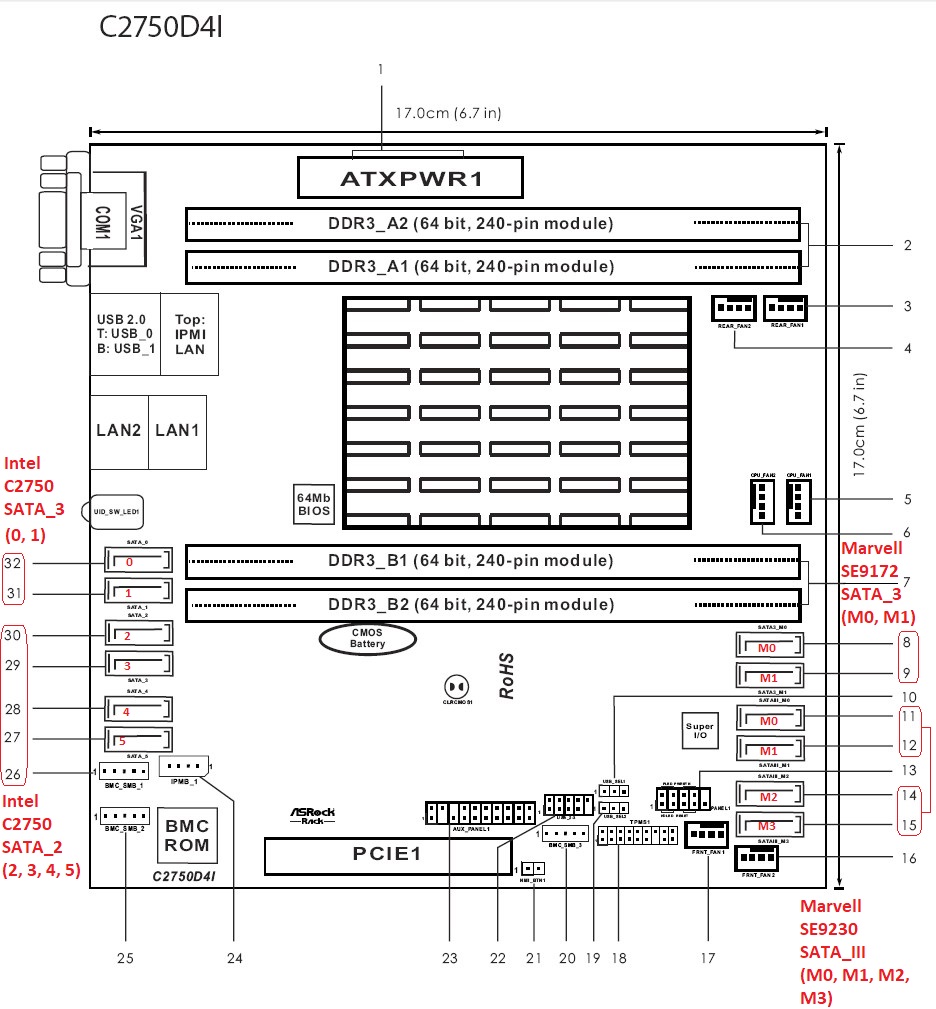
I’ve tried different SATA ports on the Marvell SE9230 controller which is where the original SATA DOM was installed.
I’d like to try one of the Intel C2750 SATA3 ports but the data drives are plugged into both ports. If I move the data drives to the Marvell controller will that cause any problems with the data drives? Will the system automatically find the moved drives? I don’t want to cause any problems to the data drives.
Below is an image of the motherboard which I’ve annotated with the four SATA controllers.
root@freenas:~ # zpool status
  pool: boot-pool
 state: ONLINE
config:

        NAME        STATE     READ WRITE CKSUM
        boot-pool   ONLINE       0     0     0
          ada2p2    ONLINE       0     0     0

errors: No known data errors

  pool: smnas
 state: ONLINE
status: Some supported and requested features are not enabled on the pool.
        The pool can still be used, but some features are unavailable.
action: Enable all features using 'zpool upgrade'. Once this is done,
        the pool may no longer be accessible by software that does not support
        the features. See zpool-features(7) for details.
  scan: scrub repaired 0B in 14:41:29 with 0 errors on Wed Oct 15 15:41:30 2025
config:

        NAME                                            STATE     READ WRITE CKSUM
        smnas                                           ONLINE       0     0 0
          raidz3-0                                      ONLINE       0     0 0
            gptid/af2fb0a9-2ab1-11e8-b18f-d05099c09f1e  ONLINE       0     0 0
            gptid/9a0df1ca-2337-11e8-809f-d05099c09f1e  ONLINE       0     0 0
            gptid/09127f01-264b-11e8-b18f-d05099c09f1e  ONLINE       0     0 0
            gptid/597544f3-305b-11ec-a07c-d05099c2ff5b  ONLINE       0     0 0
            gptid/68eb5f9d-964a-11f0-acf5-d05099c2ff5b  ONLINE       0     0 0
            gptid/092fa248-2a08-11e8-b18f-d05099c09f1e  ONLINE       0     0 0
            gptid/fd2d805c-2267-11e8-809f-d05099c09f1e  ONLINE       0     0 0
            gptid/47c8affb-2bc8-11e8-b18f-d05099c09f1e  ONLINE       0     0 0
Tried a bunch of stuff after searching the Internet for any similar problems. Here’s recap so far:
Problem: Original boot SATA DOM failed. Installed OS on new Transcend 120GB SSD. Get error “This is a NAS data disk and can not boot system” or “Reboot and Select proper Boot device” when booting. System only boots if during boot process I press F11 for Boot Menu and select “UEFI: Built-in EFI Shell” and it will boot and systems runs perfectly unless I need to restart and it will require me to manually press F11 and select as mentioned above. ASRock C2750D4I motherboard.
Things I’ve tried:
Different SATA cables.
Different SATA ports (tried ports on all 4 SATA controllers).
Unplugged all data drives so only drive connected is Boot SSD.
Loaded TrueNAS Core 13.0-U6.8 ISO on new USB stick and reinstalled OS on SSD (with and without installing 16GB space).
Tried booting off original SATA DOM which had failed but wouldn’t show up in UEFI at all.
Originally loaded OS on a WD 320GB HD but same no-boot issue.
Questions:
Why does system boot with “UEFI: Built-in EFI Shell”? What does this mean?
Why won’t system boot off SSD when it shows up in UEFI as boot priority #1?
Are the instructions at How to Set Up and Install TrueNAS CORE for installing the OS on an SSD not correct? I select “UEFI” for “TrueNAS Boot Mode”. Should I select “Boot via BIOS” instead (one thing I haven’t tried).
Is problem with the ISO file downloaded from www.truenas.com?
Anyone with the same motherboard? Can we discuss what settings you are using? SATA ports? Etc.
Now the system boots with no issues or errors. I don’t understand what exactly this means as the motherboard is UEFI but I guess I was wrong to choose “Boot via UEFI”. Sheesh.
Anyway, maybe this long, painful saga will help someone else in the future.
Thanks to those who offered their time and assistance.