> **What you get**
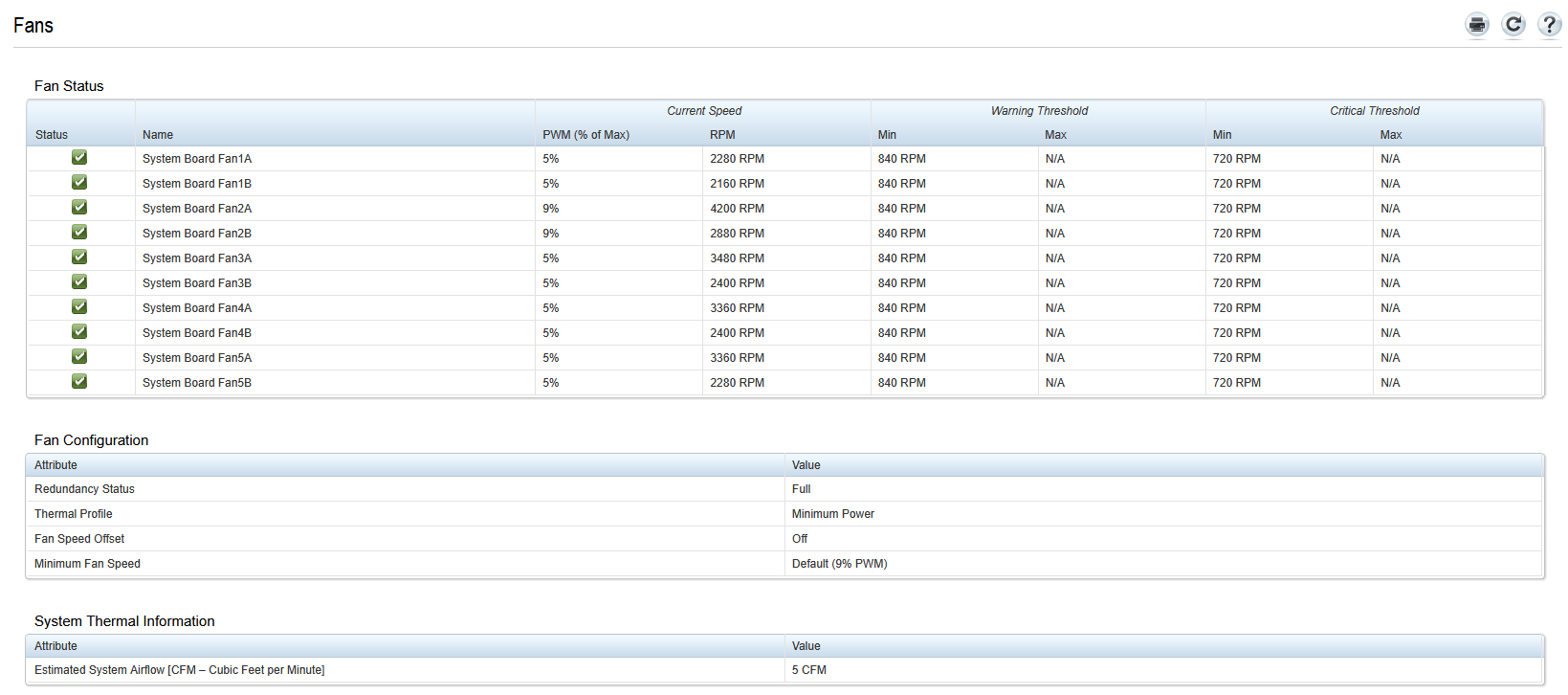
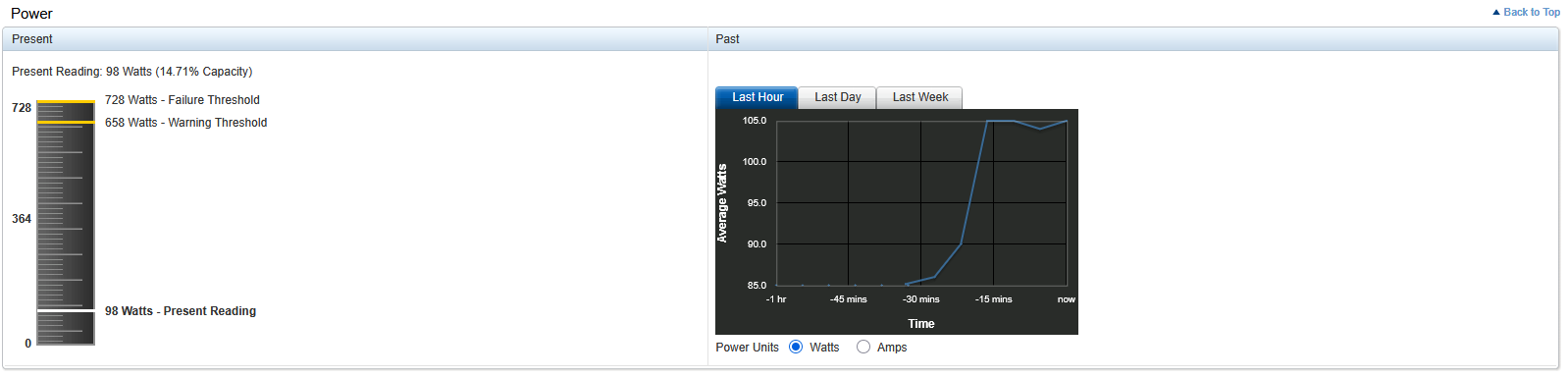
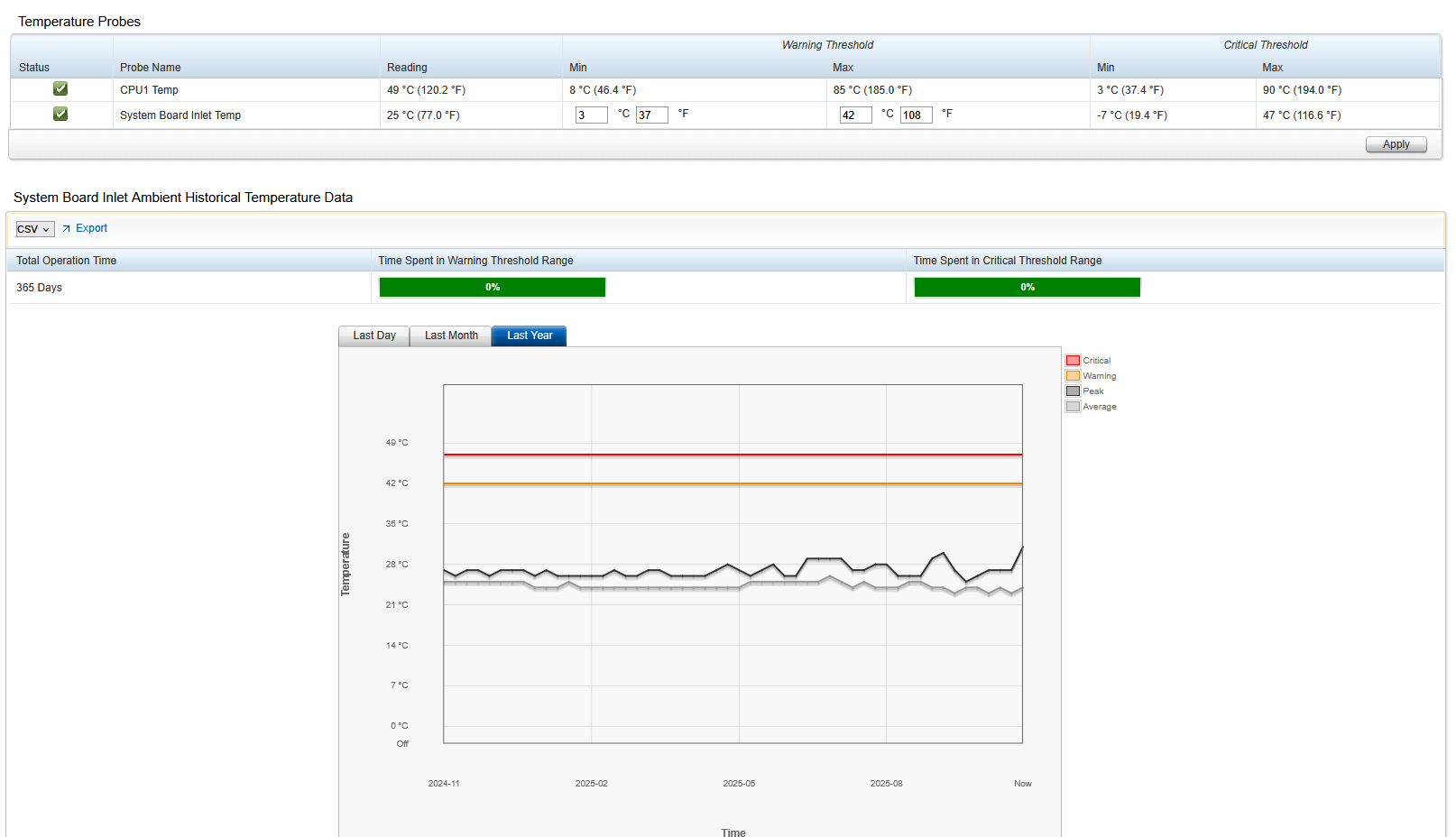
> - Quieter fans with safe thermals
> - iDRAC Service Module (iSM) working on TrueNAS SCALE
> - USB NIC pass‑through from OS to iDRAC (for inventory + logs)
> - BIOS/iDRAC/RAID controller settings tuned for ZFS
>
> **Support caveat:** This guide **uses Developer Mode** on TrueNAS, which is **unsupported** by iXsystems. Proceed only if you accept that risk. Back up your data.

---

## 0) At‑a‑glance
- Enable **Developer Mode** (lets you use `apt` on TrueNAS SCALE)
- Add Dell **iSM 5.3 repo** (bullseye) and **GPG key**
- Temporarily add Debian 11 **bullseye‑security** repo to install **libssl1.1**
- Install **dcism** and **dcism-osc**; start **dcismeng.service**
- Enable **OS‑to‑BMC USBNIC** in iDRAC and configure the host interface (`idrac`/`usb0`)
- Choose safe thermal/fan settings in iDRAC; verify with `ipmitool`
- Set recommended **BIOS** and **PERC H330** options for ZFS/HBA operation

---

## 1) Enable Developer Mode in TrueNAS SCALE
Official docs: <https://www.truenas.com/docs/scale/scaletutorials/systemsettings/advanced/developermode/>

1. Log in to the **TrueNAS SCALE** web UI as **root**.
2. Go to **System Settings → General → Advanced**.
3. Toggle **Developer Mode** → **ON**. Reboot if prompted.

> **Why:** TrueNAS normally blocks `apt` to protect the appliance. iSM needs Debian packages.

---

## 2) Prepare the shell
Open an SSH session to your TrueNAS. Use **bash** to avoid `zsh` surprises when pasting commands containing `#` comments or arrays.

```bash
# Switch this interactive shell to bash (only for the current login)
bash
If you keep using
zsh, avoid pasting lines that start with#(zsh treats some#sequences specially).
3) Add Dell iSM repository and GPG key
Dell provides iSM for Debian 11 (bullseye). It works fine on SCALE (Debian 12) once we add libssl1.1.
# Create the iSM repo file (note the TWO occurrences of "bullseye")
echo 'deb [arch=amd64] https://linux.dell.com/repo/community/openmanage/iSM/5300/bullseye bullseye main' | \
  sudo tee /etc/apt/sources.list.d/dell-ism.list

# Add Dell OpenManage repo GPG key
sudo curl -fsSL https://linux.dell.com/repo/pgp_pubkeys/0x1285491434D8786F.asc \
  -o /etc/apt/trusted.gpg.d/dell-openmanage.asc

sudo apt update
Troubleshooting: If you previously added a wrong iSM line (no second
bullseye, orhttp), remove it from/etc/apt/sources.list.d/*.listand runsudo apt updateagain.
4) Install OpenSSL 1.1 runtime (libssl1.1)
SCALE (Debian 12) ships OpenSSL 3 only. iSM binaries still need libssl1.1 (i.e., libcrypto.so.1.1). Pull it from Bullseye security repo temporarily:
# Add Bullseye security repo temporarily
echo 'deb [arch=amd64] http://deb.debian.org/debian-security bullseye-security main' | \
  sudo tee /etc/apt/sources.list.d/bullseye-security.list

sudo apt update
sudo apt install -y libssl1.1

# Clean up the temporary repo
sudo rm -f /etc/apt/sources.list.d/bullseye-security.list
sudo apt update
Verify:
ldconfig -p | grep -E 'libssl.so.1.1|libcrypto.so.1.1' || echo "Missing libssl1.1"
5) Install iDRAC Service Module
sudo apt install -y dcism dcism-osc
sudo systemctl enable --now dcismeng.service

# Check status/logs
sudo systemctl status dcismeng.service --no-pager
sudo journalctl -u dcismeng --no-pager | tail -n 50
You should see messages like:
The iDRAC Service Module (iSM) successfully connected with iDRAC using IPv4 protocol.The iDRAC Service Module has successfully started communication with iDRAC.
If you see errors referencing libcrypto.so.1.1, re-check step 4.
6) Enable and use the OS‑to‑BMC USB NIC (USBNIC)
This provides a host‑to‑iDRAC backchannel that iSM uses for richer telemetry and features.
6.1 Load the kernel drivers and bring up the link
sudo modprobe usbnet
sudo modprobe cdc_ether

# List links; look for a USB/idrac interface (often "idrac" or "usb0" or "enx...")
ip -o link

# Assign the default point‑to‑point link‑local pair (iDRAC is 169.254.0.1/30)
# Replace <IFACE> with your interface name (e.g., idrac)
sudo ip addr add 169.254.0.2/30 dev <IFACE>
sudo ip link set <IFACE> up

ping -c 3 169.254.0.1
6.2 Set iDRAC to use USB P2P mode (RACADM)
SSH to iDRAC or use the iDRAC CLI console:
racadm get iDRAC.OS-BMC
racadm set iDRAC.OS-BMC.AdminState 1
racadm set iDRAC.OS-BMC.PTMode 1           # usb-p2p
racadm get iDRAC.OS-BMC.UsbNicIpAddress    # expect 169.254.0.1
Restart iSM so it latches onto USBNIC:
sudo systemctl restart dcismeng.service
sudo journalctl -u dcismeng --no-pager | tail -n 50
7) iDRAC thermal/fan settings
Open the iDRAC web UI:
- Service Module → Setup: Confirm Installed Version on Host OS shows
5.3.0.0and Status = Running`. - Service Module → Monitoring:
- Third Party PCI Fan Response = Disabled
- Leave Fan Speed Offset = Off (unless you need a fixed uplift)
- Fans → Setup:
- Thermal Profile = Minimum Power (Performance per Watt Optimized)
Verify from the host:
sudo ipmitool sdr type temperature
sudo ipmitool sdr type fan
Healthy idle targets (room ambient ~22‑25 °C):
- Inlet ~23–25 °C
- CPU ~37–41 °C
- Fans mostly 2,000–3,000 RPM, with one or two zones higher depending on chassis/drives
- Fan Redundancy = Fully Redundant
8) BIOS: Recommended settings for TrueNAS + ZFS
These values strike a balance between low idle power, throughput, and latency; adapt to your needs.
8.1 System Profile
- System Profile → Performance Per Watt (OS)
- Turbo Boost → Enabled
- Energy Efficient Turbo → Enabled
- C1E → Enabled
- C States → Enabled
- Collaborative CPU Performance Control → Disabled
- Uncore Frequency → Dynamic
8.2 Processor Settings
- Logical Processor (Hyper‑Threading) → Enabled
- X2APIC Mode → Enabled
- Hardware / DCU Prefetchers & Adjacent Cache Line Prefetch → Enabled
- Logical Processor Idling → Disabled (reduces latency for heavy I/O)
- Number of Cores per Processor → All
8.3 Memory Settings
- Operating Mode → Optimizer Mode
- Node Interleaving → Disabled (prefer NUMA locality)
- Snoop Mode → Opportunistic Snoop Broadcast
8.4 SATA
- Embedded SATA → AHCI Mode
- Security Freeze Lock → Enabled
- Write Cache → Enabled (recommended with UPS; ZFS manages sync)
8.5 Integrated Devices
- USB 3.0 → Enabled
- I/OAT DMA Engine → Disabled
- SR‑IOV Global Enable → Disabled
- Memory Mapped I/O Above 4GB → Enabled
- Lower Memory Mapped I/O Base to 512G → Enabled
9) PERC H330 Mini (as HBA/non‑RAID for ZFS)
In the controller BIOS/utility:
- Physical Disk Power Management → No Power Savings
- Disable any disk spin‑down, RAID‑capable spin down, automatic disk power saving features
- Disk Cache for Non‑RAID → Default (ZFS governs ordering/sync)
- If your firmware supports HBA mode, use it; otherwise, create single‑disk RAID0s as a last resort (less ideal).
Flashing the H330 to IT mode is possible on some models but is outside the scope of this guide. The server here uses HBA/non‑RAID mode from BIOS.
10) Verification checklist
# iSM service running and connected
sudo systemctl is-active dcismeng.service
sudo journalctl -u dcismeng --no-pager | tail -n 50

# USBNIC up and reachable
ip -o addr show | grep -E 'idrac|usb|enx'
ping -c 3 169.254.0.1

# Sensors
sudo ipmitool sdr type temperature
sudo ipmitool sdr type fan
Expected sample output (will vary):
Inlet Temp  | ok | 25 C
Temp        | ok | 40 C
Fan1A       | ok | 2280 RPM
Fan2A       | ok | 4200 RPM
Fan Redundancy | ok | Fully Redundant
11) Troubleshooting
iSM won’t start / libcrypto.so.1.1 missing
- Re‑run Section 4 to install
libssl1.1from bullseye‑security. ldd /opt/dell/srvadmin/iSM/bin/Invoke-iSMPKIHelpershould show it resolveslibcrypto.so.1.1.
apt update shows iSM repo 404 or “no Release file”
- Ensure the repo line is exactly:
deb [arch=amd64] https://linux.dell.com/repo/community/openmanage/iSM/5300/bullseye bullseye main
zsh errors like “unknown file attribute: b” or “parse error near )”
- Start
bashbefore pasting commands, or paste commands without inline#comments.
iSM connected but fans still high
- iDRAC Third‑Party PCI Fan Response must be Disabled.
- Set iDRAC Thermal Profile to Minimum Power (a.k.a. Performance per Watt Optimized).
- Check for hot add‑in cards or blocked airflow; the R430 will raise specific fan zones.
ACPI/IPMI messages during boot (cosmetic)
You may see messages such as ACPI Error: Region IPMI has no handler. With iSM + out‑of‑band IPMI over LAN/USBNIC this is typically harmless.
12) Rollback / Cleanup
- Stop and disable iSM:
sudo systemctl disable --now dcismeng.service sudo apt remove -y dcism dcism-osc - Remove the Dell repo and key:
sudo rm -f /etc/apt/sources.list.d/dell-ism.list \ /etc/apt/trusted.gpg.d/dell-openmanage.asc sudo apt update - Optionally remove
libssl1.1if you don’t need iSM anymore:sudo apt remove -y libssl1.1
13) Appendix: Useful RACADM snippets
# Show thermal settings
racadm get system.thermalsettings

# Set Third‑Party PCI Fan Response off (already set in UI in this guide)
racadm set system.thermalsettings.ThirdPartyPCIFanResponse Disabled

# Show BIOS System Profile (read)
racadm get BIOS.SysProfileSettings.SysProfile
# Example value: PerfPerWattOptimizedOs
14) Credits & License
- Based on hands‑on configuration and Dell documentation.
- Share and adapt with attribution. Consider linking back to this guide.