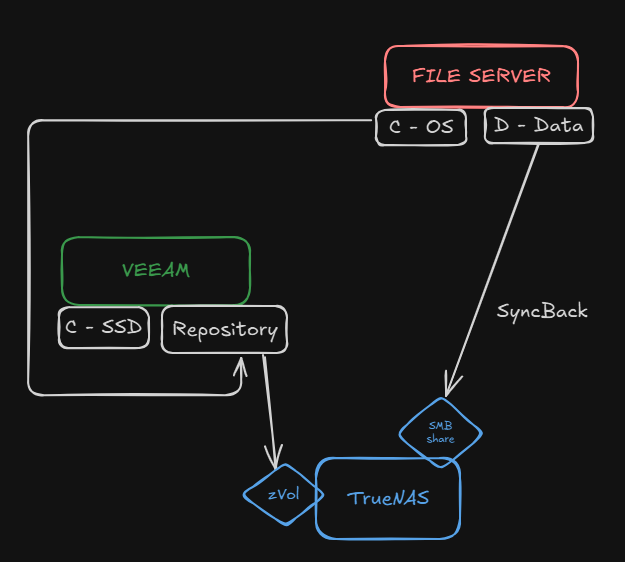
Well, I’m at the point of purchasing the hardware, and having a couple of SSDs or nvmes now is easier than purchase later. That’s why.
SSDs would be easier for me to install in caddies, nvmes requiere a separate pci card, nothing too hard, but will free a couple of bays if it’s beneficial.
As for record sizes, will give you an idea:
TYPE
QTY
SIZE (TB)
AVG (KB)
PDF
866.567
1,7
1.961,76
JPG
1.450.316
2,8
1.930,61
ZIP
14.150
1,6
113.074,20
That’s the TOP3 file groups in one of the shares, but can act as an average.
Also, how can I set the L2ARC for caching and metadata?
Is this secondarycache=metadata ? Any rule to size it? is it imporant to define what’s what or will it do it on the fly? 1 TB sounds enough?
L2ARC does both by default. For your use case, I doubt it would be helpful to keep local files in the L2ARC on the destination system, as they are not being read.
On the other hand, the metadata on the destination system is being read all the time by any rsync-like backup program. So as long as your entire pool metadata doesn’t fit in the ARC (and it may), I’d expect the L2ARC to add a marginal benefit, especially since the originating machine is all-flash, the receiving machine uses a HDD pool, and you have a 10GbE connection.
So anything that bypasses the HDD pool would help, I reckon.
This is good advice but given that the system is getting built, that pretty much any SSD will do, and that 1TB SSDs are cheap, I’d default to using a L2ARC instead and then see if there is a significant % hit or not… The L2ARC can be attached and detached at any point…
For instructions on how to configure the L2ARC for metadata only, etc. please see here.
Your ARC will handle the vast majority of this and if it can’t you probably want a bigger ARC aka RAM. What network speed are you working with between the two systems?
Nice, thank you!. Adding more ram now is easy, but I believe I will settle with 128GBs and forget the metadata VDEV (for now).
Production Serv----10Gbit—> TN Backup server ----> 1 GBit WAN link -----> TN Replication
From what I’ve seen, that 10 Gbit is barely used, it’s more about latency than raw throughput. The WAN link might get upgraded in the near future to 10 Gbit, but that’s 6 months away at least
I use netcat and it makes a huge difference re: transfer speed. But, as I understand it, you need to have a VPN in place to protect the data in transit as NETCAT will send it unencrypted, right?
I’d start at 1M but 512k is likely fine too. The bottleneck will likely be the network. But larger recordsizes are helpful squashing metadata needs when the media is big also.
See my resource, between eliminating most small files by bundling them into sparsebundles and larger recordsizes for image and video files, the metadata needs shrunk a lot in my use case.
That was one of the reasons my net transfer speeds went from 250MB/s to 400MB/s for large files.
I’ve got the system all planned out and I’ve got a last (probably not) question.
Beside a large SMB share (or multiple) where I will have a copy of the production files, I do have to backup the operating system of the server as well, and here comes veeam.
Besides a TrueNAS VM, I will have a Windows Server VM with veeam installed. The “C” (OS) drive of the veeam VM will live in the boot volume, and the “D” (data) drive will be a … this is where I need help:
A zvol inside the main pool so it can host the drive?
Another SMB share?
Given that the backups are a typical sync task, would you add a SLOG? Consensus seems to point to a “no”, but I’d rather ask.
The goal is to have the “D” drive of the veeam server located in the main pool of the TrueNAS server, that way it has the same redundancy, the same replication policies, etc.
Keep in mind that this will be a backup of the production file (OS) only, not the files as well, so that’s like… 200 GBs max + incrementals.
I know I’ve mentioned this before but what is your Windows File Server actually bringing to the party other than complexity and the need for Veeam to backup the OS?
I do agree that the WServer brings nothing in the structure, but it is here to stay for the time being. Anyway, I do have other servers to be backed up, so my question is still relevant.