Designing new system

Hey all, first time here!

Let me start by saying that although I have plenty of experience with virtualization and Windows Servers, I have zero experience with Linux, TrueNAS and ZFS, so… bear with me, but turn me in right direction if you should.

I need to design a backup solution for my company and the plan is to work around Proxmox + TrueNAS, as I’ve ditched vmware thanks to Broadcomm, but that’s another story.

So even though this is work project, and I’d like to purchase complete system, I do have some room for DIYing some of the pieces for better performance and reliability, as I will be the one supporting the system.

The concept is like this: I have two Windows File Servers, one is about 20TB and 10 TB the other, I need to backup them and then replicate to another system offsite, the offsite system will probably be a twin of the primary one.

The current plan is to robocopy / sync the file structure from the File Server to the TN (a pull would be better) daily, that means comparing millions of files every day to check for changes, and copy just a few, snapshot them, and transfer them offsite via WAN. The daily change is about 20-30 GBs, but that’s after checking 7,5 million files. This also means that only “one” user will be accessing the server, as the Production File Server will still be another one.

Now, I’d like you to give me some ideas hardware-wise, from what I’ve found after hours of reading the forums, some metadata index would be interesting, as the transfers are just small office-like files.

The base hardware looks like this (nothing purchased yet)

  • A Dell R740xd with a HBA330

  • 128 GBs RAM (at least), can I go with less?, do I need more?

  • 2 sata ssd drives for proxmox boot mirrored

  • 10 x 8 TB WD Red Pro drives in RAIDZ2, looking at 60-80TB available capacity.

And for the caching part… I’m open to suggestions. What vdevs do you think will benefit me the most? Metadata?, L2ARC? What configuration would you suggest?

I was thinking of 2 mirrored SATA SSDs for Metadata and 2 mirrored NVMEs for L2ARC, but that could be the other way around as well. What’s the speed and endurance requirements for these?

Connection to the main servers is 10Gbit SFP+, I could go 25Gbit, but I very much doubt it would be beneficial for the millions of files to be moved since SMB protocol takes so much overhead.

Server will be connected to UPS.

TL;DR: I need help designing a backup system for a couple of big file servers, around 30TBs (millions of files), would appreciate some insight about what vdevs and drives would give me the best configuration.

Phew, that was a long introduction. Thank you!
1 Like

Hi and welcome.

Perhaps a silly question but why are we keeping the production filestore on Windows and not moving it over to TN? That would mean we could lose the robocopy element and just use snapshot and replication for the offsite backup?

2 Likes

Once you have a sVDEV holding the metadata, the marginal benefit of a L2ARC on a remote server receiving data is likely close to zero. Instead of two and two SSDs for sVDEV and L2ARC, go for a more redundant sVDEV config like a 3-way mirror. If you lose an sVDEV, you lose the entire pool.

Also see the sVDEV planning resource to ensure your sVDEV is actually big enough to hold all the metadata AND the small files. Do not underestimate the benefit of small files being stored on SSDs instead of HDDs. Also, do not overlook the impact of recordsize on dataset performance.

I would also look into a backup program that helps reduce the ended for network traffic by noting locally what has and has not changed and only sending changes. TrueNAS does this automatically via snapshots I have to believe someone on windows has come up with similar approaches.

1 Like

Not a silly question actually, the main server is all flash and about 3 years old, I cannot justify to the “Cs” above me that the system is useless. On the other hand, skipping the robocopy would be a massive benefit for me, but, see #1. Also, the benefit of having it completely isolated from the network is an important factor.

But yeah, skipping the robocopy would be nice.
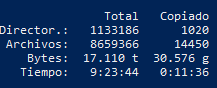
image
Sorry screenshot in Spanish but you get the point: 9:23 hours checking files, 11 minutes copying.

The goal is to set up a server that will act as a backup repository, as well as a lower-tier storage for historical data.

The company I work for does contruction site surveys mainly, so that means a TON of pictures, and all kinds of pdf files.

Large files = large record sizes. Set record size for the large file datasets to 1M.

Hey, maybe I’ve missinterpreted something, so I’ll split my question in two:

  • Do you mean that L2ARC would be beneficial for the “first” (source) server in this scenario?
  • And based on your comment, I understand that the receiving (dest) end, should not see a benefit of L2ARC or sVDEV, since the snapshots are already taken, and the traffic flow (1 Gbit WAN) is considerably slower, is that right?

As for the small files, again might be my lack of experience on this, but what I’ve seen recommended is about 16K to 128K, which… doesn’t seem like much really, I mean, just a small DOCX is about 500K, insert photos and that goes to 2MB easily.

As for the backup program, yeah, not ideal, I’m looking at a demo of Syncthing, Windows is not the smartest guy keeping track of changes.

Also, why robocopy? The folder structure is so deep (more than 20 levels), that even with longpath enabled the copy / paste explorer API just… can’t.

I doubt an all flash system would benefit much from a sVDEV or L2ARC. No doubt, there are speed tiers in SSDs but the margins are unlikely to be significant.

Instead, I would try to find a copy system that is as efficient as possible, ideally by creating quasi snapshots of various directories to keep track of what has and has not changed rather than exhaustively going down every rabbit hole in your directory structure.

I recall having used such a copy system in the distant past on windows but I cannot remember its name, sorry.

Get in touch with a salesperson from iXsystems…

What’s Proxmox doing here? Do you mean virtualising TrueNAS on Proxmox, and if so why?

More than 20 years I was on a project with a similar challenge. Only that the check for the daily backup took more than 24 hours. And that on a high-end SAN that by itself cost more than a million.

The solution was to place the hundreds of thousands of files that were created every day in a directory structure like ./output/year/month/day/00001 . So for every day of produced files you had exactly one directory to save (recursively).

This approach of course only works under certain conditions. But my, perhaps naive, assumption is that few applications/systems change files all over the place. And with some creativity (symlinks?) one can usually come with something comparable.

So the question from my end would be to describe in more detail what applications are running and how they create and/or change files, and how big those files are.

2 Likes

Personally I’d just create an SMB dataset/share in TrueNAS and copy (migrate) your data across. Give whoever needs access to that share and let replication create your offsite backup copy. Simples :grin:

The all-flash is the source system, not the destination server, and even though it is interesting, I’m not removing it. So back to my OP, do you believe an L2ARC with 128 GBs of RAM is necessary or not?

Yes, I’m on it.

Well, this is more of a side effect than a requirement. Aside from the data itself, I have to backup the OS as well, therefore a backup software must be installed, name VEEAM. I’m not 100% sure if for bare-metal server the Veeam server is a must or the agent alone can use an SMB share, I’ve worked in the past with VMware and that was the ordinary procedure. So having “the backup appliance” is beneficial from a security and network design point of view.

Thank you for comment, but think of this: There’s a hundred people working on different folders, based on different projects, some create plans in AutoCad, some create legal documents, some take photos of the construction site, etc. I don’t see how that would work.

And let the other server running just for the show… :sweat_smile:

Now seriously, I’d be more confortable doing this with a Windows-style approach, I’m putting quite some effort on this project given the caching and replication benefits that this brings along, in the hope that this can help with the current infraestructure, not reinvent the wheel.

I moved all my companies Windows fileservers over to TrueNAS about 8 years ago and never looked back. Using SMB and integrated with AD it works the same with all the added benefits. Snapshots, Replication, Data Integrity checking, ARC cache, sandbox datasets, resilience with RAID-Z3, quotas, easy to grow shares and pools, etc.

1 Like

In a system with a sVDEV, no.

The reason being that the sVDEV already brings all the benefits of a persistent, metadata-only L2ARC (and does not have to get “hot”). On top of that, the sVDEV will significantly speed up processing of small files, an Achilles heel for HDDs.

The main benefit of a L2ARC is that it can fail without the pool being negatively affected. In systems that do some reads also, a default L2ARC can help by keeping some of those files at the ready. I don’t see the use case in a receiving remote machine for that but I have also not used a machine that way either.

The main downside of sVDEV vs. L2ARC is cost and drive bays. You need 3x more drives for the sVDEV than a L2ARC unless you like to live dangerously. Plus, try to plan out the sVDEV and the recordsizes in advance to maximize benefit.

2 Likes

Fair enough :-). It wasn’t clear to me what the hot data set looks like. So yes, the approach I mentioned doesn’t work as such. But perhaps the scan time, if its is a real problem, can still be reduced by borrowing some ideas.

E.g. I would assume that projects that are closed are moved to a separate location. Something like

./projects/_archive/customer_a/project1
                               project2
           customer_a/project3
                      project4

In that case the _archive directory could be excluded or scanned with lower priority. Just an idea.

Then the obvious way is to ditch Windows Server and move to serving SMB from TrueNAS. Snapshots need not scanning the entire hierarchy.

1 Like

I appreciate your help, and I don’t mean to be rude, but that is not what I’m asking. I understand that moving everything out of that FS and consolidating into another one would be beneficial, but I’m not ditching the first server, and I’m not putting my production storage into something absolutely new to me that I have no experience with.

1 Like

Got it, so based on your other post, I could have an L2ARC with “some” ARC data and some metadata, assuming the performance would not be as fast as a dedicated sVDEV, but with a less strict requirements in terms of redundancy, right?

Maybe a couple of mirrored nvmes would do? I mean, I could have a PCIe card with a couple of nvmes, and still hold the data in the HDDs. Or fast Enterprise-grade SSDs would do?

My main goal is to accelerate that filesync I showed before.

Thank you, the “archive” data will be moved to another server to make room for the new projects in the main one. All the projects are named something like “YYYYMMDD_project”, so it’s easy to move the closed projects. btw, that “archive” server would also use “this” server (TN) as a backup.

Sure I can understand this. It would be like someone trying to convince me to move all my systems over to Windows :joy:. Main thing is that you’re giving TrueNAS a try and I have no doubt it will work well for you and one day maybe you’ll be ready to take the next step. You are where I was about ten years ago. Best of luck.

1 Like

L2ARC is not pool critical, so there is no reason to mirror it. You can, it’s marginally helpful, etc. For your use case, I would start by trying a persistent, metadata-only L2ARC. Run 3 sync operations to get the L2ARC cache “hot” and see to what extent the transfer times change. For example, when I ran some experiments with rsync along those lines in the past, I saw some pretty dramatic improvements.

However, and this is important, my sync was from the NAS to a local DAS. What you’re doing is the opposite, i.e. transferring from a Windows box to a TrueNAS. I’d expect there still to be a benefit because rsync is so exhaustive as it traverses directory structures.

In CORE, L2ARC was not persistent by default. In SCALE and CORE, a metadata=only setting for the L2ARC has to be set. For some comparisons re: sVDEV and L2ARC in my use case, see here. Recordsizes also have a big impact - thanks @winnielinnie!

1 Like