Howdy folks, I’m looking for some help figuring out why scale is rebooting more often than not when running regularly scheduled scrubs.
Specs:
Scale 25.04.2.5
4x16GB Crucial ECC memory @2666
5900X under a NH-D12L, in an Asus X570 Hero
booted from mirrored 500GB SK Hynix P41s on a PCIe riser
LSI 9211-8i/Dell H310 HBA card
Arc A310, passed through to plex
all wrapped in an 846 with redundant PWS-920P-SQs
Pools:
boot: mirrored 500GB SK Hynix P41s on a PCIe riser
6x4TB RZ2 (WD Red)
6x20TB RZ1 (Seagate Water Panthers)
12x16TB RZ2 (Toshiba MG08)
a single 1TB WD Red sata SSD for app installs
The problem: my regularly scheduled scrubs are very reliably crashing the system. On reboot, 7-120 minutes later, the whole thing goes down again. Sometimes, the scrubs will complete successfully. On the larger pools, that’s about seven hours without any issues. I have rock solid performance otherwise - I typically use the largest pool as a network recording target, while streaming media via apps running on scale, without so much as a hiccup. It’s not specific to just one pool, all of them (excepting the SSDs) have crashed at least once. They’ve also all passed.
The research: over the past couple months, I’ve made a bunch of little tweaks to try and address the issue. Most of the similar threads I’ve found online point to either a drive failure (my pools seem healthy, via both the GUI and zpool status -v), a dying HBA (I’ve swapped the 9211 for a new Dell H310, and back again), or an overheating system. To address that last point, I’ve pulled the whole system out of the rack and run it open, as cold as I can get it - in addition to throwing a spare fan on top of the riser cards. I’ve also tried killing what few apps I do run (primarily plex) and leaving the scrub to run without any external pressure on the system - same result.
My install of scale is pretty fresh, I’ve only updated once to get onto 25.04. The boot drives are fresh, the apps are fresh, I’ve tried to follow best practices this time around.
The loss: I’m not really sure what to try next - please let me know what else you want to know, or what else you think I should try! This is a relatively novel issue for an established (albeit NAS of Theseus) setup.
I’d also love to know if there’s somewhere I can be looking for specific issues or errors thrown from my system. The logs I’ve been able to parse don’t look irregular. There’s nothing in the audit logs, and I’m not even getting an “irregular restart” email - the only real tell, besides the fact that the system is sometimes unavailable, is that the uptime is low.
So, what am I missing?
Did you check for memory errors using e.g. memtestx86+ ? Did the scrub find any crc errors it then repaired ? Just asking cause i had a similar Problem which was related to RAM timing in my case. Just out of curiosity: how often do you scrub ? Cause the default setting is to run a new scrub 35 days after the last successfull one if i remember it right.
Y’know, I haven’t don’t memory testing in years. Because the whole system was stable for such a long time, it didn’t cross my mind.
My scrubs are set to run once a month, on a staggered schedule (so one pool per night). They’re not completing successfully, so when the system comes back online it tries to get back to the job, which causes the system to crash again - you see the cycle? I agree it would be silly to try and run them nightly
I’m not sure I’ve ever seen a scrub report of it actually doing anything, using the parity data to fix stuff. I mostly run them because it’s the responsible thing to do, and I like the green checks on the GUI home page.
Looking at the scrub history, I only recall seeing the tasks being completed
In your case, were the timings too high? I’m pretty sure I’m running my ram at stock, but that’s something else for me to check
Scrubs are demanding on a system so it could be a cooling issue as well. Prime95 or similar should also be run. I like 4 hours for thos test and for Memtest86+ you should run at least 5 complete passes.
Those tests may show you the issue.
Edit: running a system outside a case disrupts positive air flow. Sometimes it will result in a few parts retaining heat.
It would be good for us if you post your system hardware, all the parts you put together. This includes the power supply. It is also possible the power supply could be it.
The more dara points we can get, the easier it is to point at the most likely cause.
Well in my case it was really strange - but i am using a Ugreen DXP 6800 so… I got a set of matching DDR5 4800 32gb. Did a memtestx86+ and it failed at test 5. So i pulled out 1 module and tried again. No Problem. Did the same with the 2nd module same slot. No Problem. Same procedure with the 2nd slot. No Problem with any of the 2 modules. But as soon as i used both modules errors reappeared. Then i disabled CPU Boost in Bios and tried with both modules. No errors. Ok but running a i5-1235U at 900 Mhz on the performance and 400 Mhz on the efficient cores was somehow a no go. So turned on Speedboost in Bios again and decreased the Max Boost frequency on the Performance cores in Bios from 4.4 to 4 Ghz. Tested again. Errors. And then i changed RAM timings from STD SPD to XMP and no more errors. It might also have been just coicidence and all related to overheating cause this IS an issue on the Ugreen. Later i also replaced the case fans with noctua and if i find the time will replace the thermal paste on the cpu. But i had no problems with scrubs or strange reboots since then.
For sure. My 846 has two redundant PWS-920P-SQs. It’s normally running behind a UPS, which shows about ~250-300w consumption, so I feel like I’m pretty well within the power budget there.
It would be good for us if you post your system hardware, all the parts you put together. This includes the power supply. It is also possible the power supply could be it.
As far as I can tell, that’s all the hardware in the box!
While the system is out of the rack, it’s still in its enclosure. I just parked it in a cooler part of the apartment
Managed a second successful scrub last night, on one of the larger pools. Took about half a dozen reboots before completing successfully. If it wasn’t for the UPS-mon hey, you’re not connected to your UPS emails I’d have no idea
Still planning to start the stress testing after work today, but please help me keep fielding potential pain points
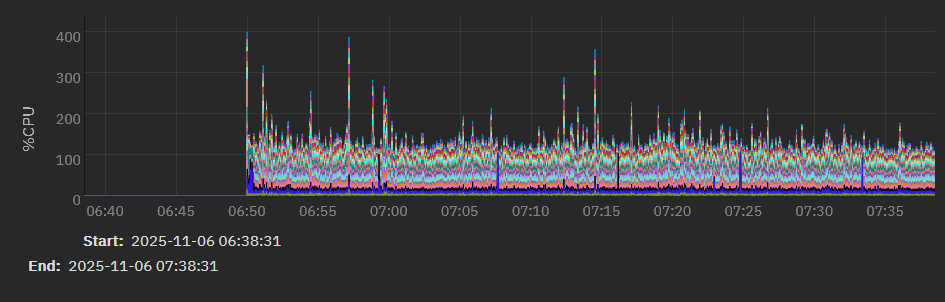
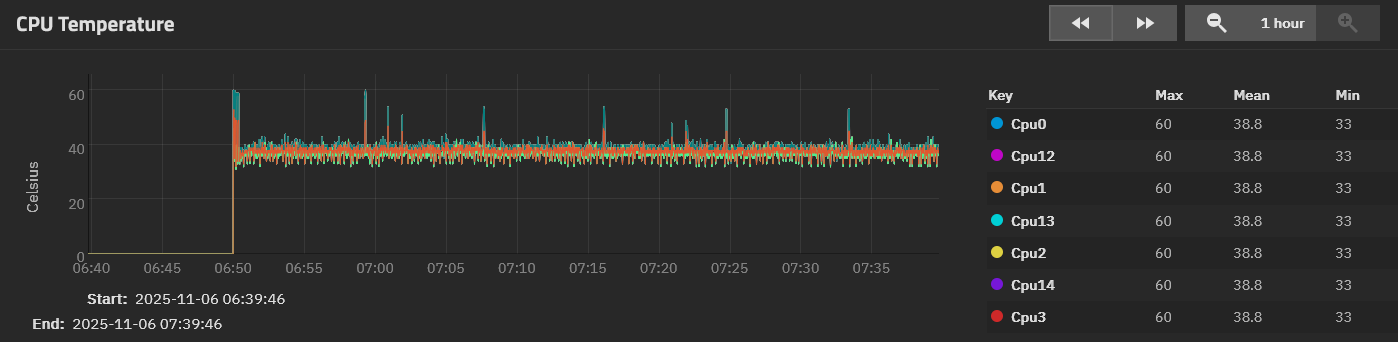
E: here’s a couple grabs of the CPU reporting graphs during the last successful scrub. Still going to hit it with prime95 later, but it was seeing data like this that had me thinking that if there was a thermal issue, it was with the HBA
Your cpu temps look good. I wouldn’t replace the thermal grease.
That sucks about the RAM failures and speed. I don’t know if you have control over the individual time settings but if you do, maybe that would help. But it sounds like you know what you are doing.
The ram failures weren’t mine - I still haven’t run memtest.
Unfortunately, the nuance of those timings is a bit outside my wheelhouse. I can set the top level values okay, but everything deeper in the bios is a bit of a mystery to me.
I appreciate your suggestions, it’s just going to take me a minute to generate more results to bring back
Good news! After clearing seven passes of memtest+ with flying colors, I had cause to fuss in the bios for a while. It looks like something is promoting a bios reset, which has been reenabling PBO, Asus’ awful auto overclocking features, and messing with PCIe bifurcation. After getting the settings back to where I left them, the system has seemed much more stable. I’ve gotten two drives upsized and resilvered without any hitches, and temps remain nice and low
I do believe @joeschmuck called it right - temps were getting out of hand as the board tried to push the chip to boost too high. That’s what I (rightfully) get for not using a server oriented board