For the past few years, I’ve had my TrueNAS (iXsystems Mini 3.0 X+) set up with a pair of USB drives attached for the sole purposes of backing up the internal drives / pool. One external drive is an Onsite backup that is always connected, and the other is actually a pair of drives that I swap out once a month, so that I have a copy of my data offsite (in a safe deposit box at my CU) in the event of a major issue.
This arrangement worked under CORE 13, 24.10, and 25.4. My last rotation was before upgrading to 25.10 - today, I attempted to connect one of the Offsite drives to make a new backup to take offsite, and got the following:
Disks have duplicate serial numbers: None (sdf, sdg).
Reading up on other posts, I see the general consensus is not to use USB drives, which seems a bit silly when they are an effective (cost and practicality) means of backing up your data. (Edit: I understand not using them for a main data pool, I am looking at this as just for backing up data to an external source.)
I get that I could disconnect my other drive temporarily to make this backup, but that adds a lot of manual work to making a simple backup - I used to be able to have both drives connected so I didn’t need to disconnect the onsite backup drive while also making a backup to take offsite.
Is there any way to enable both drives being connected at the same time? Or am I going to be forced to disconnect one backup to make a second copy?
Depending on the USB enclosure there could be a chance that it works less badly than your current setup & passes through valid information to TrueNAS. Some users have posted ‘success’ with specific models.
I don’t have any specific models USB enclosure to recommend because I wouldn’t recommend using USB drives at all. Hopefully this at least leads you towards a possible solution.
Would an eSATA PCI card / enclosure be preferable to USB, or run into the same limitations? (I could extract the drives themselves from the MyBook cases and seat them in an eSATA enclosure, if that would improve things.)
Could likely run into worse - port multipliers also don’t behave nice…
Since these disks are specifically for backups, might make sense to risk it vs having no backup - but don’t assume either option is viable for a stable & healthy pool.
I have three eSATA enclosures, two cables, and a PCIe card on the way - I’ll report back once I’ve installed them if it picks up the serial numbers and lets me import them from the UI without issue.
@GJSchaller - Good luck. I would also check for eSATA enclosures with a fan. That enclosure from StarTech is fanless, which during a ZFS scrub or re-silver could get toasty.
It is pretty rare to get an eSATA 3.5" enclosure that has both a fan and metal chassis. The one I picked up feels like a tank, (aka: either a battle field tank, or heavy fish tank…). But, also cost a small fortune, so I hope it lasts for a long time.
Might as well toss a square of thermal tape & one of those raspi copper heat sinks onto the IC too.
This has me wondering though if a pcie x1 riser + an HBA might be more reliable or not. Logically it should work (better?) & possibly be equally cost effective, as long as there is a limited amount of drives connected.
To be clear - the external drives are going to be low use, mostly for offsite backups. They won’t be in a pool with other drives, they will be written to once a day (if that) overnight, and two of them will be swapped out between a Safe Deposit box.
I’m not worried about performance, one 16 TB drive is more than enough storage, my main concern is being able to keep one drive onsite, and the other plugged in for offsite backups at the same time for a few days a month.
@Arwen - if you have a good enclosure, I’d appreciate it if you have a link - I don’t mind investing a bit of money for a good backup solution, as long as it’s not bleeding me every month.
I REALLY don’t think people would pay more than $200 for a single eSATA & USB 3 hot swap 3.5" disk enclosure. Even if made of metal and has a fan. I don’t recall the exact price, but it was over $200 US 4 or more years ago. Here is a link, (which is out of stock, probably obsolete);
The same company makes other similar units, again quite pricey. Looks like it was designed for Data Center use, which means it must be robust. But, the selection of eSATA enclosures with hot swap 3.5" bay and a fan, are quite, quite limited.
Last, my backup disks are stored in an anti-static, zip-lock baggie, then put in a hard shell case, similar to:
Thank you for the lead. If the StarTech ones work and prevent the Duplicate Serial Numbers (none) issue, I may upgrade to these down the line. While indeed pricy, they’re perfect for a home lab that does not have a rack-mount for something like an md1200, and when I want to rotate them offsite.
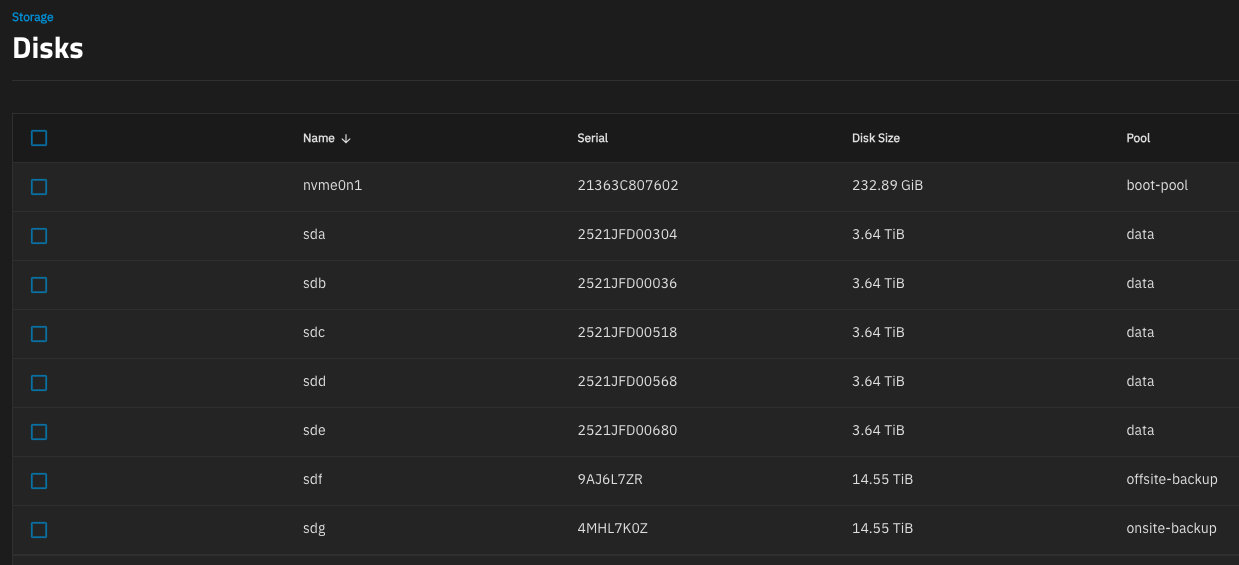
I’m happy to say that the combination of the StarTech eSATA controller and the StarTech eSATA enclosures I linked above did the trick - I can mount both disks, and they are showing their serial numbers:
This got me what I needed, so I can have two backup destinations connected at the same time. Thank you all for the guidance and help!
@Arwen - the StarTech enclosures are metal, although fanless. We’ll see how heat goes, and I can upgrade down the line to the other enclosures if finances and necessity allow / require it.
You can always get one of those external USB powered fans, and blow air across the disk chassis.
I do something similar for my miniature media server which has no fan. It gets hot when doing scrubs, which the fan helps mitigate. (One of the media storage devices is a 2TB laptop HDD.)

 Working at 5v instead of 12v will also reduce noise