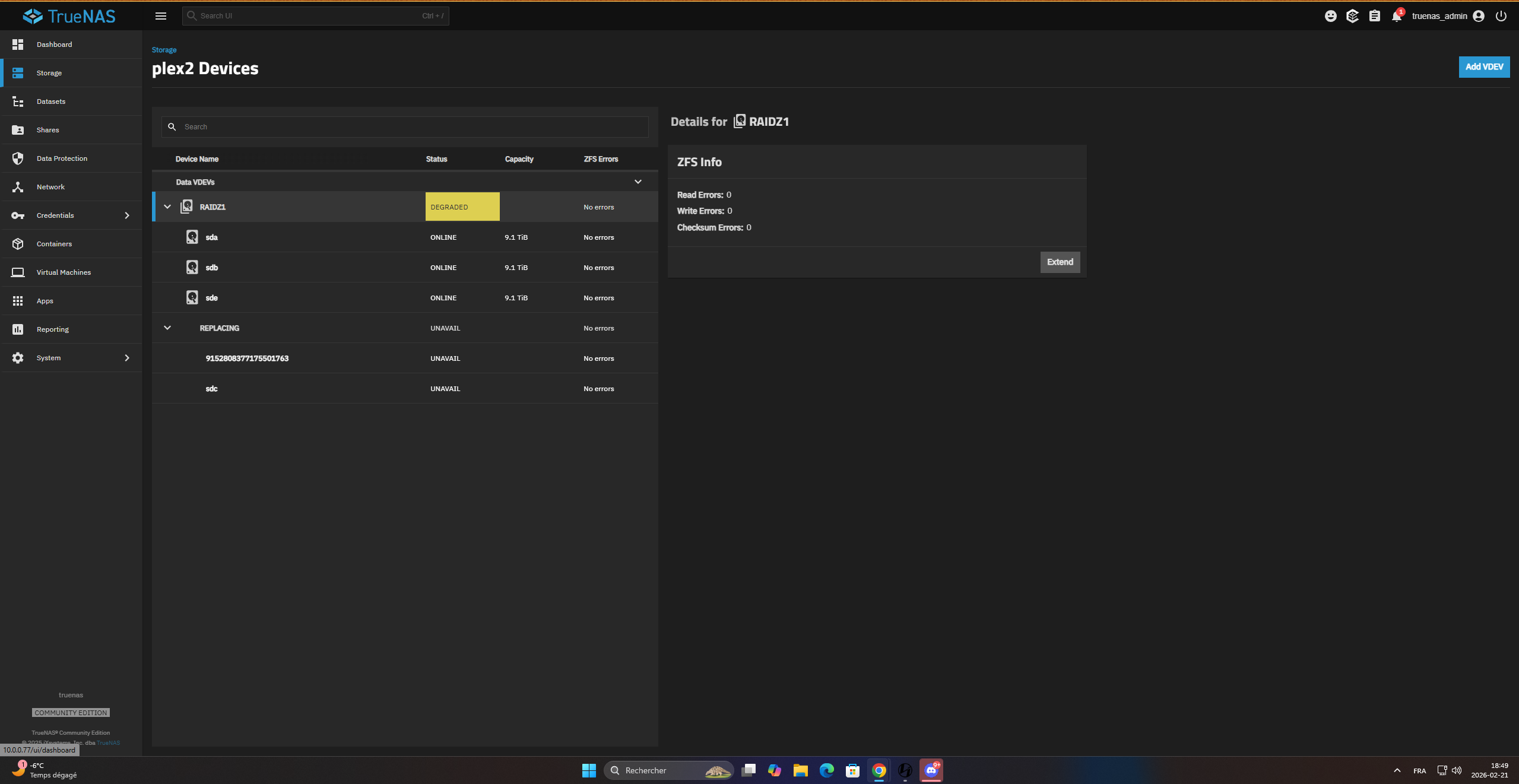
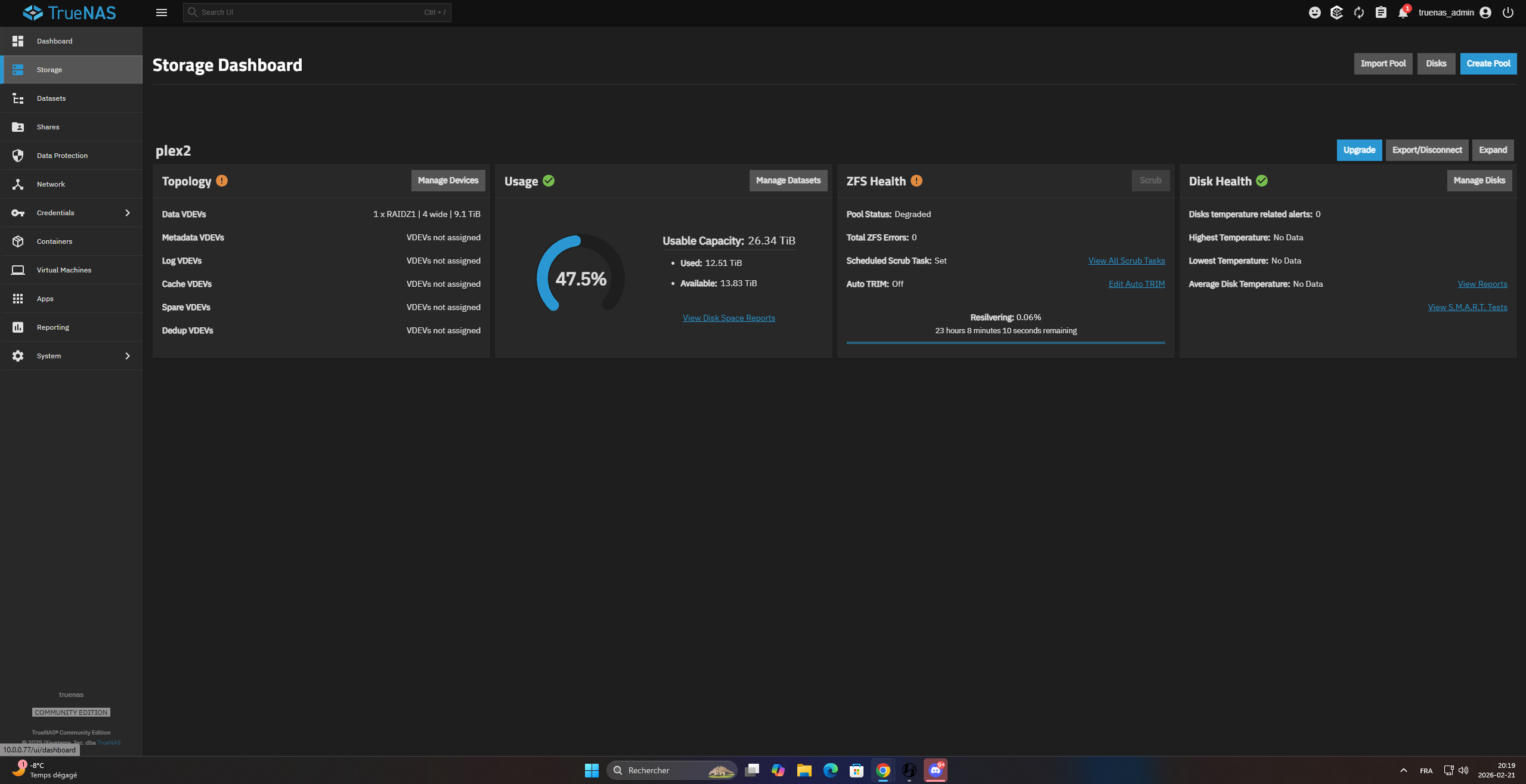
It will take a while depending on how much data is there.
You should run the following and post back the results using Preformatted Text mode (</>) or Ctrl+e on the toolbar. Each in their own Preformatted Text window. Use the pool names so we know what one you are talking about. Check all the drive model numbers to make sure they are CMR and not SMR types. sudo zpool status -v sudo zpool import
Just let it keep going. The percent done is an estimate by the software. How much data did this pool have? Your drives have to read and write all that data to do the replace.
What pool is getting resilvered? Is this the WD Red Pros or the WD Blacks?
icheck reporting and no HDD working . all hdd is 0b/s max . the second pool WD black i try resilver .i found 0 10tb black .. wd give me a 12tb red pro. i know the 12tb go down to 10Tb.
the shell does not work. I can type the command but it says nothing, as if the system is not responding. I don’t have access to the dashboard or anything else. nothing really answers. an infinite loading loop
i think i need reboot the system. nothing work. the hdd do anything
Linux truenas 6.12.15-production+truenas #1 SMP PREEMPT_DYNAMIC Wed Oct 29 14:40:06 UTC 2025 x86_64
    TrueNAS (c) 2009-2025, iXsystems, Inc. dba TrueNAS
    All rights reserved.
    TrueNAS code is released under the LGPLv3 and GPLv3 licenses with some
    source files copyrighted by (c) iXsystems, Inc. All other components
    are released under their own respective licenses.

    For more information, documentation, help or support, go here:
    http://truenas.com

Linux truenas 6.12.15-production+truenas #1 SMP PREEMPT_DYNAMIC Wed Oct 29 14:40:06 UTC 2025 x86_64

        TrueNAS (c) 2009-2025, iXsystems, Inc. dba TrueNAS
        All rights reserved.
        TrueNAS code is released under the LGPLv3 and GPLv3 licenses with some
        source files copyrighted by (c) iXsystems, Inc. All other components
        are released under their own respective licenses.

        For more information, documentation, help or support, go here:
        http://truenas.com

Warning: the supported mechanisms for making configuration changes
are the TrueNAS WebUI, CLI, and API exclusively. ALL OTHERS ARE
NOT SUPPORTED AND WILL RESULT IN UNDEFINED BEHAVIOR AND MAY
RESULT IN SYSTEM FAILURE.

Welcome to TrueNAS
Last login: Sat Feb 21 17:41:44 EST 2026 on pts/4
truenas_admin@truenas[~]$ sudo zpool status -v

[sudo] password for truenas_admin:
^[[A^[[A^[[B^[[B
plex1 the hdd is connected but not shoing here ( Wd Red Pro )
Linux truenas 6.12.15-production+truenas #1 SMP PREEMPT_DYNAMIC Wed Oct 29 14:40:06 UTC 2025 x86_64
    TrueNAS (c) 2009-2025, iXsystems, Inc. dba TrueNAS
    All rights reserved.
    TrueNAS code is released under the LGPLv3 and GPLv3 licenses with some
    source files copyrighted by (c) iXsystems, Inc. All other components
    are released under their own respective licenses.

    For more information, documentation, help or support, go here:
    http://truenas.com
Warning: the supported mechanisms for making configuration changes
are the TrueNAS WebUI, CLI, and API exclusively. ALL OTHERS ARE
NOT SUPPORTED AND WILL RESULT IN UNDEFINED BEHAVIOR AND MAY
RESULT IN SYSTEM FAILURE.
Welcome to TrueNAS
Last login: Sat Feb 21 18:42:38 EST 2026 on pts/0
truenas_admin@truenas[~]$ sudo zpool status -v
[sudo] password for truenas_admin:
pool: boot-pool
state: ONLINE
scan: scrub repaired 0B in 00:00:05 with 0 errors on Sat Feb 14 03:45:07 2026
config:
    NAME         STATE     READ WRITE CKSUM
    boot-pool    ONLINE       0     0     0
      nvme0n1p3  ONLINE       0     0     0
errors: No known data errors
pool: plex2
state: DEGRADED
scan: scrub repaired 8.33G in 06:50:54 with 0 errors on Tue Jan 27 17:08:42 2026
config:
Linux truenas 6.12.15-production+truenas #1 SMP PREEMPT_DYNAMIC Wed Oct 29 14:40:06 UTC 2025 x86_64
    TrueNAS (c) 2009-2025, iXsystems, Inc. dba TrueNAS
    All rights reserved.
    TrueNAS code is released under the LGPLv3 and GPLv3 licenses with some
    source files copyrighted by (c) iXsystems, Inc. All other components
    are released under their own respective licenses.

    For more information, documentation, help or support, go here:
    http://truenas.com
Warning: the supported mechanisms for making configuration changes
are the TrueNAS WebUI, CLI, and API exclusively. ALL OTHERS ARE
NOT SUPPORTED AND WILL RESULT IN UNDEFINED BEHAVIOR AND MAY
RESULT IN SYSTEM FAILURE.
Welcome to TrueNAS
Last login: Sat Feb 21 18:43:44 EST 2026 on pts/1
truenas_admin@truenas[~]$ sudo zpool import
[sudo] password for truenas_admin:
pool: Plex
id: 3790003645163348177
state: FAULTED
status: One or more devices contains corrupted data.
action: The pool cannot be imported due to damaged devices or data.
The pool may be active on another system, but can be imported using
the ‘-f’ flag.
see: Message ID: ZFS-8000-5E — OpenZFS documentation
config:
Are you seeing activity on Plex2 with the drive replacement?
You can try running and posting the following to try to sort out the current drives in the system. I can’t quite tell if your newest drive is working or not. I don’t know if the Replace is working.
Warning: the supported mechanisms for making configuration changesare the TrueNAS WebUI, CLI, and API exclusively. ALL OTHERS ARENOT SUPPORTED AND WILL RESULT IN UNDEFINED BEHAVIOR AND MAYRESULT IN SYSTEM FAILURE.

Welcome to TrueNASLast login: Sat Feb 21 18:47:50 EST 2026 on pts/2truenas_admin@truenas[~]$ sudo lsblk -bo NAME,LABEL,VENDOR,MODEL,SERIAL,PARTUUID,START,SIZE,PARTTYPENAME
password for truenas_admin:NAME        LABEL     VENDOR   MODEL                 SERIAL           PARTUUID                               START           SIZE PARTTYPENAME
sda                   ATA      WDC WD101FZBX-00ATAA0 VH0E5T8M                                                      10000831348736
└─sda1      plex2                                                     af680dce-2b95-47cf-9d81-e60d5a4ee262    2048  9998683865088 Solaris /usr & Apple ZFS
sdb                   ATA      WDC WD101FZBX-00ATAA0 VCKKP3KP                                                      10000831348736
└─sdb1      plex2                                                     8b7e8bf9-7e0d-46dd-baa8-035f333b4989    2048  9998683865088 Solaris /usr & Apple ZFS
sdc                   ATA      WDC WD122KFBX-68CCHN0 WD-B0033KVD                                                   12000138625024
└─sdc1      plex2                                                     764270ef-0d2b-499d-b777-1a63a8604903    2048  9998683865088 Solaris /usr & Apple ZFS
sdd                   ATA      WDC WD181KFGX-68CKWN0 T0G15NAF                                                      18000207937536
└─sdd1      Plex                                                      2cba833f-590b-4bde-ac23-8a0aef2091d8    2048 17998060453888 Solaris /usr & Apple ZFS
sde                   ATA      WDC WD101FZBX-00ATAA0 VHG0PPTM                                                      10000831348736
└─sde1      plex2                                                     9b7fa2b5-ca08-4d1c-a7a8-0a56777184fa    2048  9998683865088 Solaris /usr & Apple ZFS
sdf                   ATA      WDC WD181KFGX-68CKWN0 T0G16SEF                                                      18000207937536
└─sdf1      Plex                                                      4b7c958e-0150-4f33-b096-9143a7c9a4c5    2048 17998060453888 Solaris /usr & Apple ZFS
sdg                   ATA      WDC WD181KFGX-68CKWN0 T0G0XXDF                                                      18000207937536
└─sdg1      Plex                                                      f34516c8-ec38-4092-8a64-b662445f7844    2048 17998060453888 Solaris /usr & Apple ZFS
sdh                   ATA      WDC WD181KFGX-68CKWN0 PNG2R10P                                                      18000207937536
nvme0n1                        KINGSTON SNV3S1000G   50026B7785D2F49E                                               1000204886016
├─nvme0n1p1                                                           35d0aa8d-7d2a-438c-8aae-80e5d7de9458    4096        1048576 BIOS boot
├─nvme0n1p2 EFI                                                       98c36892-feb0-475c-ba4f-bcaad8cbed78    6144      536870912 EFI System
└─nvme0n1p3 boot-pool                                                 f4d96083-9f94-4107-b3e1-4110036971ff 1054720   999664852480 Solaris /usr & Apple ZFStruenas_admin@truenas[~]$
Warning: the supported mechanisms for making configuration changesare the TrueNAS WebUI, CLI, and API exclusively. ALL OTHERS ARENOT SUPPORTED AND WILL RESULT IN UNDEFINED BEHAVIOR AND MAYRESULT IN SYSTEM FAILURE.

Welcome to TrueNASLast login: Sat Feb 21 18:47:50 EST 2026 on pts/2truenas_admin@truenas[~]$ sudo lsblk -bo NAME,LABEL,VENDOR,MODEL,SERIAL,PARTUUID,START,SIZE,PARTTYPENAME[sudo] password for truenas_admin:NAME        LABEL     VENDOR   MODEL                 SERIAL           PARTUUID                               START           SIZE PARTTYPENAMEsda                   ATA      WDC WD101FZBX-00ATAA0 VH0E5T8M                                                      10000831348736└─sda1      plex2                                                     af680dce-2b95-47cf-9d81-e60d5a4ee262    2048  9998683865088 Solaris /usr & Apple ZFSsdb                   ATA      WDC WD101FZBX-00ATAA0 VCKKP3KP                                                      10000831348736└─sdb1      plex2                                                     8b7e8bf9-7e0d-46dd-baa8-035f333b4989    2048  9998683865088 Solaris /usr & Apple ZFSsdc                   ATA      WDC WD122KFBX-68CCHN0 WD-B0033KVD                                                   12000138625024└─sdc1      plex2                                                     764270ef-0d2b-499d-b777-1a63a8604903    2048  9998683865088 Solaris /usr & Apple ZFSsdd                   ATA      WDC WD181KFGX-68CKWN0 T0G15NAF                                                      18000207937536└─sdd1      Plex                                                      2cba833f-590b-4bde-ac23-8a0aef2091d8    2048 17998060453888 Solaris /usr & Apple ZFSsde                   ATA      WDC WD101FZBX-00ATAA0 VHG0PPTM                                                      10000831348736└─sde1      plex2                                                     9b7fa2b5-ca08-4d1c-a7a8-0a56777184fa    2048  9998683865088 Solaris /usr & Apple ZFSsdf                   ATA      WDC WD181KFGX-68CKWN0 T0G16SEF                                                      18000207937536└─sdf1      Plex                                                      4b7c958e-0150-4f33-b096-9143a7c9a4c5    2048 17998060453888 Solaris /usr & Apple ZFSsdg                   ATA      WDC WD181KFGX-68CKWN0 T0G0XXDF                                                      18000207937536└─sdg1      Plex                                                      f34516c8-ec38-4092-8a64-b662445f7844    2048 17998060453888 Solaris /usr & Apple ZFSsdh                   ATA      WDC WD181KFGX-68CKWN0 PNG2R10P                                                      18000207937536nvme0n1                        KINGSTON SNV3S1000G   50026B7785D2F49E                                               1000204886016├─nvme0n1p1                                                           35d0aa8d-7d2a-438c-8aae-80e5d7de9458    4096        1048576 BIOS boot├─nvme0n1p2 EFI                                                       98c36892-feb0-475c-ba4f-bcaad8cbed78    6144      536870912 EFI System└─nvme0n1p3 boot-pool                                                 f4d96083-9f94-4107-b3e1-4110036971ff 1054720   999664852480 Solaris /usr & Apple ZFStruenas_admin@truenas[~]$
You might have grabbed too much with the copy & paste and it didn’t format correctly.
Try powering down and checking the cables. Make sure to track all drives by serial numbers as device names can change between reboots. SDA can be SDB the next boot.
Did the problem drives from both pools share power or cables? It’s a bit odd to have two failures and then a problem with a replacment drive right away again. You might have bad power or data cables to the drives.
If your pool is up, even if degraded, I would make backups, if possible. You can’t have any other drives go down with Raid-Z1.
I can disconnect the plex wd red pro hdds to try to fix the plex2 problem to start. do the replacement and resilver it and then we can take care of plex (wd red pro). I have 3 HDDs to connect to 1 cable (3 red pro plex)
I then have 5 HDDs connected to the 2nd cable available on my psu. the server has been running like this for a long time without any problem, maybe 1 year.
should we try that?
and yes the HDDs are identified with the serial number on the side
I would just wait for the resilver and get Plex2 to 100% health. You will have to work through if you have power or data cable problems. It could also be a HBA, if you have one of those.
I don’t think you posted a full description of your hardware, os version and the layout of all the pools and how they connect.