
I just wanted to let you know that I have found quite an elegant workaround to get all S.M.A.R.T. data from my drives in the D4-320. Unfortunately the TrueNAS UI does not work with it, but since the AS285CM chips do transmit the data passthrough, I came to the idee to install Netdata as a container to visualize all SMART datapoints … and it all works pretty well.
2 Likes
Changing the fan profile to “HeavyIO” IIRC helped that quite a bit. There is a minor warning on the drive validation page about fully loaded systems and 7200rpm/hot drives. Helium filled ones were better, but yeah, the XL could get quite warm. I prefer my drives under 40C personally.
SMART itself is changing in 25.10 as well, getting integrated with the general “Drive Health” - would be interested in seeing the fix/workaround in case it’s something we’ll need to consider. Scrutiny is also a good app for pulling SMART data, does it speak with your D4-320?
1 Like
All I did is:
- generate a conf file under /etc/smartd.conf.d that contains my devices by id (/dev/disk/by-id/usb-TerraMas_TDAS_ZR52T7JQ-0:0 -d sat -a -o on -S on -s (S/…/…/./02)) (it should work with /dev/sdb/ -d sat -a -o on -S on -s (S/…/…/./02) )
- Then install the standard netdata app, activate the smart option and map the devices that I want to monitor (host device /dev/sdb => container device /host/dev/sdb
- Last thing is to create the following config file for the netdata SMART module inside the netdata container.
cat >/etc/netdata/go.d/smartctl.conf <<'EOF'
jobs:
  - name: das-drives
    update_every: 30
    scan_every: 0
    no_check_power_mode: standby
    extra_devices:
      - name: /host/dev/sda
        type: sat
      - name: /host/dev/sdb
        type: sat
      - name: /host/dev/sdc
        type: sat
      - name: /host/dev/sdd
        type: sat
      - name: /host/dev/sde
        type: sat
EOF
I would prefer to have this out of the box in TrueNAS because it is a lot of attributes that are monitored and a workaround, but its is working relly nicely as you can see.
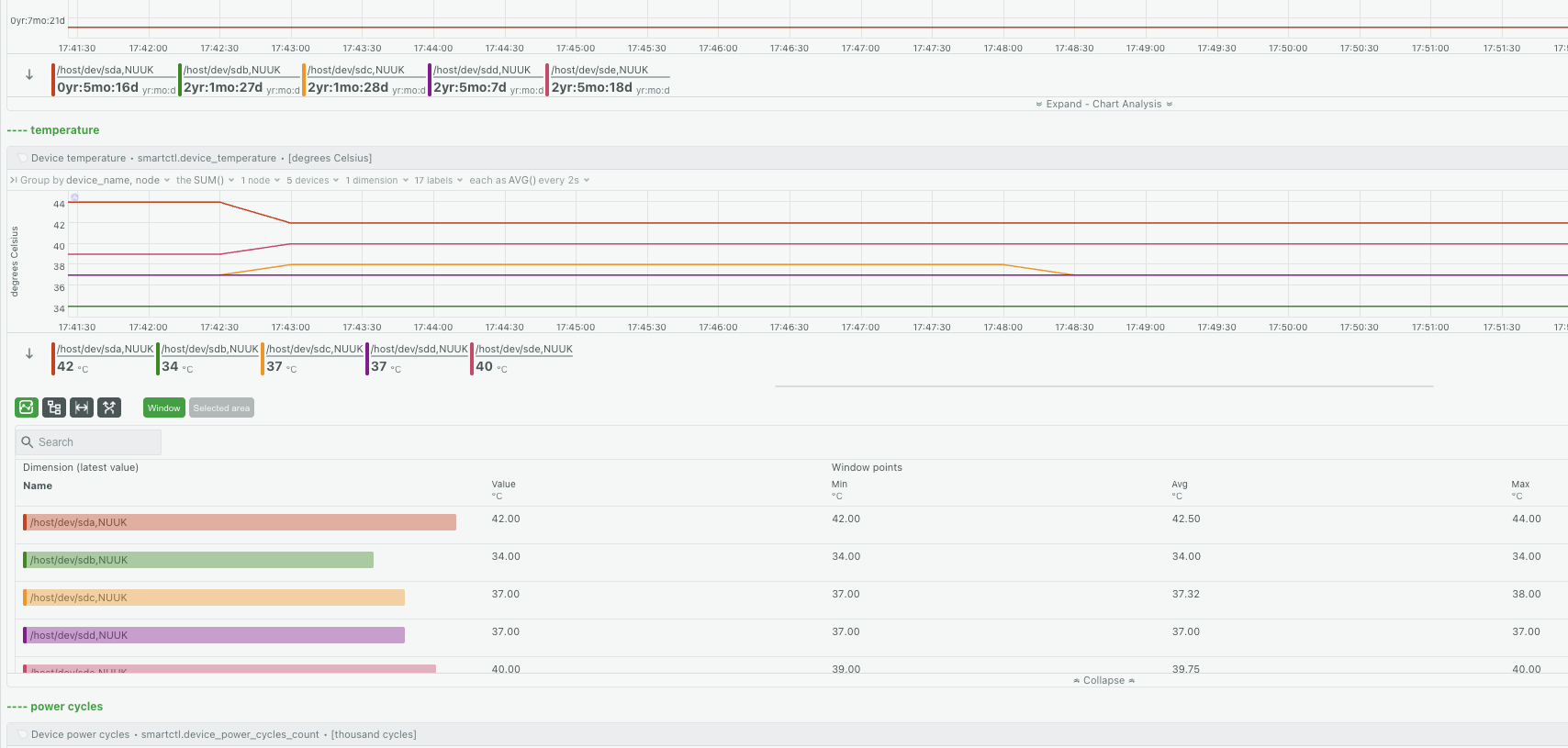
PS: I am on 25.10 RC1 already (not playing with the daily builds though  )
)
PPS: Just tried out Scrutiny, thank you, it works! something like this is a much better approach.
2 Likes
This is likely why TrueNAS GUI / middleware does not gather any SMART data from the enclosure.
Their are several USB to SATA adapter chips that will pass SMART data, but almost all require the user to figure out what options to use for the command line of smartd.
I will let iX speak on how SMART is run with TrueNAS CE. But, my guess is without device parameters.
This is exactly why I’m looking into this Terramaster D4 enclosure. I currently run 4x 2TB drives in a Jonsbo N1 enclosure with an external usb connected 4TB drive for snapshot replication.
Swapping the 2TB drives for 4TB drives, moving the 2TB to the TM D4 I think allows me easier (and sturdier) backup of snapshots, as well as swapping actual back drives to rotate with a off-site stored drive .
1 Like
HI all,
I’m still running fine on the TerraMaster D4-320 off a Beelink Ryzen mini PC. We’re still running fine. Yes, the temps don’t show in the GUI on 24.04. I’m running a script and just didn’t notice it. Otherwise, no problems. I have Plex, Jellyfin, and FileFlows doing transcoding using the Ryzen chip. I have two NVME m.2 in the beelink where I have a mirror set up for transcoding and app storage. I use an external NVME m.2 in a USB enclosure for a boot device. TrueNAS mentions this to me: " Warning
‘boot-pool’ is consuming USB devices ‘sda’ which is not recommended."
This is OK by me.
I did pick up a TERRAMASTER D5-310 HDD Enclosure 5Bay
which I put on another PC. It works fine too. It has a “Single” swtich. This case is aluminum and very solid. Still no temps in the TrueNAS GUI though.
I installed Proxmox on the host PC and put TrueNAS 25.10 on a VM. I passed the drives down to TrueNAS by serial numbers, and it too works fine (AFAIK). Proxmox monitors the SMART and temps and sends notifications. I at first tried to pass down the D5-310 USB interface, but that did not work whatsoever. Many errors from TrueNAS. Passing the drives down by SN is what works.
I also have a Broadcomm HBA with a few SSDs on it. I passed the HBA to TrueNAS and it too didn’t show SMART and temps. Everything else works fine on TrueNAS. Here too, I can go back to not passing the HBA and instead passing drives by serial numbers and letting Proxmox manage the SMART.
I wanted to run Proxmox just to be cool. Well I’m not cool, but I’m having fun!
I have another mini system I’m going to set up with just TrueNAS on it. And I’ll attach the D5-310 to it. We’ll see how it goes.
L8r
2 Likes