Documentation to use the API still needed!

I feel super dumb trying to use the API, yeah the new one: TrueNAS Websocket Documentation

I don’t want to mention how many years I spent coding and using APIs, I’d be even more ashamed.

Seriously, I thought it’d be a 10mn think to start using the API and consolidate an Infra As Code base.

I can’t understand how to read its documentation. It only shows an exemple of connection, and the link to: TrueNAS uses DDP: meteor/packages/ddp/DDP.md at devel · meteor/meteor · GitHub, which isn’t helpful at all.
I can only find few examples on the forum, AI is wrong wrong wrong, I’m stuck.

I’m using midctl hoping for a no-auth quick start:
Shouldn’t this be working?

midclt call pool.snapshottask.query '[{"dataset": "tank/mydataset"}]'

I get a

[EINVAL] query-filters: Item#0 is not valid per list types: [query-filter] Not a list

As i understand it, this only outputs json formatted data. But I only use the API this way, which isn’t the best way.

Agreed, new API docs really could be better. Filters should be list of lists where each item is [key, op, value], possible keys and value types are in second column (or one could just call method without filters and look for anything useful in output), operations are =, !=, >, <

Example to find only enabled tasks for given ds:

midclt call pool.snapshottask.query \
  '[ ["dataset", "=", "pool/name"], ["enabled", "=", true] ]'
1 Like

Just to understand what we’re talking about here, are we referring to the “new” API docs meaning the 13.0 Websocket documentation linked in the first post?

Unfortunately, like the rest of CORE, there aren’t any planned changes to improve on the 13.0 API docs, beyond possible API updates in the case of a security fix.

On a positive note, the actual new API docs coming with 25.04 have been completely rewritten to, among other things, include more how-to content.

midclt call pool.snapshottask.query '[{"dataset": "tank/mydataset"}]'

No that shouldn’t work because {"dataset": "tank/mydataset"} is not a list.
midclt call pool.snapshottask.query '[["dataset", "=", "tank/mydataset"]]'
is a properly-formatted query-filter. We actually have pretty extensive documentation on how to use query-filters under ip of server/api/docs

https://www.truenas.com/docs/scale/24.10/api/scale_websocket_api.html
If you browse to bottom there’s a query-methods section.

We also give some hints about how to translate typical SQL-style syntax into query-filters and query-options via API.

1 Like

Thanks, that’s the proper section to be able to understand how to query the API.
It’s hard to find somehow, I would expect it to be the first section of the documentation

Sounds better that the actual presentation indeed.
Where is this available? Only if you install 25.04? I couldn’t find it on the TN website

It’s available through the 25.04 UI. I don’t know anything about plans for a public URL

2 Likes

FWIW, to lookup the new API Documentation (since v24.10)

https://api.truenas.com/

1 Like

Looks fantastic!

Not quite fantastic yet in fact.

I’m still almost totally unable to use the API with midclt, as there seems be not documentation and no examples about how it’s supposed to be used.

Yes, Contents — TrueNAS API v25.04.2 documentation is available, but good luck with this!

There are no example in this documentation, it feels it’s a pure technical representation of the EP available in the python library behind it.

NB: some working EP are not even in the API doc anymore, e.g. midclt call disk.temperature
Deprecation?

How on earth is it possible to use midclt call config.save ?
I get a ValueError: Pipe ‘output’ is not open
I know I’m supposed to provide an output, but HOW ?

25.04 was in a transitional phase on the backend between our old auto-generated API documentation and the new one. Hence, not all public API methods are documented. Look at 25.10 API documentation. If you review the documentation for 25.10 there is explicit example of how to generate a downloadable configuration from config.save in the section on middleware jobs.

Not everything is going to be achievable using the midclt command. That tool was initially developed for internal / developer purposes and is a thin shell wrapper around the python API client.

That said, I’m not sure what the point is of running the midclt command locally to save a config file. There’s already a cronjob writes config backups to the configured system dataset. The point of that endpoint is to use with the core.download method to generate a http path / token from which to download the config file remotely.

That said, I opened a ticket to improve documentation for API endpoints like this: Jira

Thanks @awalkerix
Contents — TrueNAS API v25.10.2 documentation is indeed a lot better in coverage at least.
As for the explicit example, I think it’s the same content as on v25.04 and honestly I don’t get it (yet!)

My idea as for using config.save is simply to trigger a config save and get the content from an external system.

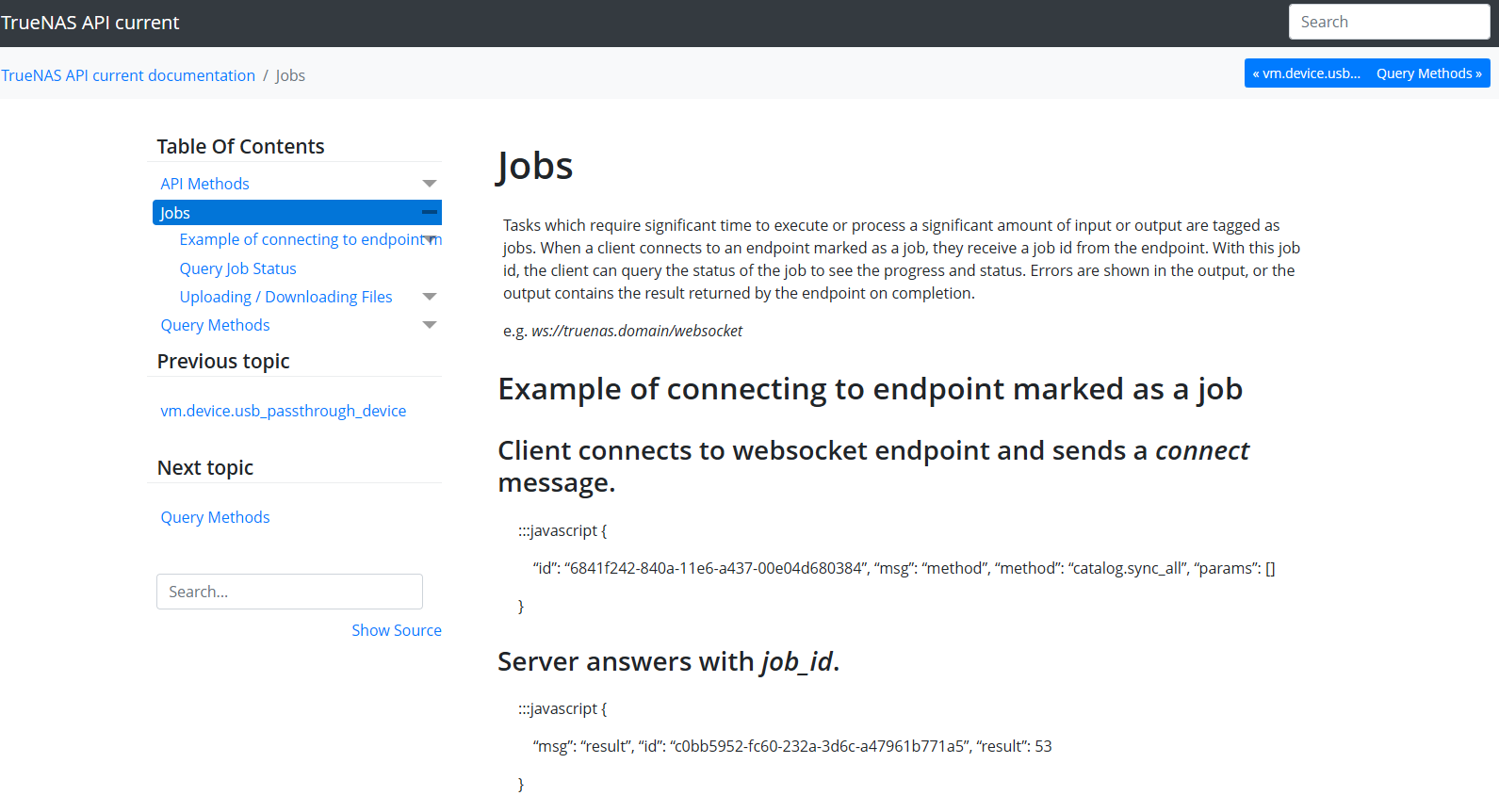
To do that you’ll want to use the python API client and not the midclt command. Jobs — TrueNAS API v25.10.2 documentation

1 Like

I took some help from gemini..

This works for me:

config_save.py
#!/usr/bin/env python3

"""TrueNAS Config Backup - WebSocket API core.download"""
import json
import ssl
import websocket
import requests
import time
from urllib3.exceptions import InsecureRequestWarning

# Suppress only the single warning from urllib3 needed.
requests.packages.urllib3.disable_warnings(category=InsecureRequestWarning)

# ------------------------- CONFIGURATION -------------------------
TRUENAS_HOST = ‘AA.BB.CC.DD
TRUENAS_API_KEY = ‘myapikey’

# Save config options
EXPORT_SECRET_SEED = True  # True = Include passwords/keys (Keep this safe!)
OUTPUT_FILENAME = f"truenas-config-{int(time.time())}.tar"

# WebSocket endpoint
WS_URL = f'wss://{TRUENAS_HOST}/api/current'
# ---------------------------------------------------------------------------

def send_and_receive(ws, method, params=None, msg_id=1):
    """Send JSON-RPC request and return response"""
    request = {
        "jsonrpc": "2.0",
        "id": msg_id,
        "method": method,
        "params": params or []
    }
    ws.send(json.dumps(request))
    response = json.loads(ws.recv())
    
    if "error" in response:
        raise Exception(f"API Error: {response['error']}")
    return response.get("result")

def download_file(url, output_path):
    """Downloads the file from the URL provided by core.download"""
    full_url = f"https://{TRUENAS_HOST}{url}"
    print(f"Downloading from: {full_url}")
    
    # We use verify=False to match the SSL_CERT_NONE behavior of the websocket
    try:
        response = requests.get(full_url, verify=False, stream=True)
        response.raise_for_status()
        
        with open(output_path, 'wb') as f:
            for chunk in response.iter_content(chunk_size=8192):
                f.write(chunk)
        print(f"File saved successfully: {output_path}")
    except Exception as e:
        print(f"HTTP Download failed: {e}")

def main():
    # SSL context (disable verification)
    ssl_context = ssl.create_default_context()
    ssl_context.check_hostname = False
    ssl_context.verify_mode = ssl.CERT_NONE

    ws = None
    try:
        # Connect to WebSocket
        ws = websocket.create_connection(
            WS_URL,
            sslopt={"context": ssl_context}
        )

        # Step 1: Authenticate
        print("Authenticating...")
        auth_result = send_and_receive(
            ws,
            "auth.login_with_api_key",
            [TRUENAS_API_KEY],
            msg_id=1
        )
        if not auth_result:
            raise Exception("Authentication failed")
        print("Authenticated successfully")

        # Step 2: Request Config Download via core.download
        print("Requesting config generation...")
        
        # core.download arguments:
        # 1. Method to call ("config.save")
        # 2. Arguments for that method ([{"secretseed": True}])
        # 3. Desired download filename (optional string)
        payload = [
            "config.save", 
            [{"secretseed": EXPORT_SECRET_SEED}], 
            OUTPUT_FILENAME
        ]

        # The result returns [job_id, download_url]
        download_info = send_and_receive(
            ws,
            "core.download",
            payload,
            msg_id=2
        )

        if not download_info or len(download_info) != 2:
            raise Exception("Failed to get download URL from API")

        job_id = download_info[0]
        download_url = download_info[1]

        print(f"Config generated (Job ID: {job_id})")

        # Step 3: Perform the HTTP download
        # core.download generates a one-time URL (usually /_download/token...)
        download_file(download_url, OUTPUT_FILENAME)

    except Exception as e:
        print(f"Error: {e}")
    finally:
        if ws:
            ws.close()

if __name__ == "__main__":
    main()

Nice! I got it working.
It still feels a little too complex for integration tasks to me though.
An Ansible module would be ideal to wrap-up this code and provide an easy to use task.

It doesn’t appear to make any use of the TrueNAS API client, which likely adds greatly to its complexity.

That’s right. It’s reimplementing a JSON RPC client in the script. If the truenas API client is used, it’d look something more like this:

from truenas_api_client import Client
import requests

with Client('wss://127.0.0.1/api/current', verify_ssl=False) as c:
    c.call('auth.login', 'root', 'awalker') # Don't actually hardcode cred!
    job_id, path = c.call('core.download', 'config.save', [{}], 'backup.db')
    resp = requests.get(f'https://127.0.0.1{path}', verify=False)
    assert resp.status_code == 200
    print(len(resp.content))  # do something with content downloaded

You’re downloading the actual tarball over http in that code and the import inside the main function is weird.

Fair points! It’s been a long week. :wink:

config_save2.py
#!/usr/bin/env python3
from datetime import datetime, UTC
import requests
from truenas_api_client import Client

# Configuration
HOST = 'host.domain.tld'
API_KEY = 'myapikey'
EXPORT_SECRET_SEED = True
FILENAME = f"truenas-config-{datetime.now(UTC).strftime('%Y%m%d-%H%M%S')}.tar"

def main():
    # 1. Connect
    with Client(f'wss://{HOST}/api/current', verify_ssl=True) as c:
        
        # 2. Authenticate
        c.call('auth.login_with_api_key', API_KEY)

        # 3. Request download link        
        job_id, path = c.call('core.download', 'config.save', [{'secretseed': EXPORT_SECRET_SEED}], FILENAME)

        # 4. Download file
        print(f"Downloading to {FILENAME}...")
        resp = requests.get(f"https://{HOST}{path}", verify=True)
        
        # 5. Save to disk
        with open(FILENAME, 'wb') as f:
            f.write(resp.content)
        
        print("Done.")

if __name__ == "__main__":
    main()