Hi everyone,
I’m having an issue with one of my disks. I’d love to confirm if it’s the disk or something else before going through the RMA process. I’d hate to mail it off and have them say “the drive is fine”, etc.
My system:
I have TrueNAS Core v13.0-U6.7 running on a Dell PowerEdge T320 with an H310 HBA SATA/SAS card flashed to IT mode. I’m booting from an SSD and have a ZFS2 pool of six 26 TB Seagate Exos ST26000NM000C drives (a refurb from ServerPartDeals). The SSD is plugged into the motherboard and the six drives are plugged into the HBA card.
This is my secondary NAS, used as a backup to my primary TrueNAS machine. This server has been off for over a month as I rearranged cabling, etc.
What happened:
Yesterday, after being shut off for over a month, I turned the system on. The web interface informed me drive 5 was “unavailable”. The alert said:
“Pool TrueNAS Clone state is DEGRADED: One or more devices could not be opened. Sufficient replicas exist for the pool to continue functioning in a degraded state. The following devices are not healthy. Disk ATA ST26000NM000C-3W ZXA0XXX is UNAVAILABLE”
What I’ve tried from the hardware side:
- Opened the Dell PowerEdge and re-seated all the HBA drive cables and all power connectors. No capacitors or components look suspicious.
- Swapped out the modular 750W power supply with a spare.
- Confirmed all other disks are operating fine. They pass all short S.M.A.R.T. tests
- Swapping disk 5 into the two spare drive bays on the NAS, with no change in the problem.
When the system boots, all the LEDs on the drive carriers initially flash normally. However, during this initial process, disk 5 stays on blinking away for an extended period of time, as if it’s having trouble accessing it.
The log shows this group repeated a few times:
Nov 16 15:14:09 truenas2 (da5:mps0:0:9:0): CAM status: SCSI Status Error
Nov 16 15:14:09 truenas2 (da5:mps0:0:9:0): SCSI status: Check Condition
Nov 16 15:14:09 truenas2 (da5:mps0:0:9:0): SCSI sense: ABORTED COMMAND asc:0,0 (No additional sense information)
Nov 16 15:14:09 truenas2 (da5:mps0:0:9:0): Error 5, Retries exhausted
Problems running S.M.A.R.T. on TrueNAS Web UI:
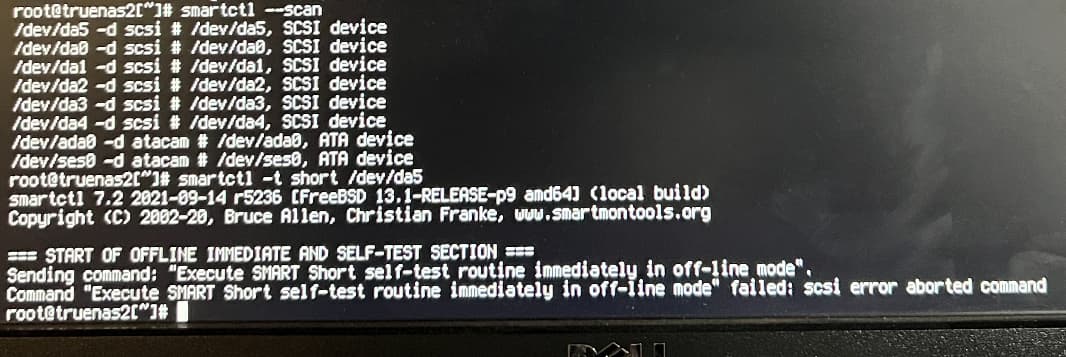
When attempting to run a S.M.A.R.T. test via the web UI on drive 5, short or long, I get the following:
“Sending command: “Execute SMART Short self-test routine immediately in off-line mode”. Command “Execute SMART Short self-test routine immediately in off-line mode” failed: scsi error aborted command”
I tried taking the drive offline and repeating all the S.M.A.R.T. tests and got the same error.
I then pulled drive 5 and plugged it into the SATA port on my PC. When the drive gets power I hear it struggling and it’ll even halt the BIOS boot process.
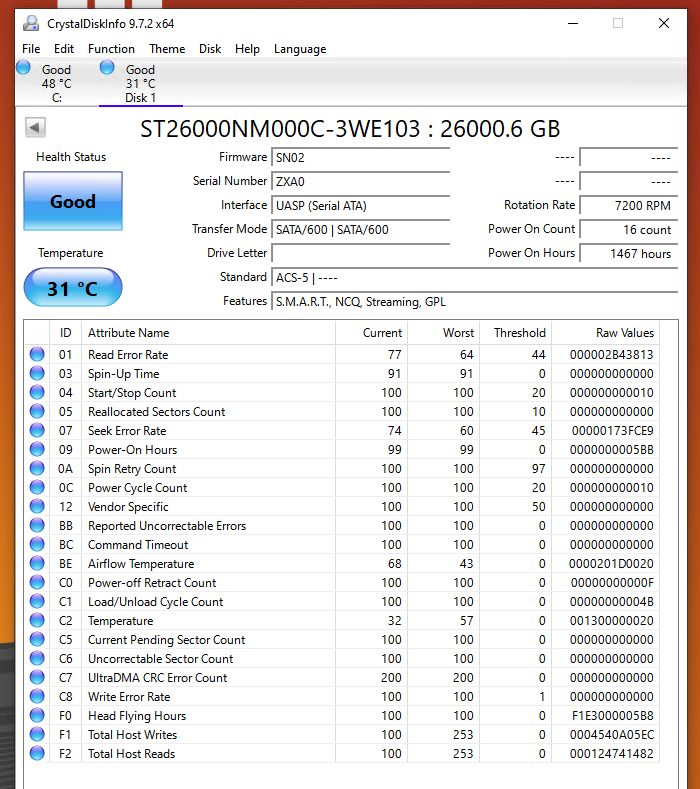
On Windows running CrystalDiskInfo says it’s “Healthy”. However, I also tried smartctl via the Windows command line, but I get an error “failed: input/output error” when trying short or long S.M.A.R.T. tests.
I haven’t tried a Linux system yet, but can try too. Here’s an image of the Windows CrystalDiskInfo report:
Is there anything else I should try before RMA’ing the drive?
This is the first disk issue I’ve had that wasn’t resolved by re-seating cables (back when I was using a custom tower), so I’m unsure if I’m missing anything. I’d be cautious to format the disk and using it again if it’s really problematic.
Any thoughts or ideas would be wonderful, thank you!
P.S. Apologies for any rich text formatting errors.
-Steve