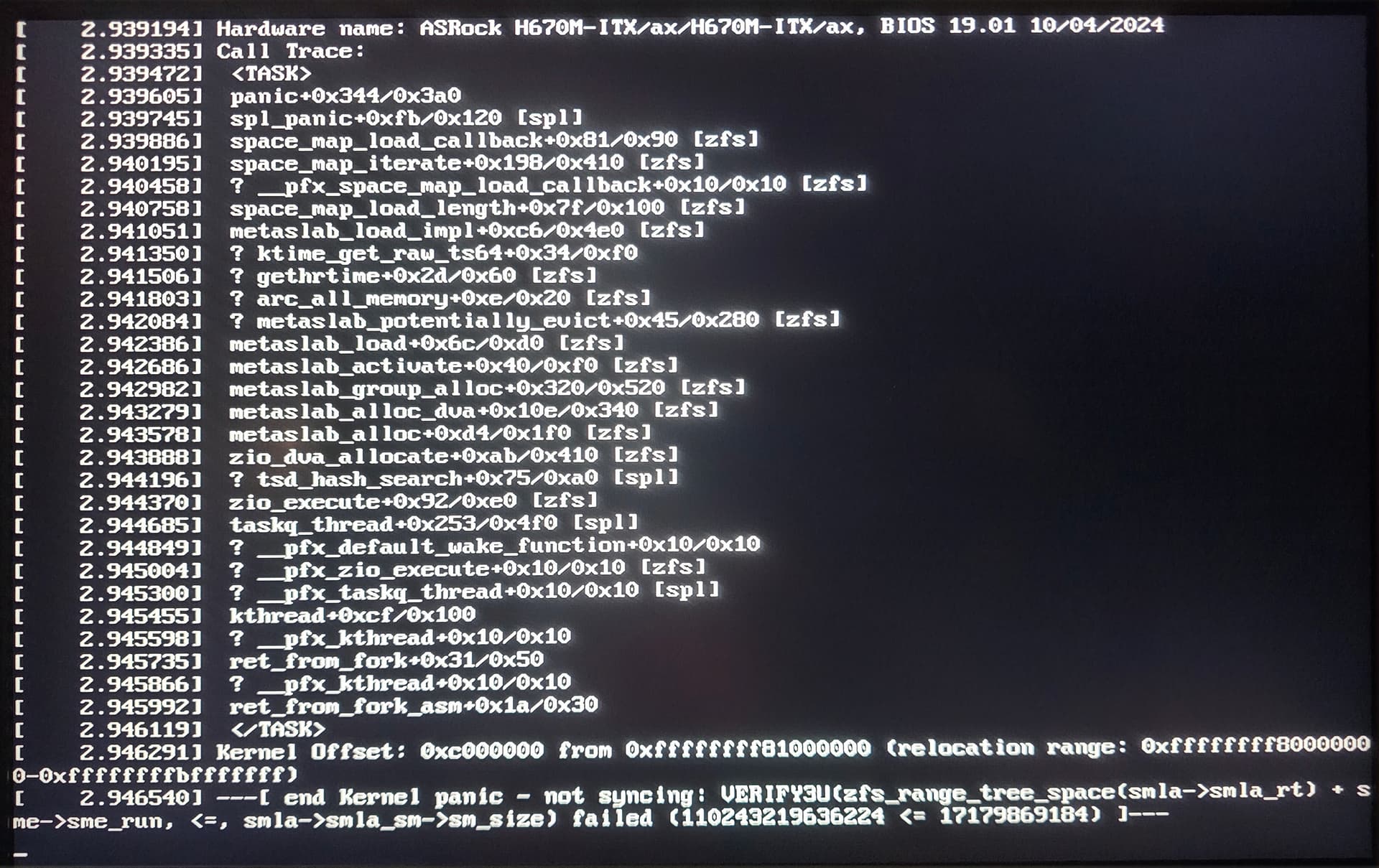
Hello all. Running TrueNAS SCALE. Recently my smart lights stopped responding and I checked HAOS which was not running. Restarted my server (power cycle) and it didn’t help. Plugged in a monitor, and I saw these odd error messages on the boot screen. Please forgive if it’s not enough info, I have no idea how to get any full logs if it won’t boot, or even scroll the screen up to see the full boot messages, but here’s what I have:
Kernel Panic.. not syncing… VERIFY3U something something “failed”? What is going on?
Has my SSD crashed possibly? It’s only a 2 year old WD drive that only has the OS on it I’m pretty sure.. I sure hope I can recover backups.. I sadly never really planned for this type of failure, I have backups of most apps/settings/VMs/my actual NAS storage, but I don’t know if I ever backed up my TrueNas OS itself. It would SUCK having to set everything up again.
Soon as I fix this it’s the first thing I’ll do. Thanks so much for any ideas/input. I have searched for the notable terms in my boot messages and found nothing helpful
Hardware:
ASRock H670m-ITX/ax
32GB Teamgroup (T-Create) RAM
1TB? WD SSD for OS
No GPU
Please let me know if there’s more information I should provide, and how to find it. Thank you
First thing I’d do is make at least a temporary clean boot drive (usb stick if you have to).
If it boots from the temp drive - then you have your answer; get a new boot drive & remember to backup the configuration periodically. If it doesn’t boot? Well, report back & we’ll go from there I guess…
Thank you so much I guess that makes sense. I guess I thought.. well I don’t know what else I thought it could be. I’ll try to boot from a USB drive. This is such a dumb noob question but to make a clean boot drive, that is different than the USB drive I used to install TrueNAS originally correct? Or is it the same thing. I guess I will look into this right now Just wanted to ask in case I have a hard time finding info. Thank you so much for answering
Fair question - the USB you originally used to install TrueNAS will still be used just for that; installing TrueNAS. Have a second USB or a drive of some sort ready & connected to install to.
Pay very close attention when installing - you don’t want to accidentally install on a disk containing your data.
That ok - we’re still not sure if it is something else we haven’t thought of yet. Maybe this’ll be crazy complicated, but hopefully it is just a failing boot drive.
That makes sense. I do have a spare USB HDD attached that was never really used for anything, (and probably a spare SSD around here..) I will try to install to one of those, then, and report back. Thank you again
I was able to install TrueNAS on the external drive and boot it up fine, had a weird issue briefly where going to the IP listed on my router for the server showed “invalid URL” and a big red X but, after a reboot it was fine. So I’m assuming that yes, the drive was bad :’(
It was a less than 1 year old Western Digital Black 2TB SN7100. I’m hoping I can get a warrantied replacement for it because that’s a sad, insanely low lifespan for a drive.. also I realize much too big for just the OS but I’m learning.
So will this be a problem as far as attaching my previous storage pool as it was? I hope that the backups I made of all of my storage where my dockge, HAOS VM and settings, and backups of old PCs are stored (and less importantly but still important, all of my media), will be able to be attached/imported.. last time I tried to add a drive to a fresh TrueNAS install it said I had to format the drives so I’m anxious.
I haven’t even tried to get that far yet tbh, just kind of worried about it and it’s 2:00 a.m. here so I will try to figure out how to add my 4x 4TB drives to the system again tomorrow.. then how to restore everything I had running before, if I get that far thank you!
If you used a SINGLE boot device, then a SINGLE bad block could cause no end of problems. So, the drive might be okay and just lost a block. The drive might even have thousands of spare blocks, they just do no immediate good if the data on the bad block can’t be recovered.
Drives can loose a single block to the point that internal error recovery is not possible. Thus, the Enterprise people use Mirrored boot devices. They simply don’t want to deal with these types of trivial problems.
I have two nvme slots on this PC, I planned to back up everything to an external drive occasionally, keep it as cold storage and use the other m.2 slot for something else for reasons I won’t bore with, regardless it’s irrelevant now, I will just use it for a backup system drive.
Now begins the process of searching the forum to find out how to attempt to recover this data :’)
Will report back if I can’t find something or when it’s failed or succeeded. Thank you
Alright, it was really much more straightforward than I thought, and VERY luckily, I had *actually* made a backup of my configuration.. in fact, I’m pretty sure it was just TrueNAS asking me to make a backup of my config before the update to 25.10, so thank you SO much TrueNAS for your excellent design! I also noticed I had a config backup saved on my phone from 4 days ago, when I posted this, I have no idea how because the server wasn’t working… I’m starting to wonder if there was another update that day that I forgot about doing.. weird. Anyway,
With that one backup and after importing the pool, I restored the users/credentials, HAOS VM, AND most importantly the painfully, miserably difficult to set up Dockge apps for my Arr stack/Jellyfin server (I did back up the compose file to Google Keep as a note now), also Pihole (which never worked anyway) and Nginx proxy for my Jellyfin. Very, very happy. Thank you so much.
Last issue is to figure out how to try to “fix” the previous SSD, see if it’s actually gone bad. No idea how to try to read the data, or restore it IF there was anything besides TrueNAS on it.. I don’t know if there was/if that’s even possible.. which makes me question why I spent $150 on a 2TB “gaming” drive just for the OS, but. I’ll figure it out. Thank you
It could be as simply as a single bad block & just needs a clean install. Could be something else entirely
I remember I had an ssd that after years of service was no longer detected in any system, so I decided to probe it & found no shorts. After desolering the controller & the NAND, reballing, and soldering back - success! It was finally detected… with 0 bytes of available storage; turns out I soldered the NAND in the wrong orientation & killed it, important lesson learned.
Hopefully your issue was just a single corrupt file & the drive can be put into service.



 I guess that makes sense. I guess I thought.. well I don’t know what else I thought it could be. I’ll try to boot from a USB drive. This is such a dumb noob question but to make a clean boot drive, that is different than the USB drive I used to install TrueNAS originally correct? Or is it the same thing. I guess I will look into this right now Just wanted to ask in case I have a hard time finding info. Thank you so much for answering
 thank you!