[EFAULT] Failed 'up' action for 'mealie' app. - Also unable to install new apps

Got a fun one.

So I upgraded Mealie to 1.5.6 just now and the app suddenly wont start, gives the following error:

[EFAULT] Failed 'up' action for 'mealie' app. Please check /var/log/app_lifecycle.log for more details

Which I have done so and got the following output from lifecycle log:

[2025/08/14 12:36:48] (ERROR) app_lifecycle.compose_action():56 - Failed 'up' action for 'mealie' app:  Network ix-mealie_default  Creating
 Network ix-mealie_default  Created
 Container ix-mealie-permissions-1  Creating
time="2025-08-14T12:36:43+01:00" level=warning msg="config `uid`, `gid` and `mode` are not supported, they will be ignored"
 Container ix-mealie-permissions-1  Created
 Container ix-mealie-postgres_upgrade-1  Creating
 Container ix-mealie-postgres_upgrade-1  Created
 Container ix-mealie-postgres-1  Creating
 Container ix-mealie-postgres-1  Created
 Container ix-mealie-mealie-1  Creating
 Container ix-mealie-mealie-1  Created
 Container ix-mealie-permissions-1  Starting
 Container ix-mealie-permissions-1  Started
 Container ix-mealie-permissions-1  Waiting
 Container ix-mealie-permissions-1  Exited
 Container ix-mealie-postgres_upgrade-1  Starting
 Container ix-mealie-postgres_upgrade-1  Started
 Container ix-mealie-postgres_upgrade-1  Waiting
 Container ix-mealie-permissions-1  Waiting
 Container ix-mealie-postgres_upgrade-1  Exited
 Container ix-mealie-permissions-1  Exited
 Container ix-mealie-postgres-1  Starting
 Container ix-mealie-postgres-1  Started
 Container ix-mealie-permissions-1  Waiting
 Container ix-mealie-postgres-1  Waiting
 Container ix-mealie-permissions-1  Exited
 Container ix-mealie-postgres-1  Error
dependency failed to start: container ix-mealie-postgres-1 is unhealthy

Which as you can see gives me little to no information on what is actually wrong - nothing in TrueNAS config has changed for over 5 years, I did have a pending system update which I’ve now completed from 24.10.2.2 to 2.4.

This error seems prelavent across the entire app catalogue as I can no longer install apps either

Anyone got any ideas on how I can resurrect Mealie and the ability to install apps?

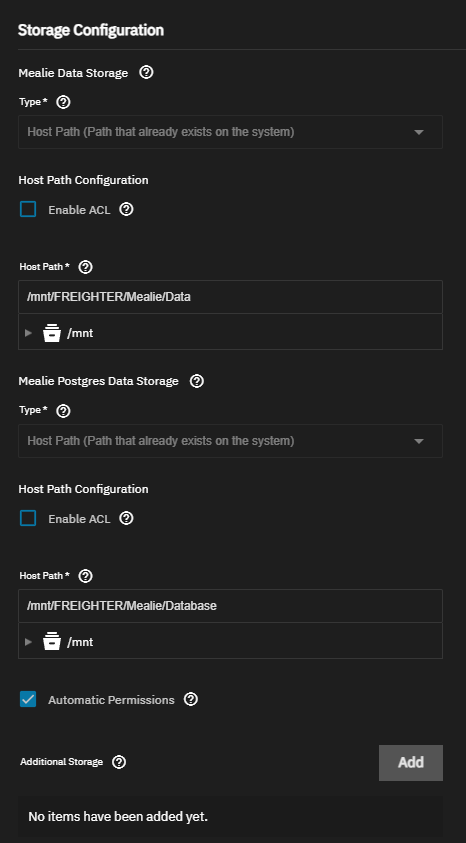
Is it installed using ixVolumes or host path datasets? The error suggests a permissions problem on the Postgres storage

It’s setup for host path datasets - but the apps have been running for a fair while with no issues. Why would it suddenly not have the right permissions on a dataset?

Immich is the only app that I can launch without any errors - the datasets are all using the same setup just one unique for each app.

sorry for the multiple deletes, phone did NOT like replying to you

I’m not sure. That is a little odd.
Let’s see if that’s the issue first though. The postgres dataset should be owned by 999:999 or the Automatic Permissions option should be selected for Postgres in the app configuration.

So I cant embed an image for whatever reason BUT auto perms are on.

For future reference, in order to post pictures you have to take the tutorial by @TrueNAS-Bot

Send a PM to TrueNAS-BOT containing the following

@truenas-bot start tutorial

Hi! To find out what I can do, say @truenas-bot display help.

Y’know, I thought I’d finished it but I clearly didnt!

Thanks for the heads up :slight_smile:

As previously mentioned - auto perms are active :slight_smile:

What are the actual permissions though?

What information do you need? Auto perms are on so it should just chown anything it needs to and then run as it needs to within the container?

Relised I never posted the up error in full:

 Error: Traceback (most recent call last):
  File "/usr/lib/python3/dist-packages/middlewared/job.py", line 509, in run
    await self.future
  File "/usr/lib/python3/dist-packages/middlewared/job.py", line 556, in __run_body
    rv = await self.middleware.run_in_thread(self.method, *args)
         ^^^^^^^^^^^^^^^^^^^^^^^^^^^^^^^^^^^^^^^^^^^^^^^^^^^^^^^
  File "/usr/lib/python3/dist-packages/middlewared/main.py", line 1367, in run_in_thread
    return await self.run_in_executor(io_thread_pool_executor, method, *args, **kwargs)
           ^^^^^^^^^^^^^^^^^^^^^^^^^^^^^^^^^^^^^^^^^^^^^^^^^^^^^^^^^^^^^^^^^^^^^^^^^^^^
  File "/usr/lib/python3/dist-packages/middlewared/main.py", line 1364, in run_in_executor
    return await loop.run_in_executor(pool, functools.partial(method, *args, **kwargs))
           ^^^^^^^^^^^^^^^^^^^^^^^^^^^^^^^^^^^^^^^^^^^^^^^^^^^^^^^^^^^^^^^^^^^^^^^^^^^^
  File "/usr/lib/python3.11/concurrent/futures/thread.py", line 58, in run
    result = self.fn(*self.args, **self.kwargs)
             ^^^^^^^^^^^^^^^^^^^^^^^^^^^^^^^^^^
  File "/usr/lib/python3/dist-packages/middlewared/schema/processor.py", line 183, in nf
    return func(*args, **kwargs)
           ^^^^^^^^^^^^^^^^^^^^^
  File "/usr/lib/python3/dist-packages/middlewared/schema/processor.py", line 55, in nf
    res = f(*args, **kwargs)
          ^^^^^^^^^^^^^^^^^^
  File "/usr/lib/python3/dist-packages/middlewared/plugins/apps/app_scale.py", line 51, in start
    compose_action(app_name, app_config['version'], 'up', force_recreate=True, remove_orphans=True)
  File "/usr/lib/python3/dist-packages/middlewared/plugins/apps/compose_utils.py", line 61, in compose_action
    raise CallError(err_msg)
middlewared.service_exception.CallError: [EFAULT] Failed 'up' action for 'mealie' app. Please check /var/log/app_lifecycle.log for more details

I get similar errors when trying to install other apps - I’ve tried on two different hosts - one of which was never utilising app containers.

 Error: Traceback (most recent call last):
  File "/usr/lib/python3/dist-packages/middlewared/job.py", line 509, in run
    await self.future
  File "/usr/lib/python3/dist-packages/middlewared/job.py", line 556, in __run_body
    rv = await self.middleware.run_in_thread(self.method, *args)
         ^^^^^^^^^^^^^^^^^^^^^^^^^^^^^^^^^^^^^^^^^^^^^^^^^^^^^^^
  File "/usr/lib/python3/dist-packages/middlewared/main.py", line 1367, in run_in_thread
    return await self.run_in_executor(io_thread_pool_executor, method, *args, **kwargs)
           ^^^^^^^^^^^^^^^^^^^^^^^^^^^^^^^^^^^^^^^^^^^^^^^^^^^^^^^^^^^^^^^^^^^^^^^^^^^^
  File "/usr/lib/python3/dist-packages/middlewared/main.py", line 1364, in run_in_executor
    return await loop.run_in_executor(pool, functools.partial(method, *args, **kwargs))
           ^^^^^^^^^^^^^^^^^^^^^^^^^^^^^^^^^^^^^^^^^^^^^^^^^^^^^^^^^^^^^^^^^^^^^^^^^^^^
  File "/usr/lib/python3.11/concurrent/futures/thread.py", line 58, in run
    result = self.fn(*self.args, **self.kwargs)
             ^^^^^^^^^^^^^^^^^^^^^^^^^^^^^^^^^^
  File "/usr/lib/python3/dist-packages/middlewared/service/crud_service.py", line 268, in nf
    rv = func(*args, **kwargs)
         ^^^^^^^^^^^^^^^^^^^^^
  File "/usr/lib/python3/dist-packages/middlewared/schema/processor.py", line 55, in nf
    res = f(*args, **kwargs)
          ^^^^^^^^^^^^^^^^^^
  File "/usr/lib/python3/dist-packages/middlewared/schema/processor.py", line 183, in nf
    return func(*args, **kwargs)
           ^^^^^^^^^^^^^^^^^^^^^
  File "/usr/lib/python3/dist-packages/middlewared/plugins/apps/crud.py", line 203, in do_create
    return self.create_internal(job, app_name, version, data['values'], complete_app_details)
           ^^^^^^^^^^^^^^^^^^^^^^^^^^^^^^^^^^^^^^^^^^^^^^^^^^^^^^^^^^^^^^^^^^^^^^^^^^^^^^^^^^
  File "/usr/lib/python3/dist-packages/middlewared/plugins/apps/crud.py", line 248, in create_internal
    raise e from None
  File "/usr/lib/python3/dist-packages/middlewared/plugins/apps/crud.py", line 241, in create_internal
    compose_action(app_name, version, 'up', force_recreate=True, remove_orphans=True)
  File "/usr/lib/python3/dist-packages/middlewared/plugins/apps/compose_utils.py", line 61, in compose_action
    raise CallError(err_msg)
middlewared.service_exception.CallError: [EFAULT] Failed 'up' action for 'wordpress' app. Please check /var/log/app_lifecycle.log for more details

It would be good to verify what the actual permissions of the datasets/folders are.
I make no assumption on how Automatic Permissions work, better to verify.

Go to the path /mnt/FREIGHTER/Mealie and runls -alR, post the output (as text, format it with the </> button in the forum toolbar, please). You can use the built-in Shell available in the GUI or ssh if you prefer.

doing a fresh install (not an upgrade like OP). both the mealie data and postgres are “host path” dataset, same folder recipes/

(tried creating distinct folders recipe/DB and recipie/data instead of using the same top level folder but same error)

Traceback (most recent call last):
  File "/usr/lib/python3/dist-packages/middlewared/job.py", line 509, in run
    await self.future
  File "/usr/lib/python3/dist-packages/middlewared/job.py", line 556, in __run_body
    rv = await self.middleware.run_in_thread(self.method, *args)
         ^^^^^^^^^^^^^^^^^^^^^^^^^^^^^^^^^^^^^^^^^^^^^^^^^^^^^^^
  File "/usr/lib/python3/dist-packages/middlewared/main.py", line 1367, in run_in_thread
    return await self.run_in_executor(io_thread_pool_executor, method, *args, **kwargs)
           ^^^^^^^^^^^^^^^^^^^^^^^^^^^^^^^^^^^^^^^^^^^^^^^^^^^^^^^^^^^^^^^^^^^^^^^^^^^^
  File "/usr/lib/python3/dist-packages/middlewared/main.py", line 1364, in run_in_executor
    return await loop.run_in_executor(pool, functools.partial(method, *args, **kwargs))
           ^^^^^^^^^^^^^^^^^^^^^^^^^^^^^^^^^^^^^^^^^^^^^^^^^^^^^^^^^^^^^^^^^^^^^^^^^^^^
  File "/usr/lib/python3.11/concurrent/futures/thread.py", line 58, in run
    result = self.fn(*self.args, **self.kwargs)
             ^^^^^^^^^^^^^^^^^^^^^^^^^^^^^^^^^^
  File "/usr/lib/python3/dist-packages/middlewared/service/crud_service.py", line 268, in nf
    rv = func(*args, **kwargs)
         ^^^^^^^^^^^^^^^^^^^^^
  File "/usr/lib/python3/dist-packages/middlewared/schema/processor.py", line 55, in nf
    res = f(*args, **kwargs)
          ^^^^^^^^^^^^^^^^^^
  File "/usr/lib/python3/dist-packages/middlewared/schema/processor.py", line 183, in nf
    return func(*args, **kwargs)
           ^^^^^^^^^^^^^^^^^^^^^
  File "/usr/lib/python3/dist-packages/middlewared/plugins/apps/crud.py", line 203, in do_create
    return self.create_internal(job, app_name, version, data['values'], complete_app_details)
           ^^^^^^^^^^^^^^^^^^^^^^^^^^^^^^^^^^^^^^^^^^^^^^^^^^^^^^^^^^^^^^^^^^^^^^^^^^^^^^^^^^
  File "/usr/lib/python3/dist-packages/middlewared/plugins/apps/crud.py", line 215, in create_internal
    new_values = self.middleware.call_sync(
                 ^^^^^^^^^^^^^^^^^^^^^^^^^^
  File "/usr/lib/python3/dist-packages/middlewared/main.py", line 1654, in call_sync
    return self.run_coroutine(methodobj(*prepared_call.args))
           ^^^^^^^^^^^^^^^^^^^^^^^^^^^^^^^^^^^^^^^^^^^^^^^^^^
  File "/usr/lib/python3/dist-packages/middlewared/main.py", line 1694, in run_coroutine
    return fut.result()
           ^^^^^^^^^^^^
  File "/usr/lib/python3.11/concurrent/futures/_base.py", line 449, in result
    return self.__get_result()
           ^^^^^^^^^^^^^^^^^^^
  File "/usr/lib/python3.11/concurrent/futures/_base.py", line 401, in __get_result
    raise self._exception
  File "/usr/lib/python3/dist-packages/middlewared/plugins/apps/schema_normalization.py", line 34, in normalize_and_validate_values
    dict_obj = await self.middleware.call(
               ^^^^^^^^^^^^^^^^^^^^^^^^^^^
  File "/usr/lib/python3/dist-packages/middlewared/main.py", line 1629, in call
    return await self._call(
           ^^^^^^^^^^^^^^^^^
  File "/usr/lib/python3/dist-packages/middlewared/main.py", line 1460, in _call
    return await methodobj(*prepared_call.args)
           ^^^^^^^^^^^^^^^^^^^^^^^^^^^^^^^^^^^^
  File "/usr/lib/python3/dist-packages/middlewared/plugins/apps/schema_validation.py", line 37, in validate_values
    verrors.check()
  File "/usr/lib/python3/dist-packages/middlewared/service_exception.py", line 72, in check
    raise self
middlewared.service_exception.ValidationErrors: [EINVAL] values.mealie.base_url: Not a valid URI


The devil is in the details and your error is different, the relevant line is the one at the end.
I recommend you post your own thread.

Output is way too big to post (over 10000 characters) - what specifics do you want to see?

edit uploaded it to pastebin

Mealie Perms Output

root@FREIGHTER[/mnt/FREIGHTER/Mealie]# ls -alR
.:
total 37
drwxrwx---  4 root    root    4 Feb  4  2025 .        <---- This looks like an issue
drwxr-xr-x 15 root    root   15 Aug 14 11:53 ..
drwxrwx---  7 root    root   13 Aug 14 12:25 Data
drwx------ 19 netdata docker 25 Aug 14 12:26 Database

Please run:
chmod o+x /mnt/FREIGHTER/Mealie

Reasoning:
The marked line shows that /mnt/FREIGHTER/Mealie doesn’t allow any user or group other than root to traverse the folder. Since netdata isn’t root and docker doesn’t belong to the root group, that user is effectively locked out from reaching Mealie’s database folder. The proposed command adds transverse permissions to users and groups other than root.

For this to work /mnt also needs transverse permissions. I think it does by default, but you can double-check with:
ls -al /mnt

Edit: Looking some more at it, I think you may need to do it with /mnt/FREIGHTER/Mealie/Data as well, since that is owned by root/root and has rwxrwx--- permissions which would block out the apps (568) user:
chmod o+x /mnt/FREIGHTER/Mealie/Data

I’m curious how you ended up in this jam.

Edit2: I corrected a mistake in the folder name, it was incomplete. /mnt/FREIGHTER actually looks just fine, it gives transverse permissions as one would expect. It’s specifically the Mealie folder/dataset that has the issue.

Edit3: As per @TechnicallyPixel pointed out, I had written chown instead of chmod. Obviously chmod is the correct command.

Wouldnt o+x be chmod not chown?

But to answer how I ended up in this - the app updated and suddenly wouldn’t launch. So honestly I have no idea what’s gone wrong

You are absolutely correct, use chmod, not chown.
I will change my previous post.

Well…

Its not thrown an error but its looping though

Aug 28 19:21:19 FREIGHTER kernel: br-a1b655e62a0d: port 1(veth530002e) entered blocking state
Aug 28 19:21:19 FREIGHTER kernel: br-a1b655e62a0d: port 1(veth530002e) entered forwarding state
Aug 28 19:21:20 FREIGHTER kernel: br-a1b655e62a0d: port 1(veth530002e) entered disabled state
Aug 28 19:21:20 FREIGHTER kernel: vethce9a217: renamed from eth0
Aug 28 19:21:20 FREIGHTER kernel: br-a1b655e62a0d: port 1(veth530002e) entered disabled state
Aug 28 19:21:20 FREIGHTER kernel: veth530002e (unregistering): left allmulticast mode
Aug 28 19:21:20 FREIGHTER kernel: veth530002e (unregistering): left promiscuous mode
Aug 28 19:21:20 FREIGHTER kernel: br-a1b655e62a0d: port 1(veth530002e) entered disabled state

So uh… further than we was but also not much closer.