I am attempting to upgrade my Immich app installalation from postgres 15 to 18. It appears the app comes built in with a pgvecto_upgrade container however it is failing to complete the upgrade process. I’ve tried restarting the machine and checking permissions, which appear to be in order.
Here is the snippet from the logs I get, is there a way to manually download the seemingly missing postgres 15 binaries? Is there a way I can check if they are there already?
2026-03-20 20:56:50.309491+00:00[ix-postgres-main] - [2026-03-20 14:56:50] - Starting entrypoint with migration and upgrade handling 2026-03-20 20:56:50.314885+00:00[ix-postgres-main] - [2026-03-20 14:56:50] - No migration needed from old data location. 2026-03-20 20:56:50.316541+00:00[ix-postgres-main] - [2026-03-20 14:56:50] - Checking directory [/var/lib/postgresql/15/docker] 2026-03-20 20:56:50.320319+00:00[ix-postgres-main] - [2026-03-20 14:56:50] - - Found database: PostgreSQL [15] 2026-03-20 20:56:50.321698+00:00[ix-postgres-main] - [2026-03-20 14:56:50] - Using highest version found: PostgreSQL [15] at [/var/lib/postgresql/15/docker] 2026-03-20 20:56:50.323469+00:00[ix-postgres-main] - [2026-03-20 14:56:50] - Starting timezone migration for /var/lib/postgresql/15/docker 2026-03-20 20:56:50.329330+00:00[ix-postgres-main] - [2026-03-20 14:56:50] - Parameter [timezone] is already canonical - [America/Denver] 2026-03-20 20:56:50.334923+00:00[ix-postgres-main] - [2026-03-20 14:56:50] - Parameter [log_timezone] is already canonical - [America/Denver] 2026-03-20 20:56:50.336417+00:00[ix-postgres-main] - [2026-03-20 14:56:50] - Timezone migration complete 2026-03-20 20:56:50.339252+00:00[ix-postgres-main] - [2026-03-20 14:56:50] - Current version: 15 2026-03-20 20:56:50.340548+00:00[ix-postgres-main] - [2026-03-20 14:56:50] - Target version: 18 2026-03-20 20:56:50.342005+00:00[ix-postgres-upgrade] - [2026-03-20 14:56:50] - Starting upgrade from PostgreSQL [15] to [18] 2026-03-20 20:56:50.343187+00:002026-03-20T20:56:50.343187732Z 2026-03-20 20:56:50.343230+00:002026-03-20T20:56:50.343230229Z 2026-03-20 20:56:50.344585+00:00[ix-postgres-upgrade] - [2026-03-20 14:56:50] - ERROR: Old PostgreSQL [15] binaries not found at [/usr/lib/postgresql/15/bin] 2026-03-20 20:56:50.346079+00:00[ix-postgres-main] - [2026-03-20 14:56:50] - ERROR: Upgrade failed 2026-03-20 20:56:50.617824+00:00[ix-postgres-main] - [2026-03-20 14:56:50] - Starting entrypoint with migration and upgrade handling 2026-03-20 20:56:50.623739+00:00[ix-postgres-main] - [2026-03-20 14:56:50] - No migration needed from old data location. 2026-03-20 20:56:50.625185+00:00[ix-postgres-main] - [2026-03-20 14:56:50] - Checking directory [/var/lib/postgresql/15/docker] 2026-03-20 20:56:50.627664+00:00[ix-postgres-main] - [2026-03-20 14:56:50] - - Found database: PostgreSQL [15] 2026-03-20 20:56:50.628998+00:00[ix-postgres-main] - [2026-03-20 14:56:50] - Using highest version found: PostgreSQL [15] at [/var/lib/postgresql/15/docker] 2026-03-20 20:56:50.630331+00:00[ix-postgres-main] - [2026-03-20 14:56:50] - Starting timezone migration for /var/lib/postgresql/15/docker 2026-03-20 20:56:50.634897+00:00[ix-postgres-main] - [2026-03-20 14:56:50] - Parameter [timezone] is already canonical - [America/Denver] 2026-03-20 20:56:50.639263+00:00[ix-postgres-main] - [2026-03-20 14:56:50] - Parameter [log_timezone] is already canonical - [America/Denver] 2026-03-20 20:56:50.640628+00:00[ix-postgres-main] - [2026-03-20 14:56:50] - Timezone migration complete 2026-03-20 20:56:50.643214+00:00[ix-postgres-main] - [2026-03-20 14:56:50] - Current version: 15 2026-03-20 20:56:50.644523+00:00[ix-postgres-main] - [2026-03-20 14:56:50] - Target version: 18 2026-03-20 20:56:50.645936+00:00[ix-postgres-upgrade] - [2026-03-20 14:56:50] - Starting upgrade from PostgreSQL [15] to [18] 2026-03-20 20:56:50.647163+00:002026-03-20T20:56:50.647163194Z 2026-03-20 20:56:50.647186+00:002026-03-20T20:56:50.647186795Z 2026-03-20 20:56:50.648461+00:00[ix-postgres-upgrade] - [2026-03-20 14:56:50] - ERROR: Old PostgreSQL [15] binaries not found at [/usr/lib/postgresql/15/bin] 2026-03-20 20:56:50.649804+00:00[ix-postgres-main] - [2026-03-20 14:56:50] - ERROR: Upgrade failed
Immich won’t update for me either. Error: postgres_image_selector Input should be ‘vectorchord_18_image’. Google suggested this was a UI element and sure enough, I was using an older version of Postgres that said deprecated, and the dropdown listed version 18. I chose that and tried to start it, errored out. Chose the old version, started, running but outdated.
Hi guys, just an update for those who are having this issue. I ended up deleting all of the folders and files in my “Postgres Data Storage” dataset for Immich (effectively removing the whole database). From there I restarted Immich and was able to rebuild the new Postgres 18 database from the most recent database dump script in the “Data” dataset. Go into the data dataset/folder and look for a folder called “backups” with dated .sql files. It seems to me that Immich automatically backups up its database each day and retains the backups for up to 2 weeks.
I highly recommend that if you follow my nuclear approach that you take a backup before doing anything AND verify you have a database dump script like I did.
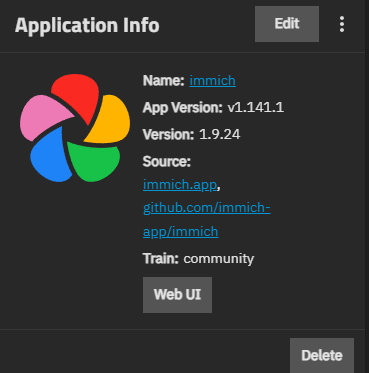
I’m nervous about working in the command line to do this - would creating and new DB folder and pointing the immich config to this folder for postgres do the same? I’m very nervous about losing my photos. I’ve tried everything I’ve read and hasn’t worked for me. I likely screwed something up with my rollback attempts because what I’m looking at doesn’t match anything I’m reading in various posts. This is the version I’m sitting at right now, stuck in deploying:
Can you share the exact path you found for said backups? I checked and I do have backups enabled, but I can’t find a “backups” folder anywhere in the “data” folder.
it may be called something different but if you go into the edit page for your app there will be two paths that you assigned when you installed immich, one will be for uploads and the other for postgres. The database backups will be found in the uploads dataset.
If you used the default iXsystems location you may have to do some digging on the internet (and in a shell) to see those files
I believe this would allow you to upgrade, however you would still need to apply the database dump file in order to get assigned people, tags, and accounts back. In this case since the database backups are stored in the same dataset as the photos you will likely be able to restore your database from the immich web ui.
Still, please verify those database backups exist before doing this.
What if I was willing to start from scratch on those items? As long as the photos load I could rebuild the people, tags etc? Or would I have to add all the photos back?
quick research seems to show the existing DB is needed to map the photos into immich as well. if a new folder for the db is created and immich pointed to that instead then it will start blank despite pointing to the old uploads folder.
ok will attempt database backup/restore. if this fails, is there a best practice to re import the existing uploads folder and have immich reindex everything?
so making progress. I backed up my db backups - have a number of files that look like this: immich-db-backup-20260321T020000-v2.5.6-pg15.16.sql.gz
created a new db folder and change config in immich to point to that folder.
it “reconfigured” itself and finally started up again. Now I can access the interface, but as expected none of my pictures are showing up - need to restore the db.
I checked the instructions on how to do this, but I’m suspecting I rolled back my immich version to far because I can’t find the restore DB section under administrator settings.
also, when I try to update the app it give me the error about postgres 18 and won’t upgrade.
thoughts? should in install from scratch a new instance, point to the same uploads folder and create a new DB folder and then try to restore the backed up db?
Not sure if this solution was available in the previous version - but turned out to be simple. Install new instance, point to same uploads folder, create new db folder, when it boots up open web UI - click restore from backup, then restore. Works. Thanks for all the insight on how the back end works and where to find the backups.
going to add something else to this thread because just now I thought I’d have to go through this all over again - latest updated fail to start. this time through some digging into the logs I figured out that my instance of adguard was blocking a critical install function - seems immich reaches out to the internet for machine learning. had to add an exception for sentry.ixsystems.
here’s what the log showed:
[2026/04/11 12:26:14] (ERROR) app_lifecycle.compose_action():58 - Failed ‘up’ action for ‘immichphotos’ app: machine-learning Pulling \n pgvecto Pulling \n permissions Pulling \n redis Pulling \n pgvecto_upgrade Pulling \n s>
[2026/04/11 12:27:38] (ERROR) app_lifecycle.compose_action():58 - Failed ‘up’ action for ‘immichphotos’ app: machine-learning Pulling \n server Pulling \n machine-learning Error Head "https://ghcr.io/v2/immich-app/immich-mac>
[2026/04/11 12:28:28] (ERROR) app_lifecycle.compose_action():58 - Failed ‘up’ action for ‘immichphotos’ app: machine-learning Pulling \n server Pulling \n machine-learning Error Get “https://ghcr.io/v2/”: dial tcp: lookup gh>
[2026/04/11 12:32:25] (ERROR) app_lifecycle.compose_action():58 - Failed ‘up’ action for ‘immichphotos’ app: machine-learning Pulling \n server Pulling \n machine-learning Error Head "https://ghcr.io/v2/immich-app/immich-mac>
[2026/04/11 12:32:29] (ERROR) app_lifecycle.compose_action():58 - Failed ‘up’ action for ‘immichphotos’ app: machine-learning Pulling \n server Pulling \n server Error Get “https://ghcr.io/v2/”: dial tcp: lookup ghcr.io on 1>
[2026/04/11 12:34:17] (ERROR) app_lifecycle.compose_action():58 - Failed ‘up’ action for ‘immichphotos’ app: machine-learning Pulling \n server Pulling \n server Error Head "https://ghcr.io/v2/immich-app/immich-server/manife>
[2026/04/11 12:35:59] (ERROR) app_lifecycle.compose_action():58 - Failed ‘up’ action for ‘immichphotos’ app: machine-learning Pulling \n server Pulling \n server Error Head "https://ghcr.io/v2/immich-app/immich-server/manife>
[2026/04/11 12:38:07] (ERROR) app_lifecycle.compose_action():58 - Failed ‘up’ action for ‘immichphotos’ app: server Pulling \n machine-learning Pulling \n machine-learning Error Get “https://ghcr.io/v2/”: dial tcp: lookup gh>
[2026/04/11 12:41:11] (ERROR) app_lifecycle.compose_action():58 - Failed ‘up’ action for ‘immichphotos’ app: machine-learning Pulling \n server Pulling \nGet "https://ghcr.io/v2/immich-app/immich-server/manifests/sha256:26be>
Thank you, I didn’t know Immich added an option to restore from postgres backup on a fresh server. This made my migration from TrueNAS app 1.9.24 (immich v1.141.1) to 1.14.11 (immich v2.7.3) so much easier!