I’m moving disks from an old NAS box to a new one, however I am unable to import the old pool in the new box. Under storage > disks it shows the 3 disks of the old pool and shows them as rust (Exported) which is what I would expect as that was the old pool name. However when I go to storage > import pool the pool dropdown has no items in it, it is just an empty list. Am I missing a step somewhere. The documentation I read suggests that there shouldn’t be any other steps needed. So what am I missing?
*I did import my configuration from the old box before doing this so there is a rust VDEV etc already showing in storage. Do I need to remove that first or can I just add the drives to it? I’d like to preserve my dozens of shares if possible but I think that isn’t tied directly to the pool.
If this was just simple storage, you would have powered off, moved disks to new server, fresh install on new boot device and reloaded your system configuration. The system should have picked up the pool. It might help if you post details on your before server and the current server. OS version, pool layouts, etc.
How did you do your process?
Post back the results for the following commands using Preformatted Text mode (</>) or Ctrl+e. One Preformatted Text reply per command
The previous box was on the latest community version of Core. The new is the latest Scale. I exported with keys(?) that produced a tar which I imported in the new box without issue. I only have the one pool (rust raidz1), was running no jails.
I installed Scale and imported the old config on it. Then I shut down the Core box pulled the drives and then put them in the new box and restarted. Now I’m trying to import the pool from those drives I pulled.
root@truenas[~]# zpool status -v
  pool: boot-pool
 state: ONLINE
config:

	NAME        STATE     READ WRITE CKSUM
	boot-pool   ONLINE       0     0     0
	  sda3      ONLINE       0     0     0

errors: No known data errors
root@truenas[~]# zpool import
  pool: rust
    id: 13590953219994848660
 state: ONLINE
status: The pool was last accessed by another system.
action: The pool can be imported using its name or numeric identifier and
	the '-f' flag.
   see: https://openzfs.github.io/openzfs-docs/msg/ZFS-8000-EY
config:

	rust        ONLINE
	  raidz1-0  ONLINE
	    sdc2    ONLINE
	    sdd2    ONLINE
	    sdb2    ONLINE
You can try with the -f flag. I am guessing you had the Core system up after the system config download and the transactions don’t match what it expects.
zpool import -f rust
You might need to use ‘sudo’ before it. If that works, export the pool with the CLI / Shell and then import it using the GUI. TrueNAS wants you to use the GUI or you could have problems with the middleware.
Thanks, that did the trick. I was able to export it from the UI and then it showed up in the UI import and imported again correctly. Thanks for the help!
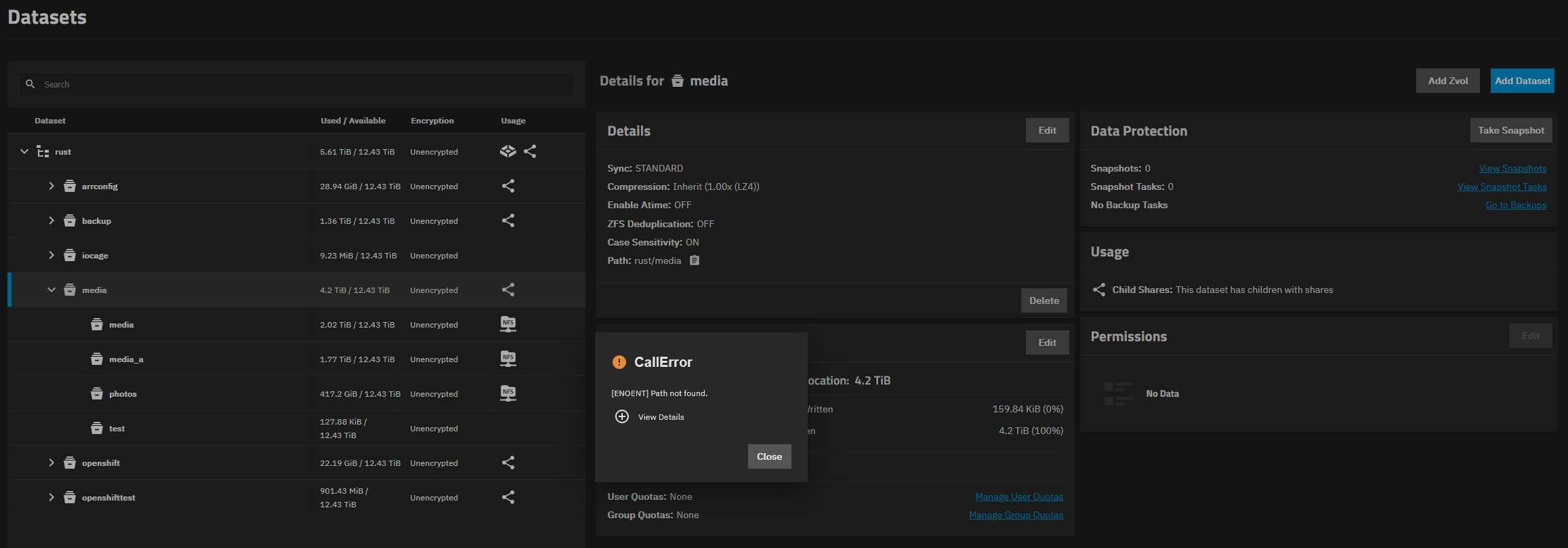
And now a new error. When I go to the the DataSets page I get “[ENOENT] Path not found.” This migration has gone a lot less smooth than I would have hoped.
Can you post screenshots or explain what were expecting to see and what you are seeing? I’m not sure where you are on getting the pool, etc. showing properly.
zfs list should be able to show us the same type of info, if you want to paste the results back.
It’s might be purely a UI issue. It comes and goes. It happens for all the entries in the tree under datasets, except maybe the iSCSI items, I don’t recall them throwing it. Sometimes the error has the tree path in it as well /rust/media for example. I had a stack trace of the error as well but when I couldn’t connect to the forums last night I couldn’t past it, if the error happens again I’ll attach it as well.
If you can capture and post the error details, it might help. You expand the View Details with the plus button on the CallError window. I don’t think the copy and paste of the error works cleanly but it is better than nothing.
Here is the stack trace that comes with the error.
Traceback (most recent call last):
  File "/usr/lib/python3/dist-packages/middlewared/api/base/server/ws_handler/rpc.py", line 360, in process_method_call
    result = await method.call(app, id_, params)
             ^^^^^^^^^^^^^^^^^^^^^^^^^^^^^^^^^^^
  File "/usr/lib/python3/dist-packages/middlewared/api/base/server/method.py", line 57, in call
    result = await self.middleware.call_with_audit(self.name, self.serviceobj, methodobj, params, app,
             ^^^^^^^^^^^^^^^^^^^^^^^^^^^^^^^^^^^^^^^^^^^^^^^^^^^^^^^^^^^^^^^^^^^^^^^^^^^^^^^^^^^^^^^^^
  File "/usr/lib/python3/dist-packages/middlewared/main.py", line 954, in call_with_audit
    result = await self._call(method, serviceobj, methodobj, params, app=app,
             ^^^^^^^^^^^^^^^^^^^^^^^^^^^^^^^^^^^^^^^^^^^^^^^^^^^^^^^^^^^^^^^^
  File "/usr/lib/python3/dist-packages/middlewared/main.py", line 782, in _call
    return await self.run_in_executor(prepared_call.executor, methodobj, *prepared_call.args)
           ^^^^^^^^^^^^^^^^^^^^^^^^^^^^^^^^^^^^^^^^^^^^^^^^^^^^^^^^^^^^^^^^^^^^^^^^^^^^^^^^^^
  File "/usr/lib/python3/dist-packages/middlewared/main.py", line 665, in run_in_executor
    return await loop.run_in_executor(pool, functools.partial(method, *args, **kwargs))
           ^^^^^^^^^^^^^^^^^^^^^^^^^^^^^^^^^^^^^^^^^^^^^^^^^^^^^^^^^^^^^^^^^^^^^^^^^^^^
  File "/usr/lib/python3.11/concurrent/futures/thread.py", line 58, in run
    result = self.fn(*self.args, **self.kwargs)
             ^^^^^^^^^^^^^^^^^^^^^^^^^^^^^^^^^^
  File "/usr/lib/python3/dist-packages/middlewared/api/base/decorator.py", line 116, in wrapped
    result = func(*args)
             ^^^^^^^^^^^
  File "/usr/lib/python3/dist-packages/middlewared/plugins/filesystem_/acl.py", line 483, in getacl
    raise CallError('Path not found.', errno.ENOENT)
middlewared.service_exception.CallError: [ENOENT] Path not found.
Oddly sometimes it gives nothing for path and sometimes it actually puts a path (although an incorrect one).
Traceback (most recent call last):
  File "/usr/lib/python3/dist-packages/middlewared/api/base/server/ws_handler/rpc.py", line 360, in process_method_call
    result = await method.call(app, id_, params)
             ^^^^^^^^^^^^^^^^^^^^^^^^^^^^^^^^^^^
  File "/usr/lib/python3/dist-packages/middlewared/api/base/server/method.py", line 57, in call
    result = await self.middleware.call_with_audit(self.name, self.serviceobj, methodobj, params, app,
             ^^^^^^^^^^^^^^^^^^^^^^^^^^^^^^^^^^^^^^^^^^^^^^^^^^^^^^^^^^^^^^^^^^^^^^^^^^^^^^^^^^^^^^^^^
  File "/usr/lib/python3/dist-packages/middlewared/main.py", line 954, in call_with_audit
    result = await self._call(method, serviceobj, methodobj, params, app=app,
             ^^^^^^^^^^^^^^^^^^^^^^^^^^^^^^^^^^^^^^^^^^^^^^^^^^^^^^^^^^^^^^^^
  File "/usr/lib/python3/dist-packages/middlewared/main.py", line 782, in _call
    return await self.run_in_executor(prepared_call.executor, methodobj, *prepared_call.args)
           ^^^^^^^^^^^^^^^^^^^^^^^^^^^^^^^^^^^^^^^^^^^^^^^^^^^^^^^^^^^^^^^^^^^^^^^^^^^^^^^^^^
  File "/usr/lib/python3/dist-packages/middlewared/main.py", line 665, in run_in_executor
    return await loop.run_in_executor(pool, functools.partial(method, *args, **kwargs))
           ^^^^^^^^^^^^^^^^^^^^^^^^^^^^^^^^^^^^^^^^^^^^^^^^^^^^^^^^^^^^^^^^^^^^^^^^^^^^
  File "/usr/lib/python3.11/concurrent/futures/thread.py", line 58, in run
    result = self.fn(*self.args, **self.kwargs)
             ^^^^^^^^^^^^^^^^^^^^^^^^^^^^^^^^^^
  File "/usr/lib/python3/dist-packages/middlewared/api/base/decorator.py", line 116, in wrapped
    result = func(*args)
             ^^^^^^^^^^^
  File "/usr/lib/python3/dist-packages/middlewared/plugins/filesystem.py", line 467, in stat
    raise CallError(f'Path {_path} not found', errno.ENOENT)
middlewared.service_exception.CallError: [ENOENT] Path /rust not found
Those stack traces are for the same UI element, but it changes when I leave and come back to the dataset page. I believe the path should be /mnt/rust since that’s where the pool is mounted.