
The Situation: I have a drive in my pool that is listed as ‘Removed’ due to being unhealthy, even though it appears to pass a short SMART test. The pool is now in a degraded state and showing four of the remaining good disks as ‘resilvering’.
The Question: Is it safe to power down the NAS and swap out the failed drive while the pool is resilvering or should I wait for it to finish?
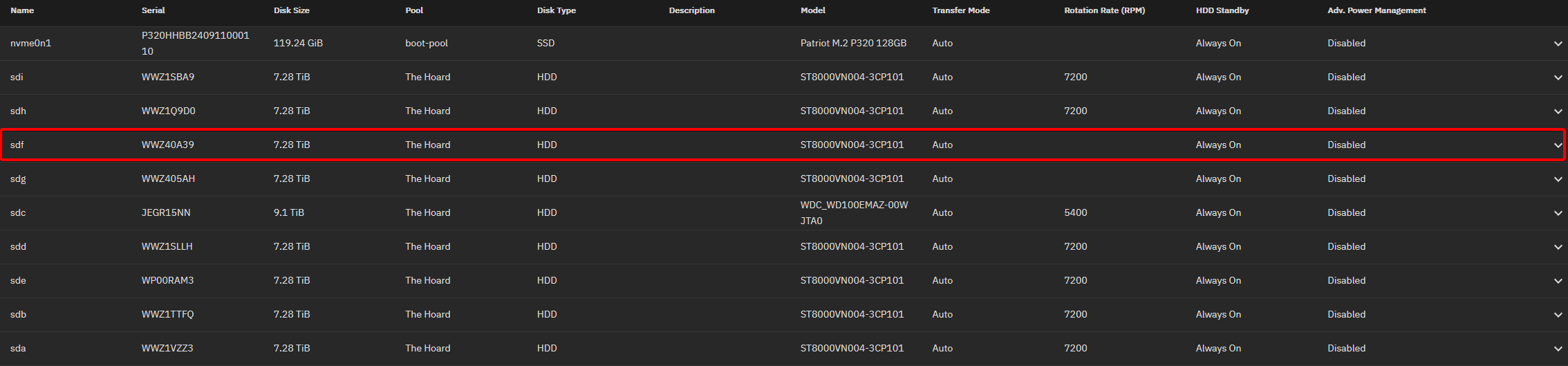
Disk Info (drive with errors highlighted):
zpool status -vx output:
  pool: The Hoard
 state: DEGRADED
status: One or more devices is currently being resilvered.  The pool will
        continue to function, possibly in a degraded state.
action: Wait for the resilver to complete.
  scan: resilver in progress since Sat Mar 14 12:19:16 2026
        3.76T / 54.1T scanned at 6.50G/s, 0B / 50.4T issued
        7.14M resilvered, 0.00% done, no estimated completion time
expand: expanded raidz1-0 copied 34.0T in 18:51:32, on Tue Nov  4 06:44:36 2025
config:

        NAME                                      STATE     READ WRITE CKSUM
        The Hoard                                 DEGRADED     0     0     0
          raidz1-0                                DEGRADED 2.51K 1.11K     0
            6784c3af-de11-400c-85e1-73119e0e8a50  REMOVED      0     0     0
            6221a190-0069-4833-8082-901117bbc152  ONLINE   2.10K 1.27K     0
            f5edd9c1-9b93-4fa5-b9c2-aa68a03d9d0a  ONLINE       0     0     0  (resilvering)
            a909f20e-ac31-45a4-b295-47849d1393fb  ONLINE   1.56K 1.04K     0
            d1003ab8-018e-4cdf-bb39-99e0b9444505  ONLINE       0     0     0  (resilvering)
            da8c68c0-ddf3-474b-8236-5d60f24c00d5  ONLINE       0     0     0
            a2874c99-a790-45db-9ed2-a4efa918559f  ONLINE       0     0     0
            4d249df5-dca8-4345-ab48-5a4552dc05eb  ONLINE       0     0     0  (resilvering)
            0d241af5-beca-49fd-be4e-5452e8c4acc4  ONLINE       0     0     0  (resilvering)

errors: List of errors unavailable: pool I/O is currently suspended
dmesg -H error (showing multiple times for different sectors on this drive):
[  +0.000003] I/O error, dev sdf, sector 15628052512 op 0x0:(READ) flags 0x800 phys_seg 28 prio class 0
[  +0.000076] sd 0:0:8:0: [sdf] tag#8645 FAILED Result: hostbyte=DID_OK driverbyte=DRIVER_OK cmd_age=0s
[  +0.000164] sd 0:0:8:0: [sdf] tag#8645 Sense Key : Not Ready [current]
[  +0.000003] sd 0:0:8:0: [sdf] tag#8645 Add. Sense: Logical unit not ready, cause not reportable
[  +0.000002] sd 0:0:8:0: [sdf] tag#8645 CDB: Read(16) 88 00 00 00 00 03 a3 81 26 20 00 00 00 e0 00 00
smartctl -a results:
=== START OF INFORMATION SECTION ===
Model Family:     Seagate IronWolf
Device Model:     ST8000VN004-3CP101
Serial Number:    WWZ40A39
LU WWN Device Id: 5 000c50 0e8081cef
Firmware Version: SC60
User Capacity:    8,001,563,222,016 bytes [8.00 TB]
Sector Sizes:     512 bytes logical, 4096 bytes physical
Rotation Rate:    7200 rpm
Form Factor:      3.5 inches
Device is:        In smartctl database 7.3/5528
ATA Version is:   ACS-4 (minor revision not indicated)
SATA Version is:  SATA 3.3, 6.0 Gb/s (current: 6.0 Gb/s)
Local Time is:    Sat Mar 14 12:39:09 2026 CST
SMART support is: Available - device has SMART capability.
SMART support is: Enabled

=== START OF READ SMART DATA SECTION ===
SMART overall-health self-assessment test result: PASSED

General SMART Values:
Offline data collection status:  (0x82) Offline data collection activity
                                        was completed without error.
                                        Auto Offline Data Collection: Enabled.
Self-test execution status:      (   0) The previous self-test routine completed
                                        without error or no self-test has ever
                                        been run.
Total time to complete Offline
data collection:                (  559) seconds.
Offline data collection
capabilities:                    (0x7b) SMART execute Offline immediate.
                                        Auto Offline data collection on/off support.
                                        Suspend Offline collection upon new
                                        command.
                                        Offline surface scan supported.
                                        Self-test supported.
                                        Conveyance Self-test supported.
                                        Selective Self-test supported.
SMART capabilities:            (0x0003) Saves SMART data before entering
                                        power-saving mode.
                                        Supports SMART auto save timer.
Error logging capability:        (0x01) Error logging supported.
                                        General Purpose Logging supported.
Short self-test routine
recommended polling time:        (   1) minutes.
Extended self-test routine
recommended polling time:        ( 693) minutes.
Conveyance self-test routine
recommended polling time:        (   2) minutes.
SCT capabilities:              (0x50bd) SCT Status supported.
                                        SCT Error Recovery Control supported.
                                        SCT Feature Control supported.
                                        SCT Data Table supported.

SMART Attributes Data Structure revision number: 10
Vendor Specific SMART Attributes with Thresholds:
ID# ATTRIBUTE_NAME          FLAG     VALUE WORST THRESH TYPE      UPDATED  WHEN_FAILED RAW_VALUE
  1 Raw_Read_Error_Rate     0x000f   078   064   044    Pre-fail  Always       -       62442624
  3 Spin_Up_Time            0x0003   097   091   000    Pre-fail  Always       -       0
  4 Start_Stop_Count        0x0032   099   099   020    Old_age   Always       -       2009
  5 Reallocated_Sector_Ct   0x0033   100   100   010    Pre-fail  Always       -       0
  7 Seek_Error_Rate         0x000f   086   060   045    Pre-fail  Always       -       430950864
  9 Power_On_Hours          0x0032   090   090   000    Old_age   Always       -       9259
 10 Spin_Retry_Count        0x0013   100   100   097    Pre-fail  Always       -       0
 12 Power_Cycle_Count       0x0032   099   099   020    Old_age   Always       -       2009
 18 Head_Health             0x000b   100   100   050    Pre-fail  Always       -       0
187 Reported_Uncorrect      0x0032   100   100   000    Old_age   Always       -       0
188 Command_Timeout         0x0032   100   099   000    Old_age   Always       -       8590065669
190 Airflow_Temperature_Cel 0x0022   051   032   000    Old_age   Always       -       49 (Min/Max 48/49)
192 Power-Off_Retract_Count 0x0032   100   100   000    Old_age   Always       -       1987
193 Load_Cycle_Count        0x0032   098   098   000    Old_age   Always       -       4992
194 Temperature_Celsius     0x0022   049   068   000    Old_age   Always       -       49 (0 24 0 0 0)
197 Current_Pending_Sector  0x0012   100   100   000    Old_age   Always       -       0
198 Offline_Uncorrectable   0x0010   100   100   000    Old_age   Offline      -       0
199 UDMA_CRC_Error_Count    0x003e   200   200   000    Old_age   Always       -       0
240 Head_Flying_Hours       0x0000   100   100   000    Old_age   Offline      -       8612h+57m+34.421s
241 Total_LBAs_Written      0x0000   100   253   000    Old_age   Offline      -       107750888480
242 Total_LBAs_Read         0x0000   100   253   000    Old_age   Offline      -       316712971685

SMART Error Log Version: 1
No Errors Logged

SMART Self-test log structure revision number 1
Num  Test_Description    Status                  Remaining  LifeTime(hours)  LBA_of_first_error
# 1  Short offline       Completed without error       00%      9258         -
# 2  Short offline       Completed without error       00%      8949         -
# 3  Short offline       Completed without error       00%      8426         -
# 4  Short offline       Completed without error       00%      7971         -
# 5  Short offline       Completed without error       00%      7227         -
# 6  Short offline       Completed without error       00%      6513         -
# 7  Short offline       Completed without error       00%      5769         -
# 8  Short offline       Completed without error       00%      5049         -
# 9  Short offline       Completed without error       00%      4305         -
#10  Short offline       Completed without error       00%      3561         -
#11  Short offline       Completed without error       00%      2841         -
#12  Short offline       Completed without error       00%      2097         -
#13  Extended offline    Completed without error       00%      1478         -
#14  Short offline       Completed without error       00%      1378         -
#15  Short offline       Completed without error       00%       634         -

SMART Selective self-test log data structure revision number 1
 SPAN  MIN_LBA  MAX_LBA  CURRENT_TEST_STATUS
    1        0        0  Not_testing
    2        0        0  Not_testing
    3        0        0  Not_testing
    4        0        0  Not_testing
    5        0        0  Not_testing
Selective self-test flags (0x0):
  After scanning selected spans, do NOT read-scan remainder of disk.
If Selective self-test is pending on power-up, resume after 0 minute delay.

The above only provides legacy SMART information - try 'smartctl -x' for more
