Right I’ve done it.
I now have both of my “real” nics connected.
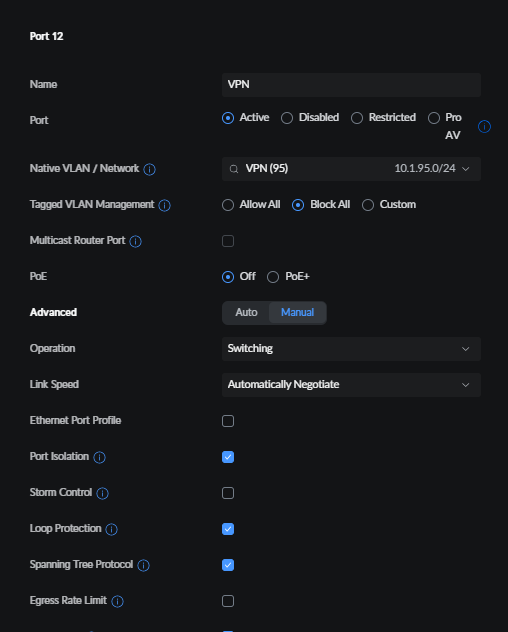
I have the second nic connected to an isolated port that is dedicated to one of my VLANS, I have that VLAN routed through my VPN, I also selected “Host Network” in the app, and assigned the GUI port to use the primary NIC, and the download port assigned to the secondary NIC, and once the app (qBittorrent) I had to also in the advanced settings, assign it to use the second NIC as it was still trying to use the primary NIC, I now see it in my switches console, and I can see all internet traffic being routed through my VPN.
Also, I found, I had to lock down the GUI to the IP of the primary NIC, this I believe is quite important and doesn’t seem to be documented anywhere yet.
So to summarise:
App in question = qBittorrent
eno2np1 (Primary NIC): 192.168.0.21/24
This one is on my main network and is locked down for GUI access in the General settings
eno1np0 (Second NIC): 10.1.95.5/24
I have this connected to a fully isolated port that is assigned to only allow access to one vlan (10.1.96.0/24)
In the app config, set GUI access to 192.168.0.21 and set BT Port to 10.1.95.5
In the apps GUI, go to settings → advanced and I set the following:

Then I created a rule in my Switch to divert all traffic from 10.1.95.5 to my VPN.
Job done.
If anyone is interested on how I setup the port on my Ubiquity Switch: