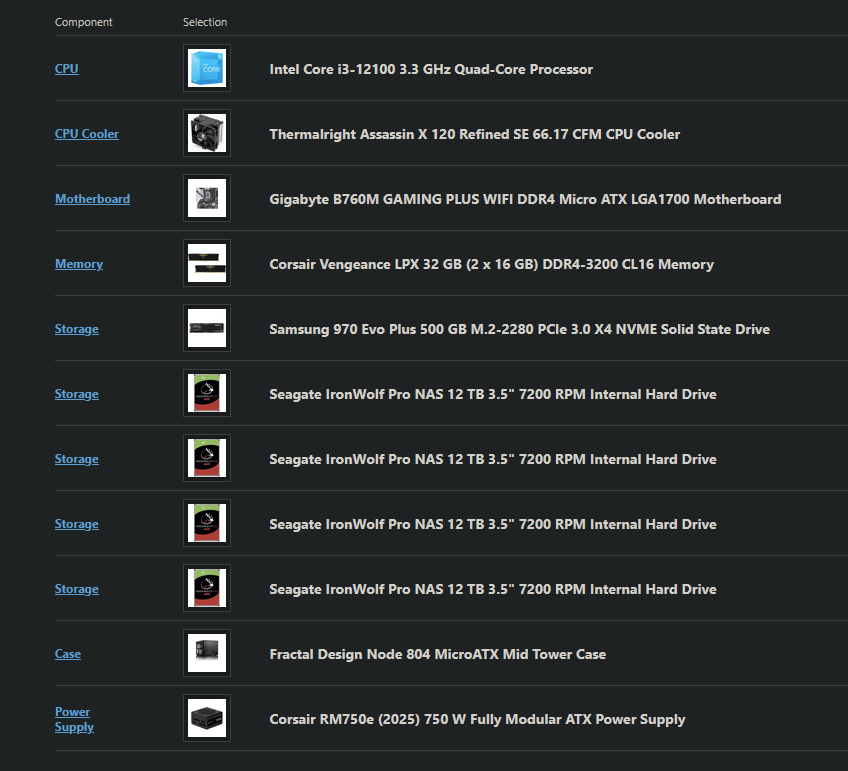
Hello all, I am putting together my first NAS build. Its been a while since I’ve built a computer and haven’t had to research much in a while. I am asking for some help to see if what I chose makes sense. I already purchased 4×12TB IronWolf Pro drives but thats all I have.
PC Part Picker list: pcpartpicker . com/list/yWwKBv
Main goals:
NAS for Windows + Linux access (I will be switching my main tower to Linux soon, but my laptop needs to stay Windows)
Media server (planning to run Jellyfin)
No subscriptions / no cloud / no locked ecosystem
Set it up once and leave it alone
I plan to run RAIDZ1 in TrueNAS SCALE
Why I made some choices:
Intel CPU with iGPU for stability + hardware transcoding
My $0.02 - there is a solid chance that you could get some used server hardware depending on your local market that would have ecc ram, ipmi, more pcie & storage slots, etc for less than price of brand new. This would come at the cost of (likely) higher power draw and (very likely) higher noise.
iGPU transcoding is… alright. If you have 4k video, or worse, anything in HDR, then expect it to go poorly. I’ve had mediocre results compared to adding a GPU. ECC ram is recommended, not mandatory, so make sure you run several full passes of memtest. NVMe boot drive of 500g is huge overkill, use that for your apps & any possible future VMs instead. Your choice of motherboard has 2 m.2 slots, find the cheapest functional m.2 that has more than 16gb of storage space. You can always backup your config & roll another boot drive; they should be treated as borderline consumables. If you backup your configs occasionally, rolling a new boot drive is a painless 5 minute job to get back online.
Uhh, what else? Don’t expect wifi to work, go in with a plan to have ethernet going in.
Look into burn-in guides for the hard drives; expect it to take like a week or so before putting data on them.
Otherwise, this is a pretty decent build that uses consumer hardware but avoids lots of pitfalls. It even still have a full x16 pcie slot ready for either an HBA or a GPU for the future!
Thank you! This was my first post here. Didn’t realize I could post a picture. It would have made more sense lol.
Your advice is really helpful. It is a great point about the boot drive. I really hated the cost, but wanted to make sure I had enough space for any programs I needed to run. That thing is stupid expensive. I already dumped more $ than I wanted on the drives. Didn’t realize the tower was going to cost this much as well. I though $500 max.
Thanks for the warning on the wifi. I will need to see if I can find a fix for that. I wanted to access the NAS from my shop computer in a detached garage.
Can I add a GPU later without losing anything I have stored on the NAS?
New accounts can’t post pictures/links until they complete a tutorial (see your DMs, a bot should have sent you some garbage).
Boot drive works very differently on Truenas; it is ONLY used for the OS. Nothing else. Apps, vms, etc will live on a seperate pool. Your 500gb nvme is just fine for this purpose; you could likely get away with 250gb.
Hmm, the only things I see on there are responses from you and two badges I got from this thread. Maybe the bot sends it later?
Thank you for the quick response. I will swap out the SSD and pull the trigger on the rest. Want to go with all new hardware for longevity and reliability. I will have to hold off on a GPU for now. I am already kicking myself for starting this lol.
Or Xeon E-2100(G), or even dirt cheap Core i3-9100, which supports ECC UDIMM as well—provided that you can find DDR4 ECC UDIMM at acceptable price that is…
How many drives are planned in the future? The Node 804 can host two sets of four, which is a good fit to the 8 SATA ports of a C246 motherboard. But if the current four drives is also the maximum, a Node 304 is a very nice NAS case for up to six drives, well cooled, smaller and quieter than the Node 804—the catch being that it require a mini-ITX board, which would push you towards a X10SDV motherboard and a dGPU for transcoding (or, admittedly, a mini-ITX consumer board with 6 SATA slots).