I’m migrating our former MinIO server to TrueNAS. I got it up and running with v25.10.7 installed from the downloaded ISO, created a pool, added the Garage app so we’d have local object storage, joined the box to Active Directory, etc. At some point, I went to the system update page in the web UI, changed the update profile from mission-critical to general (this is a community install, not enterprise), and let it pull in v25.10.8, which was just released yesterday.
I came back to the office this morning and couldn’t bring up the web UI. It wasn’t responding to ping, either. I twiddled the network settings from the console…no joy. I booted the server into SystemRescueCD to rule out hardware issues…all four interfaces worked.
Nothing critical had found its way onto the new setup just yet, so I wiped it, reinstalled from the ISO, and let it upgrade to v25.10.8. So far, so good. This time around, I figured out pulling SSL certificates from Let’s Encrypt with validation through our Technitium DNS server before I put Garage back on it. As soon as the installation completed, inbound connections to the server failed again.
I opened a shell prompt from the console and was able to ping other hosts. I was able to scp the Technitium DNS-challenge script I’d written to another box so I don’t have to reinvent that wheel. I also figured out how to stop Garage…upon which the TrueNAS web UI started working again.
app start garage in the TrueNAS CLI shell consistently kills all inbound connectivity. app stop garage consistently brings it back. I don’t know if other apps have the same effect or if it’s just something with Garage, but I’m a bit concerned that what should’ve been a minor upgrade managed to cause such breakage.
Your networking is a bit more complicated than what the app may have anticipated. You may need to create a custom Docker bridge or macvlan to bind garage to your intended subnet instead of relying on host networking. I don’t think this is attributable to the 25.10.8 upgrade.
In fact, this feels like the garage app is either duplicating the MAC or IP or TCP port on one of the host NICs.
The four interfaces are bonded together. The bond has a static IPv4 address assigned to it and is using the LOADBALANCE link aggregation protocol. Garage was happily working with this configuration under 25.10.7; I was using rclone to move data into and out of it and was going to get our Veeam backup server talking to it next when I noticed problems after the upgrade to 25.10.8.
Try creating a bridge interface on top of the bond interface and moving the system IP from the bond interface to the new bridge interface. You may also need to rebuild garage to take advantage of the new bridge interface. That’s what’s likely happened. The garage bridge became the system default since there was no system bridge.
That made no difference…inbound connections still get killed. As an added bonus, now the console is being spammed with br1: received packed on bond1 with own address as source address messages.
If by “rebuild” you mean “uninstall and reinstall the app,” that’s what I did. I also tried replacing Garage with SeaweedFS before making the aforementioned network config changes…same problem as with Garage, so at least it’s looking less like an issue with Garage.
Garage exposes five ports for various services. By default, the port bind mode for each is Publish port on the host for external access. No host IPs are included by default. I tried setting host IPs for all ports to the host IP address. That made no difference, I then tried setting the port bind mode for all ports to None, which I’d expect would make Garage inaccessible to the LAN, but at least it shouldn’t kill the TrueNAS web UI…right? Nope…still lost the web UI until I stopped the app from the console, same as before.
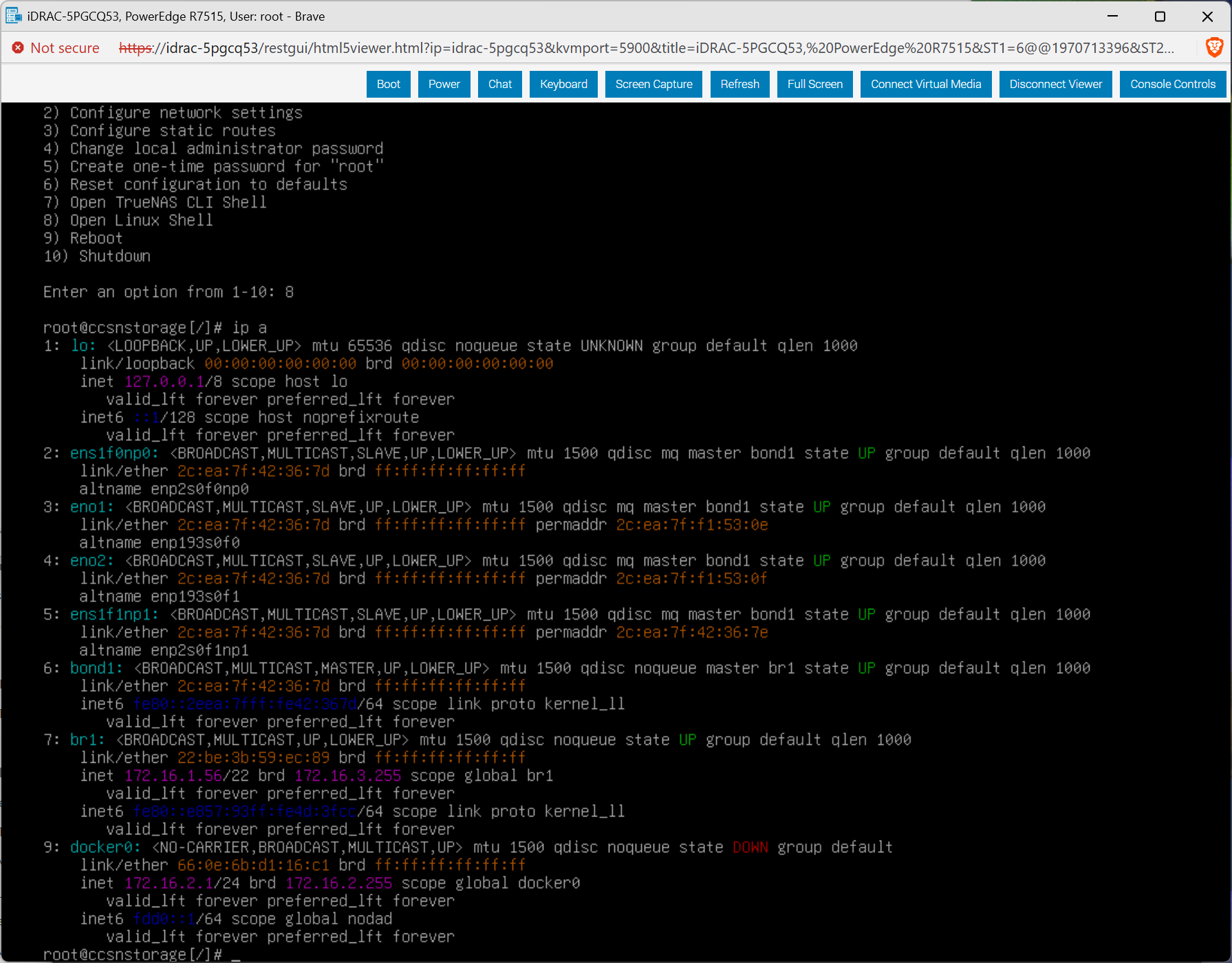
Before starting Garage, the network configuration looks like this:
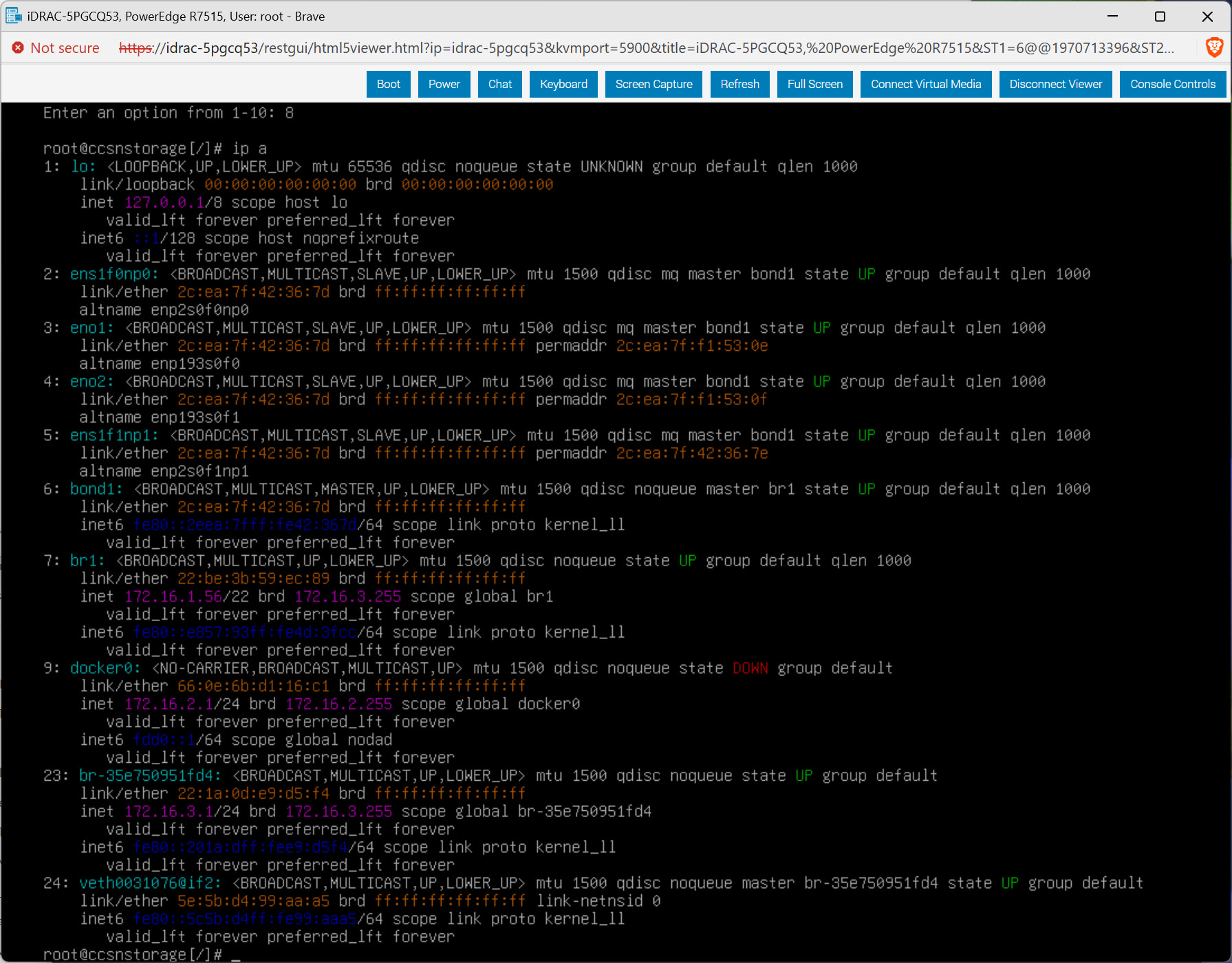
It looks like it’s creating a new bridge (br-35e750951fd4) instead of using the one I created (br1). I didn’t capture this part of the system’s behavior when it was running 25.10.7…guess I could wipe it again, reinstall and reconfigure 25.10.7, install Garage on it, and see if there’s anything different.
…and now I’m getting the same behavior on 25.10.7, after having gotten it running without much fuss yesterday before upgrading to 25.10.8. This is frustrating.
I made a backup of the configuration before upgrading yesterday…going to restore that and see if there’s something I’ve been missing since then.
Update: that didn’t work, probably because I’ve wiped the storage pool on each install. I might just give up on local object storage and switch to file-based shares. Veeam works with those just as well, if not better…it’s currently targeting an SMB share on a Synology NAS.
Out of curiosity, is it still an issue if you create an alias on your bridge/LAG and manually bind the TrueNAS interface to that, while letting Garage/SeaweedFS bind to the main address on the network interface?
I think by default the TN UI may bind to 0.0.0.0 (it’s been a hot minute since I had default network settings - and I’ve only been playing with the 26/27 builds, not 25) but I had to mess around a little to make sure there were no port overlaps between the host and any docker containers
By default, everything was bound to 0.0.0.0. Whenever Garage (or SeaweedFS, so it’s probably apps in general and not just Garage) started up, it wasn’t just the TrueNAS web interface that was inaccessible, but everything…it wasn’t even responding to ping requests.
I tried adding a second IP address to the bond interface, and put the TrueNAS web interface on one address and Garage on the other. No matter which address was used for which service, the one with the web interface on it would quit responding to anything whenever Garage was started. As soon as I stopped Garage from the console (via iDRAC), the web interface would come back.
I even got rid of the bond altogether and just used one of the NICs by itself. That made no difference.
The TrueNAS web interface should only be on ports 80 and 443. I haven’t gotten around to setting up file sharing, but SMB only uses ports 445 and 139, IIRC. Garage, as configured by TrueNAS, uses ports 30186-30190. There shouldn’t be any port conflicts to blame.
Also worth noting: the Garage admin interface (on port 30186) isn’t working either when the app is started.
I’ll try the “early adopter” channel next (instead of “general”) and see if the changes in there fix the problems I’ve been having. It looks like that’ll pull in 27.0.0RC1 instead of 25.10.8.
Update: The Garage app doesn’t work any better under 27.0.0RC1 than it did under 25.10.8. OTOH, 27.0.0RC1 has a built-in object storage system that should make Garage unnecessary.
I’m curious, what is output of ip -4 route and ip -6 route (if ipv6 is relevant) once everything dies? (assuming you have IPMI or physical access when the app kills networking).
I have a completely unrelated issue due to my specific NIC & have noticed some wonky stuff with default route just vanishing from my bridge after a reboot even though in the GUI it still has it properly configured & saved. A quick midclt call route.sync fixes it up right quick, but it took a hot minute to figure out what new failure is causing my NIC to shit the bed on this latest update (once again, ongoing issue that I don’t blame TrueNAS specifically for).
Edit: I guess ip route show dev #INTERFACEHERE# could also show if it is your bridge specifically forgetting how the fuck to connect to LAN considering how many interfaces you have. (-6 as necessary)
sudo as necessary if not root
Edit 2: I was looking over your network config more closely & realized that what I’m saying earlier is likely not relevant.
I noticed your bridge is 172.16.1.56/22 - when you show Garage starting, I noticed it sets up 172.16.3.1/24 <— wouldn’t this cause an overlap due to subnets overlaping the IP ranges?
Could test by changing docker address pool to something like 172.25.0.0 or whatever flavour you think best. At worst it is easily reversible if what I’m saying isn’t relevant.
I didn’t notice that. Yes, 172.16.3.1 would cause a conflict.
I went into the settings currently in effect for apps, though, and it said it was using 172.17.0.0/12 or something like that. I’ve since changed it to 172.16.4.0/22 and have it assigning /28s to each app. Garage is up and running, and it’s not interfering with the TrueNAS web interface or anything else on TrueNAS (like SMB shares).