General question whether I understood SSL certification correctly

Good day,

For about 3 years now, I’ve had my own server at home, and everything runs pretty flawlessly.
I mainly use the server as decentralized storage so I can access it on the go with my phone and laptop when I’m not accessing it from my PC at home. So far, I’ve been using Wireguard to connect to the server.
Besides that, I also use the server for private music streaming and during our DnD sessions. We use Jellyfin for that.
Our fellow players can access the music library via their own Wireguard VPN connection, and that works quite well too.
So much for the explanation of how the server is mainly used.

First off, I should say that I enjoy trying new things and love gaining practical experience. Sometimes I don’t care whether I gain an advantage from it or not.
For this exact reason, I started researching how to turn the usual HTTP:// address into an HTTPS:// address. Why? Pure curiosity, that’s all.
I’ll briefly summarize my research journey.

To use an HTTPS address, I need an SSL certificate. I was already aware of this fact, but how to obtain one was completely new to me.
After a lot of research, I found out that I can get the SSL certificate from various providers, such as Cloudflare. Additionally, I need my own domain.
If I understand correctly, this would mean my server is then reachable over the web without using a VPN connection.

However, it seems I would then be dependent on Cloudflare to reach the server from outside my home network, is that correct?

For your information: I am aware of Tailscale’s existence. However, I gave myself the challenge of being as independent as possible from other providers (at least from the perspective of a single private individual), and I have no problem investing more work into something and keeping it up to date.
The thought of not being able to access the server anymore because another provider, e.g., Tailscale, is having technical problems is not exactly my preference.

To put my question very briefly: Does the server have to be available over the web to have an SSL certificate, and if so, can I still access the server via a VPN connection in case of an outage?

Thank you so much in advance for your answers!

Gévarred

There are different approaches, the answers to your questions depends on the approach taken.

The “cloud” way is to do SSL termination on the cloud itself (for example using cloudflare as you have suggested). In that case the cloud provider does sit in the middle of the traffic like this:

Service <-- HTTP / Cloudflare Tunnel --> Cloudflare Network <-- HTTPS connection --> Client

Main benefit, apart from being convenient/easy to set up, is that it provides better security. You never expose a port directly to the internet, the cloud provider usually has some degrees of protection against attacks. You can still access your server via VPN in this scenario, but likely only using HTTP or HTTPS with untrusted certificate.

In the more classical scenario there is no cloud provider in the middle of traffic. The client talks directly to the server in your network (maybe via a wireguard VPN). This does require opening a port in the firewall and port forwarding. In that scenario you need to figure out how to get a SSL certificate. In the “old days” you would go to a certificate authority and buy a certificate and install it manually. Nowadays most people use letsencrypt, which provides free certificates and the whole certification process can be automated.

You do not need to have your server exposed to the internet to get a trusted certificate from letsencrypt. The most flexible way to do that is to deploy a reverse proxy in your network which does the SSL termination.

The network path looks like this:

Service <- HTTP -> Reverse Proxy <- HTTPS -> Client
1 Like

You can get the cert from various providers (certificate authorities or CAs), but Cloudflare isn’t a CA–any cert you get from them would in fact be from a third-party CA.

To get a cert from a public certificate authority, yes, you need a domain.

Not necessarily. Just having a domain doesn’t mean your server is accessible from anywhere.

No.

Making your web server use HTTPS instead of/in addition to HTTP ensures the traffic between the server and client is encrypted, making it very hard for someone to potentially intercept that traffic (possibly including login credentials or other sensitive data).

This requires an SSL certificate but there are two (for the scope of this discussion) different types of SSL certificate: CA signed and self-signed. Both provide the encryption element, but a CA signed certificate adds an element of “trust” to the connection.

Self-signed certificates are typically generated by the same device running the service, and when you connect to them using, for example, a web browser you will see a message warning you that the presented certificate is self-signed and cannot be trusted. You’ll usually have to click through a few messages to access the server, accepting the risk. Self-signed certificates are just as secure as CA signed certificates, and are absolutely good enough if you’re the only person who will be accessing the services that are protected with it.

CA signed certificates are provided by a trusted Certificate Authority and, in addition to encryption, provide proof that the server you are connecting is what it says it is using its domain name, typically. CA signed certificates are useful if you’re going to be providing access to a service over the Internet and want to prove to the connecting users that they’re accessing the server they think they are.

Your web server doesn’t need to be exposed to the Internet to get a CA signed certificate, there are a number of different ways of acquiring them, particularly if you’re using an ACME client to automate it. The most efficient method is to use DNS TXT records, but you’ll need a domain registrar that provides API access to your DNS records for that. I can strongly recommend Mythic Beasts for that.

As for a CA to use for certificates, there’s no reason not to use Lets Encrypt these days, as they’re completely free.

FWIW, I use Nginx Proxy Manager on my TrueNAS Scale server to automatically request and update a LetsEncrypt wildcard cert for all my services and subdomains that are used to access services on my server (including Plex, sonarr, tautulli, overseerr, qbittorrent, web, etc.). The domain validation is performed using ACME’s DNS validation scripts, and the cert updates every 30 days. My TrueNAS admin interface uses the self-signed cert it created during installation, as I’m the only person that ever uses it and it’s not exposed to the Internet (I access it remotely using Tailscale).

You’ll need a DNS host that provides API access–your domain registrar and your DNS host don’t have to be the same. And there are lots of options for that; Cloudflare is likely the most popular (I’m sure the (lack of) cost has a lot to do with that), but plenty of others. I don’t know that I’ve heard of Mythic Beasts though.

1 Like

Yeah, very good point :+1:

Mythic Beasts is a hosting ISP that’s very popular with people in the networking and self-hosting field. They offer a variety of, some may say, unnecessarily feature rich services. They’re run by nerds, for nerds, and their support is superb.

Many thanks to everyone involved for the quick & helpful answers!

Just to make sure I’ve understood correctly:

  • The server doesn’t necessarily have to be publicly accessible to have a valid SSL certificate, regardless of whether it’s a CA-signed or self-signed certificate.
  • Both types of certificates serve the same purpose, with the only difference being that the CA-signed certificate is more trustworthy and doesn’t display warnings (to put it simply).
  • A CA-signed certificate can be automatically renewed at regular intervals.

Before I ask about the technical implementation, I first want to make sure I’ve understood everything correctly.

So, if I understand everything right, the following is possible:
You can access a private server (both from home and on the go via VPN) through a constantly renewing, CA-signed certified domain (e.g., “https ://myserver.com”) without making it visible to the whole world, without depending on other providers, and without the “”“disadvantage”“” of self-signed certificates.
And apps (let’s stick with my Jellyfin scenario) can be reached using the same methods, for example, via “https ://myserver.com/jellyfin”.

Yeah, I think you do understand it correctly. I added some more details/clarifications.

If you use self-signed certificates you can make the browser warnings go away by importing the certificate into the certificate storage (trust store) of the client device. But it is a cumbersome process.

CA-signed MUST be renewed at regular intervals. The letsencrypt issued certificates are typically valid for 90 days, if you don’t renew you will again get a browser warning. Self-Signed certificate can be set decades into the future.

For application you use subdomains instead of using the URL path. I.e. you would use https://jellyfin.myserver.invalid instead of https://myserver.invalid/jellyfin. If you use a reverse proxy, you would typically get a certificate for *.myserver.invalid, this allows you to use the same certificate for all applications.

1 Like

Yes to all three of your initial questions :+1:

And yes, the certs can be configured to auto-renew with the right scripts or apps. It’s almost the default way to do it nowadays. As certificate liftimes get shorter and shorter it’s too time consuming most people to do it by hand anymore.

And users can access services protected with an SSL cert using whatever route you allow to get to the service: exclusively on your local network, over the public internet, or via a VPN.

The latter starts to get a little complicated, though, as you’ll run into the problem of potentially wanting to access a server via two different IP addresses: it’s private or public Internet IP, and it’s VPN IP. You can’t (easily; split DNS is the solution) have two different IP addresses associated with the same hostname, and certificates are tied to FQDNs or domain names. How do you present a valid SSL cert for a service that you’re accessing via multiple IP addresses and FQDNs? It’s possible, but gets really complicated :slight_smile:

And if you also want to have https://myserver.invalid included in the certificate remember to add that as a SAN entry as well, because the wildcard *.myserver.invalid doesn’t include that.

2 Likes

It’s good to know that I’m getting a better grasp of the topic little by little.
At the same time, I’m also noticing that it’s slowly getting more complex (which, to be honest, doesn’t surprise me much).

I’ve seen subdomains often before (a nice example right in front of our noses: forums.truenas.com), but until now, I didn’t know the difference.

For me personally, I therefore prefer the method with the renewed CA-signed certificates and the use of subdomains.
So, on paper, the process would look like this:

  • Buy a domain name of my choice
  • Add the selected domain in TrueNAS under Network → Global Configuration → Domain
  • Obtain a wildcard certificate for my services and subdomains (for example, using the method mentioned by WiteWulf)
  • Check if the apps are working and possibly change some settings.

Before I implement any of this (or do something stupid), I have one specific question for @WiteWulf.

What exactly is the reason for potentially reaching the server via two different IP addresses?
I apologize for not sharing the following information sooner, which may have led to a misunderstanding.
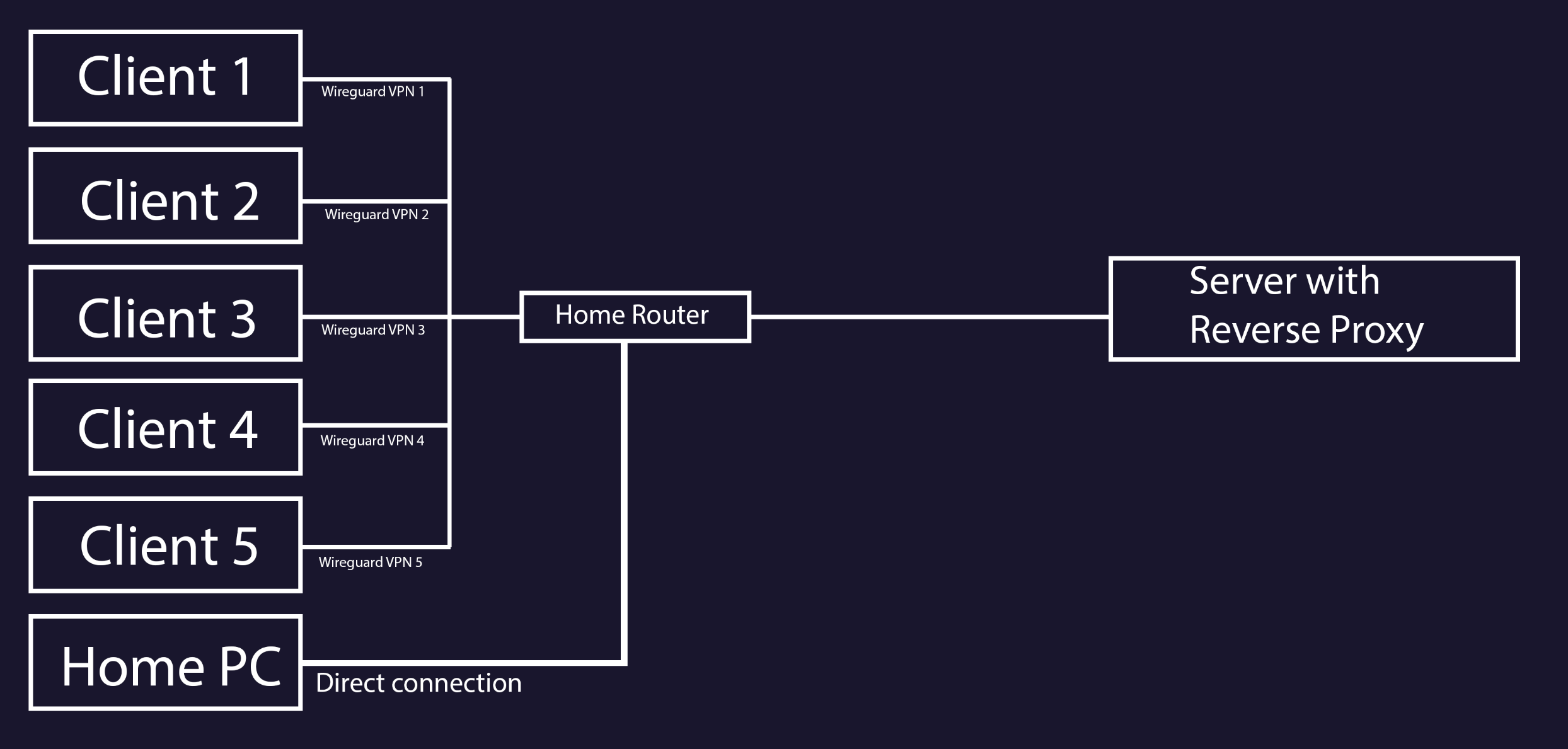
The server is connected to my router (a FritzBox in my case), and the VPN connection is between the client device and the FritzBox via Wireguard.
So, if I’m not mistaken, the hostname thus has only one IP address, that of the server, or is my understanding of this scenario incorrect?

Yes. The issues that @WiteWulf do not apply if you use a VPN.

In IPv4 your server has a local address (for example 192.168.x.x). Your router has a local address as well as a WAN address (your “public” ipv4 address). Inside your internal network you can access the server using 192.168.x.x. If want to connect from outside the WAN (without resorting to a VPN) you need to use the WAN IP of your router as well as doing a port forward on the router itself.

This is how you get a scenario where depending on where the client is (outside/inside LAN) a different IP should be used. Altough if you enable hairpin nat on the router you can also use the WAN IP inside the LAN, but it is not ideal.

Side note, if you use Ipv6-only you don’t have that problem anymore. But configuring ipv6 can be a bit challenging.

1 Like

Really, you can do either with most applications, though using the subdomain is usually the cleaner solution.

Please don’t use path-based app separation. Yes you might be able to make it work temporarily but even then it’s a security nightmare.

1 Like

Unless you want to expose your TrueNAS webui to the Internet (strongly not recommended!!!) I would stay away from the TrueNAS system configuration for this. You want the certificate to secure apps you are running on your TrueNAS, not TrueNAS itself; just use the system generate self-signed cert for the TrueNAS webui. Use NPM (nginx proxy manager) to manage your certs and reverse proxy them using subdomains as previously suggested.

There was another app whose name escapes me now that automatically set up proxies and subdomains for your containerised apps, but that may only have been for when we were using k8s was it sidecar?

traefik is what I use. But you do have to manually configure it using yaml files, therefore it’s not as user friendly as NPM.

Why not both? OK, there’s no strong reason to put a trusted cert on the NAS, but neither is there a strong reason not to.

Yes, Traefik is what you’re probably thinking of. Another that can be used that way (more easily) is Caddy:

Yeah, Traefik was the one I was thinking of. I could never get it working so I used NPM instead.

Re putting a CA cert on TrueNAS: the main annoyance I ran into was that if I managed/renewed the cert with NPM, even if I made it accessible to TrueNAS in a folder I couldn’t figure out how to reload the TrueNAS web server to use the new cert when it renewed. And, likewise, if I used the TrueNAS OS to manage cert renewal I couldn’t get NPM to use the new cert without manually replacing the certs. I suppose the best way would be to use NPM to manage the cert and proxy access to the TrueNAS webui.

Yep. Well, I use Caddy, but same idea.

Edit: Actually, I do both. I do use Caddy to proxy the TrueNAS UI, and I also use a separate LXC to obtain a wildcard cert and deploy it to several devices including the NAS.[1] That’s straightforward enough to automate, using either one of my scripts or @jjrushford’s tnascert-deploy.


  1. Other devices include my PVE hosts, iLO, iDRAC, and IPMI controllers. ↩︎

2 Likes

Many thanks for the reminder about the Reverse Proxy!

For now, I’ll use the standard built-in certificate for the TrueNAS Web UI; that’s perfectly sufficient for me. I don’t need direct remote access via Tailscale; I already use the Wireguard connection through my router for that.
All other applications are then certified with the help of the Reverse Proxy (nginx in my case).

After about 3 hours of research, I decided to buy the domain from Porkbun.
Why?
Many users report positively about its ease of use and good support.
Furthermore, Porkbun offers API support, also for DNS records.
The domain is already SSL certified, including the wildcard.

Unfortunately, I’m encountering a few technical difficulties during implementation.
First off: I successfully installed nginx via the TrueNAS catalog and can access it.

Now I’m facing the following problem:
How do I configure nginx so that the IP addresses of my applications can be accessed via HTTPS in the future?

I read through several posts and watched numerous videos, and unfortunately, none of them could really help me.
It’s very important to say that the problem isn’t the posts and videos! The problem lies entirely with me.
Many posts use nginx in combination with Tailscale and Cloudflare.
As I mentioned at the beginning, I use Wireguard and would like to stick with that method.
The reason: Our DnD players should be able to access Jellyfin so we can all listen to the same music and everyone can watch previous sessions. For this reason, everyone has their own VPN connection via Wireguard.
Why the decision for Wireguard? It requires few computing resources, and creating a user account is not necessary.
In the meantime, I already tried the Tailscale route, but then I only get to the TrueNAS Web UI, despite specifying the Jellyfin port :confused:

tl;dr: Domain with SSL certificate exists and is automatically renewed, nginx is installed - but I can’t configure the Reverse Proxy correctly, preference for Wireguard.

I’ve attached an extremely rough schematic as a template of how the setup already exists, in case this helps for future posts.

I apologize if anything is unclear anywhere. This topic is overwhelming me more than I initially thought.