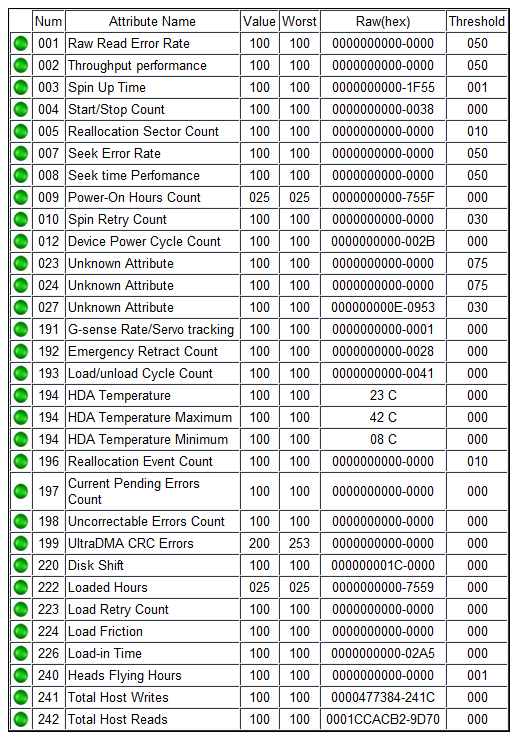
I have a pool consiting of a number of HDD’s in mirrors. Recently one of them a 18TB Toshiba (MG09) was kicked out of the pool with 55 errors (from memory in the read column)
So I replaced the drive, resilvered and all is (currently) good.
I then took the “faulty” drive, stuck it on another machine and ran some tests. Smart was complaining about a single pending sector (Attribute 197). Nothing else leapt out at me as being an issue.
So I did a complete disk erase taking a long time. The result of which is that the attibute 197 reset to 0 and nothing much seemed to change.
Now, on the assumption that it was s single dodgy sector that caused this issue, it seems excessive to kick the drive out of the array. I thought that things like this should cause the sector to be remapped after a couple of hiccups and things should just continue. In particular since it would appear that the sector is now working great again as there are now zero reallocated sectors, unless of course SMART is not being 100% honest about reallocated sectors.
Something is not working as I think they should do. Could be a firmware issue on the drive, or a ZFS issue, or an HBA issue. The drive is enterprise grade and about 3-4 years old
Not an expert, but if I had to give my $0.02 guess, there were pending errors, drive hung while trying to sort them out & got kicked from the array? Glad it isn’t dead at least!
I agree - I can see what happened (probably). My contention is that thats not what should happen. Having considered - this is something that the drive should deal with and that ZFS should accomodate. Clearly neither happened.
I agree that ZFS should not have kicked the drive out. However remapping sector errors is a little more complicated than what we generally here and think.
As I understand it, and this may not be true for manufacturers, but if a sector fails to have the ability to write to the sector, then the drive cannot map it out. This sounds very strange to me but I gather it is true. It has to do with writing data that saying that sector it bad. I will not say I understand the way this works but I’m fairly sure it is true. For the past few months I had been playing with a drive whete i cannot force it to remap the bad sector. I have tried! My next course of action it to try a low level type format.
@NugentS do you have TLER on? That “should” help but does it always work… I don’t think so as a lot of people have issues with a drive being dropped out.
If you ever find a solution I’d love hear what it is.
Good point. A too long of TLER value might have caused ZFS to timeout on the access. Thus, dropped the drive from the pool.
Now as far as sparing out sectors on HDDs, my understanding of SATA is that if a sector is previously determined to be bad, simply writing to it will cause it to be spared out. (If their are spare sectors still available…)
SAS / SCSI is different and I don’t know the methodology, other than their is a SCSI command that can perform sparing out. Not sure how ZFS would cause that action… but perhaps that is one of the reasons why we are supposed to use direct access to the disks.
I will not pretend to understand ZFS. I would have thought the same as you do. The default TLER value is 70 (7.0 seconds) which can be changed in the multi_report_config.txt file however I’m not sure if changing this value, nor to increase or decrease the value, would help or not.
If there is a better value to use that is more optimal, I’d like to hear about it.
Default TLER is 7 seconds (70) in most if not all NAS and enterprise type drives. When a drive encounters a read or write error, it will attempt to fix the error, if TLER is on and set to 7 seconds the drive will try to correct the error but will give up after 7 seconds of trying it it can’t and report the error so the zfs/raid won’t kick it out of the pool for being ‘stuck’. Some desktop drives like WD Blue drives, and Seagate Barracuda drives (and apparently some Hitachi drives) have a value of 0. these will retry indefinitely or until they are kicked out of the system for being “stuck” and non-responsive.
I would agree that Truenas in my opinion is too aggressive in kicking drives out. I have had a drive just last week kicked out for 2 checksum errors while doing a block replication pulling data from the other system. Truenas decided to hate the drive immediately after it happened and kicked it out of the pool, thus degrading the pool.
I think it may have been a poor connection to the backplane (system s old). I did a short test, a long test and a pool scrub before I physically touched the drive. All gave the clear on the drive and the error count did not increase. I then did pull the drive inspect it and reinsert it. Despite another long test and another scrub hammering the drive with no increase in error count, Truenas has grudgingly accepted it being put back in the pool but won’t clear the error. Not so bad when drives were cheap, to not worry about it and just toss the drive in recycle and put in a new one. But now when it takes ounces of Gold to buy a new drive not so feasible to do. My choice? Ignore the error and save my last new drive of that size for the main system.
In my opinion I don’t think Truenas should have kicked it out and put the pool in degrade. To me that is not what a system should do since the error is not immediately fatal. I think it should have alerted, then monitored the drive and the parameter for rapidly increasing errors and if the errors continued to increase then kick the drive out of the pool. with a “warning of rapidly increasing drive errors on drive (serial number)”.
ZFS requires manual intervention to clear ZFS errors. This is done with zpool clear POOL.
What does zpool status POOL say?
As for kicking the drive out of the pool, we don’t truly know how long the drive was not responding. Ideally we would see something like this in the log file Drive X failed to respond for 20 seconds, will consider the drive as failed. Plus, if their is a tunable for that 20 second value, list it too. Perhaps like:
Drive X failed to respond for 20 seconds, (zfs_drive_timeout_fail), will consider the drive as failed.
Below is the zpool status. One drive in vdev raidz2-1 had 2 checksum errors. This kicked out the drive from the pool although zfs is supposed to automatically detect the checksum mismatch, then use parity or mirror data if it is a mirror to rebuild the data, and rewrite the corrected data to the drive. By indications “no data errors” this is what zfs did, What Truenas apparently did was degrade the pool by kicking the drive out apparently after zfs recovered (fixed) the error. Other wise if it did so before zfs fixed the error it would (or should) have a zfs data error. I come into the office and have a degraded pool to deal with instead of a hey this disk has two checksum errors. Which is worse? 2 data errors that occured or a degraded pool? I put the disk back into the pool and ran a scrub which was the only other choice besides replace. This did nothing to solve the error but Truenas was happy enough to let the drive remain in the pool. I did reseat the drive which resulted in resilvering the drive (as I had it out more than a few seconds - so normal) and monitoring the system and drive closely now for a week, there is no issue with the hardware to this point. I have purposely left things alone after the drive reseat to see if the error occurs again, or if it stays the same.
If a checksum error or two is such an issue, then why does a scrub not take care of clearing the issue? Why does a person have to know to go to the command line and run a zpool clear on the pool? I can see if a drive suddenly generates a whole series of checksum errors as something is truely immediately wrong and the drive should be dropped asap.I am not advocating for ignoring the issue, just why be so sensative to an error?
Ths is the zpool ststus command rquested. Other than the 2 checksum errors on the drive in the second vdev, it looks fine. A reboot of the server has also been done since the error. I am probably going to go ahead sometime later today or tomorrow do the zpool clear on the pool.
zpool status Pool1
  pool: Pool1
 state: ONLINE
status: One or more devices has experienced an unrecoverable error.  An
        attempt was made to correct the error.  Applications are unaffected.
action: Determine if the device needs to be replaced, and clear the errors
        using 'zpool clear' or replace the device with 'zpool replace'.
   see: https://openzfs.github.io/openzfs-docs/msg/ZFS-8000-9P
  scan: scrub repaired 0B in 14:52:24 with 0 errors on Mon May 11 02:37:24 2026
config:
Ehh - slippery slope imo. I’m more in favour of aggressive alarms that make you look into an issue. The logic for when TrueNAS should auto scrub & then undegrade the pool would be tricky & could cause even more complaints or possibly more alarms.
Should it try to self heal after the very first zfs error? If so what happens if it gets another error right after doing the needful? Does it repeat the self heal attempt ad nauseam? Should it alarm every time therefor causing a flood or alarms for a single failed drive, or remain silent & possibly risk the pool? Makes more sense to flag the disk & let admin take the wheel.
While there could be a good logic loop, I’m sure that someone would then complain about it anyway.
IMO alarming is working as intended, something went wrong & you had to make the choice how to proceed. I’d be more pissed if I had any kind of smart or zfs errors & TrueNAS simply remained quiet until the pool failed as it tried to do whatever in the background instead of alerting me.
Not advocating at all no alarms or alerts. I want them. What I don’t want is the scenario where we treat an issue with a hammer and make it essentially worse. Near as I can tell, the system had a disk that generated 2 checksum errors in a row and that was all. It did not generate 50 or 100 in 1 or 2 seconds or anything like that. It generated 2 errors which zfs did what it was supposed to do and took care of. Fine. I want an email alert warning something is wrong and I should look at the issue. Since this was a non fatal error and more of an apparent transit error it does need monitoring but not forcing the pool to degrade by taking the disk out of the pool. Creating a degraded pool is much more serious of an issue than an transit error that zfs fixed. That’s hitting the issue with a hammer and potentially creating a bigger data risk problem. It then can be argued that the philosophy of “we are protecting your data” then kind of goes out the window at that point.
I am in agreement with the OP that for some things Truenas is over reactive. I don’t really agree if their sector count on the 18TBdrive increased rapidly that Truenas should not have kicked out their drive. 18TB drives are costly and 50 sector errors is right on the edge of the general area of watch the drive or replace the drive. I don’t think it is that hard to track the error rate of an error and if it is increasing rapidly stop and kick the drive out of the pool.
In my case 1-5 checksum errors is not considered immediately fatal but needs alerting. Conditions that are not immediately fatal can also be monitored for increasing, or rapidly increasing numbers which indicate a true failure and the need for immediate action to preserve data.
I did clear the error and am going to run another manual scrub. I expect no issues. If I do get a checksum error then I am going to swap drive slots and see if it follows the drive or remains at the slot. If it does follow the drive I will replace it.
Based on the above zpool status Pool1 output, I would guess that something more serious occurred than 2 checksum errors. Perhaps a timeout. Perhaps the reboot cleared the original error or counters.
Now to be clear, with RAID-Z2, you would have to have 3 disks with errors, in the same block, (aka RAID-Zx stripe), to have permanent data loss.
One of the things that is somewhat weak in TrueNAS, is storage problem diagnoses. For anything beyond simple “disk is totally dead”, (thus MUST replace), resorting to Unix shell is likely required.
A great many free admins of TrueNAS seem to miss this weakness. I personally recommend any TrueNAS admin, free or paying customer, learn both Unix & ZFS status and trouble shooting. It does not have to be immediately. But, over time, something is likely to go wrong and having a bit of experience can help.