
Hello,
I’m setting up a new TrueNAS system and would like to confirm my approach for user home directories, specifically for a non-default administrator account. My goal is to create a secure home directory for my new admin that is accessible to other administrators but locked down from regular users.
Here is what I have done so far:
- Created a Parent Dataset: I created a parent dataset to hold all user homes at
/mnt/FlashStandard01/SecureRoot/DS_User_Homes_01.

- Set Parent Dataset ACLs: For DS_User_Homes_01
the parent dataset, I set an ACL that givesModifyaccess to theGroup - builtin_usersandFull ControltoGroup - builtin_administrators` .
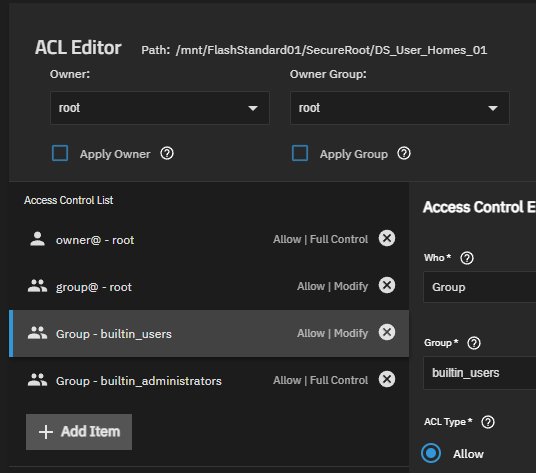
- Created Admin Home Dataset: I then created a child dataset specifically for my new admin user called
Homes_Admin. When creating the admin user, I pointed their home directory to this path and checked the “Create Home Directory” box. This dataset grantsFull Controlto onlyGroup - builtin_administrators
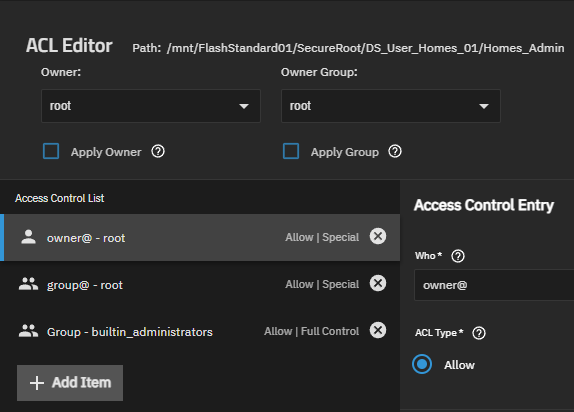
My Questions:
-
Parent Dataset Security: For the parent dataset (
DS_User_Homes_01), should I remove theGroup - builtin_usersACL entry to prevent regular users from being able to browse the root folder containing all home directories? -
“Create Home Directory” Practice: I’ve read that checking “Create Home Directory” may not be advisable. I do plan to use SSH with my administrator account. I thought putting this admin home directory inside this dataset would be a good idea. What is the recommended method for creating user home directories?
-
Multiple Admins: If I add another administrator, what is the best practice? Should they share the
Homes_Admindataset, or should each admin get their own separate dataset (e.g.,Homes_Admin2) with their own home directory? -
Regular Users: For future non-admin users, is my plan correct: create a new, separate dataset for each user and then add a specific ACL entry like
User - <username> | Allow | Full Controlto give them ownership?