How do you organize your homelab?

How do you guys have your homelab set up? Especially those running multiple servers or a bigger TrueNAS system.

Do you use a proper rack, regular shelves, or just make use of whatever space you have?

I’m also curious how you deal with cables, airflow, and getting to everything when you need to replace a drive or do some maintenance. Anything you wish you’d done differently when you first put your setup together?

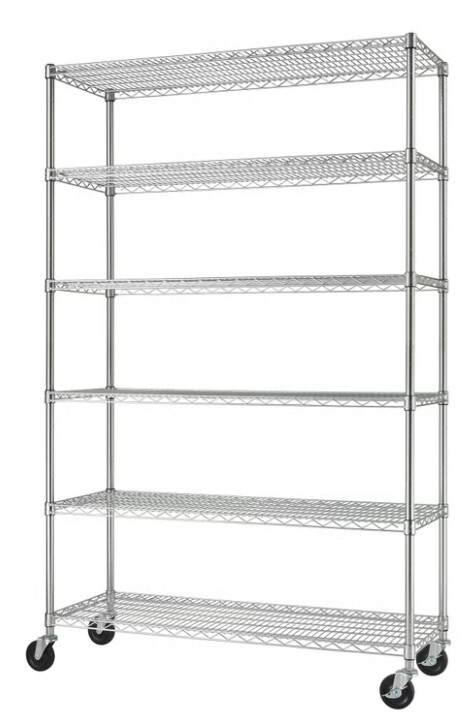
Wire rack on casters.

Pros:

  • inexpensive
  • highly customizable
  • lots of horizontal and vertical space
  • excellent ventilation
  • on casters if you need access to back
  • easy to route cables
  • easy to ty-wrap long power strips to back of shelves
  • excellent load capacity
  • no solid horizontal surfaces to collect dust
  • come in many different sizes to fit your needs and space
  • avoids locking you into more expensive 19 inch EIA rack equipment

Cons:

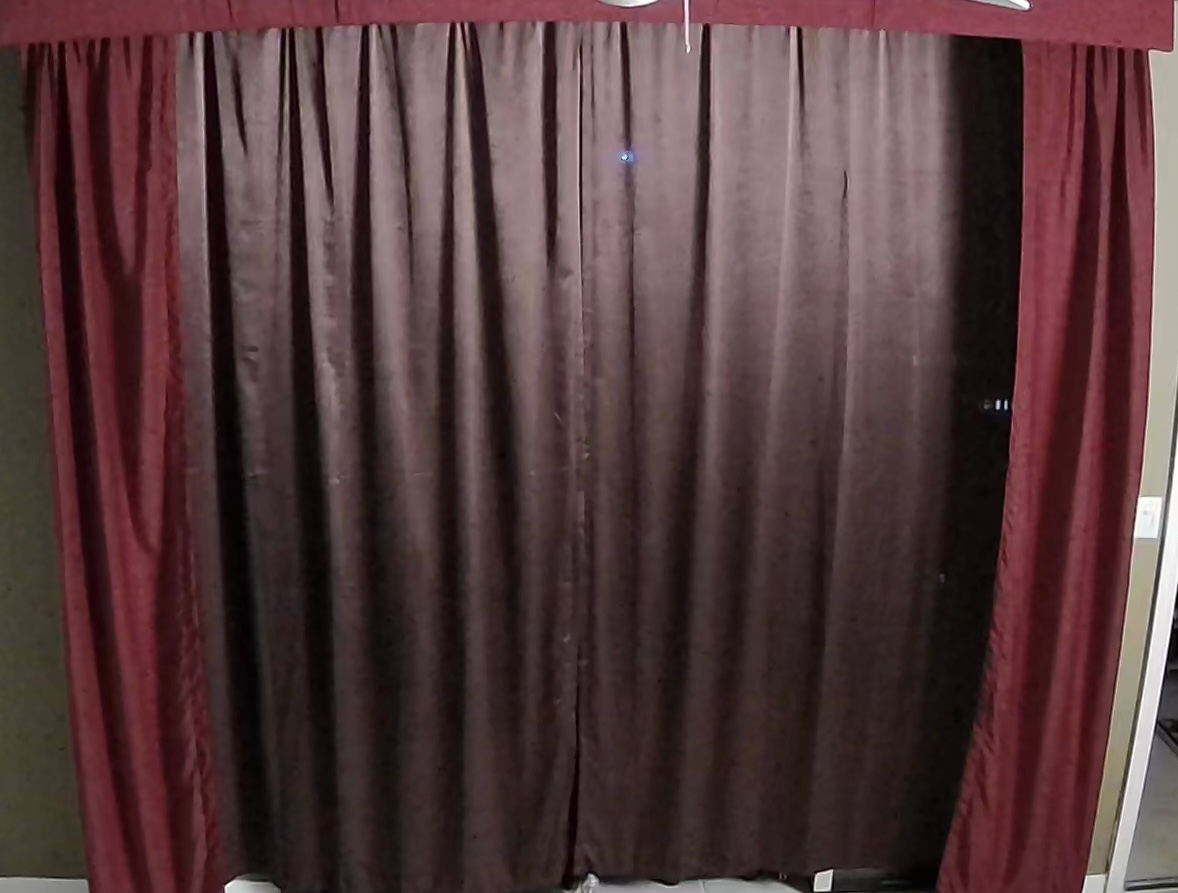
  • Spouse may not approve if visiable. Mitigated by hanging pinch pleated curtains on top shelf or to ceiling.

In addition, I have all my AV gear and speakers on the shelves with a roll down 10 foot acoustically transparent projection screen.

Lol, I can relate to the cons. My wife HATES seeing the garage. She says that despite me having tons of drawers it is still disorganized. ( I personally think everything’s perfect the way they are lol)

I have thoughts of an enclosed 42U rack, but most of my gear is in a half-height rack on wheels. It’s in a detached shop building about 70’ from the house, in an air-conditioned room, with 10G fiber back to the house. My Proxmox hosts and my NAS are on rails so I can slide them out if I need to get inside, and of course the drives are hot-swappable.

My home lab is no where near as fancy.
I have one server inside a mid-size standard computer case. My drives are held in by screws, but in fairness, they are nvme m.2 drives.

I have a test system also in a small case and several spinning rust drives screwed in as well.

Nothing is fancy but it was something i could afford.

Also, my needs are light, i need 5TB of storage and have 12TB total in a RAIDZ2 configuration. Lots of extra space to grow, but there is very little growth of data, measured in MB a year, not GB or anything like that.

If you know what you want your system capable of, design around that. Hotswap drive bays are nice but purchase good quality ones, the cheap stuff may not be very good and when you plug in a hot swap drive, the one thing you do not want is the power connection shorting out. Been there, done that. Now i power down, always.

My previous system before the m.2 nvme system was a full size atx case with 5 removable drive bays. It was nice but the drive bays were never really useful since my drives were very reliable.

Your final setup will probably be influenced by:

  • The protests of your household treasurer.
  • Space, power, noise and heat. If you have to work or sleep anywhere near to where you’re building, your own comfort should be top of mind.

I was limited to a laundry room, where I installed a very large wallmount rack. I made it work, but it caused a lot of other problems. I personally recommend a full-depth rack located close to a dedicated (or minimally used) circuit, close to your network dmarc or patch panel, and in a well-ventilated space.

You can buy ready-made rackmount cable management and power solutions, and if the whole shebang has to be visible, you can setup your lab very neatly in a rack.

The primary pain point you’ll spare yourself though is that you’ll be able to choose equipment that fits your use case, rather than being constrained to equipment selected to fit your rack.

Mine is split:

  • Storage/compute is mostly all confined within a consumer tower case, sitting off one side/below my desk (next to a 2U UPS), where it receives better (cooler) airflow from outside the room.
  • Networking sits in a home-made rack (aluminium square tubing + plastic corner pieces to plug the cube together) at the top of a wardrobe next to the NTD, with its own 2U UPS.

The server was ideally meant to go into the wardrobe as well, but at this point it’s a bit too heavy/bulky to safely fit onto the cheap wardrobe shelving (and it’d also need me to install some filters and a thermally-regulated exhaust fan). As it stands, the network rack only needs the sliding wardrobe door left ajar during the day to cool the ~50w it produces, and closed at night to stop the ambient LED glow from causing a nuisance.

Ideally, I’d have it all sitting in a short comms rack with smoked glass front access, so I can be more deliberate with fans/filters/airflow direction and any required sound dampening, and not worry about light pollution.

I bought a desk from Facebook Marketplace a while back with this built in side-cupboard thing that had the door missing. I later found out that the cupboard was the perfect width to mount standard 19in rack kit, so I bought a set of rack strips off of Amazon that screwed into either side of the desk and it’s been running rock solid for a good couple years now. It’s also my networking lab, so it’s got a couple little edgerouters, three switches and a palo firewall.

As for the TrueNAS system itself:

Due to it’s weight I don’t exactly want it hanging. This is in my bedroom so the last thing I need to hear is a crack followed by a loud crash at three in the morning. Because I don’t have rails or anything something that was important to me was getting a chassis with drive-bays at the front so I could swap them out without having to pull this thing out, it’s freaking heavy. Can’t really see in this picture but I’ve actually got some 40mm holes drilled on either side of this cupboard to allow airflow in from the side intakes to cool the HBA and NIC :laughing: - though majority of the airflow is front → back and just dissipates into the room. This time of year it’s quite nice to have though in the summer it’s a bit toasty.

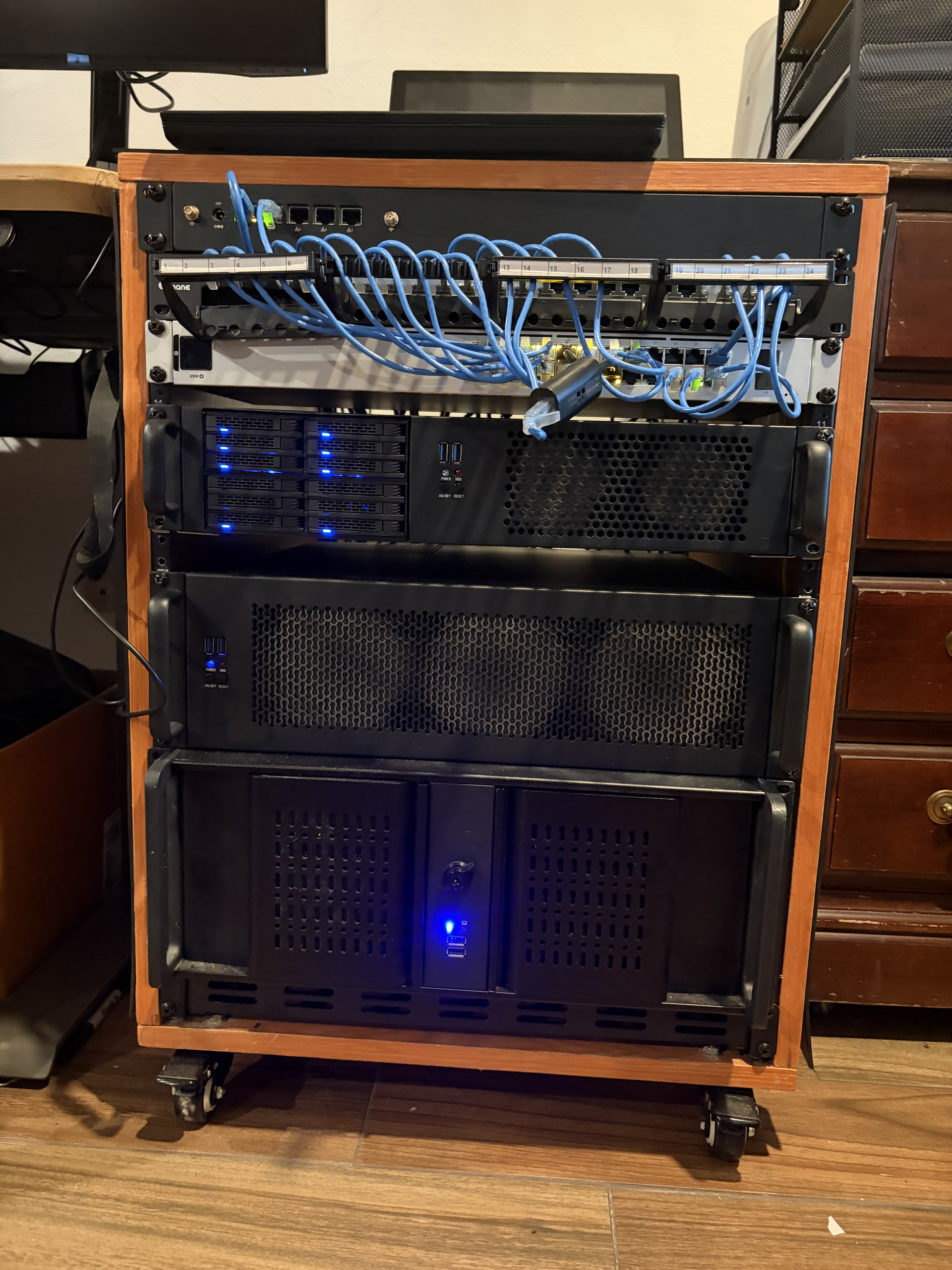
As for airflow I’ve got a PDU (which is really just a 6-way extension lead) screwed into the back, with each (actively in use) device connected via one of those TPLink/Tapo controllers & power monitors.

I kept toying back and forth with buying a proper rack but this kinda just works and I like the fact that is sits next to me while I’m working, it’s literally an arms reach away if there’s a disk failure.

This is in your bedroom? Is it that quiet?

Regardless, that is a great use if the desk.

You should automate these curtains to open when you go near using Home Assistant :smiley:

I have a 14u enclosed rack that I built using plywood and rack hardware I bought on Amazon. It’s enclosed except for the front and back and there is no problem with airflow. The rack has a built in power strip for all the gear. A few years ago, I had Solar installed on my house and I have a Tesla PowerWall that feeds a critical circuits panel. My rack’s power strip is plugged into that critical circuits panel so, the PowerWall is my UPS. I’m on time of use with NET metering and the power wall supplies power during peak time in the evening and reserves power for those times when the grid goes down.

If I could do it over, I’d build a slightly larger rack as my 14u is completely filled. I could use a few extra slots for some additional gear i have.

Already done.

All of the fans have been swapped out for Noctua and run at a static PWM value of 165 (65%) while I’m here - which is more than enough to keep the threadripper under control. The disks also stay cool as the chassis (which I spent FAR too much money on!) is 6U split into 2U for the disks with their own airflow channel and 3xNoctua 40mm fans, and 4U for the rest of the system.

Similarly I’ve swapped out my edgeswitch fans for Noctua too. The rest of my network kit is fanless.

I got lucky with the disks as well, they didn’t make much noise to begin with but I’ve done as much as I can to noise-isolate against vibrations etc. It’s whisper quiet, enough that I don’t notice it at all :slight_smile:

I like it when I read that someone took the initiative to modify their system to make it better. I’m not stranger to making case mods. Have saw, will cut. I know that isn’t what you did but making the fans quieter is a big step. Anything that can be fanless it a blessing.

My current system has 3 fans, the Power Supply (very quiet), The CPU (very quiet except when booting of course), A custom located Case Fan (very quiet). I don’t normally have any hard drives in this machine, I’m all M.2 NVMe. The case fan blows air up into a 3D printed cover that goes over my M.2 drives, ensuring maximum cooling using minimal fan speed. A SCRUB will kick the case fan up in speed and I can hear that, but it is not very loud, and a SCRUB only lasts about 54 minutes for the 6.6TB of data I have stored. Yes, my storage capacity is small, but my needs are small as well.

Hum… I could sell my five 4TB NVMe drives for double what I paid for them 2 years ago. Profit!
Kidding, I love the quiet server.

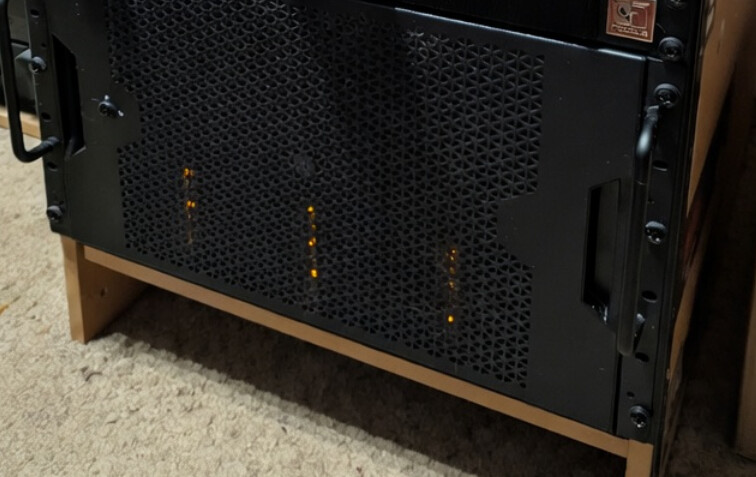
15U moveable rack with 11U worth of a equipment and a 1U heavy duty shelf.

I did buy a 39U rack, and I still use it for the all flash server and other stuff (eg PC running on a test bench, multiple switches, a spare shelf, but the honest answer is that a moveable rack is just straight up better.

I had a dedicated computer room from the get go. It was initially quite roomy, but time going on, it’s pretty cramped.

Computers, UPSs, my TrueNAS, several LTO desktop decks and an LTO autoloader sit simply on tables.

Under the tables is the stuff that needs rarely access, 2 UPSs and my
previous QNAP much smaller NAS that is used as a backup for a small
part of the TrueNAS content.

The 2 NASs are connected to my main 10G network, serving all the
house, and by each a dedicated 40G LAN adapter going directly to my main
2 PCs.

The main hurdle is the backup. How do you backup 75TB of data easily and reliably?

I use LTO drives, the last one being an LTO9. But affordable backup
software is really bad. I have been using a 250 Euros commercial
software for the last 13 years, and when my data grew, it became a real
hurdle. Slow, painful to restore directly to a NAS over SMB because it’s
slower over SMB, a real annoyance despite a relatively nice UI.

I tested the free ones on the net, and hated their clumsy interface.

So, I built mine, running on Windows 10 or 11 with LTO-4 to LTO-9
drives and autoloaders (I don’t have LTO6 and LTO8 decks to test on
those 2 though, and only one autoloader).

It took me 10 months, but here I am. Very fast, 300 MB/s (not MiB/s!)
on LTO9 over SMB for backup and restore, optimized for small files so
that I don’t have to RAR folder like browser profiles with tens of
thousands of small files, and incremental backups.

Here is how it performs for my main backup:

Start:               Thursday, October 22, 2026 05:05:24
End:                 Thursday, October 22, 2026 21:13:16
Total Duration:      16 hours, 7 minutes, 33 seconds
Setup time:          10 minutes, 34 seconds
Streaming Duration:  12 hours, 20 minutes, 11 seconds
Finalization+Verify: 3 hours, 36 minutes, 47 seconds
Avg Streaming Speed: 287.85 MiB/s - 301.83 MB/s
Data Size:           12.19 TiB (13.40 TB)
Files:               1156784
Avg Size:            11.05 MiB (11.59 MB)
Block Size:          1 MiB
Compression:         ON
Generation:          1
Tape:                TAPE0 - QUANTUM ULTRIUM-HH9
Tape Used:           10.3 TiB (11.4 TB)
Tape Remaining:      4.94 TiB (5.43 TB) of 15.3 TiB (16.8 TB)  (67% used, 33% free)

The long verification time was to check several files by re-reading
them, worth the time spent for my peace of mind even though the software
uses CRC for all files.

But the best is the daily incremental backups. They are much shorter,
and they are kept as generations on the same tape, so a restore never
needs more than one tape. Here is one (on a different tape from the
previous one, as I “round robin” several):

Start:               Tuesday, October 27, 2026 00:12:26
End:                 Tuesday, October 27, 2026 00:54:35
Total Duration:      40 minutes, 6 seconds
Setup time:          24 minutes, 59 seconds  (scanning 10 TiB looking for changes + seek time that can take time on LTO decks)
Streaming Duration:  1 minutes, 25 seconds   (actual backup)
Finalization+Verify: 13 minutes, 41 seconds  (same as above, long seek times)
Avg Streaming Speed: 393.00 MiB/s - 412.09 MB/s
Data Size:           32.78 GiB (35.20 GB)
Files:               41828
Avg Size:            821 KiB (841 KB)
Block Size:          1 MiB
Compression:         ON
Generation:          3
Tape:                TAPE0 - HPE Ultrium 9-SCSI
Tape Used:           11.9 TiB (13.1 TB)
Tape Remaining:      3.34 TiB (3.67 TB) of 15.3 TiB (16.8 TB)  (78% used, 22% free)

I’m thinking of going commercial with it, and I’d like the opinion of
some beta testers here, what better forum for this than this one?

Send me a PM if you feel interested. If it does go commercial, beta testers will have it for free.