
Looking at my System/Boot I have 23 files listed there.Different versions all the way back to the initial install back in 2021. Should I clean some of those out? If so which ones?
Yes.
I’d argue the 20 oldest ones.
One thing to consider, is the feature set of your pool(s).
Any boot-environment that has an older version of ZFS, that can not import your data pool(s), is more or less useless.
Now we normally don’t recommend updating the feature set of data pools, unless you want or need a specific feature. Like RAID-Zx expansion, or ZSTD compression. And even then, it is suggested to make sure such feature(s) is available in at least 1 or 2 prior boot environments.
Ideally, if you have say 3 boot environments, boot to the oldest and enable the individual feature, or update all features of your pool(s). Then, boot back to your latest. After, all your boot environments can access the ZFS data pools.
Never update boot pools.
Background: OpenZFS is under active development, and as such, new features are added several times a year. Bug fixes, documentation updates and code optimizations don't really count as "feature" updates. Those would be backward and forward compatible.
Any one you will certainly not revert to.
It is probably wise to keep the latest minor update of the previous major version; anything prior to that can go away. As to intermediate minor updates of the current major version, use your discretion.
A minimal set would be:
n.p currently in use
n.p-1 previous minor (no bug encounteresd)
n-1.last
Offical Policy
My Retention Policy (almost the same words)
- Industry best practices recommend keeping the current running release and one to two previous stable releases for quick rollback if necessary.
- Remove older boot environments unless there is a specific rollback reason.
- Keep older releases for 30 to 90 days until you have confidence in the current release.
- Remove older releases when boot pool space is limited (<20% free remaining). Each boot environment typically uses 2-5GB. Consider setting up a system alert when boot pool capacity reaches 70-80%.
- Remove releases that no longer receive security updates. Keep the most recent version with security patches.
Thanks. That makes total sense.
I keep anything I consider stable without any know issues for my needs. Any revision upgrade to the pool will negate all previous editions. I keep a changelog on why I’m updating or keeping the revision & when a pool upgrade has been completed. I also keep an iso of the releases I consider stable based on the previous rules. Keep in mind rollbacks will also affect configuration changes you have made since the upgrade. i.e. Any shares/configuration changes made after the rollback point will be negated unless you can upload the configuration of newer builds to the rollback instance.
I find keeping track of multiple configs for previous boot environments and the state of pool flags specific to each previous environment too onerous and not worth the squeeze, especially for all the required security patching after a rollback. In my case, I keep only a single boot environment, but save the config each week and keep the last 2 week’s worth of saved configs in both on premise and off premise encrypted stores. I only keep an old boot environment for a week after an upgrade in case I need to roll back, but I delete the old environment afterwards.
I wonder how you set up all of this.
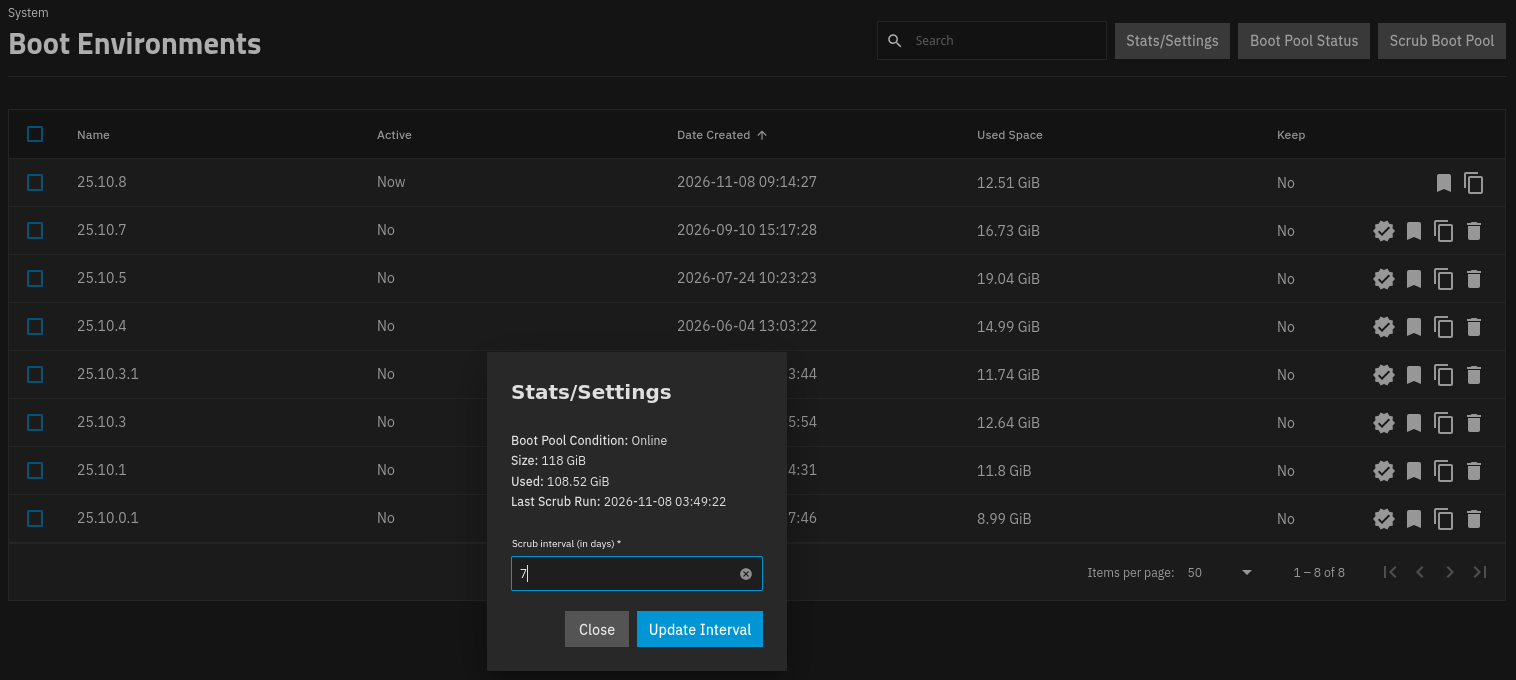
No, though their a flag to keep certain boot environments, (see right side column and hover over the icons).
This is partly due to the Enterprise Data Center philosophy of TrueNAS. The Enterprise customers manage their NASes, sometimes with very particular procedures. Like keeping certain boot environments from prior major updates, in addition to current major update’s minor releases.
While it might be nice to have a minimum number of boot environments to keep, like 3, problems arise for us home & small business users. We use such a variety of boot devices and sizes that it would still have to be set per NAS. And such a feature would likely be disabled or set to such a high default for Enterprise DC users.
I maintain only the last 3 boot environments. Any clones I make for testing purposes are deleted shortly after they are no longer useful.
Everyone has their own way of managing their system, you will also develop something you are comfortable with.
The real reason I chimed in here was to say, at least have a backup of your current system and the previous versions configuration files, this is above and beyond maintaining boot environments.
I have the last years worth of backup config files in my archived email, easy to retrieve if needed. Will I go back a year, NOPE, but they are there and I purge them when I feel the need to cleanup a bit.