How to connect to virtual machine using VNC?

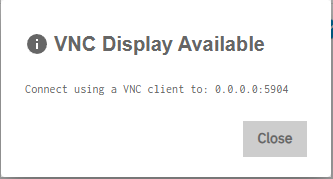
I’m using TrueNAS 25.10.2.1 - Goldeye. I currently have three virtual Linux machines and am trying to stand up a new Linux VM. It appears that the default console is now VNC, however, I’m not finding a VNC view on my NAS. I only get this popup when I click on display.

I tried switching to Spice for the display, but it just hangs, as a matter of fact, the current Spice display on all of my VM’s hangs. It appears that Spice is no longer an option.

Any suggestions on how to get VNC to work?

Thanks

You need to use a VNC client from another machine.

In case you are using a Mac, there is a VNC client builtin to Mac OS.

Bring the Finder to the front, e.g. by clicking on the desktop background, type Cmd+K, enter

vnc://<IP of your TrueNAS>:5904

into the dialog box.

1 Like

An improvement would be for the message to not show 0.0.0.0:port but TrueNAS-IP:port

2 Likes

Yes, that would be helpful.
Thanks

Thank you for the replies. Much appreciated.