How to create a custom app with persistand bind mounts

Hey TrueNAS gurus,

I am trying to create a custom app using the inductiveautomation/ignition/8.3 image and I can’t seem to get my container to start with my bind mount.

Ignition stores it’s data in /usr/local/bin/ignition/data directory so I created a volume mount that ties this container directory to a dataset in my server.

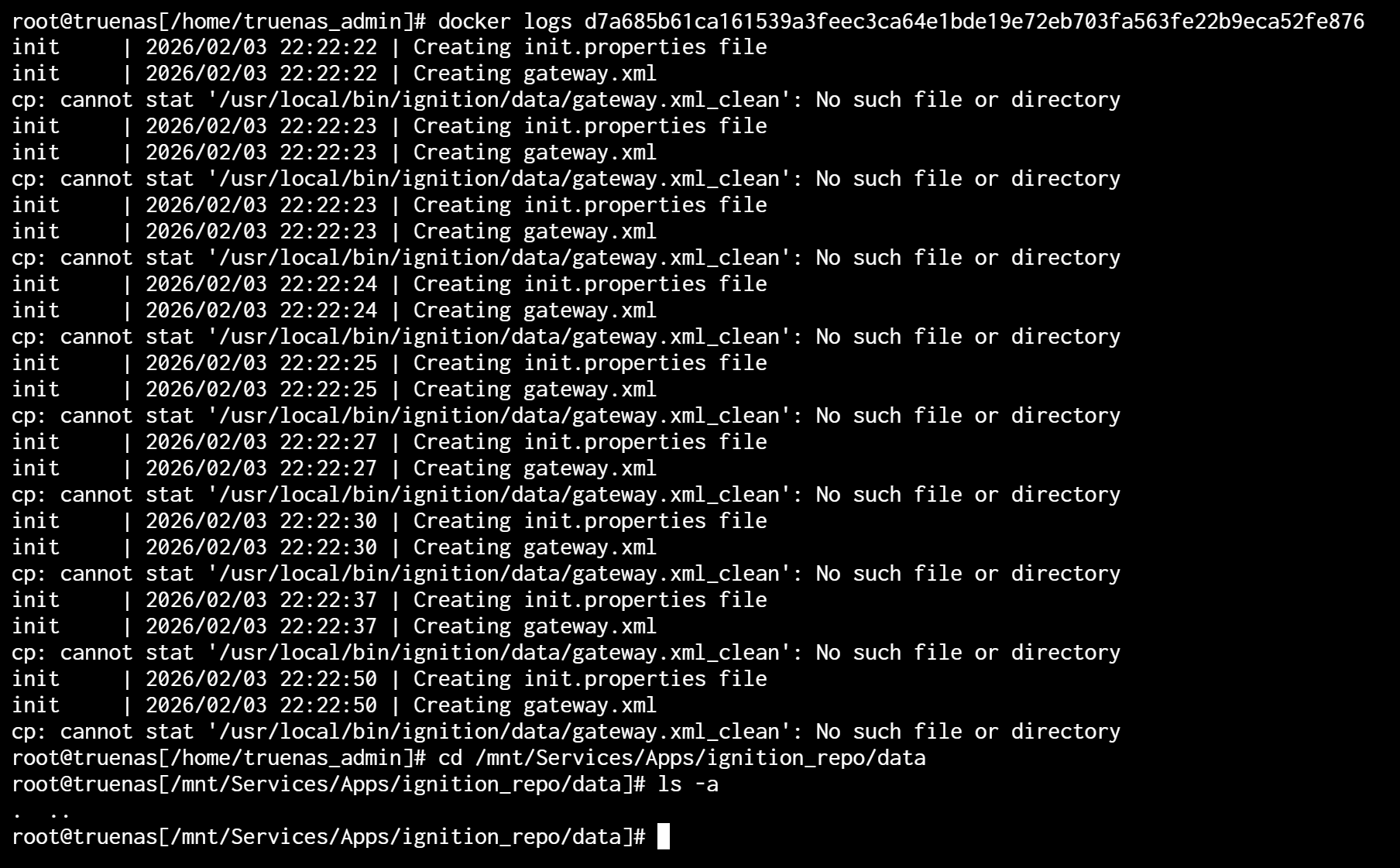
When I start the container, the logs tries to find files in that directory but cannot find them because the bind mount is empty. This is not the same behaviour of regular docker on linux or docker desktop.

It seems that for whatever reason, the binding is mounted after the ignition container starts and all the files normally in that directory from the image are replaced with the blank dataset.

What am I missing?

How does your hostpath mount look like?
It should look like this (example as i dont know the extact locations):

/mnt/Poolname/apps/ignition_data:/usr/local/bin/ignition/data

If you post your compose file i can try and get it working…

I am using the UI. I think I have the path correct.
I’ve tried it before with adding ACL, but that didn’t work either.

personally i find the custom compose option better then the ui wizard… but i must agree that the path looks correct.

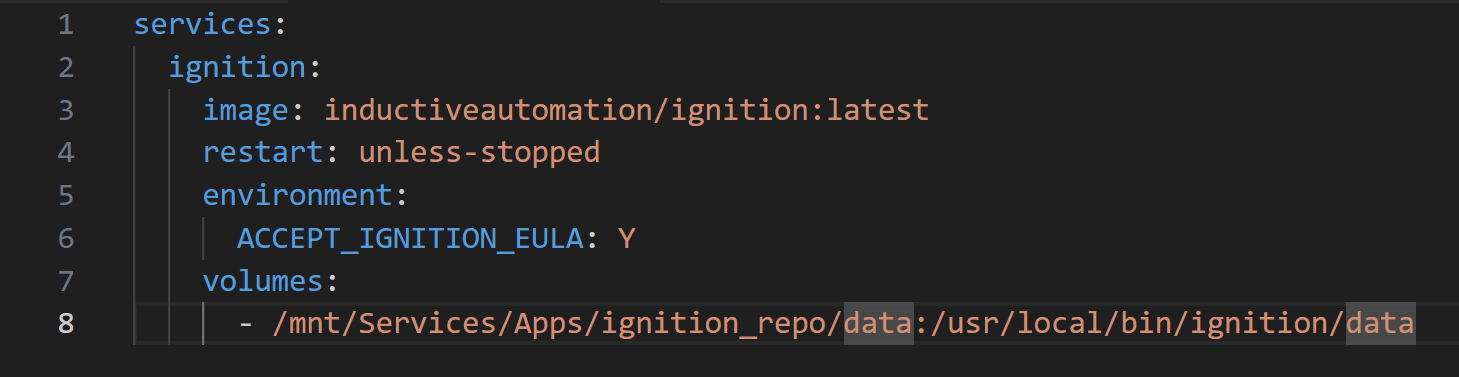
Ok, I will try the compose option then. Here is the compose:

Looks like it still doesn’t work. Clearly that directory is empty. If you do the same on docker desktop, this behaviour doesn’t happen.

Hmm, i just tried to install via yaml. The app installed fine without error, but won’t stay running, It starts for a second and then stops. I don’t know anything about ignition so i don’t know if this behaviour is expected or not. And i also see that no files get created in the mounted Dataset.

Ok, so I changed it from being a bind to a named volume. That works for me.
I tried this earlier using the IX volume in the GUI, but it deleted itself when changing the config.

Thankfully this doesn’t happen when changing the compose file.

Are the permissions on the pv set ok ? Cause the image is doing this:

COPY --chown=2003:0 --chmod=ug=rwX,o=rX /usr/local/bin/ignition ./ # buildkit

and then

ARG IGNITION_INSTALL_LOCATION=/usr/local/bin/ignition
ARG IGNITION_UID=2003
ARG IGNITION_GID=2003
ARG IGNITION_USER_HOME=/home/ignition

RUN |4 IGNITION_INSTALL_LOCATION=/usr/local/bin/ignition IGNITION_USER_HOME=/home/ignition IGNITION_UID=2003 IGNITION_GID=2003 /bin/sh -c mkdir -p “${IGNITION_USER_HOME}” && (getent group ${IGNITION_GID} > /dev/null 2>&1 || groupadd -r ignition -g ${IGNITION_GID}) && (getent passwd ${IGNITION_UID} > /dev/null 2>&1 || useradd -r -d “${IGNITION_USER_HOME}” -u ${IGNITION_UID} -g ${IGNITION_GID} ignition) && chown -R ${IGNITION_UID}:0 “${IGNITION_USER_HOME}” && chown ${IGNITION_UID}:0 “${IGNITION_INSTALL_LOCATION}” && chmod g+w “${IGNITION_USER_HOME}” && chmod g+w “${IGNITION_INSTALL_LOCATION}” # buildkit

Why this happens (Docker behavior)

If container image contains data inside a directory, for example:

A
B
C

And you bind mount an empty host directory over it, container will see:

(empty)

This is normal Docker behavior.

Bind mount always overrides what exists inside the container image.


What is usually safer

For apps that initialize data on first start:

• Docker volume
or
• First start container without mount → let app create structure → then persist it

For Ignition specifically, Docker volume is usually easiest and safest.


Recommended approach (TrueNAS SCALE Apps)

If you are deploying an app that writes data inside container paths:

Use ixVolume / Docker volume instead of Host Path bind mount.

Why:

• App can initialize correctly
• No risk of masking internal files
• Easier upgrades
• Less permission problems


If you already used Host Path and data is missing

Possible scenarios:

  1. Host folder was empty → container data got masked

  2. Container created data somewhere else

  3. Permissions blocked initialization


Safe recovery workflow

Stop container.

Remove Host Path mount.

Start container once without mount.

Check if app recreates internal data.

If yes:

Stop container again.

Create volume.

Mount volume instead of Host Path.

Start container.


When Host Path still makes sense

Host Path is fine when:

• You control directory content manually
• App does NOT auto-initialize data
• You need direct host access to files

For database-like or self-initializing apps → volume is usually safer.


TL;DR

Bind mount can hide container data.

If app initializes data on first start, volume is usually the safest choice.