
In the custom config how do I specify a different container by using the tag option?
I’ve been told by the developer to " Pull the image with the test tag".
Thanks
Paul
when you create a custom app you can specify the tag here
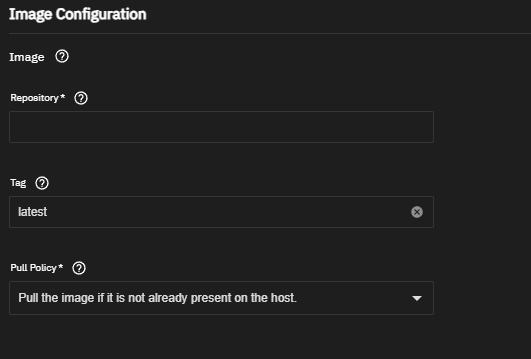
when you pull an image from dockerhub there’s a tag column, e.g.
https://hub.docker.com/r/linuxserver/jellyfin/tags
just choose one of those tags and replace the “latest” tag with the version number
Edit:
the same can be done with the yaml function
services:
  jellyfin:
    image: lscr.io/linuxserver/jellyfin:latest #replace latest with version tag you want to deploy
    runtime: nvidia
    container_name: jellyfin
    environment:
      - PUID=568
      - PGID=568
      - TZ=Europe/Berlin
      - JELLYFIN_PublishedServerUrl=192.168.0.5 #optional
Thanks again. I am not sure if I needed to but after a couple of attempts I had to do the following.
1.) create the custom app with the tag ‘test’
2.) append ‘test’ to the image line in the custom config
image: radrootllc/karaoke-eternal:test
yes, that looks correct and should pull the test image when saved and the app restarted
It worked 